
On this page
Start here
Quick answer
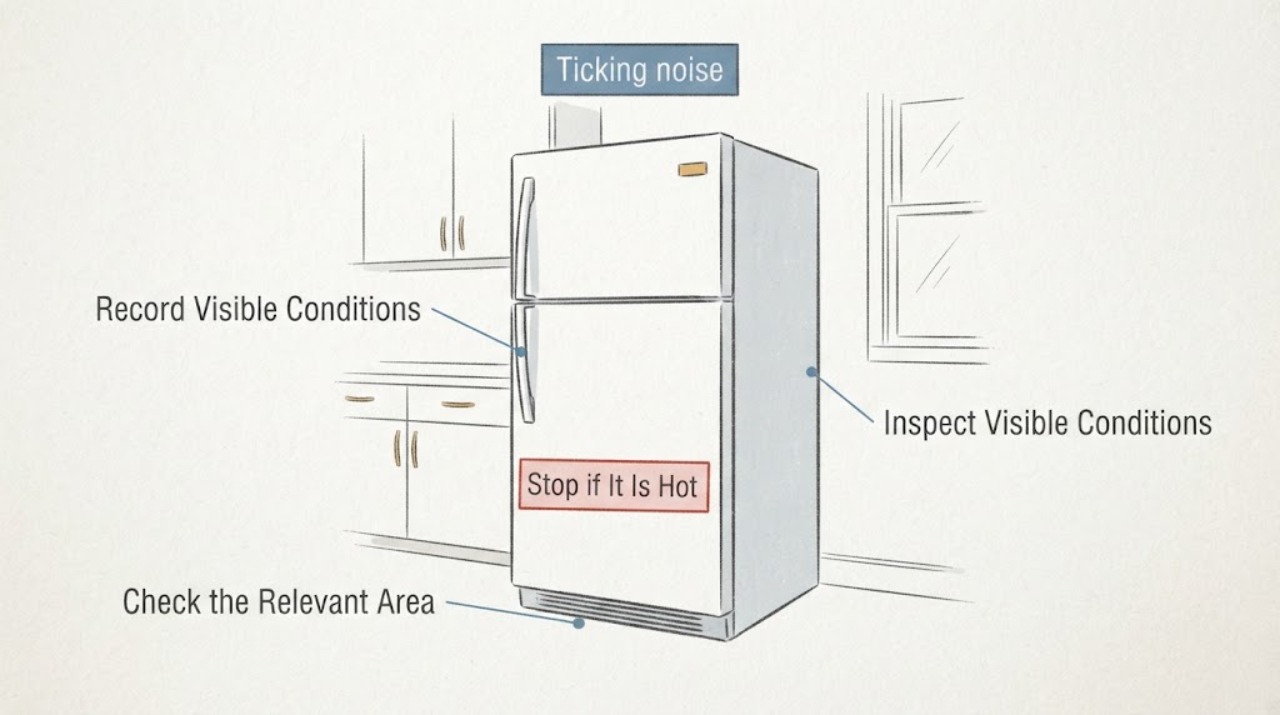
Do not identify a Hotpoint HPS15BTHLRWW part from the word ‘ticking’ alone. Record where the sound comes from and whether it begins when the compressor tries to restart, follows an ice-maker cycle, or appears during defrost. The model’s official manual says a compressor can click or chirp while attempting to restart, and that this can take up to 5 minutes; it also describes ice dropping, refrigerant flow, and defrost sounds as normal operating sounds. If the noise is brief and cycle-linked while cooling is normal, monitor it. If it persists beyond the documented restart window, becomes harsh or electrical, or occurs with poor cooling, heat, odor, water, or a power trip, stop owner troubleshooting and arrange qualified service. A condo wall can make a sound seem louder, but loudness alone does not identify a relay, control, compressor, or fan.
Work through in order
Diagnostic checks
Use only checks that match the exact appliance or system and its official guide.
-
Check 1
From a safe position with the refrigerator closed, make a short recording and note whether the sound is a single tick, a repeated click, a knock, a buzz, a scrape, or grinding. Record whether it seems to come from inside the cabinet, near the base, the side against the condo wall, the door, or the ice-maker area. Note whether it starts at compressor startup, after the compressor stops, after a door opening, or at an apparently random time; do not move the refrigerator or reach behind it just to locate the sound.
Expected result: The sound is brief and tied to a cooling event; follows a door or ice-maker event; changes when the room is quiet but not when the cabinet is touched; or is continuous, harsh, scraping, electrical-sounding, or worsening.
Next step: Use the recording and timing for the cycle comparison below. If the sound is harsh, electrical, rapidly worsening, or accompanied by heat, odor, smoke, water, or a breaker trip, stop using the appliance and isolate power only from a dry, safe position.
Stop if: Stop for smoke, sparks, burning odor, an unusually hot or damaged cord or connection, water near electrical parts, violent movement, or repeated breaker trips.
Why this matters
Why: Timing and character separate a documented operating sound from a persistent noise that needs diagnosis. A condo can transmit vibration through a wall or floor, so perceived loudness is not proof of an internal failed component.
-
Check 2
Compare the recording with the HPS15BTHLRWW manual without opening any panel. If the ticking starts as the compressor attempts to restart, time the episode once and note whether it ends within the manual’s stated limit of up to 5 minutes. Also note whether a brief crack or pop occurs during a defrost period, or whether a water-flow or gurgling sound is present. Do not repeatedly cycle power to reproduce the noise.
Expected result: The noise is a short click or chirp during compressor restart and ends within about 5 minutes; it is a crack or pop during defrost; it sounds like refrigerant or water movement; or it continues outside any documented event.
Next step: If the sound matches a documented cycle and temperatures remain normal, monitor and keep a recording. If it lasts beyond the restart window, repeats without a cycle, or is paired with cooling loss, frost, heat, odor, or a power symptom, arrange model-specific service instead of selecting a part.
Stop if: Do not remove the rear cover, perform an energized test, touch wiring or rotating parts, or handle refrigerant tubing.
Why this matters
Why: A brief cycle-linked sound can be normal on this model family. The manual’s 5-minute restart description is a boundary for comparison, not a diagnosis of a relay, compressor, or control board. A sound outside the documented pattern remains unresolved.
-
Check 3
If the refrigerator has an ice maker, observe from outside whether the tick or knock occurs immediately after a completed ice-making cycle or with the normal water-fill event. Do not put fingers into the ice maker while it is plugged in. If the water line is not connected, use the manual’s normal control procedure to keep the ice maker off rather than testing its ejector or heater.
Expected result: The sound follows ice dropping or water fill; no ice-maker event matches the sound; or the ice maker is being operated without a connected water supply.
Next step: Monitor a sound that consistently follows a normal ice-maker event. If the water supply or ice-maker configuration is uncertain, follow the exact manual and leave the mechanism alone; arrange service if the sound persists independently or cooling changes.
Stop if: Do not touch the ejector mechanism or heater while plugged in, bypass the ice-maker switch, or remove an ice-maker or electrical cover.
Why this matters
Why: The manual says ice cubes dropping into the bucket and water entering the ice maker can be heard on applicable configurations. A matching ice-maker event is a better explanation than a guessed control-board fault, while an unmatched or harsh sound needs further service review.
-
Check 4
With the appliance left in place, inspect only visible installation conditions: a loose object touching the cabinet, a shelf or bottle that can rattle, obvious side or rear contact, a rocking cabinet, or blocked ventilation. The installation instructions call for clearance around the refrigerator and describe using the front leveling legs and rollers; do not pull a condo-installed or plumbed refrigerator out alone, and do not reach behind it.
Expected result: Removing a loose accessible object stops the sound; the cabinet visibly rocks or touches a wall; clearances are obstructed; or the visible installation is stable and the ticking is unchanged.
Next step: Remove only a loose accessible object. Have a second person or qualified installer handle leveling or movement, and arrange service if the sound is unchanged or the appliance needs access behind the cabinet.
Stop if: Stop for an unstable cabinet, strained water line, damaged floor or bracket, exposed wiring, or any need to lift, tilt, pull, or reach behind the refrigerator.
Why this matters
Why: An accessible contact or unstable support can amplify a normal cycle sound through the wall or floor. If the installation is clear and stable but the sound remains, an internal fan, compressor, mounting, or control issue is possible, but the observation does not identify a part.
-
Check 5
Record whether the refrigerator and freezer are maintaining their normal temperatures, whether frost is unusually heavy, and whether the ticking began at the same time as a change in cooling. Keep doors closed while observing and do not remove interior panels, scrape frost with a sharp tool, perform any energized electrical measurement, or open the sealed system.
Expected result: Cooling remains normal and the sound is brief; cooling is weak or uneven; heavy frost or fan scraping appears; or the noise is accompanied by heat, burning odor, smoke, water near electrics, or a repeated breaker trip.
Next step: For persistent or symptom-linked noise, provide the HPS15BTHLRWW model, recording, timing, location, temperature and frost observations, and installation context to qualified Hotpoint or refrigerator service. Protect perishable food if temperatures are unsafe.
Stop if: Stop using the refrigerator and disconnect power when safe for smoke, sparks, burning odor, abnormal heat, water near electrical parts, a damaged cord, or repeated breaker trips.
Why this matters
Why: A cycle-linked sound with normal cooling is more consistent with normal operation or an installation resonance. Noise combined with a temperature or frost change makes an airflow, fan, defrost, compressor, control, or sealed-system problem more plausible, but it still does not justify guessing a part.
Use your observations
Decision map
Find the observation that best matches what you see, then follow the next safe action.
-
PATH 01Next step
What you see
The ticking starts when the compressor attempts to restart, is brief, ends within the manual’s up-to-5-minute window, and cooling remains normal.
Do this next
Monitor the sound and keep the recording. Escalate if the duration, character, cooling, frost, odor, heat, or electrical behavior changes.
Why this path and its safety boundary
Why it matters: This matches the HPS15BTHLRWW manual’s documented compressor clicking or chirping behavior more closely than it supports a failed relay or compressor. The manual does not authorize a user to identify a component from the sound alone.
-
PATH 02Next step
What you see
The tick or knock consistently follows ice dropping or water filling, and the refrigerator is cooling normally.
Do this next
Leave the mechanism untouched and monitor. If the water line is not connected, follow the manual’s off-state instruction; arrange service if the sound is independent of ice-making or becomes harsh.
Why this path and its safety boundary
Why it matters: A normal ice-maker event is more likely than a control-board diagnosis. This applies only if the refrigerator has the relevant ice-maker configuration and the sound actually tracks that event.
-
PATH 03Next step
What you see
The sound persists outside compressor, defrost, or ice-maker events, lasts longer than the documented restart window, or is unchanged after only visible loose-contact checks.
Do this next
Stop owner diagnosis and arrange qualified model-specific refrigerator service with the recording and timing log. Do not open panels or order a part by symptom name.
Why this path and its safety boundary
Why it matters: The noise is not established as a normal HPS15BTHLRWW cycle sound. An internal fan, compressor mount, control, or other fault is possible, but the evidence does not identify which part fits.
-
PATH 04Next step
What you see
The ticking is accompanied by weak or uneven cooling, heavy frost, scraping, smoke, sparks, burning odor, abnormal heat, water near electrical parts, a damaged cord, or repeated breaker trips.
Do this next
Keep doors closed, protect perishable food if temperatures are unsafe, and isolate power only from a dry safe position when appropriate. Use qualified Hotpoint or refrigerator service; use emergency help for an active fire.
Why this path and its safety boundary
Why it matters: This is no longer an isolated noise question. Cooling-system or electrical service may be required, and continued operation can increase food loss or safety risk.
When checks do not resolve it
Need a professional?
Arrange qualified Hotpoint or refrigerator service when HPS15BTHLRWW ticking persists outside documented compressor, defrost, or ice-maker events; lasts beyond the up-to-5-minute compressor-restart window; remains after safe visible-contact checks; or is paired with cooling loss, heavy frost, scraping, or abnormal running. Do not diagnose or order a relay, control board, compressor, fan, or mount from sound alone. Stop using and isolate power from a dry safe position for smoke, sparks, burning odor, abnormal heat, water near electrical parts, a damaged cord, violent movement, or repeated breaker trips.
Read the exact guide
Official sources
- Owner's Manual and Installation Instructions linked for Hotpoint HPS15BTHLRWW (Models 15, 16, 18)GE Appliances / Hotpoint · Opened the official PDF from the exact HPS15BTHLRWW product page. The cover identifies the Top-Freezer Refrigerator Models 15, 16, 18 manual; page 18/19 documents compressor restart clicking or chirping up to 5 minutes, defrost and refrigerant/water sounds, and ice-maker sounds. Pages 3–4 and 12 provide unplugging, qualified-service, panel, and ice-maker safety boundaries; pages 9–10 provide clearance and leveling guidance.
- Hotpoint HPS15BTHLRWW product and owner-manual pageGE Appliances / Hotpoint · Opened the official GE Appliances parts site page for the exact Hotpoint HPS15BTHLRWW 14.6 Cu. Ft. Recessed Handle Top-Freezer Refrigerator; the page labels the exact model and links its owner's manual and installation instructions.
Community feedback
Share a repair observation
Share a plain-text repair observation. Accepted observations are published automatically; this page may take a moment to update.