
On this page
Start here
Quick answer
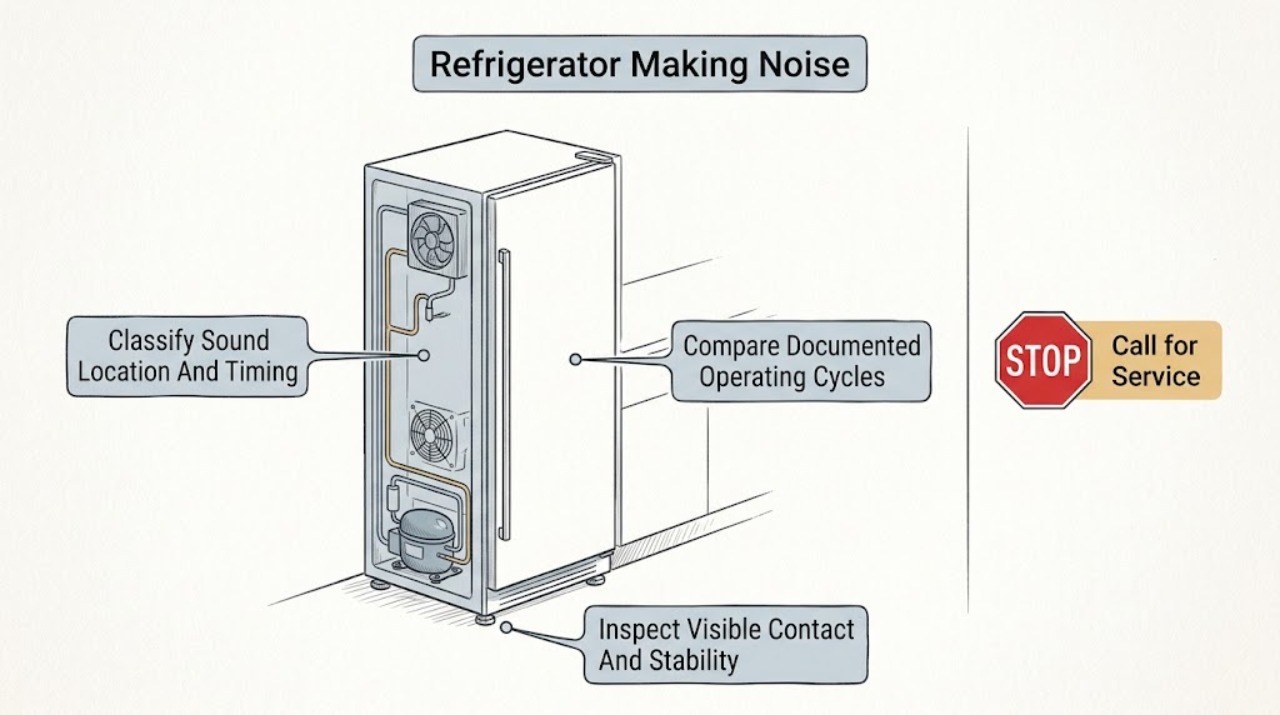
First record what the Hotpoint refrigerator sounds like, where it comes from, and when it happens. Hotpoint’s official guidance says a pump or compressor motor, gas circulating in the pipes, and cracking from defrosting can be normal; frost-free models also use internal and external fans and can sound different from older refrigerators. Pipework touching a wall and an unlevel cabinet can amplify vibration, so check only visible contact, clearance, and stability without moving the appliance alone. If the sound is new, harsh, continuous, rapidly worsening, or paired with poor cooling, frost, abnormal heat, burning odor, water, or repeated breaker trips, stop using it when safe and arrange Hotpoint or qualified service. Do not open the rear cover, touch a fan or compressor, perform live tests, or work on the sealed refrigerant system. Use the exact model manual because Hotpoint’s refrigerator and fridge-freezer architectures and features differ.
Before you begin
Safety first
- The user may record the sound, compare cycle timing with the exact manual, remove loose accessible objects, and inspect visible stability or contact from a safe position. Qualified personnel must handle appliance movement, integrated or plumbed installation, fan and compressor access, wiring, live testing, controls, and sealed refrigeration work.
Work through in order
Diagnostic checks
Use only checks that match the exact appliance or system and its official guide.
-
Check 1
From a safe position with doors closed, record the sound on a phone and note whether it is a hum, buzz, click, crack, gurgle, hiss, rattle, scrape, or grinding noise. Record whether it comes from inside, the rear, the base, a door, or an ice-maker area, and whether it occurs at startup, during cooling, after a door opening, during defrost, or continuously.
Expected result: The sound is brief and cycle-linked; a low motor or airflow sound continues during cooling; a crack occurs during defrost; a rattle changes with cabinet contact; or a harsh, scraping, grinding, or electrical sound persists independently of the cycle.
Next step: Continue with the normal-cycle comparison for brief or cycle-linked sounds, or inspect only visible clearance and stability for a vibration-like rattle. Save the recording and arrange service for persistent harsh or hazardous noise.
Stop if: Stop and disconnect power when safe for smoke, sparks, burning odor, abnormal heat, water near electrical parts, a damaged cord, violent vibration, or repeated breaker trips.
Why this matters
Why: Cycle-linked hum, gas-flow, fan, or defrost sounds can match Hotpoint’s documented operating behavior. A sound that changes with contact points suggests vibration. A harsh or persistent sound, especially with cooling or safety symptoms, makes an internal mechanical, electrical, or sealed-system fault more likely.
-
Check 2
Without touching internal parts, compare the recorded timing with the exact Hotpoint manual and observe whether the noise starts or stops with the compressor, fan, door opening, automatic defrost, or ice-maker event if fitted. Allow a new appliance to complete its documented initial cooling period; do not repeatedly switch it on and off to force a cycle.
Expected result: A low motor sound follows cooling; airflow changes with a frost-free fan; a brief crack appears during defrost; gas or water movement is heard; or the noise does not match any documented cycle and is getting louder.
Next step: If the exact manual and cooling behavior match a normal cycle, monitor the sound and keep the cabinet clear. If it is unlisted, harsh, or paired with poor cooling, frost, heat, odor, or water, keep the appliance off when unsafe and arrange service.
Stop if: Do not reach into the cabinet, block a fan, remove an ice-maker cover, open the rear, or continue operation when the sound is accompanied by smoke, burning odor, abnormal heat, or electrical trips.
Why this matters
Why: Hotpoint identifies compressor or pump-motor sound, gas circulation, defrost cracking, and frost-free fan noise as possible normal operation. An unlisted or worsening sound is not proven normal by a generic description and needs model-specific review.
-
Check 3
With the refrigerator switched off if you must touch anything nearby, inspect visible wall or cabinet contact, loose bottles or shelves, floor stability, and accessible clearances. Confirm from a safe position that the cabinet is not rocking or leaning. Do not pull out a plumbed or integrated refrigerator, reach behind it, or adjust feet while alone; follow the exact installation manual for any leveling work.
Expected result: A pipe or cabinet touches a wall; an external object rattles; the appliance rocks or a corner is unsupported; the visible installation is stable and clear; or the sound remains unchanged after loose external contact is removed.
Next step: Remove only loose accessible objects and have a second person or qualified installer handle leveling or movement. If noise persists after safe external checks, use the exact model manual and arrange service.
Stop if: Stop for an unstable or falling appliance, damaged floor or bracket, water line tension, exposed wiring, or any need to lift, tilt, move, or reach behind the cabinet.
Why this matters
Why: Hotpoint links pipework contact and poor leveling with increased noise. Removing a loose external object can resolve a rattle. A stable, clear installation with unchanged noise makes an internal fan, compressor, control, or other component more likely, but does not identify the part.
-
Check 4
Record whether the refrigerator is maintaining its model-appropriate temperature, whether frost is visible where it should not be, whether the sound began after delivery or a move, and whether ventilation around the exterior is visibly obstructed. Do not use food temperature as a reason to keep a hazardous appliance running, and do not scrape internal frost or access the cooling circuit.
Expected result: The appliance is new and cooling normally; the noise is during initial cooling; cooling is weak or uneven; frost is heavy; exterior ventilation is restricted; or the noise and cooling change appeared together.
Next step: Allow only the exact manual’s initial settling and cooling period for a safe new installation, keep visible ventilation clear, and protect perishable food if temperatures are unsafe. Arrange service when cooling or frost remains abnormal or a noise returns with it.
Stop if: Stop for abnormal heat, smoke, burning odor, water near electrical components, repeated breaker trips, or any need to remove panels, scrape coils, or handle refrigerant.
Why this matters
Why: Hotpoint says unfamiliar sounds in the first minutes of a new appliance can be normal, while its troubleshooting distinguishes normal noise from poor cooling, frost, and installation conditions. Noise plus cooling loss or heavy frost raises the likelihood of airflow, fan, defrost, control, or sealed-system service.
-
Check 5
After the sound recording, cycle comparison, visible-contact check, and cooling observation, note whether the noise is persistent, worsening, or accompanied by a display warning, fan scrape, loss of cooling, heat, odor, water, or a power trip. Keep the refrigerator closed and do not remove covers, perform live tests, or touch the compressor, fan, wiring, or sealed system.
Expected result: The sound resolved after a loose contact was removed; it remains a documented cycle sound with normal cooling; it persists with poor cooling or frost; or it is harsh, electrical, hot, wet, or associated with repeated trips.
Next step: Arrange Hotpoint or qualified refrigerator service for persistent, worsening, unlisted, or symptom-linked noise. Provide the model, recording, location, timing, temperature and frost observations, installation context, and any hazard signs.
Stop if: Stop using and disconnect power when safe for smoke, sparks, burning odor, abnormal heat, water near electrical parts, a hot or damaged cord, violent vibration, or repeated breaker trips.
Why this matters
Why: Resolution after an external contact supports vibration. A documented cycle sound with normal operation can be monitored. Persistent noise with cooling or frost symptoms makes fan, defrost, compressor, control, or sealed-system diagnosis more likely. Electrical or safety signs require immediate isolation.
Use your observations
Decision map
Find the observation that best matches what you see, then follow the next safe action.
-
PATH 01Safety boundary
What you see
The sound is brief or cycle-linked, cooling is normal, and it matches a Hotpoint-described compressor, gas-flow, fan, or defrost event without a safety symptom.
Do this next
Monitor the sound, keep the installation clear, and use the exact model manual for feature-specific behavior. Escalate if its character, duration, cooling, frost, heat, or odor changes.
Why this path and its safety boundary
Why it matters: Normal operating sound is more likely than a failed part. Hotpoint specifically lists compressor or pump-motor operation, gas circulation, cracking during defrost, and frost-free fan noise as possible normal sounds.
Safety stop: Do not normalize a new harsh, grinding, electrical, or continuously worsening sound, or one accompanied by smoke, heat, odor, water, or repeated trips.
-
PATH 02Safety boundary
What you see
The noise is a rattle or vibration that changes when a visible wall, cabinet, loose object, or unstable support is addressed.
Do this next
Remove only loose accessible objects and have a second person or qualified installer correct the support or leveling according to the exact manual. Do not move an integrated or plumbed appliance alone.
Why this path and its safety boundary
Why it matters: External contact or leveling is more likely than an internal compressor failure; Hotpoint says pipework against a wall and an unlevel cabinet can increase noise.
Safety stop: Stop for a rocking or falling cabinet, damaged support, strained water line, exposed wiring, or any need to reach behind or lift the refrigerator.
-
PATH 03Safety boundary
What you see
The refrigerator is newly installed or recently moved, the sound began during startup or initial cooling, and temperatures are progressing normally.
Do this next
Follow the exact model’s settling and startup instructions, keep ventilation clear, and monitor cooling without repeatedly cycling power. Escalate if noise remains harsh or cooling fails after the documented period.
Why this path and its safety boundary
Why it matters: Hotpoint says unfamiliar sounds during the first minutes can be normal as the motor and cooling systems start. A moved appliance may also require the exact settling guidance before operation.
Safety stop: Do not operate a damaged, unstable, wet, overheated, or electrically abnormal appliance while waiting for it to settle.
-
PATH 04Safety boundary
What you see
Noise is accompanied by weak or uneven cooling, heavy frost, a fan scrape, prolonged abnormal running, or a temperature change.
Do this next
Keep doors closed, protect perishable food if temperatures are unsafe, and arrange model-specific service. Do not scrape internal frost, remove covers, or work on the cooling circuit.
Why this path and its safety boundary
Why it matters: Airflow, fan, defrost, control, compressor, or sealed-system trouble is more likely than an isolated normal sound. The symptom combination still does not identify a safe part.
Safety stop: Stop for abnormal heat, smoke, burning odor, water near electrics, a damaged cord, or repeated breaker trips.
-
PATH 05Safety boundary
What you see
The sound is harsh, grinding, scraping, electrical, continuously worsening, or remains after visible contact and model-cycle checks, especially with heat, odor, water, or power trips.
Do this next
Disconnect power when safe and contact Hotpoint or qualified refrigerator service. Supply the exact model, recording, sound location and timing, cooling and frost results, installation details, and safety observations.
Why this path and its safety boundary
Why it matters: An internal fan, compressor, control, wiring, mounting, or sealed-system fault is possible and needs qualified diagnosis; continued operation can increase damage or safety risk.
Safety stop: Do not open panels, perform live tests, touch wiring or rotating parts, bypass a control, or handle refrigerant or the sealed system.
Helpful context
Understand the symptom
The sound and timing matter more than the word noisy
A low hum, brief click, pipe gurgle, or occasional crack can occur during compressor, refrigerant, fan, or defrost operation. A rattle that changes when the cabinet vibrates, a scrape that follows a fan cycle, or a harsh sound paired with poor cooling points to a different decision. Record the location, duration, cycle stage, door activity, defrost timing, and any temperature or frost change before trying to move the appliance.
Normal sounds are model and cycle dependent
Hotpoint’s official support identifies compressor or pump-motor noise, gas circulation, and defrost-related cracking as possible normal sounds. Frost-free models use fans, which can add airflow noise compared with an older refrigerator. A new refrigerator can also sound unfamiliar during its first minutes. These descriptions explain why a sound alone does not select a failed part; a change in character, persistence, cooling, or safety symptoms is what moves the case toward service.
Check external vibration without opening the cabinet
Hotpoint says pipework vibrating against a wall and failure to level the cabinet can increase noise. Inspect visible clearance, loose objects, and whether all corners are stably supported. A tall or integrated appliance can be heavy and connected to services, so use the exact installation instructions and a second person or professional for any adjustment. Do not reach behind a running refrigerator or remove a rear cover to chase a sound.
Cooling and safety symptoms change the answer
Noise that accompanies weak cooling, heavy frost, a fan that scrapes, hot or damaged wiring, water near electrical parts, smoke, burning odor, or repeated breaker trips should not be normalized as compressor sound. Disconnect power when safe and arrange qualified service. Internal fan, compressor, control, electrical, and sealed-system diagnosis requires the exact model and trained equipment.
Safety boundary
Stop conditions
- Stop and disconnect power when safe for smoke, sparks, flame, burning odor, abnormal heat, water near electrical parts, a hot or damaged cord, violent vibration, or repeated breaker trips.
- Do not reach behind a running refrigerator, touch a fan or compressor, remove rear or control covers, perform live tests, or work on energized wiring.
- Do not move, lift, tilt, or level an integrated, tall, or plumbed appliance alone; use the exact installation guide and qualified help for support adjustments.
- Do not scrape internal frost, bypass a control or fan safety, pierce tubing, add refrigerant, or work on the sealed cooling system.
- If noise persists with abnormal cooling, frost, heat, odor, water, or electrical behavior, leave the appliance off when unsafe and arrange Hotpoint or qualified service.
Only after diagnosis
Potential parts
- model-matched leveling foot, mounting support, vibration isolator, or accessible shelf or bin component
Consider only when visible inspection confirms a damaged or missing external support or loose user-accessible item and the exact installation or parts guide identifies it.
Cabinet, integrated, plumbed, and freestanding designs differ. Do not move the appliance or order a support part by appearance alone. - model-matched fan, fan mount, compressor mount, compressor, defrost, or control component
Consider only after qualified diagnosis of persistent noise with a documented fan, compressor, defrost, cooling, or control symptom; noise alone does not identify the part.
Internal mechanical, electrical, and sealed-system components require exact model identification and qualified service. Do not open the cabinet or handle refrigerant.
When checks do not resolve it
Need a professional?
Contact Hotpoint or qualified refrigerator service when noise is persistent, harsh, worsening, unlisted in the exact manual, paired with poor cooling or heavy frost, or unchanged after safe visible-contact and stability checks. Disconnect power when safe for smoke, sparks, burning odor, abnormal heat, water near electrical parts, a hot or damaged cord, violent vibration, or repeated breaker trips. The user may record the sound, compare its timing with documented cooling or defrost behavior, remove loose accessible objects, and inspect visible stability from a safe position. Moving an integrated or plumbed appliance, opening panels, fan or compressor access, live electrical testing, control or wiring work, and sealed-system service belong to qualified personnel.
Safety scope: The user may record the sound, compare cycle timing with the exact manual, remove loose accessible objects, and inspect visible stability or contact from a safe position. Qualified personnel must handle appliance movement, integrated or plumbed installation, fan and compressor access, wiring, live testing, controls, and sealed refrigeration work.
Common questions
FAQ
Is a humming Hotpoint refrigerator normal?
It can be. Hotpoint lists the pump or compressor motor as a possible normal sound, and frost-free models may add fan noise. Compare the hum with the exact model’s cooling cycle; a new harsh or continuously worsening hum, especially with poor cooling or heat, needs service.
Why does my Hotpoint refrigerator make cracking or popping sounds?
Hotpoint says sharp cracking can be associated with frost and defrosting air movement. An occasional cycle-linked crack with normal cooling can be normal, but a new loud sound with heavy frost, cooling loss, or scraping should be checked by a technician.
Can an unlevel Hotpoint refrigerator cause noise?
Yes. Hotpoint says failure to level the cabinet can increase noise and that pipework can vibrate against a wall. Check visible stability and contact only; use a second person or qualified installer for leveling or moving a tall, integrated, or plumbed appliance.
Why is my new Hotpoint refrigerator louder than expected?
Hotpoint says unfamiliar sounds during the first minutes can be normal as the motor and cooling systems start. Follow the exact settling and startup instructions, and escalate if the sound remains harsh, the cabinet is unstable, or cooling does not progress normally.
When should I stop using a noisy Hotpoint refrigerator?
Stop and disconnect power when safe for smoke, sparks, burning odor, abnormal heat, water near electrical parts, a hot or damaged cord, violent vibration, or repeated breaker trips. Also arrange service for persistent harsh noise with poor cooling or heavy frost; do not open the sealed system.
Read the exact guide
Official sources
- Getting Started with Your New Fridge FreezerHotpoint UK Appliances Limited · Official Hotpoint UK new-appliance guidance; startup and settling instructions must be matched to the exact model and transport history.
- Hotpoint Fridge Troubleshooting & Repair ServiceHotpoint UK Appliances Limited · Official Hotpoint UK fridge guidance; exact refrigerator and fridge-freezer behavior varies by model and region.
Community feedback
Share a repair observation
Share a plain-text repair observation. Accepted observations are published automatically; this page may take a moment to update.