
On this page
Start here
Quick answer
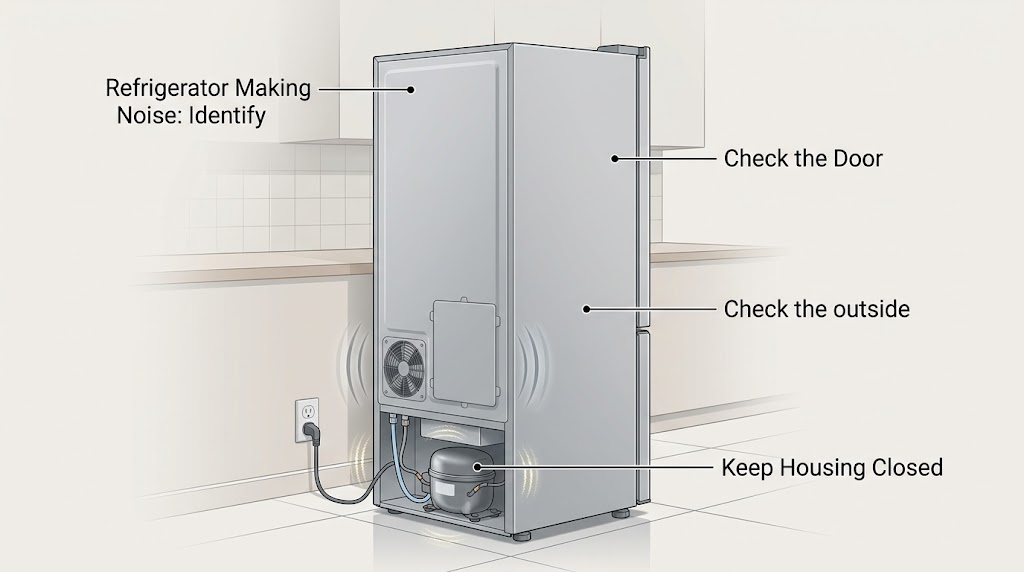
First identify the sound and when it occurs rather than assuming an Admiral part has failed. A brief hum, soft airflow, gentle gurgle, occasional click, or pop during cooling, defrost, or ice making can be normal on many refrigerator designs. A rattle or vibration may come from items on top, contact with a wall, a water line, refrigerant flow, or an unlevel cabinet. Check only the outside: remove loose objects, confirm the cabinet is stable without moving the heavy appliance, and verify that an ice maker is not trying to fill without a water supply. If the noise is accompanied by scraping, a hot or discolored plug, arcing, burning odor, water near electrical parts, repeated clicking with no cooling, or a sudden worsening, switch cooling off or disconnect power only when safe and arrange qualified service. Admiral model and control details vary, so use the complete model number for the correct manual; do not remove covers or test internal components.
Work through in order
Diagnostic checks
Use only checks that match the exact appliance or system and its official guide.
-
Check 1
From a safe position, describe the sound in plain words and note when it occurs: during compressor start or stop, continuously, after a door opening, during defrost, while dispensing water, or during ice making.
Expected result: The sound is a brief hum, soft airflow, gurgle, click, pop, hiss, rattle, buzz, grinding, scraping, or crackle; it may be regular and cycle-related or new and continuous.
Next step: Record a short description and the timing for the exact model manual or service request. Do not place hands near fans or moving parts and do not remove a cover to locate the sound.
Why this matters
Why: Brief sounds that repeat with cooling, defrost, water, or ice cycles are more compatible with normal operation. A harsh, continuous, escalating, scraping, or electrical-sounding noise is less likely to be ordinary, especially if cooling changes or a safety warning accompanies it.
-
Check 2
Check the outside of the refrigerator for loose items on top, contact with a wall or cabinet, an unstable cabinet, or visible vibration; do not pull or tilt the heavy appliance by yourself.
Expected result: Removing a loose item or giving an accessible object clearance stops the rattle, or the cabinet continues to vibrate while stable and unobstructed.
Next step: Leave the cabinet stable and keep clearance according to the exact manual. If leveling requires moving or lifting the refrigerator, stop and use qualified help; do not remove panels to reach leveling or compressor parts.
Why this matters
Why: Objects on top, contact with surrounding surfaces, and an unlevel refrigerator can amplify normal refrigerant, fan, or compressor vibration. A vibration that persists without an external source may need model-specific inspection.
-
Check 3
If the noise is a buzz or chatter near the dispenser or ice-maker area, check the visible water supply line for a kink and check the control display for an ice-maker setting; do not disconnect plumbing or open the rear compartment.
Expected result: The sound occurs only during filling or dispensing, the ice maker is on without a connected water supply, the visible line is kinked, or the noise continues independently of water and ice functions.
Next step: If the model permits, turn the ice maker off using its normal control when no water supply is connected and follow the exact manual for any line correction. If the sound continues, or the line leaks, request service rather than opening the appliance.
Why this matters
Why: Water valves and lines can buzz or chatter during filling, and a valve may make noise when an ice maker is enabled without a water supply. A persistent sound unrelated to water or ice is less likely to be explained by that cycle alone.
-
Check 4
Observe whether the refrigerator is still maintaining normal cooling while the sound occurs, without leaving doors open or changing the temperature repeatedly.
Expected result: Food remains appropriately cold and the sound is brief or cycle-related, or the refrigerator is warming, the compressor appears to run continuously, or the noise is paired with an alarm or repeated start attempts.
Next step: For stable cooling, continue the external checks and monitor without repeated power cycling. For warming, repeated clicking, or failed starts, keep food safe, avoid internal diagnosis, and arrange qualified appliance service with the model number.
Why this matters
Why: A familiar sound with stable cooling is more likely to be an operating sound. A new noise plus loss of cooling or repeated unsuccessful starts makes a fan, compressor, control, airflow, or sealed-system issue more concerning, but the sound alone cannot identify the failed component.
-
Check 5
Listen for rubbing or grinding only while opening a door normally, and visually check that the door is not contacting a cabinet; do not force the door or adjust hidden hinges.
Expected result: The sound occurs only with door movement, the door rubs a nearby cabinet, the refrigerator is visibly unstable, or the noise continues while the door is untouched.
Next step: Keep the door from rubbing and consult the exact installation instructions for any approved external leveling adjustment. If the door is damaged, hard to close, or the sound remains, request service rather than removing hinges or panels.
Why this matters
Why: Door contact, alignment, and leveling can produce creaks or squeaks during movement. A sound that continues with the door still points elsewhere, such as vibration, fan, water, or compressor operation.
-
Check 6
Inspect the visible power cord, plug, and receptacle from a safe, dry position, and note any heat, discoloration, crackling, smoke, odor, water, or breaker trip without touching a hazardous connection.
Expected result: There is no electrical warning, or the noise is accompanied by arcing, a hot or discolored plug/outlet, burning odor, smoke, moisture, damaged insulation, or repeated protective-device operation.
Next step: For any warning sign, stop using the refrigerator. Disconnect power only if the connection is cool, dry, quiet, and safe to touch; otherwise move away and call a qualified electrician or emergency service as appropriate. Do not reset protection repeatedly or run the unit with covers removed.
Why this matters
Why: Electrical warning signs are not normal refrigerator noise and can indicate a shock or fire hazard. A clean exterior does not rule out an internal appliance fault, and a protective-device trip does not identify a particular part.
-
Check 7
Find the complete Admiral model number and consult its owner manual for the noise section, installation clearances, ice-maker controls, and approved user maintenance; do not assume a Whirlpool instruction or another Admiral model applies exactly.
Expected result: The manual describes the same sound and an external check resolves it, or the sound is not listed, the model cannot be matched, or the issue remains after the documented check.
Next step: Arrange qualified appliance service and provide the model number, sound description, timing, cooling symptoms, and external observations. Do not order a fan, motor, compressor, or control part from the noise description alone.
Why this matters
Why: Brand-family guidance can explain common refrigerator mechanisms, but sound sources, panels, fans, controls, and service procedures vary by model. An unlisted or persistent sound needs model-specific diagnosis.
Use your observations
Decision map
Find the observation that best matches what you see, then follow the next safe action.
-
PATH 01Next step
What you see
Do this next
Monitor the pattern and compare it with the exact model manual. Escalate if the sound becomes harsh, continuous, louder, or is joined by warming, leaking, heat, odor, or an electrical warning.
-
PATH 02Next step
What you see
Do this next
Keep the refrigerator stable and clear of contact according to the model installation instructions. Do not move a heavy refrigerator alone or remove panels to reach hardware.
-
PATH 03Next step
What you see
Do this next
Use the exact model control to turn off an unused ice maker and follow the manual for visible water-line checks. If the noise is independent of water/ice operation or a leak appears, request service.
-
PATH 04Next step
What you see
Do this next
Keep the door from rubbing and consult the model installation instructions. Stop and arrange service if the door is damaged, hard to close, or the sound continues when the door is still.
-
PATH 05Next step
What you see
Do this next
Stop using the refrigerator. Disconnect only when the plug and outlet are cool, dry, quiet, and safe to touch; otherwise move away and obtain qualified appliance/electrical or emergency help as appropriate. Do not reproduce the noise or open the appliance.
Helpful context
Understand the symptom
Sound type matters more than the word loud
Refrigerators make sound as compressors and fans run, refrigerant moves, walls expand and contract, water valves operate, and ice is harvested. Official Whirlpool Product Help groups these sounds by pattern: humming, gurgling, clicking, popping, rattling, hissing, and airflow may all have different explanations. That guidance is useful as general refrigerator context, not as proof that every Admiral model uses the same components or sound profile. The first useful observation is whether the sound is brief and tied to a cycle, or new, harsh, continuous, and accompanied by a cooling or safety symptom.
Keep diagnosis outside the cabinet
User checks should stay at the sound, surrounding objects, visible cord and plug, doors, controls, and accessible water line. Do not remove a rear panel, fan cover, kickplate, outlet plate, or control cover; do not touch exposed wiring, refrigerant tubing, a compressor, or a fan; and do not run the refrigerator with a guard or panel removed. The exact model manual is required for any maintenance beyond these external checks.
When a noise is an electrical stop condition
A mechanical hum is different from crackling or arcing at the plug or outlet. A damaged appliance that repeatedly trips a breaker can indicate a defect with shock or fire risk. If the noise comes with heat, smoke, a burning odor, visible arcing, or a wet electrical connection, do not keep listening for a pattern or repeatedly reset protection; move away and arrange qualified electrical or appliance service as appropriate.
When checks do not resolve it
Need a professional?
Stop and arrange qualified service for a sudden, harsh, continuous, or worsening noise; grinding that persists when doors are still; repeated clicking with failed starts; warming or loss of cooling; water leakage near electrical parts; a hot or discolored plug/outlet; crackling, smoke, burning odor, visible arcing, damaged cord, or repeated breaker/GFCI/AFCI trips. If there is active smoke, flame, or sparking, move away and use emergency help as appropriate. Keep the refrigerator out of service until it is cleared.
Common questions
FAQ
Why is my Admiral refrigerator making a humming or buzzing noise?
A steady or brief hum can come from the compressor or fans, while a buzz during ice making or dispensing can come from a water valve or line. If the noise is new, harsh, continuous, or paired with warming, heat, odor, crackling, or a trip, stop using the refrigerator and arrange service rather than assuming it is normal.
Is a clicking sound from an Admiral refrigerator normal?
An occasional click can occur when relays or controls switch components, or when the compressor starts or stops. Repeated clicking with no cooling, unsuccessful starts, or a worsening sound is not something to diagnose by repeated power cycling; provide the model and request service.
How can I stop an Admiral refrigerator from rattling?
From outside the appliance, remove loose objects on top, check for contact with a wall or cabinet, and confirm that the cabinet is stable. Refrigerant or water flow can also sound like rattling. Do not move a heavy refrigerator alone or remove a panel; use the exact installation instructions or service if the vibration persists.
When is refrigerator noise a safety problem?
Treat crackling, visible arcing, smoke, a burning odor, a hot or discolored plug or outlet, water near electrical parts, damaged insulation, or repeated protective-device trips as a stop condition. Disconnect only a cool, dry, quiet, safe connection; otherwise move away and contact qualified electrical or emergency help.
Can I replace the fan, relay, or compressor because my Admiral refrigerator is noisy?
No. A sound does not identify a compatible part, and Admiral model details vary. Use the complete model number and arrange model-specific diagnosis; do not open covers or test internal components yourself.
Read the exact guide
Official sources
- Refrigerator Noise - Grinding or Squeaking when Opening DoorWhirlpool Product Help · Official manufacturer guidance for general door-noise checks; not a model-specific Admiral hinge or adjustment procedure.
- Owner's Manual — RefrigeratorWhirlpool Corporation · Official manufacturer safety and installation guidance used only for general electrical boundaries; it does not establish specifications or service instructions for an unspecified Admiral model.
- Refrigerator Noise - Rattling or VibratingWhirlpool Product Help · Official manufacturer guidance for general refrigerator rattling/vibration patterns; not a model-specific Admiral diagnosis.
- Appliance Safety TipsElectrical Safety Foundation International (ESFI) · General safety guidance for repeated breaker trips, damaged cords/plugs, authorized repair, and electricity near water; it does not diagnose an Admiral refrigerator.
- Refrigerator Normal Sounds and NoisesWhirlpool Product Help · Official manufacturer guidance for Whirlpool refrigerator platforms, used only as general refrigerator sound context; it is not proof of the sound source or controls in an unspecified Admiral model.
- Refrigerator Noise - High-Pitched or PulsatingWhirlpool Product Help · Official manufacturer guidance for general fan, refrigerant, and compressor sound patterns; not a model-specific Admiral diagnosis.
Community feedback
Share a repair observation
Share a plain-text repair observation. Accepted observations are published automatically; this page may take a moment to update.