
On this page
Start here
Quick answer
Hotpoint's opened official error guide describes F13 as a dryer temperature-sensing fault on washer dryers and says the reported symptom is that the washer dryer is not drying clothes. The FDD 9640 family is a front-loading washer dryer, with the opened official UK product/energy documents identifying the FDD 9640G UK variant; the complete suffix and 12NC should still be checked before ordering anything. First record whether washing works, whether F13 appears only during drying, the programme/load, and whether the appliance is unusually hot or has an odor. Do not open the cabinet, test a thermistor or heater with power applied, or assume a sensor, heater, fan, wiring, or control board needs replacement from F13 alone. A repeat code or any smoke, burning smell, abnormal heat, or tripping requires the appliance to remain out of service and qualified Hotpoint service.
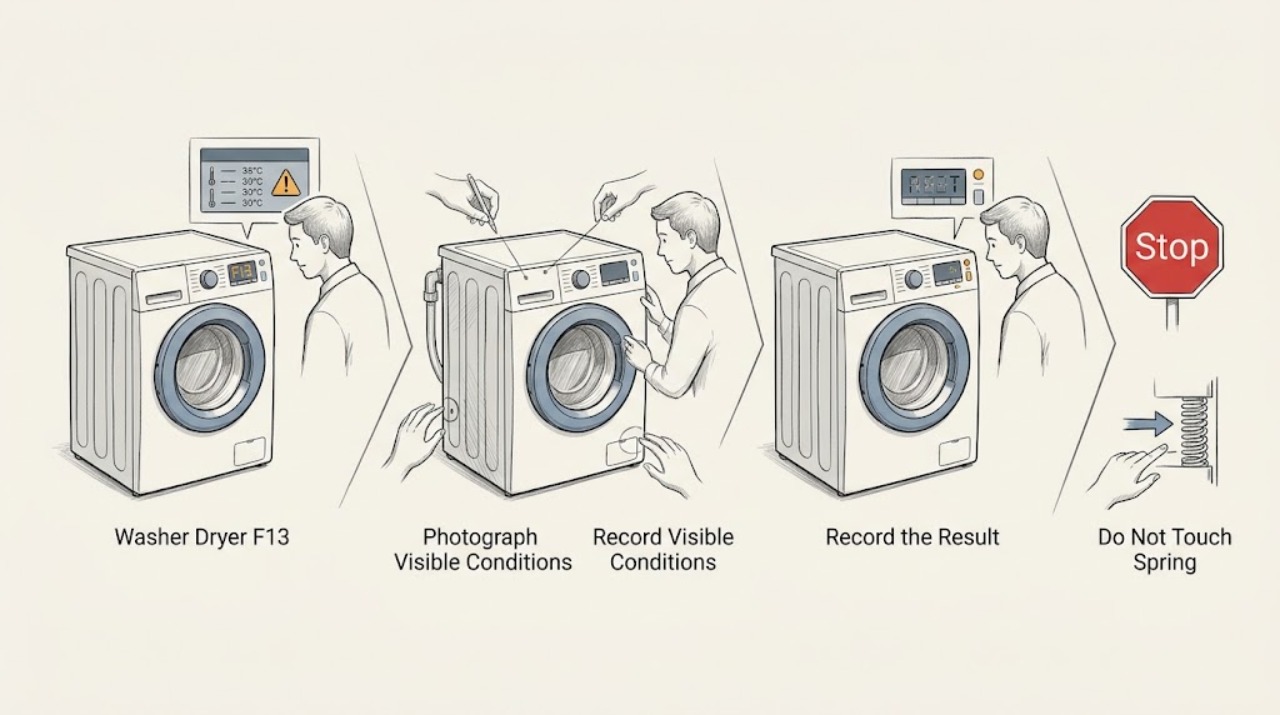
Work through in order
Diagnostic checks
Use only checks that match the exact appliance or system and its official guide.
-
Check 1
Photograph the complete rating plate and display. Record the full model suffix, 12NC or service number if present, market, the exact code format (F13, F-13, or another display), and whether the message is steady or flashing.
Expected result: The label identifies FDD 9640G UK or another suffix, the code is clearly F13, or the identity/display is incomplete or different.
Next step: Give the full identity and display photo to Hotpoint support or qualified service before selecting a part or procedure.
Stop if: Stop immediately for smoke, burning odor, sparks, abnormal heat, a hot plug, damaged cable, water near electrics, or a repeated breaker/RCD trip.
Why this matters
Why: Hotpoint directs users to find manuals by the model number or 12NC. The opened product and energy documents identify an FDD 9640G UK variant, but the shortened FDD 9640 identity does not prove every regional platform is identical.
-
Check 2
Run no further test cycle while the code is active; instead record whether a normal wash programme completes, whether the drum turns and drains normally, and whether F13 appears only when a drying programme is selected or after drying has started.
Expected result: Washing completes but drying stops or leaves clothes wet, F13 appears during washing as well, or the appliance will not start any programme.
Next step: Record the exact phase and keep the appliance off for a repeat code; supply the phase history to qualified service rather than choosing a sensor or heater.
Stop if: Do not force the door, reach into a moving drum, or use a drying cycle to reproduce the display.
Why this matters
Why: Hotpoint's official F13 description is specifically the dryer temperature-sensing fault with clothes not drying. A wash-only failure or an all-function failure is a different symptom path and is not proof that the dryer sensor is the cause.
-
Check 3
For a single drying attempt that was already completed, record the selected drying programme, approximate load type/size, whether the load was still very wet after the final spin, whether the drum felt abnormally hot, and whether airflow or condensation behavior seemed normal from the user-accessible outlet. Do not open covers or clean an internal condenser unless the exact manual explicitly provides a safe user procedure.
Expected result: The load was overfilled or very wet before drying, the load was cool and damp with no abnormal heat, or the machine was unusually hot, stopped early, or produced an odor.
Next step: Document the programme and load for service. If the appliance is cool and the code does not recur, do not claim the fault is repaired; if heat or odor is abnormal, leave it isolated and request service.
Stop if: Do not run smaller loads repeatedly, remove the heater assembly, access the fan/condenser, or test a sensor with power connected.
Why this matters
Why: Load and programme conditions can explain poor drying without proving a temperature-sensor fault. Abnormal heat, an early stop, or an odor is a safety/service observation, not a reason to keep testing.
-
Check 4
Check only external, user-accessible conditions from the exact manual: the door closes normally, the appliance is not visibly obstructed, the plug and cable are intact, and no water remains or leaks. If the appliance has a normal external power control, note whether the display and indicators respond; do not repeatedly unplug it because F13 has no official user reset listed on the opened page.
Expected result: The door, plug, display, and visible area are normal, or there is a leak, power anomaly, heat/odor, damaged cable, or protective-device operation.
Next step: Keep the washer dryer out of service for recurring F13 or any hazard and give service the model, code, phase, load, and safety observations.
Stop if: Do not remove panels, bypass a door interlock, perform continuity/voltage tests, or restore power solely to see whether the code changes.
Why this matters
Why: Normal external conditions do not identify which internal sensing, heating, airflow, wiring, or control element is involved. A leak or electrical/thermal warning overrides troubleshooting and requires safe isolation/service.
Use your observations
Decision map
Find the observation that best matches what you see, then follow the next safe action.
-
PATH 01Next step
What you see
F13 appears only after a drying programme begins, the wash side completes, and the load is left wet.
Do this next
Keep the appliance off and request qualified Hotpoint washer-dryer service with the exact model/12NC, drying programme, load, and display photo.
Why this path and its safety boundary
Why it matters: This matches Hotpoint's published user-visible F13 symptom, but it does not distinguish the dryer temperature sensor from other internal drying, airflow, heating, wiring, or control faults.
-
PATH 02Next step
What you see
F13 appears during washing, before drying is selected, or the washer cannot start any programme.
Do this next
Do not reinterpret F13 as a confirmed temperature-sensor failure. Verify the complete code and model with Hotpoint documentation or service.
Why this path and its safety boundary
Why it matters: The symptom does not fit the narrow published F13 description of a washer dryer not drying clothes; a display/phase mismatch or another fault remains possible.
-
PATH 03Next step
What you see
The load is simply very wet after a wash, but there is no F13, abnormal heat, odor, or repeat failure.
Do this next
Record the programme and load and use the exact manual for normal operation. Stop and call service if F13 returns or drying repeatedly fails.
Why this path and its safety boundary
Why it matters: Final-spin, load, and programme conditions remain possible explanations; this observation alone does not justify a sensor or heater replacement.
-
PATH 04Next step
What you see
There is smoke, burning smell, unusual heat, a hot/damaged plug or cable, water near electrics, or a tripped protective device.
Do this next
Stop using the appliance, isolate water or power only from a dry and safe position, and arrange qualified appliance/electrical service.
Why this path and its safety boundary
Why it matters: This is an immediate electrical, water, or thermal safety stop regardless of the F13 interpretation.
Helpful context
Understand the symptom
F13 is a drying-side clue, not permission to replace a temperature sensor. Hotpoint's official page puts F13 under washer-dryer error codes and describes the user-visible issue as clothes not drying. Whether the wash side still works and whether the code occurs only after drying begins are the first useful distinctions.
The opened official model documents identify the UK FDD 9640G variant, but the task identity omits the suffix and 12NC. Use the rating plate and Hotpoint's model lookup to confirm the exact regional document. Do not transfer a heater, thermistor, fan, wiring, or control-board diagnosis from a similar FDD/FDF/FDG model.
Keep the machine out of service for repeated F13, overheating, smoke, a burning smell, damaged wiring, or a protective-device trip. Do not remove the top or rear panel, enter a service mode, make a live electrical measurement, or run repeated drying cycles to make the code recur.
When checks do not resolve it
Need a professional?
Arrange qualified Hotpoint washer-dryer service when F13 returns, drying stops or leaves clothes wet, the code appears outside the drying phase, the complete model/12NC cannot be matched to the regional documentation, or any internal access would be needed. Stop immediately for smoke, burning odor, abnormal heat, a damaged plug/cable, water near electrical parts, or a protective-device trip. Do not open the cabinet, enter service mode, make live electrical measurements, bypass the door lock, or order a sensor, heater, fan, wiring harness, or control board from F13 alone.
Common questions
FAQ
Does F13 prove that the dryer temperature sensor must be replaced?
No. Hotpoint labels F13 as a dryer temperature-sensing fault, but that is a fault category, not proof of a failed sensor or a part-selection instruction. A technician should verify the exact model and the drying-phase behavior before identifying a component.
What if washing works but drying fails?
That phase split is consistent with Hotpoint's published F13 symptom of a washer dryer not drying clothes, but it still does not distinguish sensor, airflow, heating, wiring, or control causes. Keep the appliance out of service if the code returns and provide the phase history to qualified service.
Read the exact guide
Official sources
- Freestanding Washer Dryer Hotpoint FDD 9640G UKHotpoint UK · The opened official product URL identifies the FDD 9640G UK washer-dryer variant. The page is used for model-family and appliance-type identity, not as a model-specific F13 service manual.
- What Do Hotpoint Tumble Dryer Error Codes Mean?Hotpoint UK · The opened page explicitly lists F13 as a dryer temperature-sensing fault for washer dryers and describes the issue as the washer dryer not drying clothes; it recommends service. It does not identify an internal replacement part or a complete FDD 9640 suffix.
- Get Hotpoint Appliance Manuals - Quick & Easy DownloadsHotpoint UK · The opened page instructs users to enter the first five model digits or 12NC to locate the correct manual and related product documents. It supports identity verification, not a model-independent F13 component diagnosis.
- ENERGY LABEL — HOTPOINT FDD 9640G UKHotpoint / Whirlpool official document CDN · The opened official PDF displays HOTPOINT FDD 9640G UK, confirming the suffix and UK market variant associated with the product record. It contains no F13 diagnosis.
Community feedback
Share a repair observation
Share a plain-text repair observation. Accepted observations are published automatically; this page may take a moment to update.