
On this page
Start here
Quick answer
Stop the programme if the Hotpoint washer dryer is walking, banging, or threatening to move. Excessive vibration is most often a load or installation issue: redistribute a heavy or single-sided load, avoid overloading, and check that the appliance is level and not squeezed against furniture or a wall. If the vibration began on the first use or after moving the appliance, check the exact model installation instructions to confirm that all transport brackets or bolts were removed; do not remove them by guesswork. Inspect from outside for hoses or objects striking the cabinet. If vibration remains with a balanced load and correct installation, the spin is aborted, the cabinet is damaged, the drum makes grinding or metallic noise, or the appliance leaks or trips power, stop using it and arrange qualified Hotpoint service.
Before you begin
Safety first
- This article covers observation, load redistribution, and ordinary-access installation checks only. Leave transport-hardware removal that requires movement, electrical work, cabinet access, suspension, drum, motor, bearing, and plumbing repairs to qualified appliance service.
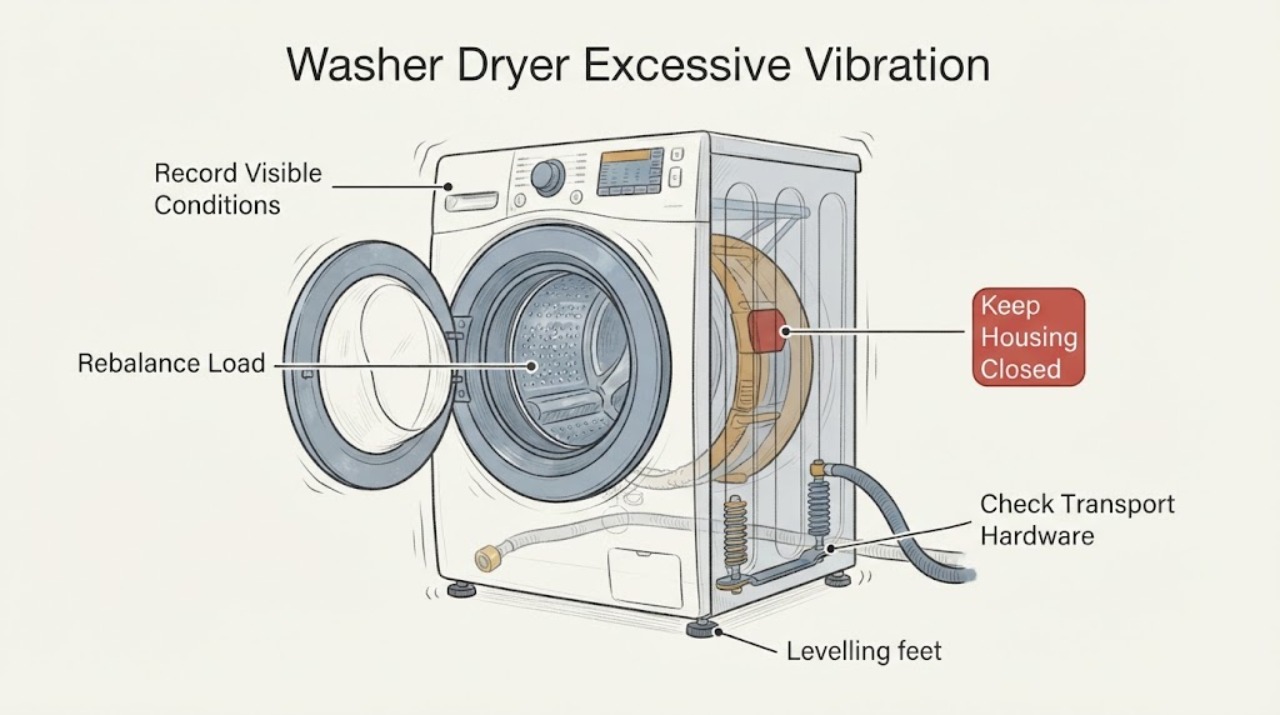
Work through in order
Diagnostic checks
Use only checks that match the exact appliance or system and its official guide.
-
Check 1
From a safe position, stop the washer dryer and record when the vibration occurs: during wash movement, drain, the start of spin, high-speed spin, or drying. Note whether the cabinet walks, rocks in place, or only transmits vibration to the floor.
Expected result: Record whether the issue is first-use or post-move, whether it is tied to one load or every load, whether a spin indicator or fault light appears, and whether there is banging, grinding, scraping, leaking, or an electrical symptom.
Next step: Use the timing to choose the load, transport-hardware, levelling, or service branch. Keep the machine stopped while inspecting it.
Stop if: Stop immediately for walking that could pull hoses or power, water near electrics, smoke, burning smell, sparking, repeated electrical trips, grinding, or damage to the cabinet or floor.
Why this matters
Why: Spin-only movement points first to load balance or installation. First-use or post-move movement points to transport hardware or installation. A persistent mechanical noise or a safety symptom is not a simple balance correction.
-
Check 2
When the machine is stopped and the door can be opened normally, redistribute the items around the drum. Remove some items if the load is tightly packed, and avoid testing with one heavy or bulky item by itself.
Expected result: Record whether the drum was overfilled, contained one heavy item, or had clothes gathered on one side, and whether the washer dryer settles when the load is distributed more evenly.
Next step: Use the load size and programme guidance in the exact model manual. Run no more than a cautious supervised spin test only if the appliance is stable, dry, and free of other warning symptoms.
Stop if: Do not reach into a moving drum, overload the machine, force a locked door, or continue if the cabinet walks or bangs after the load is redistributed.
Why this matters
Why: Hotpoint says its appliance can identify an excessive or unbalanced load, try to redistribute it, and abort spin when it remains unstable. A vibration that disappears after redistribution supports a load-balance cause rather than proving an internal failure.
-
Check 3
If the vibration was present from the first use or began after relocation, compare the rear of the appliance with the exact installation instructions and confirm whether the protective brackets or transport bolts and spacers were removed. Do not loosen anything unless the manual identifies it as transport hardware for this model.
Expected result: Record whether the manual says transport hardware should have been removed, whether any identified hardware remains, and whether the appliance was recently moved or installed on a new floor.
Next step: Follow only the exact model installation procedure, with the water supply closed and the appliance safely disconnected if the procedure requires access. Retain the hardware for any future move.
Stop if: Do not remove unidentified screws, open panels, tilt or drag the washer dryer by its door, or work behind it in a wet or cramped space.
Why this matters
Why: Hotpoint states that protective brackets or bolts left in place can make a washer dryer noisy or unstable on first use. A hardware question that cannot be identified from the model instructions should be handed to the installer or technician.
-
Check 4
Inspect from outside whether the washer dryer is stable and level as described by the model manual, whether it is squeezed against a wall or furniture, and whether loose objects are resting on it or leaning against it. Check visible feet and clearance without pulling a loaded appliance.
Expected result: Record whether the cabinet rocks when gently tested from a safe, dry position, a foot appears unsupported, the floor flexes, or the cabinet touches a wall, cabinet, pipe, rack, or other object.
Next step: Make only the minor external adjustment permitted by the exact installation instructions; clear a loose contact object. Arrange help for levelling a built-in or heavy appliance, floor repair, or any movement that requires force.
Stop if: Do not wedge the machine with improvised objects, force a foot, drag it by the door or worktop, or continue if hoses or the power cord are stretched.
Why this matters
Why: Hotpoint links noisy or unstable operation to incomplete installation, and its quick guide lists an unlevel washer or one squeezed between furniture and a wall as causes of excessive spin vibration. A clear, stable installation with persistent movement makes an internal fault more likely.
-
Check 5
With the machine stopped, inspect the visible fill and drain hose routing and the space around the cabinet. Look for a hose striking the rear panel, a crushed or kinked hose, a drain connection that moves during pump-out, or an object that vibrates against the appliance.
Expected result: Record whether the noise or movement occurs during filling or pump-out, whether a hose is taut or contacting the cabinet, and whether the drain connection or nearby object moves with the machine.
Next step: With water and power isolated as the model instructions require, restore only a safe, slack hose route or remove a loose external object. Do not alter plumbing beyond the manual or move the appliance to reach hidden connections.
Stop if: Do not disconnect a pressurised water hose, work near wet electrical parts, tape a damaged hose as a repair, or continue if the cabinet is walking or a connection leaks.
Why this matters
Why: Hotpoint recommends checking fill and drain hose connections for leaks and checking the drain hose during pump-out; its troubleshooting guidance also treats drain blockages or incorrect routing as a separate cause of abnormal operation. A hose contact can transmit vibration without being the root mechanical fault.
-
Check 6
Only after the load, transport-hardware, level, clearance, and visible hose checks are satisfactory, perform one supervised cycle or spin observation using a modest, balanced load. Stay nearby and stop at the first unsafe movement or new symptom.
Expected result: Record whether the washer dryer remains stable, whether it reaches spin without repeated redistribution or an aborted spin, and whether vibration returns with a balanced load or changes with a different programme.
Next step: Stop home diagnosis and arrange qualified Hotpoint service for persistent vibration, repeated aborted spin, mechanical noise, movement that threatens connections, or any leak or electrical symptom. Provide the model, load, programme, and timing.
Stop if: Do not run repeated high-speed tests, remove panels, test internal suspension or motor parts, or continue with grinding, scraping, burning smell, smoke, sparking, shock, leakage, or cabinet damage.
Why this matters
Why: Stable operation after a load or installation correction supports that branch. Continued excessive vibration with correct installation and a balanced load can indicate worn shock absorbers, a drum, motor, bearing, or another model-specific internal fault; the observation does not identify which part.
Use your observations
Decision map
Find the observation that best matches what you see, then follow the next safe action.
-
PATH 01Safety boundary
What you see
Vibration appears mainly during spin and the drum is overloaded, tightly packed, or carrying a single heavy or bulky item.
Do this next
Redistribute the clothing, reduce the load, and follow the exact programme and capacity guidance. Use only one cautious supervised confirmation when the machine is stable.
Why this path and its safety boundary
Why it matters: The load can distribute unevenly and make the machine unstable; Hotpoint may redistribute it or abort the spin when it remains unbalanced.
Safety stop: Stop if the washer dryer walks, bangs, repeatedly aborts spin, or vibrates with the corrected load.
-
PATH 02Safety boundary
What you see
Vibration began on first use or after moving the washer dryer, or the installation is incomplete.
Do this next
Use the exact model installation instructions to identify transport hardware and confirm level, stable placement; arrange an installer or technician if access requires movement or hardware is uncertain.
Why this path and its safety boundary
Why it matters: Protective transport brackets or bolts may remain, or the appliance may not be level or stable.
Safety stop: Do not remove unidentified hardware, tilt the appliance, or drag it by the door or worktop.
-
PATH 03Safety boundary
What you see
The machine rocks, a foot is unsupported, the floor flexes, the cabinet touches a wall or furniture, or a hose or loose object strikes it.
Do this next
Clear loose objects and make only manual-approved external levelling or clearance adjustments; obtain help for built-in, heavy, or floor-related work.
Why this path and its safety boundary
Why it matters: Installation contact or an unstable surface can amplify or transmit normal spin forces and create noise or movement.
Safety stop: Do not wedge the cabinet with improvised supports, force feet, stretch hoses, or continue if movement threatens a plumbing or electrical connection.
-
PATH 04Safety boundary
What you see
A balanced load and correct installation do not stop the vibration, or the appliance produces grinding, scraping, repeated banging, or an aborted spin.
Do this next
Stop using the washer dryer and arrange qualified Hotpoint service with the model, programme, load, timing, and symptom recording.
Why this path and its safety boundary
Why it matters: An internal suspension, drum, motor, bearing, or other model-specific problem is possible; external checks cannot identify the failed part.
Safety stop: Do not remove panels, test suspension or motor parts, or repeatedly run high-speed cycles.
-
PATH 05Safety boundary
What you see
Vibration is accompanied by a leak, stretched or damaged hose, water near electrics, smoke, burning smell, sparking, shock, or a repeated electrical trip.
Do this next
Stop immediately, close the water tap if safe, isolate power only from a dry and safely reachable position, and arrange qualified service.
Why this path and its safety boundary
Why it matters: The movement may have damaged a connection or may be part of a separate electrical, plumbing, or mechanical fault.
Safety stop: Do not touch a wet plug or outlet, reconnect a leaking hose to test it, or restart the appliance.
Helpful context
Understand the symptom
First determine when the movement begins
A washer dryer can move most during high-speed spin, when a wet load is unevenly distributed. Hotpoint describes an unbalanced load as a reason the spin may be aborted to minimise excessive vibration. Movement that began immediately after installation or relocation raises a different question: the transport brackets or bolts may not have been removed, or the appliance may not be level. Record the timing before changing several things at once.
Check the load and the installation in separate branches
Redistribute clothes and avoid tightly packing the drum, then assess the appliance with no loose items leaning against it. Check the visible installation condition without dragging a heavy appliance: it should be stable, level according to its manual, and not pressed against furniture or a wall. A first-use vibration needs the installation guide, not a guessed bolt removal.
Know when vibration is a service fault
Do not keep running cycles if the machine walks, strikes the cabinet, leaks, smells hot, trips power, or produces grinding or metal-on-metal noise. Internal suspension, drum, motor, or bearing faults need model-specific diagnosis. Unplug before any repair or replacement, and only do so from a dry, safely reachable position.
Safety boundary
Stop conditions
- Stop immediately if the washer dryer walks, pulls on hoses or the power cord, strikes surrounding objects, or threatens to fall or damage the floor.
- Stop for water near electrical parts, a damaged hose, smoke, burning smell, sparking, shock, repeated electrical trips, grinding, scraping, or cabinet damage.
- Do not remove transport hardware unless the exact model installation instructions identify it; do not open panels or test internal suspension, drum, motor, or bearing parts.
- Do not drag or tilt a heavy or built-in washer dryer by its door or worktop, and do not use improvised wedges or supports.
- After one safe load and installation correction, arrange qualified service for persistent excessive vibration or repeatedly aborted spin.
Only after diagnosis
Potential parts
- washer-dryer levelling foot or installation hardware
Consider this category only when inspection confirms a damaged foot or installation component and the exact model instructions support replacement.
Confirm the exact Hotpoint model and installation design before ordering; do not tilt or move a heavy appliance by force. - washer-dryer shock absorber or suspension component
Consider this internal part only after qualified diagnosis finds persistent vibration with a balanced load and correct transport and levelling setup.
Confirm the exact model, component specification, and safe installation procedure with Hotpoint service; do not access or test suspension parts yourself. - washer-dryer inlet or drain hose
Consider this only when a visible hose is cracked, crushed, displaced, or otherwise confirmed to be damaged or incorrectly fitted.
Match the exact Hotpoint model, connection, length, and water-protection design; close the supply before hose work.
When checks do not resolve it
Need a professional?
Arrange qualified Hotpoint service when a balanced load and correct installation do not stop excessive vibration, when spin repeatedly aborts, when transport hardware cannot be identified safely, or when movement is accompanied by grinding, scraping, leakage, a damaged hose, smoke, burning smell, sparking, shock, or repeated electrical trips.
Safety scope: This article covers observation, load redistribution, and ordinary-access installation checks only. Leave transport-hardware removal that requires movement, electrical work, cabinet access, suspension, drum, motor, bearing, and plumbing repairs to qualified appliance service.
Common questions
FAQ
Why is my Hotpoint washer dryer shaking during spin?
Start with the load and installation: redistribute an uneven or bulky load, avoid overloading, confirm the machine is level and stable, and check that it is not squeezed against a wall or furniture. If it still shakes with a balanced load, arrange service.
Could transport bolts cause a Hotpoint washer dryer to vibrate?
Yes, especially when instability starts on first use or after installation. Hotpoint says protective transport brackets or bolts must be removed, but use the exact model installation instructions to identify them and do not remove unidentified hardware.
What does it mean if my Hotpoint washer dryer aborts the spin?
Hotpoint says the appliance may try to correct an excessive or unbalanced load and abort spin if it remains unstable. Redistribute the clothes once; repeated aborted spins with a balanced load need qualified diagnosis.
Can the floor, wall, or hoses make a Hotpoint washer dryer seem louder?
Yes. An unlevel machine, contact with furniture or a wall, a flexible floor, or a hose striking the cabinet can transmit or amplify movement. Check visible clearance and routing without dragging or tilting the appliance.
When should I stop using a vibrating Hotpoint washer dryer?
Stop for walking, repeated banging or grinding, a leak, damaged hose, water near electrics, smoke, burning smell, sparking, shock, a power trip, or movement that threatens connections. Isolate water and power only when safe and arrange service.
Read the exact guide
Official sources
- Washing Machine Troubleshooting: Quick Fixes for Common ProblemsHotpoint · Hotpoint UK washing-machine guidance used for the shared washer and spin mechanics; exact washer-dryer instructions remain controlling.
- Quick guideHotpoint · Hotpoint quick guide for a specific European product family; use the exact model manual for the user's washer dryer.
- Washer Dryer TroubleshootingHotpoint · Hotpoint UK washer-dryer troubleshooting guidance; exact installation, access, and programme instructions vary by model.
Community feedback
Share a repair observation
Share a plain-text repair observation. Accepted observations are published automatically; this page may take a moment to update.