
On this page
Start here
Quick answer
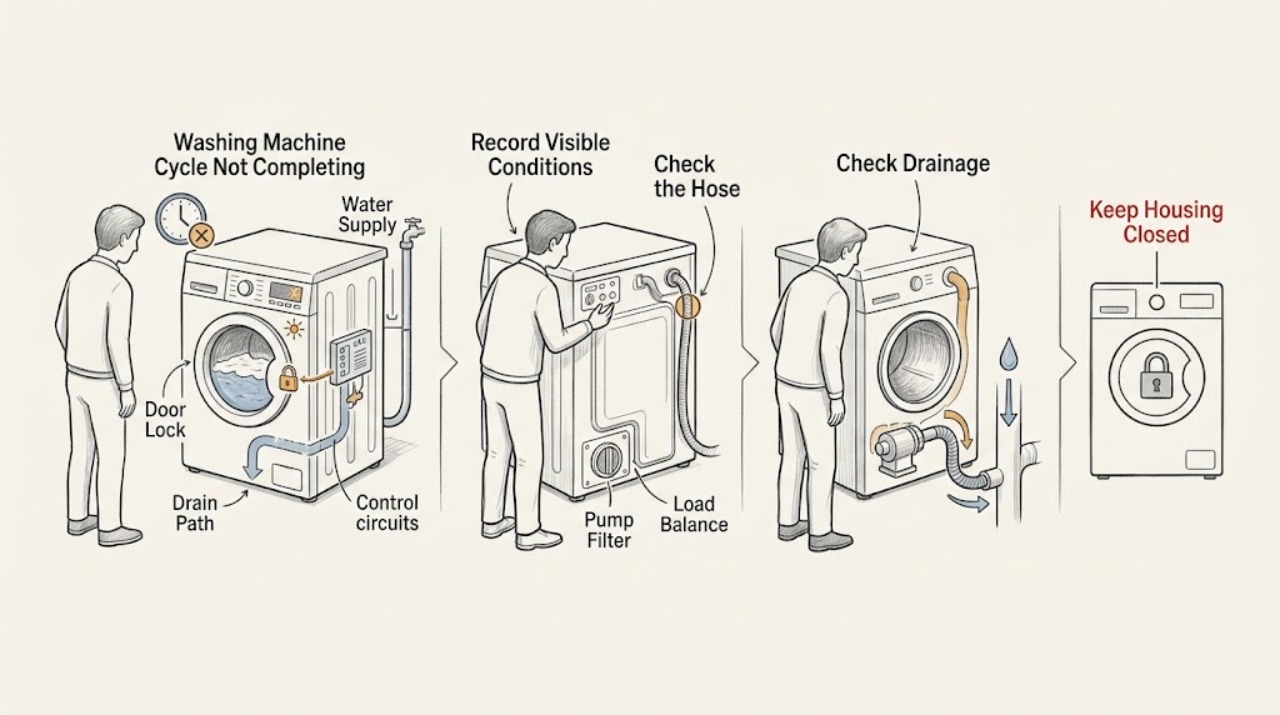
First note exactly where the Hotpoint washing machine stops: filling, washing, rinsing, draining, or spinning. Record the model, display or flashing lights, whether water remains in the drum, whether the door or lid is locked, and whether the load is soaking wet. Hotpoint says a mid-cycle stop can follow a cold-water supply problem on the rinse stage or an incorrectly positioned drain hose; a blocked drain path, rinse-hold option, unbalanced load, door-lock issue, or model-specific error can also prevent the next stage. Check the water tap and accessible hoses, the drain path and filter only as the model handbook permits, the load balance, and the exact error guidance. If water is leaking near electrics, the machine smells burnt, smokes, sparks, repeatedly trips power, vibrates violently, or will not release a locked door safely, stop using it and arrange qualified service. Disconnect power before any permitted repair or filter work, and do not open the cabinet.
Before you begin
Safety first
- This article covers normal controls and ordinary-access checks only. It does not authorize cabinet removal, live electrical work, lock or sensor bypass, pump disassembly, or powered operation after a hazard.
Work through in order
Diagnostic checks
Use only checks that match the exact appliance or system and its official guide.
-
Check 1
Record the exact Hotpoint model, selected programme, display time or status, flashing lights or code, and the stage at which the cycle stops: fill, wash, rinse, drain, or spin; do not open panels or repeatedly restart it.
Expected result: Note whether the drum is empty or full of water, the door or lid is locked, clothes are soaking wet, the pump or motor continues, and whether the same stage and indicator recur.
Next step: Follow the water, drain, load, door, or error branch below and keep the model and indicator record for service if the condition repeats.
Stop if: Stop for leaks near electrical parts, burning odor, smoke, sparks, violent movement, repeated breaker trips, a damaged cord, or a door or lid that will not release safely.
Why this matters
Why: A fill-stage stop points toward water supply or inlet conditions; water left before spin points toward drainage or a hold setting; a wet load after attempted spin points toward balance or drain protection. A code or repeated same-stage stop needs model-specific guidance.
-
Check 2
For a stop while filling or rinsing, confirm the cold-water tap is open and inspect the accessible inlet hose for a kink, crushed section, leak, or loose connection without dismantling the inlet valve.
Expected result: Record whether water enters normally, the tap symbol or fill light flashes, the hose is kinked or leaking, or the machine reaches the rinse stage and then stops with little or no water.
Next step: Restore only an obvious tap or hose condition, then run the model's appropriate programme once. If filling still fails, close the tap, disconnect power, and arrange service rather than opening the valve assembly.
Stop if: Do not loosen pressurized fittings, continue with a leaking hose, open the machine, or keep running if water reaches electrical parts.
Why this matters
Why: Hotpoint says a cold-water supply problem is a common cause of stopping during the rinse stage and that a tap symbol or flashing light can indicate a supply issue. A clear supply with repeated fill failure points toward inlet filtration, valve, pressure sensing, or control service.
-
Check 3
If water remains in the drum or the machine stops before spin, inspect the accessible drain hose, standpipe or under-sink connection, and model-approved pump-filter area for a kink, blockage, or trapped debris; also check whether Rinse Hold or Crease Care is selected.
Expected result: Record whether water drains, the drain hose is bent or blocked, the waste connection is obstructed, the filter contains debris, the pump runs without moving water, or a hold option intentionally leaves clothes in final rinse water.
Next step: With power disconnected and water handled safely, clear only an accessible obstruction described by the manual, cancel the documented hold option, and run one suitable drain or spin programme. Arrange service for a persistent blockage, pump symptom, leak, or locked door with water inside.
Stop if: Do not reach into moving parts, remove a filter with unsafe water pressure or hot water, tip the machine, open the pump housing, or continue with a leak near electrics.
Why this matters
Why: Hotpoint says a blocked or incorrectly positioned drain path can stop the cycle and that water not draining can prevent spin. Rinse Hold or Crease Care can also hold the load in final rinse water on applicable programmes; a clear path with no pumping needs service.
-
Check 4
If the machine reaches the spin stage but pauses, aborts, or leaves clothes soaking wet, wait for the drum to stop, then redistribute the load evenly and remove only excess items so the programme is not overloaded.
Expected result: Record whether the spin light or final-spin indicator flashes, the machine repeatedly tries to redistribute, the load contains one heavy item, or a balanced smaller load completes the spin.
Next step: Run one model-appropriate spin programme with the balanced load. If it remains unstable, bangs, or aborts, stop using it and arrange service; do not bypass the imbalance or lid protection.
Stop if: Stop for violent movement, metal-on-metal noise, a machine walking across the floor, a damaged hose, smoke, burning odor, or repeated power trips.
Why this matters
Why: Hotpoint says the appliance may abort spin when it cannot achieve balance, to limit excessive vibration. A balanced load that still will not spin after drainage is clear points toward door or lid sensing, motor, suspension, or control service.
-
Check 5
Confirm the door or lid closes fully, the start or on-off control is in the intended state, and the programme dial or selector has not moved from its original position; inspect the seal and latch area from ordinary access for clothing or debris.
Expected result: Record whether the lock indicator clears, the selector has moved, the machine starts and then stops when the door is sensed, or the door remains locked with water inside.
Next step: Remove only a visible obstruction, return the selector to the intended programme, and follow the model manual for a normal unlock or cancellation. Arrange service if the lock, latch, selector, or control remains unreliable.
Stop if: Do not force the door, bypass a lock or lid switch, insert tools into the latch, or open the cabinet with power connected.
Why this matters
Why: Hotpoint says a firmly closed door is required for starting, a moved programme dial can produce a flashing wash light, and a door-lock fault can stop a cycle from starting or continuing. A latch that stays locked or a recurring lock indication is not an invitation to force it.
-
Check 6
Write down the exact error code or light pattern and match it to the Hotpoint manual or official code guidance for the model; if the guidance permits a power reset and there is no hazard, disconnect power for the documented interval and retry once.
Expected result: Record whether the code identifies filling, drain or pump, heating, motor, door or drum position, or control circuitry, whether it clears, and whether the same code returns at the same phase.
Next step: Stop further resets and provide the exact code, stop stage, water state, load condition, and prior checks to Hotpoint or qualified service.
Stop if: Do not use an unrelated model's code table, repeatedly cycle power, open the control board, inspect energized wiring, or continue after smoke, odor, sparks, or a trip.
Why this matters
Why: Hotpoint's published codes represent different fault families, and all models vary. A single cleared transient may not recur, but a returning code, paused cycle, continuous pump, or repeated control failure requires qualified diagnosis.
-
Check 7
Stop routine checks when the cycle still fails after the applicable supply, drain, hold-option, balance, door, and single reset checks, and prepare a service record without removing any cabinet panel.
Expected result: Record model, programme, stop stage, water level, code or light pattern, door state, hose and filter observations, load balance, reset result, leaks, noise, smell, heat, and breaker behavior.
Next step: Arrange qualified Hotpoint appliance service and provide the record; keep the machine disconnected if any electrical or water hazard was observed.
Stop if: Do not continue running comparison cycles, bypass a lock or sensor, replace internal parts without model authorization, or perform live electrical work.
Why this matters
Why: A repeatable failure with a clear accessible water path and correct controls is consistent with a pump, inlet, heater, pressure sensor, motor, lock, control, or other model-specific fault requiring professional diagnosis.
Use your observations
Decision map
Find the observation that best matches what you see, then follow the next safe action.
-
PATH 01Safety boundary
What you see
The machine stops before or during a rinse stage, a tap symbol or fill light flashes, or little water enters.
Do this next
Check the tap and accessible inlet hose for an obvious closed, kinked, blocked, or leaking condition; use the exact manual for inlet-filter access and service a continuing fill fault.
Why this path and its safety boundary
Why it matters: Hotpoint identifies the cold-water supply as a common cause of a mid-cycle stop and uses a tap symbol or flashing light on some models.
Safety stop: Do not loosen pressurized connections or continue with a leak near electrics.
-
PATH 02Safety boundary
What you see
Water remains in the drum, the pump runs without draining, or the machine will not advance to spin.
Do this next
Disconnect power, follow the model's safe drain and filter procedure, clear only accessible blockages, cancel a documented hold option, and arrange service for a persistent drain or pump fault.
Why this path and its safety boundary
Why it matters: A blocked or kinked drain hose, waste connection, pump filter, or pump fault can prevent the spin stage; a rinse-hold option can intentionally retain water on applicable programmes.
Safety stop: Do not open a filter unsafely, reach into moving parts, tip the machine, or operate with water near electrical parts.
-
PATH 03Safety boundary
What you see
The spin light flashes, clothes remain soaking wet, or the machine repeatedly redistributes and aborts spin.
Do this next
Redistribute the load and remove excess items, then run one suitable spin programme; arrange service if a balanced load still aborts or the machine vibrates severely.
Why this path and its safety boundary
Why it matters: Hotpoint's imbalance protection can abort spin when the load remains unstable, reducing excessive vibration.
Safety stop: Stop for violent movement, banging, a damaged hose, smoke, burning odor, or repeated trips.
-
PATH 04Safety boundary
What you see
The door or lid does not confirm closed, the lock light returns, the programme dial moved, or the machine stops when advancing controls.
Do this next
Remove a visible obstruction, set the intended programme, and follow the model manual for normal cancellation or unlock; service a recurring lock or control fault.
Why this path and its safety boundary
Why it matters: Hotpoint identifies door closure and door-lock faults as start or continuation gates, and a moved selector can produce a flashing wash indication.
Safety stop: Do not force or bypass the door or lid lock, insert tools into the latch, or open the cabinet.
-
PATH 05Safety boundary
What you see
The cycle takes longer but continues, with no code, leak, violent movement, or persistent phase lock.
Do this next
Compare the programme with the exact manual, avoid overloading, use a balanced mix of large and small items, and escalate if the same phase never completes or a code appears.
Why this path and its safety boundary
Why it matters: Hotpoint says modern machines can use less water and can redistribute an imbalanced load, both of which can extend a programme.
Safety stop: Do not assume an indefinitely stalled programme is normal; stop for water, heat, smoke, odor, sparks, or a trip.
-
PATH 06Safety boundary
What you see
A code or repeated light pattern returns, the machine pauses with a continuous pump or no heat, or there is a leak, burning odor, smoke, sparks, violent movement, or repeated trip.
Do this next
Stop using the appliance, disconnect power only when safe, close the water tap if a leak is present and safely reachable, protect the area, and arrange qualified service or emergency assistance as appropriate.
Why this path and its safety boundary
Why it matters: The symptom needs model-specific fault diagnosis or has crossed a water, mechanical, or electrical safety boundary.
Safety stop: Do not repeat the cycle, silence the code and continue, bypass protection, or open the machine.
Helpful context
Understand the symptom
The stage where the cycle stops is the main clue
A machine that pauses while filling has a different decision path from one that leaves water in the drum or aborts the final spin. Write down the programme, elapsed display, exact light pattern or code, drum water level, door state, and whether the motor or pump is running. Hotpoint notes that all models vary, so use the manual for the recorded model rather than translating a code or light pattern from another machine.
Water supply and drainage can stop a later stage
A rinse stage still needs water, and a spin stage may not begin if water has not drained. Hotpoint specifically calls out the cold-water supply and drain-hose position for mid-cycle stops, and separately identifies blocked hoses, filters, pumps, and waste plumbing as drainage clues. Inspect only accessible connections and use the model handbook for filter access.
Longer is not always failed, but repeated pauses are evidence
Hotpoint explains that modern programmes can take longer because they use less water and may redistribute an imbalanced load. One extended phase can therefore be normal, but a cycle that repeatedly stops at the same phase, leaves water, flashes a code, or returns with a wet load needs a narrower check and possibly service.
Safety boundary
Stop conditions
- Stop using the washing machine for water near electrical parts, a significant leak, burning odor, smoke, sparks, a damaged cord, violent movement, or repeated breaker trips.
- Disconnect power before any permitted repair, filter, or hose work, and do not touch wet electrical equipment or energized wiring.
- Do not force or bypass a door or lid lock, reach into a moving drum or pump, tip the appliance, or open cabinet panels.
- Do not repeatedly restart a cycle, reset power, silence a recurring code, or continue comparison runs after a safety symptom.
- Use the exact Hotpoint model handbook for light patterns, error codes, safe filter access, drain-hose positioning, door release, and recovery intervals.
- Protect the floor and nearby electrical equipment from leaks and arrange qualified appliance service when an accessible correction does not restore a complete cycle.
When checks do not resolve it
Need a professional?
Arrange qualified Hotpoint or appliance service when a cycle repeatedly stops at the same stage after the relevant water, drain, load, door, and control checks; a code or light pattern returns; water remains and the model-approved drain procedure does not clear it; the door or lid will not release safely; the machine will not heat or spin; or internal access is required. Treat leaks near electrics, burning odor, smoke, sparks, violent movement, damaged cords, and repeated breaker trips as urgent safety conditions.
Safety scope: This article covers normal controls and ordinary-access checks only. It does not authorize cabinet removal, live electrical work, lock or sensor bypass, pump disassembly, or powered operation after a hazard.
Common questions
FAQ
Why does my Hotpoint washing machine stop during the rinse stage?
Hotpoint says a cold-water supply problem is a common cause of stopping during rinse. Check the tap and accessible inlet hose, and look for a tap symbol or flashing fill indicator. A correctly supplied machine that repeats the stop needs model-specific service guidance.
Why does my Hotpoint washer not move from drain to spin?
Spin may not start when water has not drained. Check the accessible drain hose, waste connection, and model-approved pump-filter area for a blockage or kink, and check whether Rinse Hold or Crease Care is selected. Do not open a filter unsafely or dismantle the pump.
Can an unbalanced load stop a Hotpoint washing-machine cycle from completing?
Yes. Hotpoint says the appliance may redistribute an unstable load and abort spin if balance is not achieved. Wait for the drum to stop, redistribute the load, and run one suitable spin programme; service persistent imbalance or violent movement.
What do flashing lights mean on a Hotpoint washing machine?
They depend on the model. Hotpoint associates some patterns with filling, a moved programme selector, an unbalanced spin load, the end of a programme, or a possible filter or waste-pipe blockage. Record the exact pattern and use the model handbook rather than guessing from another machine.
Is a longer Hotpoint wash cycle always a fault?
No. Hotpoint explains that modern programmes can use less water and may spend time redistributing a load. A cycle that continues can be normal, but one that never advances, returns a code, leaves water, or repeatedly stops at one phase needs troubleshooting.
When should I stop troubleshooting a Hotpoint washing machine that stops mid-cycle?
Stop for a leak near electrical parts, burning odor, smoke, sparks, violent movement, repeated breaker trips, a damaged cord, or an unsafe locked door. Disconnect power only when safe, do not bypass a lock or open the cabinet, and arrange qualified service.
Read the exact guide
Official sources
- Washing Machine Troubleshooting: Quick Fixes for Common ProblemsHotpoint · Hotpoint official troubleshooting guidance; light patterns and controls vary by model and the model handbook controls.
- Washing Machine Error Codes Troubleshooting GuideHotpoint · Hotpoint official error-code guidance; codes and procedures are model-specific.
- Hotpoint Service Help and AdviceHotpoint · Hotpoint official support guidance; filter access and door-release procedures depend on model.
Community feedback
Share a repair observation
Share a plain-text repair observation. Accepted observations are published automatically; this page may take a moment to update.