
On this page
Start here
Quick answer
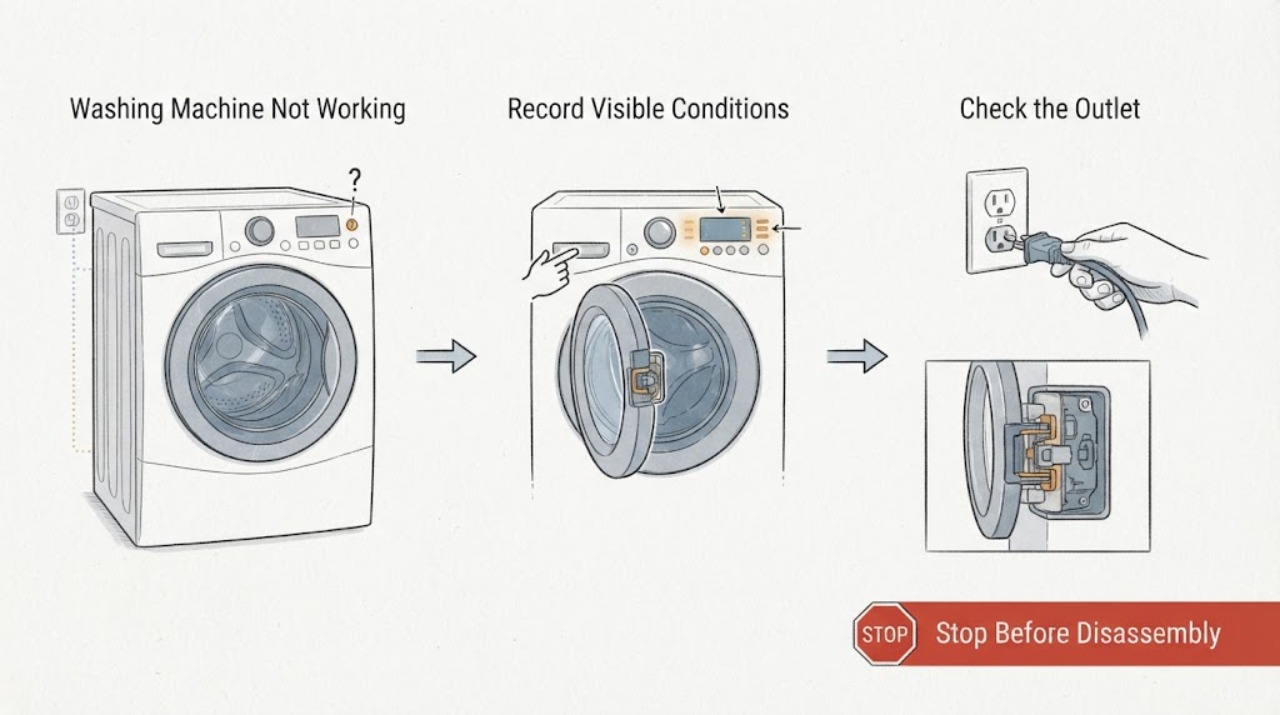
“Not working” is several different symptoms, so first note whether the display is blank, the panel is lit but Start is ignored, water is not entering or leaving, the drum will not turn, or the washer stops mid-cycle. If the floor and plug are dry, check the outlet, plug, breaker or fuse, and door seating; do not keep resetting a breaker. Select a normal program, cancel any delay or model-specific control lock, and confirm the water tap and external drain route are open and correctly positioned. If it fills but will not drain, check the model-approved pump filter and hose; if it will not spin, redistribute an unbalanced load only after water has drained. Record the exact code or flashing lights: Hotpoint associates F05 with a waste-pipe or pump issue, F06 with a door-lock fault, F02 with a motor-circuit issue, F12 with an electronic-control fault, and F01 with an electronic board fault. Stop for leaks toward electrics, standing water, violent vibration, burning smell, smoke, sparks, a damaged cord, or a repeated breaker trip; do not force the door, bypass a lock, open panels, or test live wiring.
Work through in order
Diagnostic checks
Use only checks that match the exact appliance or system and its official guide.
-
Check 1
Cancel the current cycle once and record whether the panel is blank, lit but unresponsive, showing a code, or flashing lights. Note whether water remains in the drum, whether the door is locked, and whether the drum can move only as part of a normal program; if the floor and plug are dry, unplug before touching hoses or a user-accessible filter.
Expected result: A blank display points to supply or control power. A locked door with water suggests a drain state or door-interlock issue. A full display with no movement, no fill, or an immediate pause needs a different branch than a completely dead machine.
Next step: If water is hot, near electrics, or leaking uncontrollably, stop. Otherwise continue with the safe power and control checks while the appliance is dry.
Why this matters
Why: The broad complaint becomes an observable fault class: power, door/control, fill, drain, motor/spin, or mid-cycle interruption. This prevents repeated Start presses from obscuring the original symptom.
-
Check 2
Check the wall outlet with a safe known-working appliance, confirm the washer plug is seated, and inspect only the accessible cord and plug for damage. Check the breaker or fuse once; if an extension lead is involved, remove it from the test rather than relying on it.
Expected result: A dead outlet or breaker that trips again is a household electrical issue or a safety fault. A live outlet with a blank washer panel points toward the washer's supply, control, or internal wiring rather than a program setting.
Next step: Restore power only if the external supply is dry and stable. If the washer stays blank or the breaker trips again, leave it isolated and arrange qualified electrical or appliance service.
Why this matters
Why: Hotpoint advises confirming a live socket and the correct external supply before diagnosing the washer. A repeated trip is evidence to stop, not a reason to fit a larger fuse or keep cycling power.
-
Check 3
For a powered panel that will not start, close the door firmly without slamming it and check the visible latch and seal for clothing or another obstruction. Select a normal program, cancel any displayed delay or control-lock mode using the model manual, and press Start once.
Expected result: If the door locks and the cycle begins, seating or selection was likely preventing the start. If the door will not close or lock, or F06 appears, the interlock path remains unresolved. If the program starts then immediately pauses, record the new code or light pattern.
Next step: Remove only a plainly visible obstruction and retry once. If the lock fault persists, keep the interlock intact and request service rather than bypassing it.
Why this matters
Why: Hotpoint links a door that cannot close or lock with a program that will not start. A door that remains locked may also indicate water inside, so it must never be forced open.
-
Check 4
If the machine does not fill or stops during a fill or rinse stage, confirm the cold-water tap is open and inspect the inlet hose for a visible kink, crush, leak, or loose external connection. If water remains from an earlier cycle, inspect the external drain hose and visible under-sink connection without disconnecting a wet or pressurized fitting.
Expected result: A closed tap or kinked inlet can stop a cycle before washing begins. A blocked, kinked, or incorrectly positioned drain route can leave water in the drum and prevent the washer from progressing or spinning. Visible water at a hose connection is a stop condition.
Next step: Correct only a safe, visible tap or hose-routing issue using the manual, then try the appropriate fill or drain function once. If the issue returns or a leak cannot be controlled, isolate the appliance and call for service.
Why this matters
Why: Hotpoint says a water-supply problem can stop a cycle at the rinse stage and that drain routing or waste blockages can prevent emptying. These are external checks, not permission to open valves or internal hoses.
-
Check 5
If the washer fills but will not drain or spin, note the water level and pump sound, inspect the external drain route, and—only if the model manual identifies a user-accessible pump filter—unplug the washer and check that area with towels or a shallow container. If water has drained but the drum will not spin, redistribute an obviously unbalanced load without reaching into a moving drum.
Expected result: Water remaining with a hum or drain indication points to a hose, filter, waste, or pump path. A clear drain path with no pump response points toward a pump circuit or control fault. A drained but unstable load can prevent spin, while a motor code or no drum rotation needs service.
Next step: Refit any accessible filter fully before a single safe drain or spin test. Stop for a locked door, hot water, uncontrolled flow, violent vibration, metal grinding, or a recurring code.
Why this matters
Why: Hotpoint documents separate waste or pump, motor, and unbalanced-load branches. A filter check is model-dependent; a clean filter does not justify opening the pump or testing it energized.
-
Check 6
Read the exact code or count the exact flashing lights and compare it with the Hotpoint page and model manual. Treat F01, F09, F12, or F18 as control or display indications; F02 as a motor-circuit indication; F05 or F11 as waste or pump indications; F06 as a door-lock indication; and F16 as a top-load drum-lock indication only when that exact code is shown.
Expected result: A matching code narrows the next step. A code that returns after the manual's single permitted reset, a combination not listed for the model, or multiple unexplained failures indicates a professional diagnosis rather than another generic restart.
Next step: Record the code, display state, water level, door state, fill/drain behavior, and vibration. Perform only the matching safe reset once; do not open the control panel or test a motor live.
Why this matters
Why: Hotpoint publishes model-specific meanings and warns that more serious motor or internal faults need professional assistance. Do not substitute a code remembered from another Hotpoint appliance.
Use your observations
Decision map
Find the observation that best matches what you see, then follow the next safe action.
-
PATH 01Next step
What you see
The panel is blank and the external outlet is dead, or the breaker trips again.
Do this next
Stop using the washer and have the household electrical supply assessed; do not increase the fuse rating or keep resetting the breaker.
-
PATH 02Next step
What you see
The outlet is live but the washer remains blank, shows F12, or shows an unresolved control/display fault.
Do this next
Use only the matching manual-approved reset once if safe. If the panel remains blank or the fault returns, arrange qualified service without removing covers.
-
PATH 03Next step
What you see
The door will not close or lock, F06 is displayed, or water remains behind a locked door.
Do this next
Check only for a visible obstruction and correct seating. Do not force or bypass the lock; use the model's safe drain procedure or service path.
-
PATH 04Next step
What you see
The washer will not fill or stops mid-cycle with a tap or water-supply indication.
Do this next
Check the accessible water tap and inlet hose for a safe routing issue, then use the manual's normal restart once. Escalate if the supply is present but the washer still stops.
-
PATH 05Next step
What you see
The drum is full, the washer will not drain, or F05 or F11 is displayed.
Do this next
Check the external waste route and applicable user-accessible pump filter. If clear or still unsuccessful, stop cycling the machine and arrange pump or drain service.
-
PATH 06Next step
What you see
The washer is violently vibrating, grinding, leaking, smoking, burning, sparking, unusually hot, or repeatedly tripping power.
Do this next
Stop immediately. Isolate power only from a safe, dry position, keep clear of the appliance, protect people and flooring, and use qualified or emergency help as appropriate.
Helpful context
Understand the symptom
Define the failure before trying a fix
A blank panel, a lit panel that ignores Start, a washer that fills but will not drain, a drum that will not spin, and a mid-cycle pause do not have the same next check. Record the display, door state, water level, drum movement, pump sound, and exact light pattern. Hotpoint notes that model controls and indicator patterns vary, so use the manual for the symbols on your machine.
Keep external checks separate from repair work
Only check dry, accessible parts. Do not reach into standing water near a plug or control, force a locked door, remove an energized cover, bypass a safety interlock, or test wiring live. A leak, violent movement, hot water, smoke, burning odor, spark, damaged cord, or repeated breaker trip is a stop condition.
When checks do not resolve it
Need a professional?
Arrange qualified appliance service when external power, door, water, drain, and load checks do not restore normal operation, or when a documented code returns after its permitted reset., Stop immediately for smoke, burning or electrical odor, sparks, a damaged cord, water reaching electrical parts, uncontrollable leakage, violent vibration, metal grinding, unusual heat, or a breaker that trips again., Do not force or bypass the door lock, reach into a moving drum, open control or rear panels, test live wiring, or use a larger fuse to make the washer run., If hot water remains in the drum, wait for it to cool and keep it away from electrics; use the manual's safe drain guidance or qualified help rather than forcing the door.
Common questions
FAQ
What does it mean when a Hotpoint washing machine is not working?
Define the symptom first: blank display, no Start response, no fill, no drain, no spin, or a mid-cycle pause. Each branch has different checks, so record the water level, door state, drum movement, and exact code or lights.
Why is my Hotpoint washer on but not starting?
Check that a normal program is selected, delay or control-lock mode is not active, the door closes and locks, and the water supply is open. A recurring door-lock or control code needs service rather than repeated Start presses.
Can a drain problem make a Hotpoint washer stop working?
Yes. A full drum or a blocked external drain route can prevent the cycle from progressing or spinning. Check the hose, waste connection, and applicable user-accessible filter; F05 or F11 that remains needs service.
Why will my Hotpoint washing machine not spin?
First confirm that water has drained. A load that remains unbalanced can prevent spin, while a drained drum with no rotation or an F02 indication points toward a motor or control fault. Do not reach into a moving drum or open panels.
What do F06 and F12 mean on a Hotpoint washing machine?
Hotpoint associates F06 with a door-lock fault and F12 with an electronic control fault. Confirm the exact code for your model, check only the visible door or external power conditions, and arrange service if the code returns.
Should I keep resetting a Hotpoint washer that stops?
No. Some codes have one documented unplug-and-retry sequence. A recurring fault, repeat breaker trip, leak, violent movement, burning odor, smoke, or spark is a stop condition and needs qualified help.
Read the exact guide
Official sources
- Hotpoint Service Washing Machine RepairHotpoint · Hotpoint washing-machine service, mid-cycle, water, drain, leak, light, and common error-code guidance
- Washing Machine Troubleshooting: Quick Fixes for Common ProblemsHotpoint · Hotpoint washing-machine power, door, water supply, drain, spin, load, leak, noise, and general troubleshooting
- Washing Machine Error Codes Troubleshooting Guide - Hotpoint - HotpointHotpoint · Hotpoint washing-machine error codes, door lock, waste pipe, pump, motor, electronic control, and model-specific display guidance
Community feedback
Share a repair observation
Share a plain-text repair observation. Accepted observations are published automatically; this page may take a moment to update.