
On this page
Start here
Quick answer
Separate a completely dead dishwasher from one that has lights but will not begin. If there is no display or response, check only the accessible plug and socket state from a dry position; do not repeatedly reset a fuse or breaker. If the panel is lit, confirm that the intended programme is selected, a delayed start is not counting down, and the door closes fully without a rack or item obstructing the latch. Press the exact model's ON/OFF and Start or Reset controls as documented. If an Indesit manual says the machine cannot be controlled, it may allow a power-off and programme reset, but the sequence is model-specific. A tap shutoff, kinked inlet hose, unfinished drain or water-inlet alarm can also prevent a programme from proceeding. Persistent no-start, a damaged latch, water under the machine, repeated electrical protection operation, an error code, or a control, valve, pump, or wiring fault needs qualified service; do not remove panels or work on energized parts.
Before you begin
Safety first
- The user may identify the model, inspect an accessible plug and socket from a dry position, clear accessible loading, close the door normally, use documented front-panel settings, and inspect a visible tap or hose. Qualified service must handle the latch, electrical input, control, wiring, valve, pump, anti-flood system, and concealed plumbing.
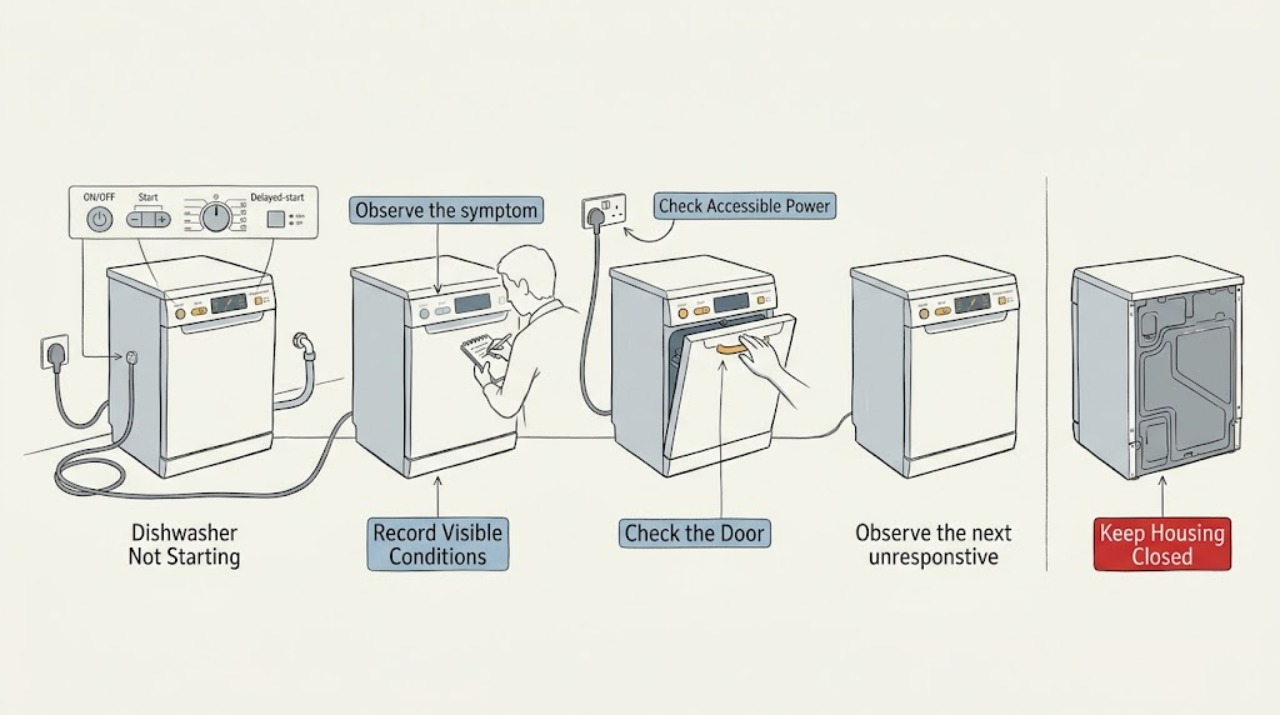
Work through in order
Diagnostic checks
Use only checks that match the exact appliance or system and its official guide.
-
Check 1
Before changing settings, record the exact Indesit model or product code, installation type, display or LED pattern, selected programme, and whether the panel or interior indicators have power. Use the matching manual or Indesit service page for that model family.
Expected result: The display is completely dark; the panel is lit; LEDs flash in a recognizable pattern; a countdown is visible; or the model identity is unavailable.
Next step: Follow the matching branch below. If the model cannot be identified, use only general safety checks and obtain the exact manual or qualified support before interpreting a code.
Stop if: Do not remove panels or pull out an integrated unit to find the model or read concealed wiring.
Why this matters
Why: The display state separates a supply problem from a control, delay, door, water, or error branch. Indesit LED meanings and button sequences are not safely interchangeable across integrated, slimline, and other models.
-
Check 2
For a dead panel, from a dry and safe position check that the accessible plug is fully seated and any socket switch is on. Do not open the plug, socket, fuse holder, dishwasher cabinet, or electrical enclosure.
Expected result: The socket switch was off; the plug was loose; another safe appliance also has no power; a household fuse or breaker has operated; or the dishwasher remains dead while the socket appears normal.
Next step: Restore only an accidentally switched-off socket. If the fuse or breaker operates again, leave the dishwasher disconnected and obtain qualified electrical or appliance service. Do not repeatedly reset protection.
Stop if: Do not touch a wet or damaged plug, socket, cord, or breaker area, and do not use an extension lead as a workaround.
Why this matters
Why: An off socket, loose plug, or household supply loss can explain a dark panel. A protection device that operates again or a dead appliance at a normal socket indicates an electrical or appliance fault rather than a programme-selection problem.
-
Check 3
With the programme stopped, inspect the accessible door edge and racks for a utensil, dish, or upper rack position preventing the latch from seating. Close the door normally and check whether the model's door indicator or start response changes.
Expected result: The door was obstructed; the latch now seats and the machine responds; the door will not close squarely; the door springs or latch appear damaged; or the panel still shows the same no-start condition.
Next step: Remove only the accessible loading obstruction and close the door once as the manual describes. If the latch, hinge, seal, or door is damaged or the machine remains blocked, keep it off and arrange service.
Stop if: Never tape, force, hold, or bypass the door latch or safety switch; do not dismantle the door.
Why this matters
Why: Indesit manuals identify an improperly shut door as a direct no-start cause. A door that cannot close or a damaged latch is a safety and service condition, not a reason to hold or bypass the latch.
-
Check 4
Use only the exact model's front-panel instructions to select a compatible programme, cancel Delayed Start if its indicator or countdown is active, and press Start or the documented programme-reset control. Do not repeatedly press buttons while the machine is in an error state.
Expected result: A delayed-start countdown was active; the delay indicator clears; the machine starts after Start; the panel accepts no commands; or the same code or flashing pattern returns.
Next step: Allow a documented delay to expire or cancel it according to the exact manual. If the reset does not restore control or a code returns, record it and arrange qualified service.
Stop if: Do not guess a reset combination, bypass a control lock, or open the control panel.
Why this matters
Why: A delay can make a functioning dishwasher appear not to start. A reset that restores control supports a programme state; an unresponsive panel or recurring code makes a control, communication, or safety fault more likely and cannot identify a replaceable board.
-
Check 5
If the programme begins but waits, beeps, or shows a water-related indication, inspect only the accessible water tap and visible inlet hose for a closed valve, kink, or crushing. Note whether water remains in the tub and whether the manual says the dishwasher must drain before filling.
Expected result: The tap is closed; the inlet hose is kinked; water remains in the tub; the machine makes an inlet or tap alarm; or the visible supply and drain conditions are normal.
Next step: Open an accessible tap only if there is no leak risk and straighten only a visible kink. Use the exact manual for safe filter or drain checks; use service for standing water, an anti-flood indication, or a concealed hose or pump problem.
Stop if: Do not disconnect a pressurized hose, move a wet integrated machine, reach into standing water, or remove the base or pump cover.
Why this matters
Why: A closed or restricted inlet can prevent a cycle from progressing, and Indesit service guidance notes that filling can depend on draining first. Standing water or an alarm can instead indicate a drain, anti-flood, pump, or control issue.
-
Check 6
If the dishwasher remains unable to start, record the exact model, display or LED sequence, door condition, delay state, water tap and hose observations, standing water, recent power interruption, and any leak or odor. Keep water and mains power isolated when the condition is unsafe.
Expected result: The issue returns after a safe setting or obstruction correction; the latch or door is damaged; a code persists; water leaks or remains in the base; or the household protection operates again.
Next step: Provide the recorded information to Indesit service or the qualified service route for the model and arrange an engineer visit. Do not resume use until a water or electrical hazard has been assessed.
Stop if: Do not open panels, perform live electrical checks, bypass the door safety system, or repeatedly reset a fault.
Why this matters
Why: Recurrence, damaged safety hardware, persistent codes, water at the base, or repeated supply protection makes an internal latch, valve, pump, anti-flood, control, or wiring fault more likely. The symptom alone does not prove a part.
Use your observations
Decision map
Find the observation that best matches what you see, then follow the next safe action.
-
PATH 01Safety boundary
What you see
The dishwasher has no display, indicator, or response when the normal controls are pressed.
Do this next
Check only the accessible plug and socket state. If the supply protection operates again or the dishwasher remains dead at a known-good socket, leave it disconnected and use qualified service.
Why this path and its safety boundary
Why it matters: This is a supply-first branch: plug, socket, household fuse or breaker, cord, or the dishwasher's power input is more likely than a door or delayed-start setting.
Safety stop: Do not repeatedly reset protection, open a socket or plug, or inspect energized wiring.
-
PATH 02Safety boundary
What you see
The panel is lit, but pressing Start does not begin a programme and the door may not close or latch normally.
Do this next
Clear only accessible loading, close the door normally, and use the exact manual's Start or reset sequence once. Arrange service if the latch or door is damaged or the panel remains blocked.
Why this path and its safety boundary
Why it matters: Door closure, a rack or dish obstruction, a released latch, or a model-specific control state is more likely than a whole-appliance power loss. A damaged latch or door requires service.
Safety stop: Do not hold the latch closed, force the door, or bypass its safety switch.
-
PATH 03Safety boundary
What you see
The display or delay indicator counts down, or the controls respond but the wash does not begin immediately.
Do this next
Cancel the delay or allow it to finish according to the exact manual, then close the door and start the programme. If the control state returns or cannot be changed, arrange service.
Why this path and its safety boundary
Why it matters: Delayed Start or a programme state can explain the waiting behavior. Indesit documentation shows that a delayed cycle begins after its countdown and that the delay can be cancelled through the model's control.
Safety stop: Do not invent a button combination, repeatedly power-cycle an error state, or open the control panel.
-
PATH 04Safety boundary
What you see
The programme appears to start but does not fill, beeps, shows a tap or water indication, or stops with water still absent.
Do this next
Check the visible tap and hose without moving the machine and use the exact model's water and drain guidance. Keep the dishwasher off and obtain service for standing water, a leak, an alarm that returns, or any concealed plumbing.
Why this path and its safety boundary
Why it matters: An accessible closed tap, kinked inlet hose, drain-first condition, insufficient supply, or water-inlet fault is more likely than a Start-button fault. A recurring alarm can involve a valve, sensor, anti-flood system, or control.
Safety stop: Do not disconnect a pressurized hose, move an integrated dishwasher while wet, or open the base to reach a valve or pump.
-
PATH 05Safety boundary
What you see
A code or flashing LED sequence persists, the machine cannot be controlled after the documented reset, water is under the appliance, the door is damaged, or the fuse or breaker operates again.
Do this next
Keep the appliance off, record the exact code or LED sequence and model, and arrange qualified Indesit service. If water is near electrical parts, isolate only from a dry safe position and obtain appropriate help.
Why this path and its safety boundary
Why it matters: The user-check boundary has been reached. Indesit error guidance maps some model-family patterns to anti-flood, fill-valve, drain, pump, heating, sensor, software, or board faults, but a code must not be transferred between models.
Safety stop: Do not open panels, bypass the door or anti-flood system, make live checks, or repeatedly reset the code.
Helpful context
Understand the symptom
First identify the no-start pattern
“Not starting” can mean no lights at all, a lit panel that ignores Start, a timer waiting under Delayed Start, a door condition, or a programme that starts and immediately waits for water. Note the display, indicator lights, beeps, selected programme, and whether the door closes. Indesit controls and LED fault patterns vary by model, so use the exact manual rather than transferring a button sequence from another dishwasher.
Power, door, delay, and water are different branches
A dead display sends the diagnosis toward the household supply. A lit display with no cycle often points to door closure, the selected control state, or a delayed start. A cycle that begins but does not fill can be a tap, hose, drain-first, or water-inlet condition. A code or persistent inability to control the machine is not a reason to open the base; it is information for the exact manual and service route.
Keep the inspection external and dry
Only inspect a plug, socket switch, door edge, rack loading, visible tap, and accessible hose from a safe position. Do not reach behind a wet machine, remove an integrated dishwasher, open its electrical enclosure, bypass the door latch, or make live measurements. If water is present at the base or near electrical parts, leave the appliance isolated and arrange qualified service.
Safety boundary
Stop conditions
- Stop using the dishwasher for a damaged door, latch, cord, plug, or socket; water near electrical parts; a leak under the appliance; smoke or burning odor; or repeated fuse or breaker operation.
- Do not bypass, tape, hold, or electrically defeat the door latch, anti-flood system, or any safety control.
- Do not disconnect a pressurized water hose, pull out or tilt a wet integrated dishwasher, remove panels, or reach into standing water.
- Do not perform live electrical checks or replace a valve, pump, control board, wiring, or lock based only on the no-start symptom.
- Use the exact Indesit manual for button sequences, delay cancellation, LED codes, water routing, and reset behavior; do not transfer an integrated or slimline sequence to another model.
- A persistent no-start after safe external checks, a recurring code, a water-inlet or drain alarm, or a damaged safety component requires qualified service.
When checks do not resolve it
Need a professional?
Safety scope: The user may identify the model, inspect an accessible plug and socket from a dry position, clear accessible loading, close the door normally, use documented front-panel settings, and inspect a visible tap or hose. Qualified service must handle the latch, electrical input, control, wiring, valve, pump, anti-flood system, and concealed plumbing.
Common questions
FAQ
Why is my Indesit dishwasher completely dead?
Check only the accessible plug and socket state from a dry position. If the socket is dead, a fuse or breaker operates again, or the dishwasher stays dead at a known-good supply, leave it disconnected and arrange qualified electrical or appliance service.
Why does my Indesit dishwasher have lights but not start?
Check that the selected programme is compatible, Delayed Start is not counting down, and the door closes and latches without a rack or dish obstruction. Use the exact manual's Start or reset sequence once; persistent failure needs service.
Can Delayed Start make an Indesit dishwasher look broken?
Yes. On the opened Indesit guide, Delayed Start shows a countdown and the wash begins after the selected delay. Cancel it or let it finish using the exact model's documented control; other models can differ.
Can a closed tap or kinked hose stop an Indesit dishwasher from starting?
Yes. Indesit service guidance says a dishwasher that will not fill should have the rear tap fully on and the pipes checked for kinks, and some models must drain before filling. Do not disconnect a pressurized hose or move a wet integrated unit.
When should I stop troubleshooting and call Indesit service?
Call for a damaged door or latch, persistent LED or digital code, standing water or a leak, an unresponsive control after the documented reset, repeated fuse or breaker operation, or any fault requiring a panel, valve, pump, control, or wiring access.
Read the exact guide
Official sources
- Indesit dishwasher quick guideIndesit · Opened the official manufacturer-hosted Indesit dishwasher guide; its 1-to-12-hour delay and button behavior are examples for that model family only.
- Indesit Dishwasher RepairsIndesit Service · Opened the official Indesit Service dishwasher-repair page; it provides broad external fill and drain checks and directs continuing faults to service.
- Indesit dishwasher instruction manualIndesit / Whirlpool · Opened the official manufacturer-hosted Indesit dishwasher manual; its exact reset wording and fault details are model-specific and are not applied to every Indesit dishwasher.
- Download Your Indesit Appliance ManualIndesit Service · Opened the official Indesit manual portal; it separates dishwasher, integrated dishwasher, and slimline dishwasher lookups, supporting exact-model manual selection.
- Indesit | Integrated Dishwasher Error CodesIndesit Service · Opened the official Indesit Service error-code page; LED patterns and code meanings apply only to compatible integrated dishwasher families and must not be transferred to an unidentified model.
Community feedback
Share a repair observation
Share a plain-text repair observation. Accepted observations are published automatically; this page may take a moment to update.