
On this page
Start here
Quick answer
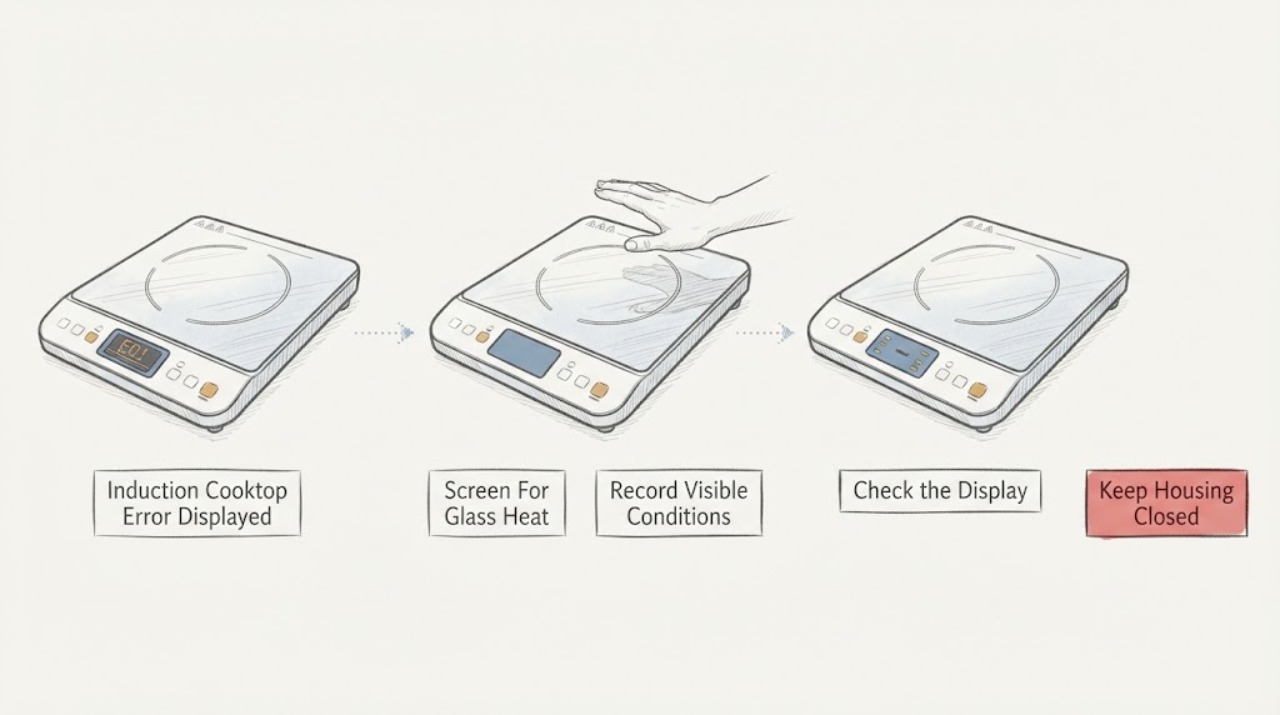
When an induction cooktop displays an error, photograph or write down the exact code, model, affected zone, and what was happening when it appeared. Do not guess a code's meaning from another brand or model. If the glass is cracked, the surface or controls are wet, there is smoke, a burning smell, arcing, a hot or damaged connection, or the cooktop trips power, switch it off from a safe dry position and keep it out of use. If the surface is intact and cool enough to approach, remove objects or liquid from the control area, use a dry induction-compatible pan centered on the correct zone, check the key lock or control state, and follow the model manual's one-time cool-down or power-reset procedure. A returning code, overheating, a blank display, or a fault that persists with the correct pan and clear controls needs qualified appliance or electrical service.
Before you begin
Safety first
- This article supports code documentation, safe cooling, clearing objects or moisture from controls, pan and positioning checks, normal lock steps, and one manual-approved reset only. Do not open the cooktop, work on live circuits, bypass safety systems, or continue cooking with a returning error.
Work through in order
Diagnostic checks
Use only checks that match the exact appliance or system and its official guide.
-
Check 1
Before interacting with the display, check from a safe dry position for cracked or shattered glass, smoke, burning smell, arcing, a hot or damaged cord or outlet, liquid entering controls, or a breaker that trips again.
Expected result: Classify the cooktop as having an immediate glass, heat, liquid, fire, or electrical hazard, or as having no such warning.
Next step: Keep the cooktop off and isolate power only from a safe dry position for any hazard; arrange qualified appliance or electrical service.
Stop if: Do not touch cracked glass or wet controls, wipe inside openings, reset a tripped breaker repeatedly, or continue cooking after smoke, arcing, or burning odor.
Why this matters
Why: A hazard makes this a stop-and-service event; a cool, intact, dry surface permits limited user checks.
-
Check 2
Photograph or write down the exact error characters, flashing pattern, model number, affected zone, cookware, setting, and timing before clearing the display.
Expected result: Record whether the code appears at power-up, when a pan is placed, after heating, after the surface becomes hot, when controls are touched, or after a power interruption.
Next step: Use the exact model manual or manufacturer error guide; do not apply a code meaning from another cooktop.
Stop if: Do not erase the only evidence by repeated resets or continue operating to collect more codes when the cooktop is hot or unsafe.
Why this matters
Why: The same-looking symptom can represent pan recognition, control input, temperature, power, or internal electronics depending on the model and timing.
-
Check 3
With the cooktop switched off and cool, remove utensils, pans, liquid, and residue from the touch-control area and clean the surface exactly as the manual permits.
Expected result: Record whether the display stops flashing, the beeping ends, the controls respond normally, or the same error remains with a clean, dry panel.
Next step: If the code clears, follow the manual and monitor; if it returns, keep the cooktop off and continue with the pan, heat, or service branch.
Stop if: Do not spray liquid into controls, use sharp tools, press a damaged key, or operate with moisture over the control area.
Why this matters
Why: Whirlpool notes that an object, liquid, soil, or permanently pressed key can affect the control panel; persistence with a clear panel points beyond a simple input obstruction.
-
Check 4
For a pan or zone-related error, use a dry, flat pan that the exact manual identifies as induction-compatible, center it on the selected zone, and keep the pan within the zone's supported size.
Expected result: Record whether the zone recognizes the pan, the error disappears, the power level flashes, or the same code appears with a known-compatible pan.
Next step: Use the correct pan only if the glass and controls are sound; arrange service if the zone still errors or the surface is damaged.
Stop if: Do not test with an empty pan, place metal objects on the surface, slide heavy cookware over damaged glass, or bypass pan detection.
Why this matters
Why: Whirlpool says a non-ferromagnetic, undersized, oversized, or off-center pan can prevent an induction zone from switching on; persistence with a correct pan indicates a cooktop or control issue.
-
Check 5
After the surface cools, verify the key lock or cooktop lock state, the selected zone and setting, and that the appliance's required ventilation openings are not blocked; do not remove trim or panels.
Expected result: Record a lock indicator, an incorrectly set control, an overheat or residual-heat indication, blocked ventilation, or a normal state with the code still present.
Next step: Use the exact manual's normal unlock or cool-down procedure once and keep the cooktop off if the error persists.
Stop if: Do not defeat the lock, cover vents, operate on a hot or damaged surface, or open the appliance to improve airflow.
Why this matters
Why: A lock can inhibit controls, while poor ventilation or excessive heat can cause protective shutdowns; a normal cool and ventilated state with a returning code needs diagnosis.
-
Check 6
If the glass is intact, the surface is cool and dry, and there is no electrical warning, perform only the exact manual's one-time power reset from a safe position; do not keep resetting the breaker.
Expected result: Record whether the display returns normally, the code clears, the same code returns immediately, or the breaker trips again.
Next step: Leave the cooktop off and arrange qualified service for a returning code, blank display, or repeated trip.
Stop if: Do not reset power with wet hands or wet surroundings, open the electrical supply, or repeat the reset as a substitute for diagnosis.
Why this matters
Why: A cleared code may have been transient; a returning code or trip indicates an unresolved control, temperature, power, or internal fault.
-
Check 7
If the error returns after the safe panel, pan, cooling, ventilation, and one-time reset checks, leave the induction cooktop off and arrange qualified appliance or electrical service.
Expected result: Give the technician the exact model, code, zone, pan, timing, temperature, ventilation, power, glass, and breaker observations.
Next step: Keep the cooktop out of service until the technician diagnoses the fault and confirms safe operation.
Stop if: Do not remove the glass, probe live circuits, bypass a thermal sensor, jumper a lock, or replace an internal module by code alone.
Why this matters
Why: A persistent code can involve a temperature sensor, induction coil, inverter or power module, control, wiring, cooling fan, or installation condition that needs model-specific testing.
Use your observations
Decision map
Find the observation that best matches what you see, then follow the next safe action.
-
PATH 01Safety boundary
What you see
The glass is cracked, liquid has entered controls, there is smoke, burning smell, arcing, visible damage, or an electrical connection is hot or damaged.
Do this next
Keep people away, isolate power only from a safe dry position, and arrange qualified appliance or electrical service; follow emergency procedures for active smoke or fire.
Why this path and its safety boundary
Why it matters: The cooktop has a glass, liquid, fire, or electrical hazard and should not be tested.
Safety stop: Do not touch damaged glass, wipe inside openings, reset power repeatedly, or continue cooking.
-
PATH 02Safety boundary
What you see
The error appears only with one pan or the power level flashes until a pan is detected.
Do this next
With a cool, intact surface, try one dry, flat, induction-compatible pan centered on the matching zone; arrange service if the correct pan still errors.
Why this path and its safety boundary
Why it matters: The pan may be non-magnetic, too small, off-center, too large, or otherwise outside the model's cookware requirements.
Safety stop: Do not use an empty pan, metal object, damaged glass, or a pan that the manual excludes.
-
PATH 03Safety boundary
What you see
The display flashes or beeps when liquid, an object, or a pressed key is on the control area, or a key-lock indicator is present.
Do this next
Switch controls off, remove the object or moisture when cool, and use the manual's normal unlock procedure once; service a damaged or persistent control.
Why this path and its safety boundary
Why it matters: The control input may be obstructed or intentionally locked.
Safety stop: Do not spray the panel, force keys, defeat the lock, or operate with moisture present.
-
PATH 04Safety boundary
What you see
The code appears after intense cooking, with an empty pan, or when the cooktop or its controls are too hot.
Do this next
Turn the zone off, remove the pan only when safe, allow the cooktop to cool, and follow the exact model's one-time reset guidance; service a returning code.
Why this path and its safety boundary
Why it matters: The cooktop may be protecting its electronics from excessive temperature or detecting a heat-related condition.
Safety stop: Do not pour water on hot glass, cover vents, restart while hot, or continue cooking after an overheat code returns.
-
PATH 05Safety boundary
What you see
The code returns with a cool, dry surface, correct pan, clear controls, and normal ventilation, or the breaker trips again.
Do this next
Leave the cooktop off and arrange qualified appliance or electrical service with the exact code and context.
Why this path and its safety boundary
Why it matters: A power supply, temperature sensor, induction coil, module, cooling, control, or wiring fault remains possible.
Safety stop: Do not open the cooktop, probe live parts, bypass a sensor or lock, or repeatedly reset the breaker.
Helpful context
Understand the symptom
An error code is evidence, not a universal diagnosis
Induction cooktops share broad symptoms but not one universal code table. Record the exact characters, punctuation, flashing pattern, model, zone, cookware, and timing. A code that appears only with one pan can point to pan recognition or positioning; a code that returns with no pan or after cooling may point to temperature sensing, power, controls, or internal electronics. Use the exact owner's manual before attempting a reset.
Clear, cool, and dry the user-accessible conditions
Water, utensils, or residue on the touch controls can produce a flashing display or continuous alert. With power off and the glass cool, remove objects and wipe the control surface with the method allowed by the manual. For a pan-related indication, use a dry, flat, induction-compatible pan centered on the matching zone. Do not test with cracked glass, an empty pan, or a pan that overhangs the zone in a way the manual disallows.
Stop when the code or heat warning returns
A single manual-approved reset may clear a transient control state, but it is not a repair. If the error returns, the cooktop overheats, a breaker trips, or a zone remains dead with a correct pan, leave it off. Do not open the glass top, probe the induction electronics, bypass a thermal sensor, or replace a control module without qualified diagnosis.
Safety boundary
Stop conditions
- Stop for cracked glass, liquid entering controls, smoke, burning smell, arcing, a hot or damaged connection, or a breaker that trips again.
- Do not touch hot or damaged glass, pour water on a hot surface, operate with wet controls, or cover required ventilation openings.
- Do not bypass key lock, pan detection, or thermal protection; do not open the cooktop or probe live induction electronics.
- Do not repeatedly reset the breaker or apply another brand or model's error-code meaning; preserve the exact code and model.
- Keep the cooktop out of service for a returning code, overheating, a blank display, or a zone that remains dead with the correct pan.
Only after diagnosis
Potential parts
- induction cooktop control or key-lock component
Consider this category only when a qualified diagnosis finds a persistent control-input or lock fault after the panel is clean, dry, and correctly operated.
Confirm the exact model and technician diagnosis; do not bypass the lock or substitute a control. - induction cooktop temperature sensor or cooling component
Consider this category only when an overheat or temperature code returns after cooling and a qualified technician identifies the sensor or cooling fault.
Confirm the exact model and professional diagnosis; do not defeat thermal protection or open the cooktop as a test. - induction coil or power module
Consider this category only when a correct pan and sound controls are confirmed but a zone remains dead and a qualified diagnosis identifies an internal power or coil fault.
Confirm the exact model, voltage, and technician diagnosis; internal induction electronics require qualified service. - induction cooktop glass or control-panel component
Consider this category only when the glass or control panel is documented as damaged and a qualified professional confirms the safe repair path.
Confirm the exact model and safe handling requirements; do not operate cracked glass or wet controls.
When checks do not resolve it
Need a professional?
Arrange emergency or qualified electrical help for smoke, burning smell, arcing, cracked glass with electrical damage, a hot or damaged connection, or repeated breaker trips. After the cooktop is safe, arrange qualified appliance service for a returning error, overheat code, persistent blank display, pan-recognition failure with a correct pan, a dead zone, control-lock failure, or any suspected sensor, coil, inverter, power-module, cooling, or wiring fault.
Safety scope: This article supports code documentation, safe cooling, clearing objects or moisture from controls, pan and positioning checks, normal lock steps, and one manual-approved reset only. Do not open the cooktop, work on live circuits, bypass safety systems, or continue cooking with a returning error.
Common questions
FAQ
What should I do first when an induction cooktop displays an error?
Record the exact code, model, zone, pan, and timing, then screen for cracked glass, wet controls, smoke, burning smell, arcing, hot connections, and repeated breaker trips. If the surface is cool, intact, and dry, use the exact manual for the next check.
Can the pan cause an induction error?
Yes. A non-magnetic, undersized, oversized, off-center, or otherwise unsuitable pan can prevent a zone from recognizing cookware. Use one dry, flat, compatible pan centered on the correct zone, and arrange service if the error persists.
What if the induction cooktop says it is too hot?
Turn the zone off and let the surface and controls cool. Do not pour water on the glass or restart while it is hot. Follow the exact model's cool-down and one-time reset procedure; a returning overheat code needs service.
Should I keep resetting the cooktop after an error?
No. A single model-approved reset can clear a transient state, but a returning code, repeated breaker trip, blank display, or dead zone needs qualified appliance or electrical diagnosis. Do not open the cooktop or bypass its safety systems.
Read the exact guide
Official sources
- Indicator or Display Flashing - Electric and Induction CooktopWhirlpool · Official Whirlpool guidance for electric and induction cooktop display conditions; exact model instructions control.
- Appliance and Electrical Fire SafetyU.S. Fire Administration · U.S. government household appliance and electrical fire-prevention guidance applicable to induction cooktops.
- Not Operating Correctly - Induction CooktopWhirlpool · Official Whirlpool induction-cooktop operating guidance used for generic, model-manual-dependent checks.
- E2 - Induction CooktopWhirlpool · Official Whirlpool E2 example used to explain a model-specific overheat code; other brands and codes can differ.
- Error Code or Indicator LightWhirlpool · Official Whirlpool product-help category for induction cooktops; it demonstrates why exact model and code matter for an unbranded topic.
Community feedback
Share a repair observation
Share a plain-text repair observation. Accepted observations are published automatically; this page may take a moment to update.