
On this page
Start here
Quick answer
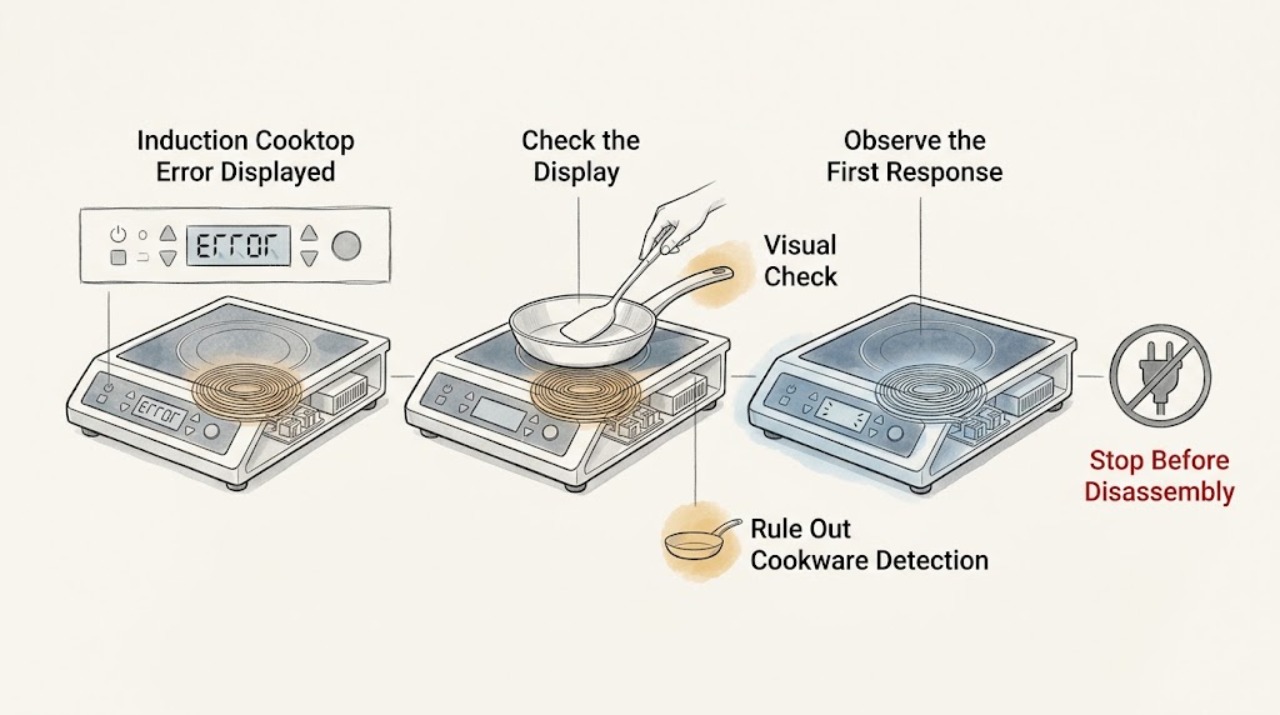
Record the complete Thermador display exactly as shown, including capitalization, digits, dE, F0, F1, F2, F4, F5, F6, F8 + H/h, F9, E7010, E7015, E8207, E8208, E9000, E9010, or U400 when applicable; do not substitute a similar-looking code. Thermador says an F plus a number indicates a detected fault and directs the owner to the exact model manual. Its published induction-cooktop error list separates demo mode (dE), cookware or control-panel overheating (F5), zone or electronics overheating (F1, F2, F4, F6 and listed related codes), voltage faults (E9000, E9010, U400), network or hood communication (E7010), and other model-specific codes. If the glass is cracked, the unit smokes, arcs, trips a breaker, or behaves dangerously, stop using it. For a persistent or unlisted code, leave the cooktop off and arrange qualified service.
Work through in order
Diagnostic checks
Use only checks that match the exact appliance or system and its official guide.
-
Check 1
Turn the cooktop controls off if they respond and photograph the entire display from a safe position. Record the exact code or symbol, the affected zone, whether a power level flashes, whether a tone sounds, and the model number from the rating label; do not remove the unit or open a panel.
Expected result: The display is an F with a number, dE, E7010, E9000, E9010, F0, F1, F2, F4, F5, F6, F8 + H/h, F9, E7015, E8207, E8208, U400, a lock symbol, or an unlisted combination; note whether all zones or one zone stopped.
Next step: Match the exact display and model to the Thermador owner manual and error-code page before trying a reset. If the code is unlisted, keeps returning, or is accompanied by smoke, arcing, a cracked surface, or a breaker trip, stop using the cooktop and arrange qualified service.
Stop if: Do not guess a code, bridge a control, remove the glass, or test energized wiring.
Why this matters
Why: The full display selects the diagnostic branch. Thermador says an F and a number indicates a fault, while the published list gives different meanings to dE, voltage codes, overheat codes, and other symbols. A model number is required to resolve variations that are not on the general page.
-
Check 2
After the cooktop is cool, remove pans and wipe visible moisture or food residue from the glass and control area with a soft cloth using the model’s care instructions. Look without scraping for a lock symbol, an unresponsive control area, a crack, a fracture, or damage; do not use cleaner on a hot surface.
Expected result: The display responds after the surface is dry, a lock symbol remains, the controls remain unresponsive, or the glass is cracked or fractured.
Next step: If the surface is intact and the display responds, follow the manual’s control-unlock or reset instructions once. If the lock remains, controls stay unresponsive, or the glass is damaged, leave the cooktop out of service and arrange qualified service; do not bypass the lock or repair the glass.
Stop if: Stop immediately for cracked or fractured glass, smoke, arcing, burning odor, liquid entering controls, or a breaker that trips again.
Why this matters
Why: Moisture or residue can interfere with touch input, while a lock symbol requires the exact model’s control procedure. A crack or fracture is a stop-use condition: Thermador says a fractured or cracked cooktop is no longer usable and the fuse should be switched off to prevent shock.
-
Check 3
With no code indicating an electrical hazard and the surface cool, remove the pan and inspect its base for flatness and damage. For a later brief test only if the manual permits, use a dry pan that attracts a magnet on its base, center it on the intended zone, and use the correct zone control; never activate a zone with an empty pan.
Expected result: The display clears with no pan, returns only with one pan, shows a flashing heat setting, or fails with a flat magnetic pan centered on the correct zone.
Next step: Use cookware that the manual identifies as suitable and reposition it once. If the same code or flashing setting returns with suitable cookware, stop repeated testing and use the manual or service branch.
Stop if: Do not heat an empty pan, use a damaged or unstable pan, place hot cookware over the control panel, or dismantle the cooktop to inspect a sensor.
Why this matters
Why: Thermador identifies unsuitable or undersized cookware, a deformed base, and selecting the wrong element as causes of detection or flashing heat behavior. A failure with suitable cookware shifts attention toward the control, sensor, power, or a model-specific fault.
-
Check 4
For F1 or F6, F2, F4, E7015, E8207, E8208, or F5, turn the affected zone off, remove hot cookware from the control-panel area, and let the electronics cool completely without covering vents or touching the hot glass.
Expected result: The code clears after cooling, returns when cookware is near the controls, affects one zone, affects all zones, or returns with no hot cookware and clear airflow.
Next step: After the code clears, use only the manual’s restart procedure and observe whether it stays cleared. If it returns, all zones shut down, the fan or control behaves abnormally, or the cooktop remains hot with controls off, stop using it and request service.
Stop if: Do not remove panels, bypass a thermal protector, block cooling airflow, or continue cooking through a repeated overheat code.
Why this matters
Why: Thermador describes F1/F6 as an overheated cooking zone, F2/F4 and listed related codes as electronics overheating, and F5 as hot cookware near the control panel. A returning code without the stated trigger is not a normal heat indication and needs model-specific service.
-
Check 5
If the exact display is dE and the cooking zones do not heat, compare the model’s owner manual with Thermador’s demo-mode guidance before changing any setting. Do not assume dE is a component failure or repeatedly cycle power.
Expected result: The manual confirms demo mode and the cooktop otherwise responds normally, or dE remains, differs from the published pattern, or appears with another fault.
Next step: Use the exact manual’s demo-mode procedure once. If dE returns, zones still do not heat, or another code appears, leave the cooktop off and arrange qualified service rather than changing wiring or controls.
Stop if: Do not access live terminals, defeat a lock, or change installation connections to clear dE.
Why this matters
Why: Thermador identifies dE with non-heating zones as demo mode. Its published recovery uses a power disconnect and a control touch within a specified short window, but model instructions should be confirmed before applying it.
-
Check 6
For E9000, E9010, or U400, stop changing cooktop settings and record whether other appliances or the home supply also show a power problem. For E7010, record whether the cooktop otherwise operates and whether the code returns after one normal off/on cycle; do not open the electrical connection.
Expected result: E9000, E9010, or U400 is shown; E7010 is shown once and clears; E7010 returns; the home has a broader outage; or the breaker trips.
Next step: For a supply-voltage code, contact the electrical utility or a qualified electrician/authorized servicer. For a returning E7010, provide the exact code and model to Thermador service. If a breaker trips, leave the cooktop off and have the circuit assessed.
Stop if: Do not reset a repeatedly tripping breaker, change the cooktop connection, measure live voltage, or remove the junction-box cover.
Why this matters
Why: Thermador identifies E9000/E9010 and U400 as supply-voltage faults, and E7010 as a network or hood-connection fault. A broader supply issue or a tripping breaker is outside an ordinary user reset; a returning communication code needs the manual or service path.
-
Check 7
After one safe, model-documented recovery attempt, compare the result with the original photograph. Keep the cooktop out of service if the code returns, the code is not listed, multiple zones fail, or the symptom is paired with heat, noise, smoke, arcing, glass damage, or a breaker trip.
Expected result: The display clears and the cooktop remains normal, or the exact code or abnormal behavior returns.
Next step: Arrange Thermador or qualified appliance service and provide the model, complete display, affected zone, sequence of events, and any photos. Do not order a board, sensor, control, or other part until the model-specific diagnosis confirms it.
Stop if: Do not continue operating through persistent faults or attempt board-level, glass, wiring, or safety-device repair as an ordinary user.
Why this matters
Why: A one-off display may clear after the documented cause is removed, but recurrence establishes an unresolved fault. Thermador directs owners to provide the exact code for assistance when a message returns or is not listed.
Use your observations
Decision map
Find the observation that best matches what you see, then follow the next safe action.
-
PATH 01Next step
What you see
The glass is cracked or fractured, the cooktop smokes or arcs, a burning odor is present, a liquid reaches controls, or the breaker trips.
Do this next
Stop using the cooktop. Keep clear of damaged or wet electrical areas and arrange qualified electrical/appliance evaluation before re-energizing. Do not bypass the breaker or repair the glass.
-
PATH 02Next step
What you see
The display clears with the pan removed or a suitable pan centered, or a lock symbol or unresponsive control appears only while the surface is wet or dirty.
Do this next
Let the surface cool, clean and dry it according to the manual, use the correct cookware, and follow the exact model control procedure once. Escalate if the symptom returns.
-
PATH 03Next step
What you see
F1/F6, F2, F4, E7015, E8207, E8208, or F5 appears with hot cookware or after extended heating.
Do this next
Remove hot cookware from the control area, allow complete cooling, and use only the manual’s recovery procedure. A returning code without the documented trigger requires service.
-
PATH 04Next step
What you see
dE appears and the cooking zones do not heat while the controls otherwise respond.
Do this next
Confirm the exact model’s demo-mode procedure and perform it once. If dE returns or another fault appears, stop and request service.
-
PATH 05Next step
What you see
E9000, E9010, or U400 appears, or E7010 returns after a normal restart.
Do this next
Stop user troubleshooting. Use a qualified electrician, utility, or Thermador authorized servicer as appropriate, and give them the exact code and model.
-
PATH 06Next step
What you see
The display is unlisted, incomplete, combined with another symbol, returns after one documented recovery, or affects multiple zones without a clear cookware or heat cause.
Do this next
Leave the cooktop off and arrange model-specific professional service; do not guess a part or open the appliance.
Helpful context
Understand the symptom
Start with the whole display, not a guessed meaning
A single character can change the decision. Photograph the display and write down every letter, digit, plus sign, slash, heat symbol, power level, and beep pattern. Thermador’s troubleshooting page treats an F and a number as a detected fault, while the error-code page gives separate meanings to codes that can look similar. The exact model manual remains the authority when a code is absent, combined with another symbol, or shown by a particular zone.
Some messages are caused by cookware or heat, not a failed board
Thermador documents cookware detection, unsuitable or undersized pans, hot cookware near the control panel, and overheated electronics as distinct paths. Let the unit cool and remove cookware from the control area before interpreting a heat-related code. Do not test by placing an empty pan on an active zone, and do not continue if the glass is cracked or the cooktop has smoke, arcing, or a breaker trip.
Safety boundary
Stop conditions
- cracked or fractured glass
- smoke, arcing, or burning odor
- liquid reaching controls or wiring
- repeated breaker trip
- unlisted or returning error code
- need to open panels or test live electrical parts
When checks do not resolve it
Need a professional?
Call qualified service for an unlisted or returning code, supply-voltage code, repeated overheat, unresponsive controls, multiple-zone failure, or any need to open the cooktop. Stop immediately for cracked glass, smoke, arcing, liquid in the controls, burning odor, or a breaker that trips again.
Common questions
FAQ
What does an F and a number mean on a Thermador induction cooktop?
Thermador says an F and a number indicates that the appliance detected a fault. Photograph the entire display and match the exact code and model to the owner manual; do not infer a meaning from the first character alone.
Can I reset a Thermador cooktop when an error appears?
Only use a reset explicitly documented for the exact model and code. Thermador lists limited recovery steps for some demo-mode, communication, and overheating conditions, but a returning or unlisted code needs service. Never reset a repeatedly tripping breaker or bypass a safety device.
Why does an error appear only with one pan?
Thermador identifies unsuitable or undersized cookware, a deformed base, wrong zone selection, and hot cookware near the control panel as possible cookware-related paths. Let the surface cool, use a dry suitable pan as the manual allows, and stop if the code returns with suitable cookware.
Read the exact guide
Official sources
- Induction Cooktops – Parts, Accessories & CleanersThermador · Thermador induction cooktops when a cookware-detection or flashing-heat symptom is isolated to a pan
- Error Codes | Induction Cooktops Support | ThermadorThermador · Thermador induction cooktops; exact model manual controls where a model-specific variation exists
- Search for Owner ManualsThermador · Use for the exact induction-cooktop model when a display, lock symbol, reset, or control behavior is not resolved by the general page
- Cleaning & Care | Induction Cooktops Support | ThermadorThermador · Thermador glass induction cooktops when cleaning a cool surface or assessing crack/fracture stop conditions
- Troubleshooting | Induction Cooktops Support | ThermadorThermador · Thermador induction cooktops when interpreting F-number displays, cookware behavior, controls, and service escalation
Community feedback
Share a repair observation
Share a plain-text repair observation. Accepted observations are published automatically; this page may take a moment to update.