
On this page
Start here
Quick answer
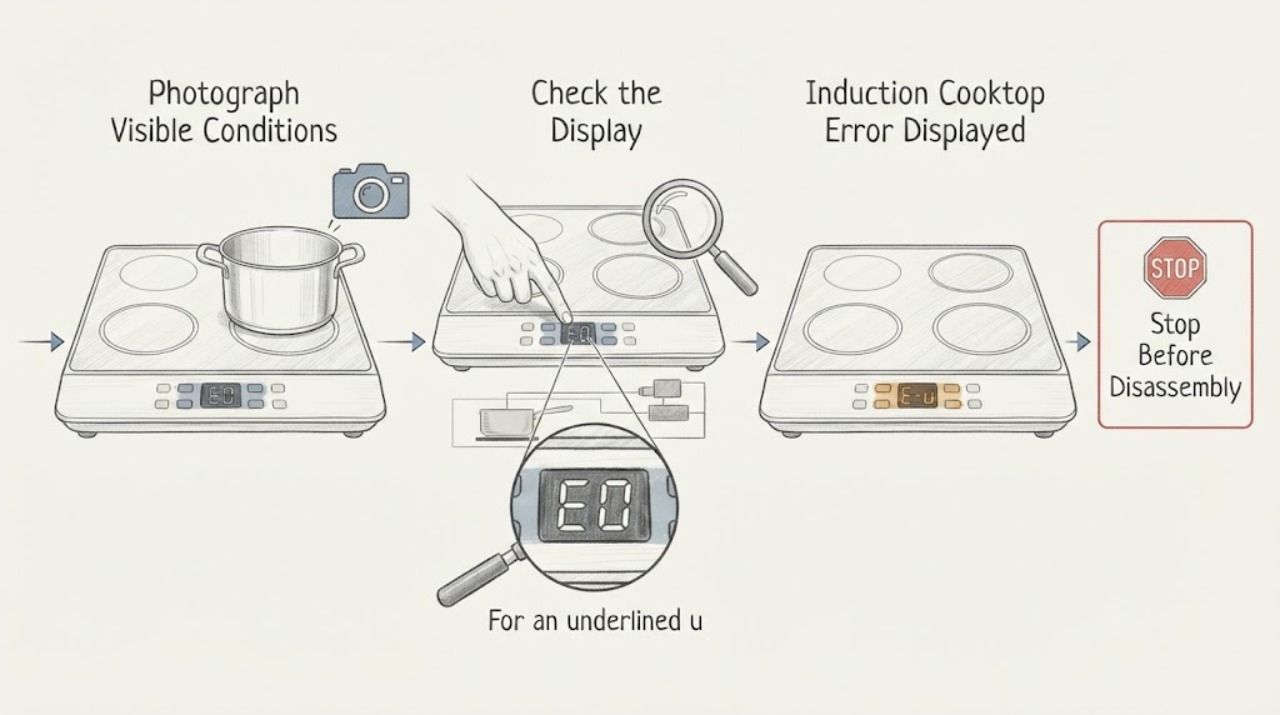
Record the exact code or symbol before touching the controls, because Samsung induction cooktop messages can represent a stuck button, a pan-detection condition, a sensor or communication fault, or a model-specific problem. Turn the cooktop off, keep the surface clear and dry, and use only the model manual's meaning for the displayed code. A d0-style stuck-button message calls for clearing moisture or anything pressing the panel; an underlined u points to pan size, material, or placement; sensor or communication codes may clear after a normal Power restart and, if the manual allows it, one user-accessible breaker reset. Stop for smoke, burning smell, sparks, cracked glass, liquid entering controls, uncontrolled heat, or a damaged power connection. If the same code returns or the panel remains unusable, stop using the cooktop and arrange qualified appliance or electrical service; do not open the glass or test live wiring.
Work through in order
Diagnostic checks
Use only checks that match the exact appliance or system and its official guide.
-
Check 1
Turn the cooktop off if the controls respond, keep hands and cookware away from the surface until it is safe, and photograph or write down the exact error, symbol, affected zone, and whether the message appears with or without cookware. From outside the appliance, check for smoke, burning smell, sparks, cracked glass, liquid on or inside the control area, uncontrolled heating, or a damaged power connection.
Expected result: The message is a pan symbol or underlined character; it appears to identify a button, sensor, or communication condition; it is not listed in the manual; or a fire, heat, glass, liquid, or electrical hazard is present.
Next step: If a hazard is present, stop using the cooktop, isolate power only when safe, and arrange emergency or qualified service as appropriate. If safe, open the exact model manual and continue with the code-specific branch; do not repeatedly clear an unknown message.
Why this matters
Why: The exact display and trigger state determine whether this is a cookware or panel condition, a resettable information code, or a service fault. Any hazard overrides troubleshooting, and a code not documented for the model should not be interpreted from a different unit.
-
Check 2
For a d0-style stuck-button message or a touch panel that will not respond normally, remove cookware and anything resting on the controls. With the cooktop off and cool enough to clean, wipe away visible water, grease, and debris using the model-approved method, then leave the panel completely dry. Use bare, dry skin for a normal touch input if the model uses capacitive controls.
Expected result: The message clears and the panel responds after the obstruction or moisture is removed, or the message and unresponsive behavior return on a clean, dry, clear panel.
Next step: If the panel recovers, test one zone with a suitable pan while watching for a new message. If the panel remains unresponsive or the code returns, stop and arrange service; do not remove the control glass or bypass the lock or sensor.
Why this matters
Why: Samsung describes a stuck-button message as continuous contact, which can be caused by moisture or something touching the panel. A recurrence on a clean, dry panel points toward a touch-control or electronics fault rather than a surface-cleaning issue.
-
Check 3
For an underlined u or other pan-detection message, remove the pan, verify that its base is magnetic and suitable for induction, choose a size that matches the zone according to the manual, and center it flat on the marked cooking area. Use water in the pan for a cautious functional check; do not test with an empty pan or touch the glass to judge heat.
Expected result: The message clears and the pan heats, the message remains with a known-compatible centered pan, or the message appears only with a particular pan or zone.
Next step: Correct the cookware or placement if that clears the message. If a known-compatible pan still is not detected or one zone repeatedly reports the error while others work, stop using that zone and request qualified service.
Why this matters
Why: Samsung says an induction pan-detection error can result from cookware material, size, or placement, and an empty pan can cause an induction burner to shut off. A persistent message with suitable cookware makes a local zone, sensor, or control fault more likely.
-
Check 4
For a sensor, communication, or other listed code, turn the cooktop off using its Power control and restart it once. If the exact Samsung guidance permits a breaker or plug reset, use only the user-accessible disconnect and the manual's sequence; do not open a junction box, remove panels, or work on the circuit.
Expected result: The code clears and the cooktop returns to normal, the same code returns immediately, or the display changes to a different code after the restart.
Next step: If the code clears, monitor one zone and record whether it returns. If it returns, another code appears, the panel stays dark, or the cooktop behaves unpredictably, stop using it and arrange qualified appliance or electrical service.
Why this matters
Why: Samsung documents a Power restart and, for certain cooktop codes, a user-accessible power cycle as a first response. A recurring or changing electronics code after that check is not a reason to keep cycling power; it needs model-specific diagnosis.
-
Check 5
Compare the displayed code with the exact model's user manual and support page, then document whether all zones or only one zone are affected, whether the panel responds, whether suitable cookware is detected, and whether the code returns after one documented restart. Do not substitute an error table from another Samsung model or region.
Expected result: The code is model-documented and cleared, the code is undocumented or persists, only one zone is affected, or all zones and controls remain unusable.
Next step: Stop using the affected zone or the entire cooktop as appropriate and request qualified service. Provide the exact code, photos, model identity, affected zones, cookware result, restart result, and any safety symptoms; do not perform internal electrical diagnosis.
Why this matters
Why: A resolved, documented message can be monitored, while an undocumented or persistent message requires service even if the cooktop still appears partly usable. A local zone fault and an all-control fault help the technician separate a zone assembly from the shared control or power path.
Use your observations
Decision map
Find the observation that best matches what you see, then follow the next safe action.
-
PATH 01Next step
What you see
A d0-style stuck-button message clears after all items are removed and the touch panel is cleaned and dried.
Do this next
Use the cooktop normally while keeping the controls clear and dry. If the message returns on a clear, dry panel, stop and request service.
-
PATH 02Next step
What you see
An underlined u or pan-detection message clears with a correctly sized, magnetic, centered pan containing water.
Do this next
The original message was likely cookware detection or placement. Continue using compatible cookware; if the same pan is rejected again or one zone remains cold, stop using that zone and arrange service.
-
PATH 03Next step
What you see
A sensor, communication, or other documented code clears after one Power restart or model-approved user-accessible power cycle.
Do this next
Monitor the cooktop and record the result. If the code returns, the panel remains dark, or operation is erratic, stop using the appliance and request qualified service.
-
PATH 04Next step
What you see
The same code returns after the documented restart, the code is not listed for the exact model, or only one induction zone repeatedly reports an error with suitable cookware.
Do this next
Stop using the affected zone or cooktop and arrange qualified Samsung appliance or electrical service. Do not open the cooktop or replace an internal part from the display alone.
-
PATH 05Next step
What you see
Smoke, burning smell, sparks, cracked glass, liquid in the controls, uncontrolled heating, or a damaged power connection is present.
Do this next
Stop immediately, keep clear of the cooktop, isolate power only when safe, and contact emergency or qualified appliance/electrical service. Do not touch the glass or operate a damaged control.
Helpful context
Understand the symptom
Write down the exact display first
A symbol that looks like a letter, a digit, or an underlined character can select a different branch. Samsung notes that available messages and settings vary by model and region, so photograph the panel and record whether the code appears when the cooktop is idle, when a pan is placed, or after a zone is selected. Do not guess a code from its appearance or use another model's reset sequence.
Not every induction message means a failed part
An underlined u can be a pan-detection message rather than an electronics failure: the cookware may be unsuitable, too small for the zone, or poorly positioned. A d0-style message can result from moisture or something continuously touching the panel. Correcting that external condition is different from repairing a recurring sensor or communication error.
Treat the glass and electronics as live hazards
Turn the cooktop off and stop for smoke, burning smell, sparks, cracked glass, liquid inside the control area, uncontrolled heat, or a damaged connection. Do not remove the glass, reach into the appliance, probe terminals, bypass a sensor, or keep resetting a code that returns. A qualified appliance or electrical professional should handle an internal fault.
Safety boundary
Stop conditions
- Smoke, burning smell, sparks, uncontrolled heating, or a damaged power connection
- Cracked or shattered glass, liquid entering the control area, or an unexpectedly hot or damaged surface
- A recurring or undocumented error after the exact model's safe user checks
- The need to remove the glass, open an electrical enclosure, probe live wiring, bypass a sensor, or defeat a safety control
Only after diagnosis
Potential parts
- touch control panel or user-interface assembly
Consider this category only when qualified service confirms a touch or stuck-input fault after the panel is clear, dry, and the model-directed restart has failed.
Control panels are model-specific and may be mains-connected. Do not remove the glass or substitute a panel from the display symptom alone. - temperature or cookware-detection sensor
Consider this category only when qualified service confirms a sensor or detection fault after suitable cookware and placement have been verified.
Sensors and their wiring are model-specific and internal. Confirm the exact model and have qualified service perform diagnosis. - induction power or inverter module
Consider this category only when qualified service confirms a recurring communication or power fault affecting a zone or multiple zones.
Power modules contain hazardous electrical circuits. Do not open the appliance, test live wiring, or order a module from an error code alone.
When checks do not resolve it
Need a professional?
Arrange qualified Samsung appliance or electrical service when an error returns after the model-directed restart, the code is not documented for the exact model, a suitable pan is repeatedly rejected, one zone remains affected, the panel stays dark or unresponsive, or any glass, heat, smoke, liquid, spark, or power-connection hazard occurs.
Have this ready
- Provide the full model identity, exact displayed code or symbol, photos, whether the code appears with or without cookware, affected zone count, panel response, cookware compatibility result, Power or breaker-reset result, and any smoke, heat, glass, liquid, spark, or power observations. Do not open the cooktop or perform live tests.
Common questions
FAQ
What should I do when my Samsung induction cooktop displays an error?
Record the exact code, remove anything touching the controls, and check the model manual. Use the code-specific branch: clear and dry the panel for a stuck-button message, verify suitable centered cookware for a pan-detection message, or use one documented Power or user-accessible power restart for a sensor or communication code.
What does an underlined u mean on a Samsung induction cooktop?
Samsung uses the underlined u to indicate a pan-detection condition. Check that the pan is magnetic, suitable in size for the selected zone, flat, and centered; test with water rather than an empty pan. If a known-compatible pan is still rejected, request service.
Can I reset a Samsung induction cooktop error code?
For many information codes, Samsung recommends turning the cooktop off and back on. If the exact model guidance permits it, one user-accessible breaker or plug reset may follow. If the code returns, stop repeated resets and arrange qualified service.
When should I stop troubleshooting a Samsung induction cooktop error?
Stop for smoke, burning smell, sparks, cracked glass, liquid in the controls, uncontrolled heat, a damaged power connection, or an error that returns after the exact model's safe restart. Do not open the cooktop, test live wiring, or bypass a sensor; arrange qualified appliance or electrical service.
Read the exact guide
Official sources
- Samsung range or wall oven error codesSamsung USA Support · Samsung range and induction-range information codes; pan detection, communication errors, power reset, and service escalation
- Samsung electric and induction cooktop temperature issuesSamsung USA Support · Samsung electric and induction cooktops; heat behavior, temperature protection, hot-surface indicator, and service boundary
- Electric cooktop panel isn't responsiveSamsung USA Support · Samsung electric and induction cooktop capacitive panels; Child Lock, bare dry skin, clean/dry panel, and service guidance
- One burner on the Samsung cooktop does not workSamsung USA Support · Samsung electric and induction cooktops; suitable cookware, pan placement, water-heating check, and service boundary
- Samsung Cooktop FAQs | Samsung USASamsung USA · Samsung cooktops; power, control lock, clean and dry controls, reset, overheating, and support guidance
- Meaning of the error codes displayed on your Samsung cooktopSamsung Canada Support · Samsung cooktops sold in Canada; stuck-button, sensor, communication, pan-detection, restart, and service guidance
Community feedback
Share a repair observation
Share a plain-text repair observation. Accepted observations are published automatically; this page may take a moment to update.