
On this page
Start here
Quick answer
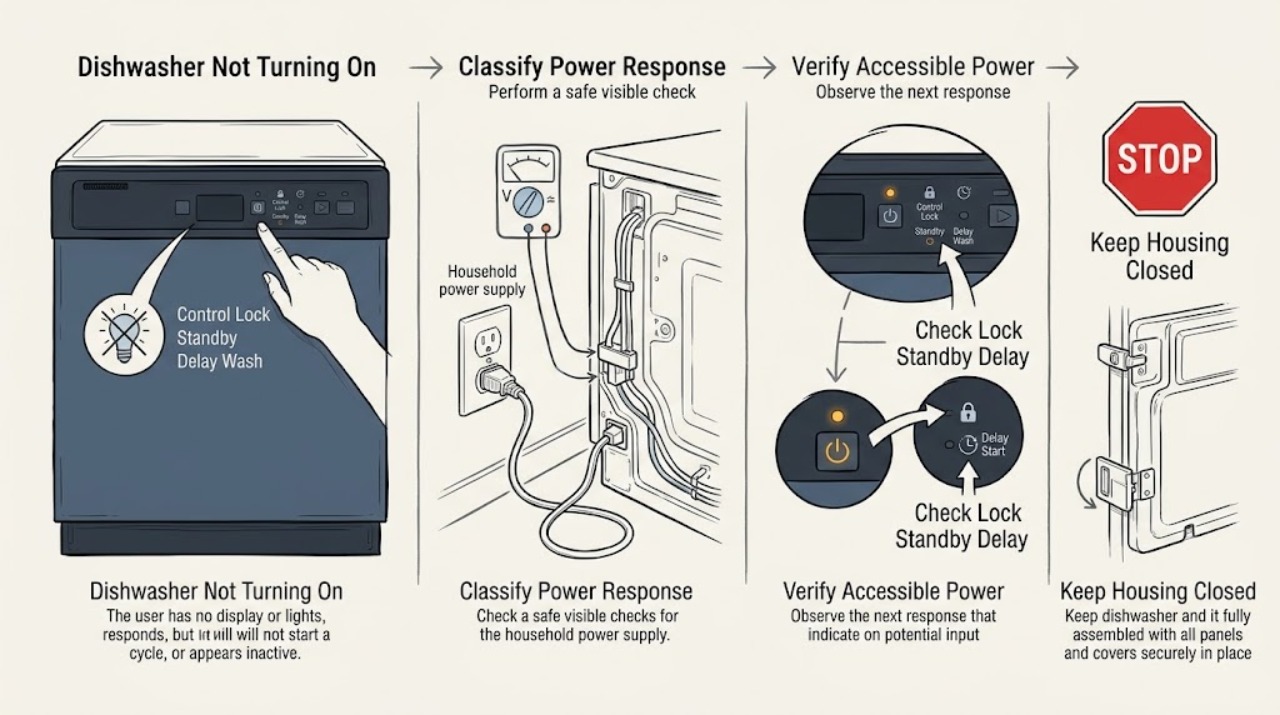
First decide whether the JennAir dishwasher has no visible power or has power but will not begin a cycle. For a dark panel, check the accessible plug or dedicated breaker once and stop if the connection is hot, damaged, or trips again. If lights or buttons respond, look for the Control Lock indicator, standby or sleep mode, and Delay Wash; JennAir says a locked control disables touch commands, standby can be awakened by opening or closing the door or pressing Start, and a delay postpones the cycle. Make sure the door closes and latches fully, the under-sink water valve is open, and the selected cycle is started according to the exact model guide. If it still will not start after these checks and a single safe control power cycle, arrange qualified service. Do not reach into wiring, remove the toe-kick or control panel, defeat the door latch, or repeatedly reset a tripped breaker; water and electrical work belong to qualified personnel.
Before you begin
Safety first
- This article covers only user-accessible indicators, controls, visible door and rack checks, the accessible water valve, and one documented control power cycle. Qualified personnel must handle wiring, terminal blocks, control or latch components, plumbing disconnection, appliance movement, and any internal diagnosis.
Work through in order
Diagnostic checks
Use only checks that match the exact appliance or system and its official guide.
-
Check 1
From a dry, safe position, note whether the JennAir display or lights are dark, whether any button responds, whether a lock symbol or flashing lights appear, and whether the household breaker has tripped.
Expected result: The panel is completely dark; the panel is lit but ignores touches; a lock or flashing indication appears; or controls respond but a cycle does not begin.
Next step: Use the no-power, locked-control, or powered-but-not-starting branch. Record any displayed or flashing code rather than guessing a generic reset.
Stop if: Stop for smoke, burning odor, a hot or damaged cord or connection, water near electrical parts, or a breaker that trips again.
Why this matters
Why: A dark panel points toward household or appliance power, an unresponsive lit panel points toward Control Lock or control service, and a responding panel narrows the check to state, door, water, or start conditions.
-
Check 2
If the panel is dark, verify that a plug-in cord is seated and that the dedicated household breaker or fuse is in its normal state. For a hard-wired unit, inspect only the household panel and visible appliance condition; do not open an electrical box or dishwasher panel.
Expected result: The cord was loose, the breaker or fuse was tripped, the supply looks normal but the dishwasher remains dark, or the breaker trips again.
Next step: Restore only a normal accessible connection once. If the panel stays dark or the breaker trips again, stop and arrange qualified appliance or electrical service.
Stop if: Do not repeatedly reset a breaker, use an extension cord as a workaround, move a hard-wired dishwasher, or inspect terminal wiring yourself.
Why this matters
Why: A loose accessible connection or single household trip can explain no lights. A normal supply with a dark panel suggests appliance power or control service; a repeated trip indicates an electrical fault rather than a normal start problem.
-
Check 3
With the panel powered, look for the Control Lock indicator, a red padlock, standby or sleep behavior, a delayed-start indicator, or a flashing sequence. Use the exact JennAir Owner's Manual to unlock controls, wake the unit, or cancel a delay; do not use a guessed key combination.
Expected result: The lock indicator is on or flashes when a button is pressed; opening or closing the door or pressing Start wakes the panel; a delay time is shown; or no state indicator explains the refusal to start.
Next step: Apply only the model-documented state change and select a cycle. If the lock cannot be cleared or the panel remains unresponsive, arrange service rather than opening the controls.
Stop if: Do not force keys, remove the control panel, or bridge a switch to defeat the lock or latch.
Why this matters
Why: A lock, standby state, or Delay Wash can make a working dishwasher appear not to turn on. If the panel remains responsive and no such state is active, continue to the door and water checks.
-
Check 4
Close the dishwasher door gently and confirm that it reaches the normal latch position without a rack, dish, gasket, or debris blocking it. From under the sink, check that the dishwasher water valve is open and that no visible supply hose is sharply kinked; do not pull the appliance forward.
Expected result: The door will not latch or springs back; a rack or dish obstructs closure; the water valve is closed or restricted; or the door and visible water supply appear normal.
Next step: Reposition only an accessible dish or rack and open the accessible water valve if safe. If the door, latch, gasket, or hose needs force, movement, or disassembly, stop and arrange service.
Stop if: Stop for a leak, damaged latch, sharp or broken rack, wet electrical area, or any need to remove panels or move the dishwasher.
Why this matters
Why: An unlatched door prevents the control from starting or resuming a cycle, while JennAir says inadequate immediate water pressure can also refuse a start or produce an error. A normal visible door and supply leave control or internal valve diagnosis unresolved.
-
Check 5
If the dishwasher has no active hazard and the external power, lock, delay, door, and water checks are normal, perform one JennAir control power cycle using the model-appropriate plug or dedicated breaker for 30 seconds. After power returns, select a cycle and press Start once while the door is fully latched.
Expected result: The dishwasher starts normally; the controls remain unresponsive; it still refuses to start; an error returns; or the breaker trips during or after the reset.
Next step: Stop repeated attempts and provide the model, indicators, door and water observations, and reset result to JennAir or a qualified technician.
Stop if: Do not reset again after a trip, open the toe-kick or control housing, probe wiring, or continue operation with a leak or electrical odor.
Why this matters
Why: A successful start supports a temporary control state. A repeated no-start, recurring error, or trip points toward model-specific control, latch, water inlet, wiring, or installation service rather than more resets.
Use your observations
Decision map
Find the observation that best matches what you see, then follow the next safe action.
-
PATH 01Safety boundary
What you see
The panel is dark and unresponsive, the accessible supply is normal, or the breaker trips again after one safe correction.
Do this next
Stop using the dishwasher and arrange qualified appliance or electrical service. Give the technician the supply type and breaker behavior.
Why this path and its safety boundary
Why it matters: The symptom is more consistent with an appliance power, wiring, or control fault than with a lock or delay state; a repeated trip is an electrical safety event.
Safety stop: Do not repeatedly reset the breaker, open the electrical connection, or move a hard-wired appliance.
-
PATH 02Safety boundary
What you see
The display or indicator responds, but a padlock, three flashes after button presses, sleep behavior, or a Delay Wash indicator is present.
Do this next
Use the exact model manual to clear Control Lock, wake the unit, or cancel the delay, then select a cycle and start it with the door latched.
Why this path and its safety boundary
Why it matters: The dishwasher may be deliberately ignoring input or waiting for a selected start time rather than lacking power.
Safety stop: Do not force the keypad, bypass the lock, or remove the control panel.
-
PATH 03Safety boundary
What you see
The panel is active but the door does not reach its normal latch, a rack or dish prevents closure, or the cycle stops when the door is moved.
Do this next
Clear only an accessible obstruction and close the door gently. Arrange service for a damaged latch, hinge, gasket, alignment, or a door that needs force.
Why this path and its safety boundary
Why it matters: Door-latch confirmation is more likely than a failed wash motor or main control. JennAir states that an unlatched door can prevent starting or resuming.
Safety stop: Do not tape, hold, or bypass the latch, and do not operate with a damaged or leaking door seal.
-
PATH 04Safety boundary
What you see
The door latches but the valve under the sink is closed or restricted, a visible supply hose is kinked, or an error or flashing sequence indicates a water or other fault.
Do this next
Open the accessible valve or remove only a gentle visible kink if safe, record the exact code or light pattern, and use the matching model guide. Call service if the symptom or code returns.
Why this path and its safety boundary
Why it matters: JennAir says immediate water pressure is needed to initiate a wash cycle; a water condition can therefore look like a no-start. An error sequence must remain model-specific.
Safety stop: Stop for a leak, wet electrical area, a damaged hose, or any need to pull out the dishwasher or disconnect plumbing.
-
PATH 05Safety boundary
What you see
Power, lock or delay state, door latch, and visible water supply are normal, but one control power cycle does not restore starting.
Do this next
Arrange qualified JennAir service with the model, indicators, recent installation history, and results of each check. Avoid further resets or panel removal.
Why this path and its safety boundary
Why it matters: A model-specific control, latch sensor, inlet valve, wiring, or installation fault is more likely; the external checks cannot identify the failed part.
Safety stop: Do not probe wiring, remove the toe-kick or control housing, or continue operation if a leak or electrical symptom appears.
Helpful context
Understand the symptom
No lights is not always a failed power supply
JennAir notes that a dishwasher that appears to have no power may have Control Lock enabled, so first observe the display, lock symbol, response to a button, and any breaker activity. A completely dark panel with no response is a power path; a lit panel that ignores touches is a control-lock or control issue. A newly installed dishwasher with power but unresponsive controls can also have an installation wiring problem, which is not a user repair.
A quiet dishwasher may be waiting by design
Standby or sleep mode can make the panel look inactive, while Delay Wash intentionally waits for a later time. JennAir says opening or closing the door or pressing Start can wake the unit, but the exact button sequence for cancelling a delay or unlocking controls belongs to the model's manual. Do not infer that a locked or delayed display means the dishwasher has lost power.
The door and water supply decide whether a cycle can begin
A door that is not fully latched can prevent starting, resuming, or even some fan operation. JennAir also says the water valve beneath the sink must be open because the dishwasher expects immediate water pressure at the start of a wash cycle. Check only the visible latch engagement and accessible valve; do not pull out the appliance or disturb hoses and wiring.
Reset once, then change the decision
If there is no leak, burning odor, hot connection, or active electrical fault, JennAir's control guidance supports a single power cycle: disconnect the plugged-in unit or switch off its dedicated breaker for 30 seconds, then restore power. If the same no-start symptom returns, a persistent control, latch, supply, or installation fault is more likely than a temporary software state. Do not repeatedly cycle a breaker or open the machine to chase the cause.
Safety boundary
Stop conditions
- Stop and disconnect power only from a safe accessible point for smoke, burning odor, a hot or damaged connection, water near electrical parts, or a repeated breaker trip.
- Stop for a leak, damaged door latch or seal, a door that will not close normally, or any need to pull out or lift the dishwasher.
- Do not bypass the door latch or Control Lock, repeatedly reset a breaker, or use a guessed control sequence for an unknown model.
- Do not open the toe-kick, control housing, terminal block, or wiring; do not perform energized electrical checks.
- If one safe control reset does not restore starting, arrange qualified service instead of repeating resets or replacing an unverified part.
When checks do not resolve it
Need a professional?
Arrange qualified JennAir dishwasher service when the display remains dark after a safe accessible power check, controls remain unresponsive after checking Control Lock and one model-appropriate power cycle, the door will not latch normally, a water or error condition returns, or the dishwasher still will not start with normal power, state, door, and water observations. Stop immediately for a repeated breaker trip, hot or damaged cord or connection, smoke, burning odor, water near electrical parts, a leak, damaged latch or seal, or a dishwasher that must be moved. The user may observe indicators, check an accessible plug or breaker once, use the exact manual for lock or delay controls, reposition an accessible dish or rack, check the under-sink valve, and perform one documented control reset. Wiring, terminal blocks, plumbing disconnection, latch or control replacement, and appliance movement belong to qualified personnel.
Safety scope: This article covers only user-accessible indicators, controls, visible door and rack checks, the accessible water valve, and one documented control power cycle. Qualified personnel must handle wiring, terminal blocks, control or latch components, plumbing disconnection, appliance movement, and any internal diagnosis.
Common questions
FAQ
Why is my JennAir dishwasher completely dark?
Check the accessible plug or dedicated breaker once, and remember that JennAir says Control Lock can also make a dishwasher appear to have no power or prevent all touch commands. If the supply is normal and the panel stays dark, or the breaker trips again, stop and arrange qualified service.
Can Control Lock make a JennAir dishwasher seem not to turn on?
Yes. JennAir says the lock disables touch commands and may show a padlock indicator or flash when buttons are pressed. Use the Owner's Manual for the exact model's unlock procedure; do not bypass the lock.
Could Delay Wash be why my JennAir dishwasher will not start?
Yes. JennAir says Delay Wash runs the dishwasher at a later selected time. Check the delay indicator and use the exact model manual or documented cancel control before treating the symptom as a failed appliance.
Why does my JennAir dishwasher have lights but not start?
Check Control Lock, standby or delay state, full door latching, and the accessible water valve. JennAir says an unlatched door or closed or restricted water supply can prevent a wash cycle from initiating. Persistent failure after one safe power cycle needs service.
Is it safe to remove the lower panel to check why my JennAir dishwasher will not start?
No. Do not open wiring, terminal blocks, controls, or plumbing connections as a user troubleshooting step. Check only the visible plug or breaker, indicators, door, rack, and accessible valve; have qualified personnel handle internal or installation diagnosis.
Read the exact guide
Official sources
- Dishwasher Error Codes - Reading - Product Help | JennAirJennAir Product Help · JennAir Product Help error-code guidance; exact codes and flashing sequences vary by dishwasher model.
- Controls Not Responding - Dishwasher - Product Help | JennAirJennAir Product Help · JennAir Product Help guidance for dishwasher controls that have power but do not respond; installation wiring and model procedures require qualified or model-specific handling.
- No Power - Not Turning On - DishwasherJennAir Product Help · JennAir Product Help guidance for dishwasher models; use the model number for installation and manual details.
- Not Starting or Operating - Dishwasher - Product Help | JennAirJennAir Product Help · JennAir Product Help article for dishwasher no-start and no-operation symptoms; exact control sequences vary by model.
- Resetting the Dishwasher's Controls (Cycle Power) - Product Help | JennAirJennAir Product Help · JennAir Product Help reset guidance for an unresponsive or stalled dishwasher; plug-in and hard-wired procedures and control-lock sequences remain model and installation dependent.
Community feedback
Share a repair observation
Share a plain-text repair observation. Accepted observations are published automatically; this page may take a moment to update.