
On this page
Start here
Quick answer
Treat "not working" as a symptom to classify, not as one failed part. First note whether the panel is completely dark, the panel lights but Start does nothing, the cycle stops, water is on the floor, water remains at the end, or a code or flashing pattern appears. JennAir Product Help separates these into No Power, Not Starting/No Operation, Leaking, Not Draining/Water Remains, and Error Code or Flashing Lights routes. Use the exact model number and displayed code when choosing a route; do only external checks such as the breaker, control lock, delay or sleep state, door closure, and visible water connections. Stop for water near electrical parts, smoke, burning odor, a damaged cord, or an active leak, and arrange qualified service for internal electrical, latch, pump, valve, heater, sensor, or control work.
Before you begin
Safety first
- The user may document the model and symptom, make safe external checks, and follow the exact manual for a permitted cancel or reset. Qualified personnel must handle internal wiring, controls, latch or float protection, pumps, valves, heaters, sensors, sump access, appliance movement, and live testing.
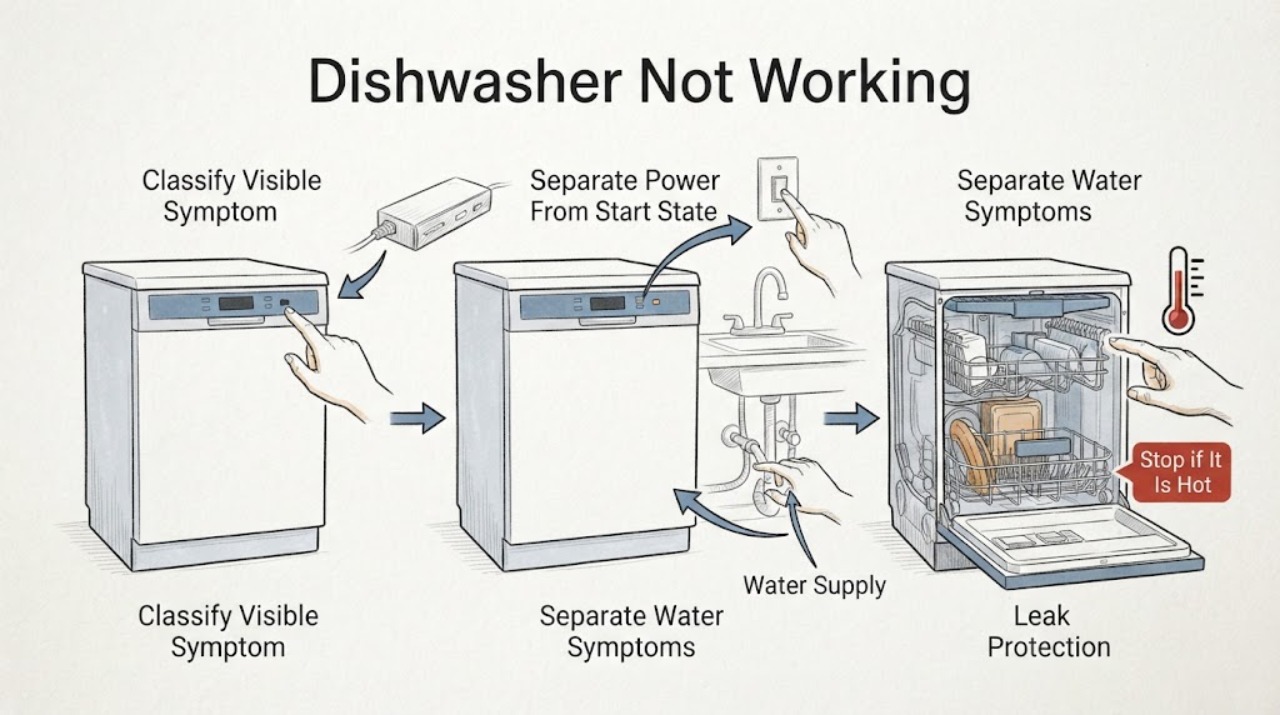
Work through in order
Diagnostic checks
Use only checks that match the exact appliance or system and its official guide.
-
Check 1
From a dry, safe position, identify the model number and record what the dishwasher does when you press the normal Start control once: note whether the panel is dark, indicators respond, a cycle begins, the cycle stops, water is present outside, water remains inside, or a code or flashing pattern appears.
Expected result: The panel is dark; the panel responds but no cycle begins; a cycle stops; water or suds escape; water remains at the end; or a code or flashing pattern is visible.
Next step: Write down the observation and use the matching branch before resetting or ordering a part. Do not use a generic code chart or assume every JennAir dishwasher has the same controls.
Stop if: Stop immediately for smoke, sparks, burning odor, abnormal heat, a damaged cord, water near electrical parts, or an active leak that could reach wiring.
Why this matters
Why: These observations map to different JennAir support families. A dark panel is a power path; a responsive panel with no start is an operation or door/control state; a leak or standing water is a water-management path; and a code needs exact model lookup.
-
Check 2
If no water is escaping, check only the accessible power and operating state: verify the household breaker has not tripped, wake the panel as the exact manual describes, look for a control-lock or delayed-start indicator, and close the door gently until the latch engages. Do not remove the toe-kick or make electrical measurements.
Expected result: The breaker is off or trips again; the panel wakes but buttons are locked; a delay or sleep state is active; the door will not latch; or all visible states are normal but Start still does nothing.
Next step: Restore a breaker only once if it is safe and no hazard is present; cancel the lock or delay only with the model instructions; clear a harmless door obstruction. Route a dark-panel symptom to Not Turning On and a lit-panel no-start symptom to Not Starting. Arrange service if the condition returns.
Stop if: Do not repeatedly reset a tripping breaker, bypass the door latch, work behind the panel, or touch wet electrical parts.
Why this matters
Why: A tripped breaker, lock, delay or sleep state, and an unlatched door can prevent operation without proving an internal part failure. A breaker that trips again or a normal-looking panel that still will not start needs qualified diagnosis.
-
Check 3
If water or foam is involved, stop observing the machine while it is safe to do so and identify where it is: at the front or vent, underneath or behind, in the filter area, or across the tub at the end of a cycle. Check only visible connection points and the detergent type; do not pull out the dishwasher.
Expected result: Water is at the door or vent; water is underneath or behind; suds are present; only a small amount is in the filter area; or substantial water remains at the end of the cycle.
Next step: For active leaking, stop the cycle and use the Leaking route; shut the water supply if the exact situation and access make that safe. For water remaining after a cycle, use Not Draining. Clean only an obvious external spill or accessible sink-side obstruction; arrange service for internal drainage, leak protection, or plumbing work.
Stop if: Stop and isolate the appliance when safe if water approaches the cord, outlet, junction box, or other electrical parts; do not restart to test an active leak.
Why this matters
Why: JennAir leak pages treat door or vent and underneath or behind leaks as different routes. Its drain guidance says a small amount in the filter area can be normal, while persistent water can involve a drain connection, disposer knockout plug, obstruction, air gap, or suds.
-
Check 4
If the dishwasher shows a code, numbered pause pattern, or flashing indicator, photograph it exactly and record whether it appeared at startup, during filling, during washing, or during draining. Locate the exact JennAir manual with the model number before interpreting it.
Expected result: The same code returns; the lights only flash with no readable code; the code clears after a documented control action; or there is no code but the cycle repeatedly stops at one phase.
Next step: Use the Error Displayed route with the exact model and code. If the machine stops without a code, document the phase and use the operation or component-specific route; do not substitute another model error meaning or open the control area.
Stop if: Do not bypass a safety indication, repeatedly clear a leak-related code, or perform live electrical tests.
Why this matters
Why: JennAir publishes multiple code and flashing-light patterns, but the correct meaning and action depend on the model and display. A repeatable code or cycle-phase stop is stronger evidence for a service diagnosis than the broad phrase not working.
-
Check 5
After recording the symptom and only when there is no leak or electrical hazard, follow the exact model manual for one permitted reset or cancel action. Observe whether the same condition returns on the next safe attempt; do not keep repeating resets as a repair.
Expected result: The appliance resumes normally; the symptom returns immediately; the breaker trips; the door still will not latch; a leak appears; or the same code or stop phase returns.
Next step: If normal operation returns, monitor one complete cycle and keep the model and reset details. If not, schedule qualified JennAir service and provide the model, symptom timeline, photos, codes, installation history, and safe checks performed.
Stop if: Do not open panels, remove the dishwasher, bypass interlocks, reach beneath standing water, or continue operating with smoke, burning odor, water near electrics, a damaged cord, or an active leak.
Why this matters
Why: A one-time recovery can indicate a transient control state, but recurrence points toward a persistent power, latch, water, drain, sensor, heater, pump, or control issue that this hub cannot identify safely. A returned hazard overrides all further tests.
Use your observations
Decision map
Find the observation that best matches what you see, then follow the next safe action.
-
PATH 01Safety boundary
What you see
The panel is completely dark, or the panel is lit but controls do not respond or a cycle will not begin.
Do this next
Check the accessible breaker once and use the exact manual to wake or unlock the controls. Then follow Not Turning On for no power or Not Starting for a lit-panel no-start. Call service for recurring breaker trips, an unresponsive panel, a failed latch, or any internal electrical symptom.
Why this path and its safety boundary
Why it matters: A dark panel belongs to JennAir No Power or Not Turning On. A lit panel can instead be in control lock, sleep, delay, or door-latch state; if those are clear, internal power or control diagnosis is more likely.
Safety stop: Do not repeatedly reset a breaker or bypass a door interlock.
-
PATH 02Safety boundary
What you see
Water or suds escape from the door or vent, or water is found underneath or behind the dishwasher.
Do this next
Stop the cycle, contain visible water without reaching under the appliance, and use the Leaking route. Shut off the water supply and power only when safe; persistent leaks, a leak code, or anything behind the unit requires qualified service.
Why this path and its safety boundary
Why it matters: The location changes the likely path: JennAir separates door or vent leaks from underneath or behind leaks, and lists water-supply, drain-line, detergent-suds, and model-specific leak-code checks.
Safety stop: Do not restart an active leak or pull out the dishwasher to inspect hoses.
-
PATH 03Safety boundary
What you see
A cycle ends with substantial water in the tub, but there is no active external leak.
Do this next
Use the Not Draining route. If the dishwasher is connected to a disposer, confirm only the visible installation context and have plumbing work handled safely; call service if the water remains, the pump is abnormal, or the drain path requires disassembly.
Why this path and its safety boundary
Why it matters: JennAir says a small amount in the filter area can protect seals and may be normal; more water at cycle end can point to a disposer connection, drain obstruction, air-gap issue, suds, or an internal drain problem.
Safety stop: Do not reach into standing water near electrical parts, remove internal pump covers, or use sharp tools to clear the appliance drain.
-
PATH 04Safety boundary
What you see
A code, pause sequence, flashing-light pattern, or repeatable mid-cycle stop appears without the main symptom being a power failure or external leak.
Do this next
Use the Error Displayed route, record the exact model and code, and follow only the matching official manual. If there is no code, provide the stopped cycle phase to a qualified technician rather than guessing a failed component.
Why this path and its safety boundary
Why it matters: JennAir has model-specific error and flashing-light entries. A repeatable stop may involve filling, washing, heating, draining, sensing, or controls, but the observed code and exact model are required before narrowing it.
Safety stop: Do not use a generic code table, bypass a safety state, or open the control or sump area.
-
PATH 05Safety boundary
What you see
The dishwasher powers on and completes a cycle, but the complaint is poor cleaning, cold water, weak spray, unusual noise, odor, or another performance symptom.
Do this next
Record the specific performance symptom and choose the matching JennAir Product Help category. Arrange service if the issue involves internal pump, motor, heater, sensor, valve, or control diagnosis.
Why this path and its safety boundary
Why it matters: The broad Not Working label is not the best match when the machine still runs. A component- or symptom-specific route can use the cycle phase and model architecture without duplicating this start and power triage page.
Safety stop: Stop if the symptom includes smoke, burning odor, abnormal heat, exposed wiring, or water near electrics.
Helpful context
Understand the symptom
What this general page covers
Not working can mean no lights, no response to Start, a cycle that stops, a leak, standing water, an error indication, or poor washing even though the machine runs. Those observations point to different JennAir support routes. This page is a triage hub: record the symptom, perform a small set of safe external checks, and then use the matching focused page. It does not replace a model manual or authorize opening the dishwasher.
Capture the symptom before resetting
Before cycling power, record whether the display or indicators are lit, which buttons respond, whether the door latched, whether the problem occurred at the beginning or in the middle of a cycle, and whether there is water, foam, an unusual smell, or a displayed code. A reset can erase a useful code or change the symptom. Photograph the panel and model label if service may be needed. Never infer an error meaning from a code used by another JennAir model.
Keep the focused routes separate
Use the Not Turning On route when the dishwasher has no power or the panel stays dark. Use the Not Starting route when the panel is available but a cycle will not begin or resume. Use the Leaking route when water or suds escape from the door, underneath, or behind the appliance. Use the Not Draining route when a cycle ends with more than the small filter-area water described by JennAir. Use the Error Displayed route when a code or flashing-light pattern is present. If the symptom is washing performance, heating, spraying, or noise rather than a start or power failure, choose the matching component-specific support route instead of forcing it into this page.
Only external checks belong here
A user can check a reachable breaker or outlet, confirm the under-sink water valve is open, make sure the control lock or delay is not active, close the door gently, inspect visible hose connections for a leak, and remove obvious food or debris from an accessible sink-side air gap according to its own instructions. Button labels, lock behavior, delay cancellation, and reset timing vary by model and region, so follow the exact manual. Do not remove panels, reach under a wet appliance, probe wiring, bypass a latch or float, or test a pump, heater, valve, or control while energized.
When the general route ends
If the symptom persists after the relevant safe external check, provide the technician with the model number, exact display pattern, cycle phase, water or foam location, recent installation or plumbing work, and checks already completed. JennAir support pages direct owners to model-specific manuals and service. Internal controls, door-latch parts, leak protection, drain pumps, inlet valves, heaters, sensors, and wiring require qualified diagnosis.
Safety boundary
Stop conditions
- Stop the cycle and keep clear of the appliance for smoke, sparks, flame, burning odor, abnormal heat, or a damaged cord; disconnect power only when it is safe to do so.
- If water approaches an outlet, cord, junction box, or other electrical part, stop using the dishwasher and isolate water and power only from a dry, safe position.
- Do not pull out or tilt the dishwasher, remove panels, reach beneath a wet appliance, bypass a door latch or float, or perform a live electrical test.
- Do not restart to test an active leak, a recurring breaker trip, a damaged hose, or a leak-related code.
- Do not interpret an error code from another JennAir model; keep the exact model and display pattern for qualified service.
Only after diagnosis
Potential parts
- model-matched door latch, gasket, control lock or user-interface component
Consider only after the exact model and symptom show that the door or control interface is the cause; a dark panel, no-start state, and leak can have different diagnoses.
JennAir control layouts, latch designs, and seals vary by model. Do not order by appearance or bypass the latch. - model-matched drain pump, inlet valve, leak sensor, heater, sensor, or control assembly
These are possible service findings only after a qualified diagnosis identifies the failed subsystem; the general Not Working symptom does not establish a part.
Confirm the exact model, revision, and service documentation before any part selection. Internal replacement and testing are not user-level checks.
When checks do not resolve it
Need a professional?
Arrange qualified JennAir service when the correct external route does not restore operation, a breaker trips again, the panel remains unresponsive, the door will not latch, a cycle repeatedly stops, a code returns, water remains beyond the small filter-area amount, or any leak persists. Stop immediately for water near electrical parts, smoke, sparks, burning odor, abnormal heat, a damaged cord, an active leak, or an unstable installation. The user may record the model and symptoms, check an accessible breaker once, use model-directed control or delay actions, confirm a visible water valve is open, close the door gently, and inspect visible connections without moving the appliance. Internal power, wiring, latch, float or leak protection, pump, valve, heater, sensor, sump, and control work belongs to qualified personnel.
Safety scope: The user may document the model and symptom, make safe external checks, and follow the exact manual for a permitted cancel or reset. Qualified personnel must handle internal wiring, controls, latch or float protection, pumps, valves, heaters, sensors, sump access, appliance movement, and live testing.
Common questions
FAQ
What does JennAir dishwasher Not Working mean?
It is a broad symptom, not a diagnosis. First separate a dark panel, a lit panel that will not start, a leak, standing water, a code, a mid-cycle stop, or a performance-only complaint, then use the matching JennAir support route.
Why does my JennAir dishwasher have lights but not start?
JennAir starting guidance points to control lock, sleep or standby, delay, an unlatched door, water supply, and a control reset as possible external checks. Use the exact model manual, then use the Not Starting route if the problem persists.
Is a little water in a JennAir dishwasher always a drain failure?
No. JennAir says a small amount in the filter area can be normal. Substantial water at the end of a cycle is a different symptom and should be routed through the disposer connection, drain obstruction, air gap, suds, and service checks in the Not Draining guidance.
What should I do if my JennAir dishwasher is leaking?
Stop the cycle, identify whether water is at the door or vent versus underneath or behind, and contain visible water without reaching under the appliance. Shut off water and power only when safe, then use JennAir leaking guidance or arrange service for a persistent leak.
Can I use a generic JennAir dishwasher error-code list?
No. JennAir publishes several code and flashing-light patterns, and the correct interpretation depends on the exact model and display. Photograph the code, record when it appears, locate the model manual, and use the Error Displayed route.
Read the exact guide
Official sources
- Leaking - Underneath - Dishwasher - Product Help | JennAirJennAir · Official JennAir guidance for an underneath or behind leak; access and installation details vary by model.
- Error Code or Flashing Lights - Product Help | JennAirJennAir · Official JennAir error support index; code meanings and displays are model-dependent.
- Leaking - Product Help | JennAirJennAir · Official JennAir leaking index; cause and repair depend on model, installation, leak location, and observed code.
- F8E4 - Error Code - Dishwasher - Product Help | JennAirJennAir · Official JennAir F8E4 page; the code and its display behavior are model-dependent and must not be generalized to other codes.
- Not Starting or Operating - Dishwasher - Product Help | JennAirJennAir · Official JennAir guidance; button labels, lock behavior, delay options, and reset procedure depend on the exact model and region.
- Operation - Product Help | JennAirJennAir · Official JennAir Product Help operation index; exact controls and procedures vary by dishwasher model.
- Not Draining - Water Remain at End of Cycle - Dishwasher - Product Help | JennAirJennAir · Official JennAir drainage guidance; disposer and air-gap arrangements vary by installation and model.
- Contact Us | JennAirJennAir · Official JennAir United States contact page; service availability and contact process are regional.
Community feedback
Share a repair observation
Share a plain-text repair observation. Accepted observations are published automatically; this page may take a moment to update.