
On this page
Start here
Quick answer
Separate a JennAir oven with no display from one that powers on but will not start, one that starts but does not heat, and a gas oven that clicks without a safe flame. Check the model's power and breaker requirements, Control Lock or demo mode, clock and delayed-start state, selected mode and temperature, Start action, and door position. For a gas model, the main gas valve and igniter path are model-specific; do not keep trying after gas odor, delayed ignition, a flare, or a failed flame. For an electric model, do not open the terminal block or test live wiring. If the display or clock shows LOC, PF, a flashing time, or an F/E code, record the exact message and use the JennAir model guide. Make at most one safe, model-documented power reset, then arrange qualified appliance, electrical, or gas service if the fault remains. Stop immediately for smoke, sparks, arcing, burning smell, abnormal heat, damaged glass, or a repeated breaker trip.
Before you begin
Safety first
- Do not remove terminal covers, probe live wiring, bypass Control Lock or a door switch, adjust gas regulators or igniters, repeatedly cycle a gas oven, operate with damaged glass or a damaged door, or continue after gas odor, delayed ignition, smoke, sparks, arcing, burning smell, abnormal heat, wet electrics, or repeated trip.
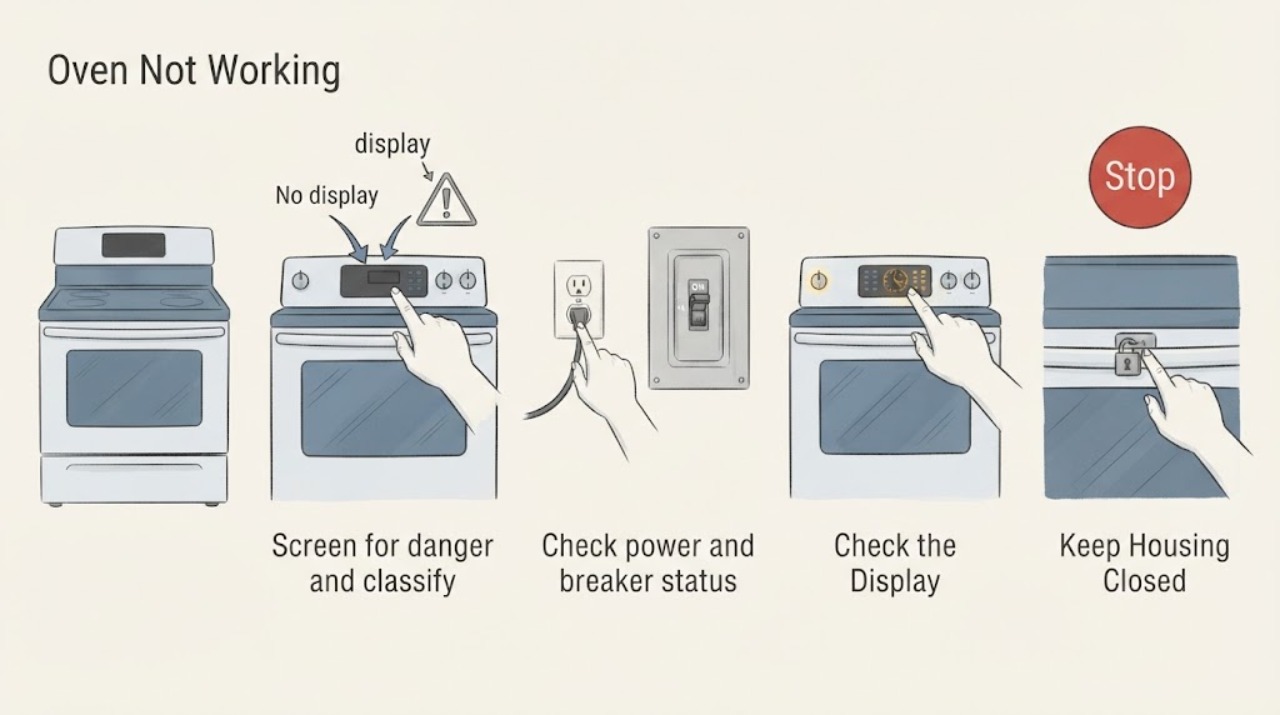
Work through in order
Diagnostic checks
Use only checks that match the exact appliance or system and its official guide.
-
Screen for danger and classify the symptom
Stop the oven and look only at the cool, visible control panel, door, cavity, floor, power connection, and gas area if applicable. Record whether the display or clock is blank, whether any key responds, whether the oven is electric, gas, or dual fuel, whether the door is closed, and whether a code or indicator is visible. Do not open the door during a suspected gas or smoke event.
Expected result: The oven is cool and dry with no hazard; or there is gas odor, smoke, flame, a spark or arc, burning smell, abnormal heat, damaged glass, wet electrical area, or a repeated breaker trip.
Next step: If safe, continue with the matching external checks. If a hazard is present, stop using the oven, leave the area when gas or fire is suspected, and arrange the appropriate emergency, gas, electrical, or appliance service.
Stop if: Stop immediately for gas odor, smoke, flame, sparks, arcing, burning smell, abnormal heat, cracked or shattered glass, wet electrical parts, or repeated trip.
Why this matters
Why: The display and heat state choose the no-power, control, door, electric-heat, or gas-ignition branch. A safety symptom changes the task to isolation and qualified help rather than troubleshooting.
-
Check power and breaker status without opening wiring
If the display, clock, and oven light are all off, check the accessible household breaker or fuse and the visible grounded connection only when the area is dry and undamaged. Do not remove the wall-oven or range cover, terminal block, junction box, or strain relief. If an installation or supply rating is uncertain, use a qualified electrician rather than making a live test.
Expected result: A breaker or fuse is open, the display returns after one safe restoration, the display remains blank with normal protection, or the breaker trips again.
Next step: If one safe restoration returns the normal display, continue to clock, lock, and mode checks. If the breaker trips again or the oven remains blank, leave it off and request qualified electrical or appliance service.
Stop if: Do not reset repeatedly, touch a hot or wet connection, use an adapter or extension cord, open a cover, or continue after smoke, sparks, arcing, burning smell, abnormal heat, or damaged wiring.
Why this matters
Why: JennAir identifies power connection, proper supply, and household protection as prerequisites for oven and igniter operation. A repeated trip or continued blank display suggests an electrical or appliance fault; it is not explained by Control Lock alone.
-
Check Control Lock, clock, demo mode, and delayed start
If the panel is lit, record LOC, Lock, Locked, a flashing time, a blank clock, a demo presentation, or any delayed-start indication. Use the exact model manual to unlock the controls, restore or set the clock if required, exit demo mode, and cancel delayed start. Do not guess a sequence from another JennAir oven.
Expected result: The controls are locked, the clock is blank or flashing, demo mode is active, a delayed bake is scheduled, the status clears after the model-specific change, or no status explains the no-start.
Next step: After the correct state is restored, select the intended mode and continue to the door and Start check. If the lock, demo, clock, or delay state returns or cannot be changed, request service with the exact display message.
Stop if: Do not bypass the lock or repeatedly power-cycle a hot oven. Stop for smoke, sparks, arcing, burning smell, abnormal heat, damaged glass, wet electrics, or repeated trip.
Why this matters
Why: JennAir says Control Lock disables keypads, demo mode prevents operation, delayed start postpones baking, and PF or a flashing time can indicate a power failure. These are control states, not proof that the heating element or igniter has failed.
-
Confirm mode, temperature, Start, and door position
With the oven cool, select a normal bake or other intended cooking mode, set a temperature supported by the model, and use the model's documented Start or Start/Enter action. Confirm the door closes normally and is not blocked by a rack, cookware, or a visibly damaged seal or hinge. Do not force a locked door or reach toward an element.
Expected result: The control accepts the mode and temperature, Start is ignored, the door is open or obstructed, the oven enters a delayed or Sabbath-style state, or the settings are accepted but heat does not begin.
Next step: Clear only a visible door obstruction, close the door normally, and make one supervised start attempt. If the mode is accepted but the oven does not heat or the door state persists, leave it off and arrange service.
Stop if: Do not bypass a door switch, operate with damaged seals or glass, place foil on the oven bottom, open panels, or continue after smoke, sparks, burning smell, abnormal heat, or repeated trip.
Why this matters
Why: JennAir's electric guidance calls out control settings and delayed start, while gas guidance says an open door can prevent elements from coming on on some models. A valid selection with no heating moves the diagnosis to supply, element, sensor, igniter, or service rather than another button sequence.
-
For an electric oven, separate supply from a no-heat fault
If the electric oven display works and the mode and temperature are accepted but the cavity does not heat, record whether this is a new installation, whether the door is closed, and whether the breaker or supply has shown a problem. Check only the model's visible settings and rating-plate information; do not handle terminal wires or electrical supply components yourself.
Expected result: The oven is newly installed, the supply or rating is uncertain, the breaker is open, the display runs but no element warms, or only one function fails.
Next step: Have a qualified electrician verify the installation and supply when uncertain. If supply is correct but a heating function still fails, leave the oven off and request qualified appliance service; do not replace an element based only on no heat.
Stop if: Do not remove the terminal block, probe live voltage, bypass a thermal control, or continue after a hot connection, smoke, sparks, arcing, burning smell, abnormal heat, damaged glass, or repeated trip.
Why this matters
Why: JennAir says an incorrect electrical connection or supply can prevent the heating element from turning on, and its no-power guidance directs persistent supply concerns to a licensed electrician. A display that works does not prove the high-power heating circuit is healthy.
-
For a gas oven, check only the safe external supply state
If the oven is gas or dual fuel and it does not heat, note whether the igniter clicks, whether a safe flame is visibly established according to the model instructions, and whether the main gas valve is in its normal open position. If the range was recently installed or reconnected, do not keep cycling the oven; use the installation instructions and qualified gas service for trapped air, regulator, ignition, or flame concerns.
Expected result: The main valve is closed, the oven clicks but no safe flame appears, ignition is delayed or accompanied by a flare, the cooktop works but the oven does not, or gas and visible settings appear normal but heat is absent.
Next step: If a visible valve setting is wrong and there is no gas odor, correct only what the exact installation instructions allow, then stop further tests. If ignition remains absent, delayed, or uncertain, leave the oven off and call qualified gas or appliance service.
Stop if: For gas odor, delayed ignition, flare, smoke, or repeated clicking without safe ignition, do not operate switches or create flames; leave the area and use qualified emergency or gas service. Also stop for sparks, burning smell, abnormal heat, or repeated trip.
Why this matters
Why: JennAir says oven igniter operation depends on a proper grounded supply and that the main gas valve must be on; a gas range can have separate oven-supply details. Clicking without prompt safe ignition is not a reason to inspect or adjust the igniter yourself.
-
Record the exact code and use one permitted power reset
Photograph any complete code or message, including F/E combinations, PF, LOC, Lock, a flashing clock, or a partial display. Only if the oven is cool, dry, intact, and free of gas odor, smoke, sparks, abnormal heat, and repeated trips, use the exact JennAir model's one documented power reset. Restore power once and observe the display without opening the appliance.
Expected result: The message clears and the oven accepts a normal setting, the same code returns, a different code appears, the clock remains wrong or blank, or the breaker trips again.
Next step: If the code or no-working condition returns, leave the oven off and arrange qualified appliance, electrical, or gas service with the recorded model, fuel type, code, and test results.
Stop if: Do not repeat resets, clear a code by repeatedly starting the oven, open the cabinet, bypass a lock, or continue after gas odor, smoke, sparks, arcing, burning smell, abnormal heat, damaged glass, or repeated trip.
Why this matters
Why: JennAir's error-code guidance maps PF and a flashing time to power failure, LOC to Control Lock, and F/E formats to model-specific fault handling; it also documents a power reset for some codes. A reset cannot establish that a heater, igniter, sensor, control, or supply is safe.
Use your observations
Decision map
Find the observation that best matches what you see, then follow the next safe action.
-
PATH 01Next step
What you see
Gas odor, delayed ignition, flare, smoke, sparks, arcing, burning smell, abnormal heat, damaged glass, wet electrics, or repeated breaker trip
Do this next
Stop using the oven, avoid switches when gas or fire is suspected, leave the area when appropriate, and arrange qualified emergency, gas, electrical, or appliance service.
-
PATH 02Next step
What you see
The display, clock, and oven light are blank, or the breaker or fuse is open
Do this next
Check the accessible supply protection once without opening wiring; persistent blank display or a repeat trip needs qualified electrical or appliance service.
-
PATH 03Next step
What you see
LOC, Lock, a blank or flashing clock, demo mode, Sabbath-style status, or delayed start prevents a normal cycle
Do this next
Use the exact model's documented control sequence once, then select the mode and Start action; a returning or unchangeable state needs service.
-
PATH 04Next step
What you see
The mode is not accepted, Start is ignored, or the door is open, obstructed, or not recognized as closed
Do this next
Clear only visible obstructions and close the door normally; persistent no-start or a damaged door needs appliance service.
-
PATH 05Next step
What you see
An electric oven accepts the setting but the cavity does not heat or only one heating function fails
Do this next
Have supply and installation verified by a qualified electrician when uncertain, then arrange appliance service for a confirmed no-heat condition; do not open wiring.
-
PATH 06Next step
What you see
A gas or dual-fuel oven clicks without safe ignition, has a closed or uncertain gas supply, or heats inconsistently
Do this next
Leave it off and arrange qualified gas or appliance service; gas odor, delayed ignition, or a flare is an immediate safety stop.
-
PATH 07Next step
What you see
A code returns after its model-specific external check or one permitted reset, or the oven remains unavailable
Do this next
Leave the oven off and give service the exact model, fuel type, code, settings, door state, supply result, and whether heat or ignition occurred.
Helpful context
Understand the symptom
No power, no start, and no heat are different faults
Record whether the clock or display is blank, whether the controls respond, whether a mode and temperature can be selected, whether Start is acknowledged, and whether the oven cavity becomes warm. A dead display points to power or a display state. A lit display with no start points to lock, demo, delay, clock, door, or control settings. A running electric oven with no heat and a gas oven with no safe flame need different service paths.
Keep checks external and model-specific
Use the owner manual for the exact JennAir model before changing a control sequence or interpreting a code. Inspect only the cool, visible door, control panel, breaker, and gas shutoff area. Do not remove electrical covers, probe wiring, adjust the regulator or igniter, bypass the door lock, or repeatedly restart an oven that smells of gas or is overheating.
When checks do not resolve it
Need a professional?
Request qualified appliance service when the safe model-specific checks and one permitted reset do not restore operation. Use qualified electrical service for supply, wiring, breaker, or outlet concerns and qualified gas service for gas-supply or ignition concerns.
Safety scope: Do not remove terminal covers, probe live wiring, bypass Control Lock or a door switch, adjust gas regulators or igniters, repeatedly cycle a gas oven, operate with damaged glass or a damaged door, or continue after gas odor, delayed ignition, smoke, sparks, arcing, burning smell, abnormal heat, wet electrics, or repeated trip.
Have this ready
- Provide the exact model and serial information if available, wall oven or range identity, electric or gas type, display and clock state, full code or message, mode and temperature, Start response, door state, breaker behavior, igniter or flame observation, and whether the cavity heated.
Common questions
FAQ
Why is my JennAir oven blank but the breaker looks normal?
JennAir identifies power, Control Lock, and supply conditions as separate checks. Confirm the accessible protection and visible connection only when dry and undamaged. If the display remains blank or a breaker trips again, leave the oven off and arrange qualified electrical or appliance service instead of opening the wiring.
Could Control Lock or demo mode make a JennAir oven seem broken?
Yes. JennAir says Control Lock disables the keypads, while demo mode prevents the oven from operating. Check the exact model instructions, restore the normal control state once, and then select a mode and Start. A lock that cannot clear or returns needs service.
Why does my JennAir electric oven turn on but not heat?
Check the mode, temperature, delayed-start state, door, and supply requirements. JennAir notes that an incorrect electrical connection or supply can prevent the heating element from turning on. If the display works but heat remains absent, do not open the terminal block; arrange qualified electrical and appliance diagnosis.
What should I do if my JennAir gas oven clicks but does not ignite?
Do not keep trying the oven. If there is gas odor, delayed ignition, or a flare, avoid switches and flames, leave the area, and use qualified emergency or gas service. Without gas odor, the main valve and model-specific ignition path still require qualified gas or appliance service when safe ignition does not occur.
What do PF, LOC, or an F/E code mean on a JennAir oven?
JennAir associates PF or a flashing time with a power failure and LOC, Lock, or Locked with Control Lock on supported models. F/E combinations require the exact model's guide. Photograph the complete message, use only the documented external check or one reset, and request service if it returns.
Read the exact guide
Official sources
- Oven Not Working - Gas - Product Help | JennAirJennAir Product Help · JennAir gas ranges; use installation instructions and qualified gas service
- Oven Not Working - Gas and Dual Fuel Range - Product Help | JennAirJennAir Product Help · JennAir gas and dual-fuel ranges; model-specific installation applies
- Nothing Is Working - No Power - Wall Oven - Product Help | JennAirJennAir Product Help · JennAir wall ovens; range controls and requirements may differ by model
- Locked, Lock or Loc - Range - Product Help | JennAirJennAir Product Help · JennAir ranges displaying Locked, Lock, or Loc; confirm the exact model
- Oven Not Heating - Powering On - Electric Range - Product Help | JennAirJennAir Product Help · JennAir electric range ovens; confirm the exact model and owner manual
- Error Codes for Cooking Appliances - Product Help | JennAirJennAir Product Help · JennAir cooking appliances; code coverage and controls vary by model
Community feedback
Share a repair observation
Share a plain-text repair observation. Accepted observations are published automatically; this page may take a moment to update.