
On this page
Start here
Quick answer
When a Kenmore dryer will not start, first confirm that the outlet and breaker are safe and supplying power, the controls are not locked, a valid cycle is selected, the door is fully latched, and Start is pressed as that model requires. Clean the lint screen and check the visible vent connection, but do not open the cabinet or bypass a safety device. If the dryer is completely dead, only hums, trips the breaker, smells hot, or has a damaged cord, stop using it and arrange qualified service.
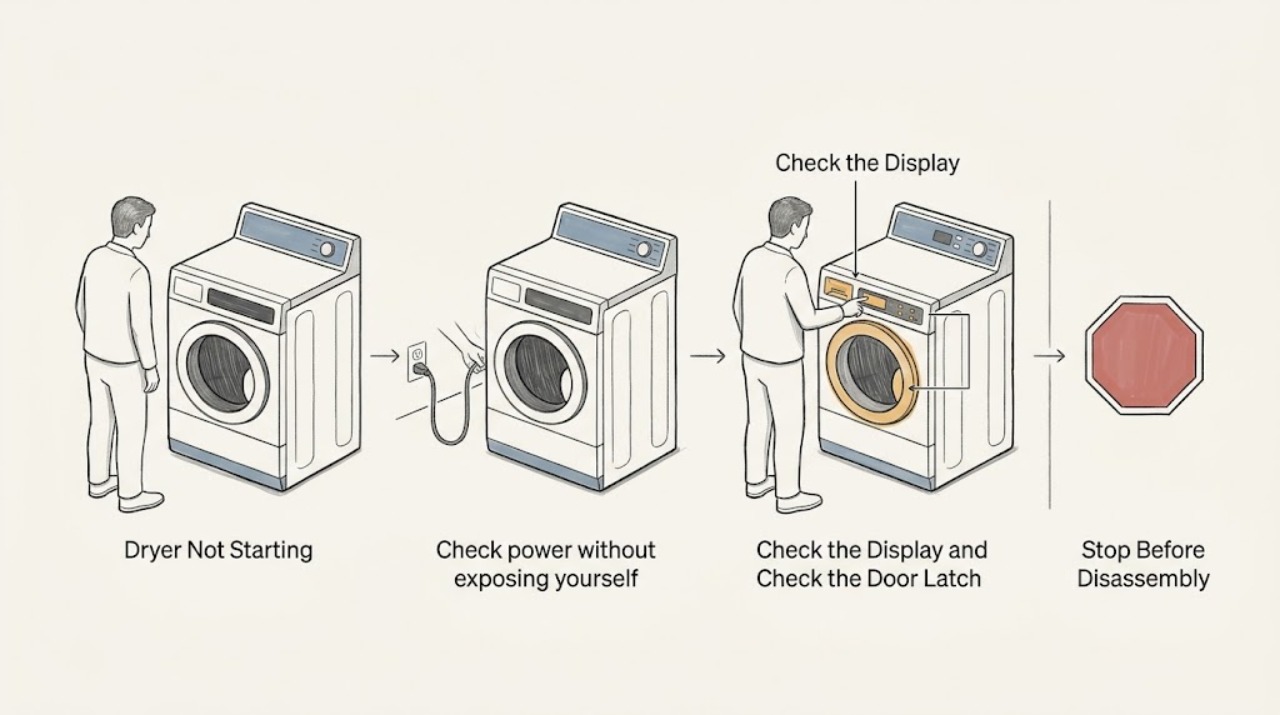
Work through in order
Diagnostic checks
Use only checks that match the exact appliance or system and its official guide.
-
Check power without exposing yourself to electricity
Look at the display or drum light, then check the dryer plug and the household breaker or fuse from a dry, safe position. Do not pull a wet cord, use a damaged outlet, remove the terminal cover, or repeatedly reset a breaker that trips.
Expected result: The dryer is completely dark, or the controls light normally but the cycle does not begin.
Next step: If power is absent, have the household circuit checked safely and retrieve the model manual. If power is present, continue to the control and door checks.
Stop if: Stop immediately for a hot or discolored outlet, damaged cord, smoke, burning odor, sparks, or a breaker that trips again; leave the dryer off and arrange qualified electrical or appliance service.
Why this matters
Why: No lights point first to supply power, the cord, a breaker, or an internal power path. Normal lights mean the start problem is more likely related to controls, the door latch, a protective device, or the drive system.
-
Confirm the control state and start command
Select a normal timed or automatic cycle shown in the model manual, check for a Control Lock or child-lock indication, and use the Start or Push to Start control exactly as the manual describes. Do not assume that a quick tap, a locked touch panel, or a special cycle will start every model.
Expected result: The control lock indicator clears and the dryer starts, or the controls remain unresponsive or the cycle refuses to begin.
Next step: If the panel remains locked, use only the model-specific unlock sequence. If the correct cycle and start command produce no response, continue to the door-latch check and record any display message.
Why this matters
Why: A locked control or an incorrect start gesture can look like a failed dryer. A responsive panel that still refuses to start points toward the door interlock, cycle selection, a stored fault, or an internal control problem.
-
Verify the door is fully latched
Open the dryer door and remove any garment edge, lint, or object that prevents the door from sitting flush. Close it firmly without slamming, then try the model's start control once. Do not tape, hold, or bypass the door switch, and do not reach into the switch opening.
Expected result: The dryer starts after the door closes correctly, or the door feels loose, will not latch, or the dryer remains silent.
Next step: If the latch or strike is damaged, stop using the dryer and arrange service. If it is intact but the dryer will not recognize the closed door, do not bypass the interlock; provide the model and symptom to a technician.
Why this matters
Why: A door interlock prevents operation when the door is open or not sensed as closed. A loose latch, damaged strike, or silent response after a firm closure indicates a possible switch or alignment fault.
-
Look for an airflow or overheating trigger
With the dryer off and cool, clean the lint screen and inspect the visible vent hose and outside exhaust area for a crushed connection or obvious blockage. Do not dismantle the cabinet or reach into the blower. If the dryer stopped after a very hot cycle, allow it to cool before any model-directed reset.
Expected result: The lint screen or visible vent is heavily blocked, the dryer was unusually hot, or airflow looks normal and the dryer never starts.
Next step: Correct only accessible lint or vent issues according to the manual. If the dryer overheated, continues to shut down, or still will not start, leave it off and arrange service rather than replacing or bypassing a safety device.
Why this matters
Why: Restricted airflow can contribute to overheating and can operate a protective cutoff. Clearing routine lint is maintenance, not proof that an internal safety device or heating fault is repaired.
-
Distinguish silence from a motor or drum fault
After confirming the dryer is unplugged and cool, open the door and gently turn the drum only if the model manual permits this simple check. Do not force it, reach behind the drum, remove a belt, or insert anything into the blower. If you press Start while the unit is safely powered, listen only from outside for a hum, click, or attempted movement.
Expected result: The drum is unusually difficult to turn by hand, or Start produces a hum/click but no drum movement; alternatively there is complete silence with normal controls.
Next step: Stop after this observation. Do not open the cabinet or test live components; give the technician the sound and drum behavior along with the model number.
Why this matters
Why: Resistance or an attempted start can point toward a seized drive path, obstruction, motor, or belt-related safety state. Complete silence with normal controls makes the door switch, start input, thermal protection, or control path more likely, but these parts require model-specific diagnosis.
-
Perform one model-approved reset
If there is no electrical hazard, the dryer is cool, and the manual describes a reset, disconnect power using the plug or the correct breaker from a dry safe position, wait for the model's specified interval, and restore power once. Re-select the cycle and observe the first response; do not repeatedly reset a dryer that overheats or trips the circuit.
Expected result: The controls recover and the dryer starts, or the no-start condition returns immediately or a fault message remains.
Next step: Leave the dryer off when the symptom returns and arrange qualified service. Record the model, cycle, display state, whether the drum moved, and any unusual sound or odor.
Why this matters
Why: A successful reset can clear a temporary control state. A repeated no-start, fault code, or immediate trip indicates an unresolved safety, control, motor, or power problem.
-
Prepare a model-specific service handoff
Find the model number from the rating label or the location described in the Kenmore manual. Record whether the dryer is gas or electric, whether the controls light, the selected cycle, the door-latch behavior, any error display, and what happened immediately before the no-start condition.
Expected result: The model and symptom history are available, or the label cannot be read without moving or opening the appliance.
Next step: Use Kenmore's manual and customer-care resources for the exact model, or request qualified service when the basic checks do not restore operation.
Why this matters
Why: Kenmore models use different controls and power arrangements, so a precise handoff prevents an unsafe generic part or test from being selected. An inaccessible label is a reason to have service identify the unit, not to move a connected dryer.
Use your observations
Decision map
Find the observation that best matches what you see, then follow the next safe action.
-
PATH 01Next step
What you see
The dryer is completely dark and the outlet, cord, or breaker is suspect.
Do this next
Stop using the dryer and have the circuit, outlet, and power connection checked safely. Do not repeatedly reset a tripping breaker or use an extension cord as a workaround.
-
PATH 02Next step
What you see
The controls light, but a lock indicator is on or Start does not respond.
Do this next
Use the exact model manual to clear Control Lock and apply the required Start gesture. If the panel remains unresponsive, arrange service rather than replacing controls without diagnosis.
-
PATH 03Next step
What you see
The door will not latch or the dryer does not respond to a correctly closed door.
Do this next
Stop using the dryer and request service for the door strike, latch, switch, or alignment. Never bypass the door interlock.
-
PATH 04Next step
What you see
The dryer was very hot, has restricted visible airflow, or stopped after a long cycle.
Do this next
Allow it to cool, clean accessible lint, and confirm the visible vent route according to the manual. If no-start or overheating returns, leave it off for service and do not bypass a thermal safety.
-
PATH 05Next step
What you see
The dryer hums or clicks without turning the drum, or the drum is unusually hard to turn when unplugged and cool.
Do this next
Stop testing and arrange qualified appliance service for the drive path, motor, belt, or blower area. Do not remove the cabinet or reach into moving parts.
-
PATH 06Next step
What you see
There is smoke, a burning odor, sparking, a hot or damaged cord, gas odor, or another immediate hazard.
Do this next
Stop using the dryer, leave the door closed if it is hot, disconnect power only from a dry safe location or at the breaker, and obtain qualified service. If there is an active fire or gas emergency, leave the area and use the appropriate emergency response.
Helpful context
Understand the symptom
Why the model number matters
Kenmore's current dryer range includes electric, gas, front-load, and compact models, and the controls and safety devices differ by model. Use the model number to retrieve the correct manual before changing a control setting, resetting a fault, or opening any service area. A no-start symptom can mean no power, an unlatched door, a locked control, an invalid cycle, a protective cutoff, or a drive/control fault.
Set the safety boundary first
Do not keep pressing Start while the dryer is hot, smells of burning, sparks, or trips the breaker. Keep hands away from the drum and blower openings, never bypass a door switch or thermal safety, and never test live wiring unless you are a qualified professional using the model's service procedure.
Only after diagnosis
Potential parts
- door switch or latch assembly
Consider this only when the door is visibly aligned but the dryer does not recognize a closed door and a qualified diagnosis confirms the interlock is not changing state.
Kenmore dryers use model-specific components; verify the complete model and the manufacturer's documentation before ordering. - thermal fuse or protective cutoff
Consider this only after a technician confirms a protective cutoff is open and the airflow or overheating cause has been addressed; a failed cutoff is not a reason to bypass it.
Confirm the exact model and rated replacement part through the correct manual or parts documentation; do not infer fit from the brand alone. - start switch or control board
Consider this only when power, cycle selection, Control Lock, door interlock, and protective checks pass but the start input still does not reach the drive system.
Electronic controls vary by model and may require qualified testing; verify model-specific compatibility before ordering. - drive motor or belt system
Consider this only when a qualified diagnosis finds that the motor or belt path is obstructed, seized, broken, or unable to turn the drum after the safety checks pass.
Do not open the cabinet or select a drive part without the exact model identification and a safe repair procedure.
When checks do not resolve it
Need a professional?
Request qualified Kenmore appliance service when the dryer remains dead after a safe power check, the door switch or latch is suspect, the dryer hums without turning, a protective cutoff may have operated, a reset does not help, the breaker trips, or any cabinet, wiring, gas, or electrical hazard is present. Provide the exact model, gas or electric type, display state, cycle, and sounds or odors.
Common questions
FAQ
Why is my Kenmore dryer completely dead?
Check the breaker, fuse, plug, and outlet from a safe dry position. If the outlet or cord is hot or damaged, the breaker trips again, or the dryer remains dark with a known-good circuit, leave it off and arrange service.
Why does my Kenmore dryer have power but not start?
Check Control Lock, the selected cycle, the required Start gesture, and the door latch. If the controls respond but the door is not sensed as closed or the cycle still will not begin, do not bypass the interlock; request model-specific service.
Can a clogged vent stop a Kenmore dryer from starting?
Restricted airflow can contribute to overheating and protective shutdown. Clean the accessible lint screen and inspect the visible vent route, but do not bypass a thermal safety or keep running a dryer that overheats.
What does it mean if a Kenmore dryer hums but the drum does not move?
A hum or attempted movement can indicate a drive, motor, belt, blower, or obstruction problem. Stop testing, unplug the cool dryer, and arrange service rather than opening the cabinet or reaching into moving parts.
Should I reset my Kenmore dryer when it will not start?
Only perform one reset if the exact model manual describes it and there is no heat, odor, electrical damage, or tripping breaker. If the no-start condition returns, leave the dryer off and provide the model and symptom history to a technician.
Read the exact guide
Official sources
- Customer CareKenmore · Kenmore product support, manuals, repairs, recalls, and customer-care routing
- Dryers | Laundry | KenmoreKenmore · Kenmore dryer product range and electric, gas, front-load, and compact model distinctions
- Kenmore ManualsKenmore · Kenmore model-specific appliance manuals and dryer operating resources
Community feedback
Share a repair observation
Share a plain-text repair observation. Accepted observations are published automatically; this page may take a moment to update.