
On this page
Start here
Quick answer
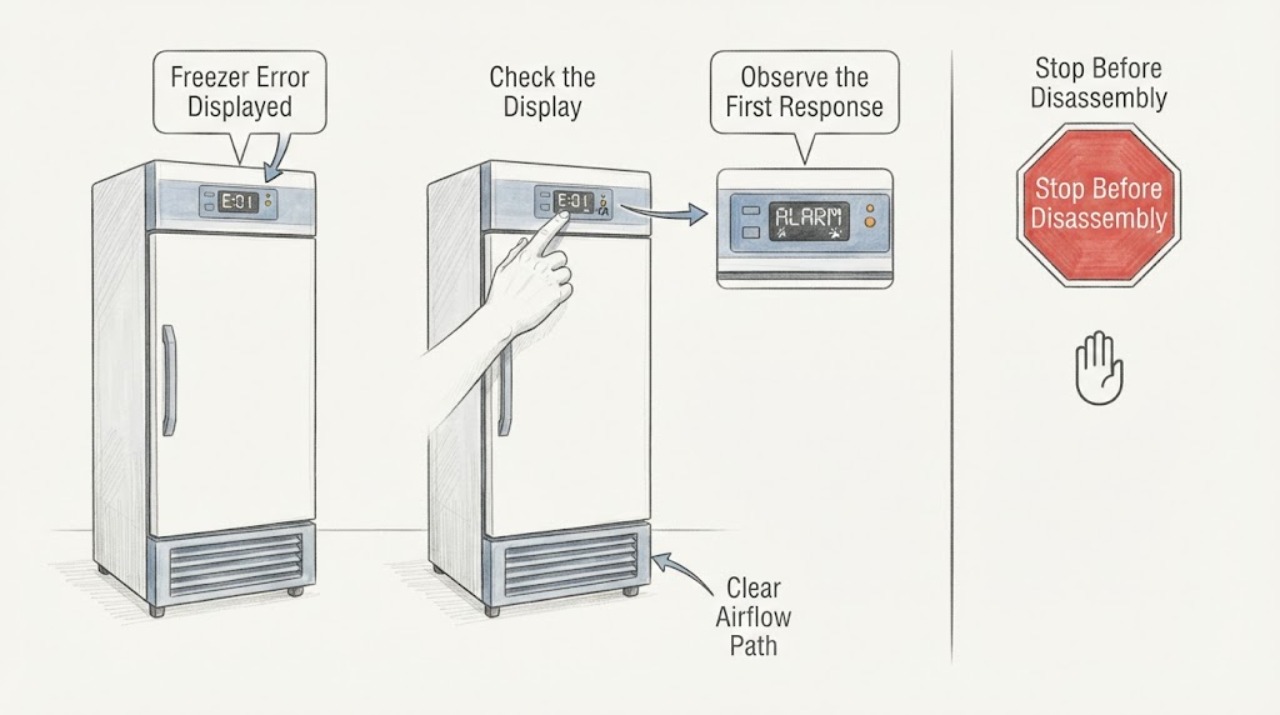
Write down the exact Kenmore freezer display, whether it is flashing or steady, and the model number before clearing it. Kenmore uses model-specific manuals for freezers, so a letter, number, temperature alarm, lock state, or OFF indication should be matched to the manual for that appliance rather than guessed from a generic chart. Check that the freezer has power, the door or lid closes and seals, vents are not blocked, and the control is not locked or intentionally set off. If the manual permits a power reset, follow that procedure once and monitor the display and temperature afterward. If the same error returns, the freezer warms, the control is unresponsive, or there is damaged wiring, smoke, burning odor, or repeated breaker operation, leave it off as appropriate and arrange qualified service. [Source: kenmore-manuals; kenmore-customer-care]
Work through in order
Diagnostic checks
Use only checks that match the exact appliance or system and its official guide.
-
Check 1
Record the exact characters or symbols on the display, whether they flash or remain steady, any audible alarm pattern, the freezer type, and the full model number from the rating label or manual.
Expected result: A letter, number, temperature indication, lock state, OFF message, blank display, or flashing alarm creates a different model-specific troubleshooting path.
Next step: Use the Kenmore manual search with the model number and preserve a photograph of the original display. Do not order a component from the code alone.
Why this matters
Why: Kenmore does not provide one universal freezer code meaning for every design; the exact model manual is needed to identify the condition and allowed reset procedure.
-
Check 2
Without opening the freezer, check whether interior lighting or the display has power, whether the plug is seated, whether the household circuit has tripped, and whether the control is locked or set to an OFF mode shown in the manual.
Expected result: No display or light suggests a power or control-state branch. A locked or intentionally off control can look like an error until the documented setting is changed. If power is present and the same error remains, continue without removing panels.
Next step: Restore only an obvious user-selected setting according to the manual. Do not repeatedly reset a breaker or open the electrical compartment.
Why this matters
Why: A display symptom may be caused by the supply or a user-control state rather than a failed cooling component, but persistent codes still require model-specific diagnosis.
-
Check 3
Check that the freezer door or lid closes fully, packages are not holding it open, the gasket contacts the cabinet, and internal or external airflow openings are not blocked by stored items or heavy frost.
Expected result: A door or lid that cannot close, a damaged seal, blocked vent, or heavy frost can explain a temperature alarm or warming symptom even when the display electronics are working. A closed seal and clear airflow make a recurring code more significant.
Next step: Reposition only accessible items and close the door or lid. If frost requires disassembly, the seal is damaged, or the error and warming continue, arrange qualified service.
Why this matters
Why: Temperature-related alerts can follow a warm compartment or poor air circulation; this check separates an accessible condition from an internal sensor or control problem.
-
Check 4
Note whether the freezer is actually warming, whether a high-temperature or door alarm is present, and whether the display changes after the door or lid is closed and left undisturbed for a supervised observation.
Expected result: An alarm that clears after the door is properly closed or after a known power interruption may be an operating alert. A code that remains while the freezer warms, or a temperature display that behaves inconsistently, needs service attention.
Next step: Keep the freezer closed and protect food as needed. Use the model manual for the alarm acknowledgement procedure, and do not rely on silencing an alarm as a repair.
Why this matters
Why: The display is evidence of a condition, not proof of a specific failed part; temperature and door observations help the technician distinguish an alarm from a control or sensor fault.
-
Check 5
If the exact Kenmore manual provides a power or control reset for the displayed condition, follow that procedure once with the freezer safely accessible, then monitor whether the display returns and whether cooling resumes normally.
Expected result: If the code clears and the appliance returns to normal operation, record the event and continue monitoring. If the code returns, the display changes to another fault, or cooling does not recover, the reset did not resolve the cause.
Next step: Do not repeat the reset as a substitute for diagnosis. Arrange qualified service with the model, original code, reset result, and temperature observations.
Why this matters
Why: A reset can clear a transient control state but cannot confirm a healthy thermistor, control board, compressor circuit, door switch, or wiring harness.
-
Check 6
Decide whether the error remains or returns, the freezer is warming, the display or controls are unresponsive, the door or lid cannot seal, or there is smoke, burning odor, damaged wiring, unusual noise, or repeated breaker operation.
Expected result: Any recurring code or cooling loss after the accessible checks means the appliance is not reliably operating. Electrical or physical damage adds an immediate safety reason to stop.
Next step: Leave the freezer off when safe and arrange qualified Kenmore appliance service; use a qualified electrician for suspected household supply faults and the appropriate emergency channel for smoke, fire, or an immediate electrical hazard.
Why this matters
Why: The remaining causes can include a model-specific sensor, control, relay, switch, harness, compressor circuit, or sealed-system issue that cannot be identified from a generic display.
Use your observations
Decision map
Find the observation that best matches what you see, then follow the next safe action.
-
PATH 01Safety boundary
What you see
The exact display is a temperature or door/lid alarm, and the door or lid was not fully closed.
Do this next
Close the door or lid, remove only the package blocking it, and monitor the alarm and temperature according to the model manual.
Why this path and its safety boundary
Safety stop: Continue with the exact-code and power/control-state checks; do not assume a persistent code is only an alarm.
-
PATH 02Safety boundary
What you see
The display is blank or the freezer has no interior light or response.
Do this next
Check the plug and household circuit from a safe location, then use the model manual or qualified service if power does not return.
Why this path and its safety boundary
Safety stop: Continue with door seal, temperature, and exact-code interpretation.
-
PATH 03Safety boundary
What you see
The display indicates an OFF or locked control state described in the model manual.
Do this next
Use the documented control procedure to restore normal operation, then verify that the display and cooling behavior are normal.
Why this path and its safety boundary
Safety stop: Do not force the controls; a persistent unresponsive display needs service.
-
PATH 04Safety boundary
What you see
The model manual allows a power or control reset for the exact displayed condition.
Do this next
Perform the documented reset once and monitor the display and freezer operation afterward.
Why this path and its safety boundary
Safety stop: Skip improvised reset sequences and contact qualified service with the exact model and code.
-
PATH 05Safety boundary
What you see
The code returns, the freezer warms, the door cannot seal, or an electrical safety symptom appears after the accessible checks.
Do this next
Keep the freezer off as appropriate, limit door opening to protect food, and arrange qualified appliance or electrical service; use emergency help for smoke, fire, or immediate danger.
Why this path and its safety boundary
Safety stop: Record the resolved condition and continue following the model manual's operating and alarm guidance.
Helpful context
Understand the symptom
The display cannot be interpreted without the model
Kenmore freezer controls vary by model and generation. An error code, a flashing temperature, an alarm, a lock state, or an OFF message may represent different conditions. Photograph the display and rating label before resetting so a technician can see the original symptom.
Separate an alarm from a control fault
A freezer can display an alert because the compartment warmed, the door or lid stayed open, or power was interrupted. That is different from a recurring code that remains after the door is closed and the appliance has stable power. Check the physical condition and temperature trend without dismantling the unit.
Use the manual as the reset procedure
The official Kenmore manual library is organized by model number and includes freezer manuals and product resources. Use that manual for the exact control sequence, lock behavior, alarm reset, and any model-specific code meaning. A generic button sequence can leave the appliance in an unintended mode.
Protect food and stop at the service boundary
Keep the door or lid closed as much as practical while deciding what to do with food if the freezer is warming. Do not open panels, test energized circuits, bypass a door switch, or work on sealed refrigeration components. A recurring error, worsening temperature, or electrical safety symptom needs qualified service.
Safety boundary
Stop conditions
- Stop immediately for smoke, fire, burning odor, exposed or damaged wiring, sparking, unusual heat, or a breaker that trips again.
- Do not open the electrical compartment, test live circuits, bypass a door or lid switch, alter circuit protection, or work on the sealed refrigeration system.
- Do not keep resetting the freezer or silence an alarm repeatedly while the cabinet is warming or the same error returns.
- If a code persists after the model-specific accessible checks, leave the freezer off when safe and arrange qualified service.
Only after diagnosis
Potential parts
- electronic control or user-interface assembly
Only consider this class when qualified diagnosis confirms a persistent display or control fault after the exact model procedure and power checks.
Confirm the exact Kenmore model and the manufacturer's fit information before ordering any component. - temperature sensor or thermistor
Only consider this class when qualified testing links a recurring temperature code or inaccurate reading to the sensor after door, airflow, and power conditions are ruled out.
Use the model manual and qualified service confirmation; do not assume a generic display identifies an interchangeable sensor. - door or lid switch and wiring harness
Only consider this class when qualified diagnosis confirms that a properly closed door or lid is not being detected or the harness is damaged.
Verify the exact model, switch location, component specification, and installation requirements with qualified service.
When checks do not resolve it
Need a professional?
Contact Kenmore customer care or qualified appliance service when the exact error is not resolved by the model manual, the code returns after one documented reset, the freezer is warming, the control remains unresponsive, or the door or lid cannot seal. Use a qualified electrician for suspected household supply problems and emergency service for smoke, fire, sparking, or immediate electrical danger.
Have this ready
- Exact Kenmore model and serial or rating-label details
- The exact display characters, whether they flash or remain steady, and any alarm sound
- Whether the freezer is warming, whether the compressor or fan appears to run, and when the symptom began
- Door or lid closure, gasket, frost, stored-item, and airflow observations
- Whether power was interrupted, which model-specific reset was attempted, and whether the code returned
- Any smoke, burning odor, sparking, damaged wiring, unusual noise, or repeat breaker behavior
Common questions
FAQ
What should I do when my Kenmore freezer displays an error?
Record the exact display and model number, then use the model-specific Kenmore manual. Check power, door or lid closure, airflow, and control state without opening panels. If the code returns or the freezer warms, arrange qualified service.
Can I reset a Kenmore freezer error by unplugging it?
Only use a power-reset procedure when the exact model manual permits it. Perform it once, monitor the display and cooling, and treat a returning code or continued warming as a service condition rather than repeating the reset.
Why is my Kenmore freezer showing an alarm instead of a normal temperature?
The display may be reporting a warm compartment, door or lid condition, power event, lock state, or model-specific fault. Check the door seal and power from outside the cabinet, preserve the exact display, and use the manual for the correct interpretation.
Read the exact guide
Official sources
- Customer Care & Support | Kenmore AppliancesKenmore · Kenmore customer-care, manuals, parts, warranty, safety, and repair-resource pathways
- Find Your Manual | Kenmore Appliance Manuals & GuidesKenmore · Kenmore model-specific owner manuals and resources for freezers and other appliances; exact code meanings and reset steps depend on the model
Community feedback
Share a repair observation
Share a plain-text repair observation. Accepted observations are published automatically; this page may take a moment to update.