
On this page
Start here
Quick answer
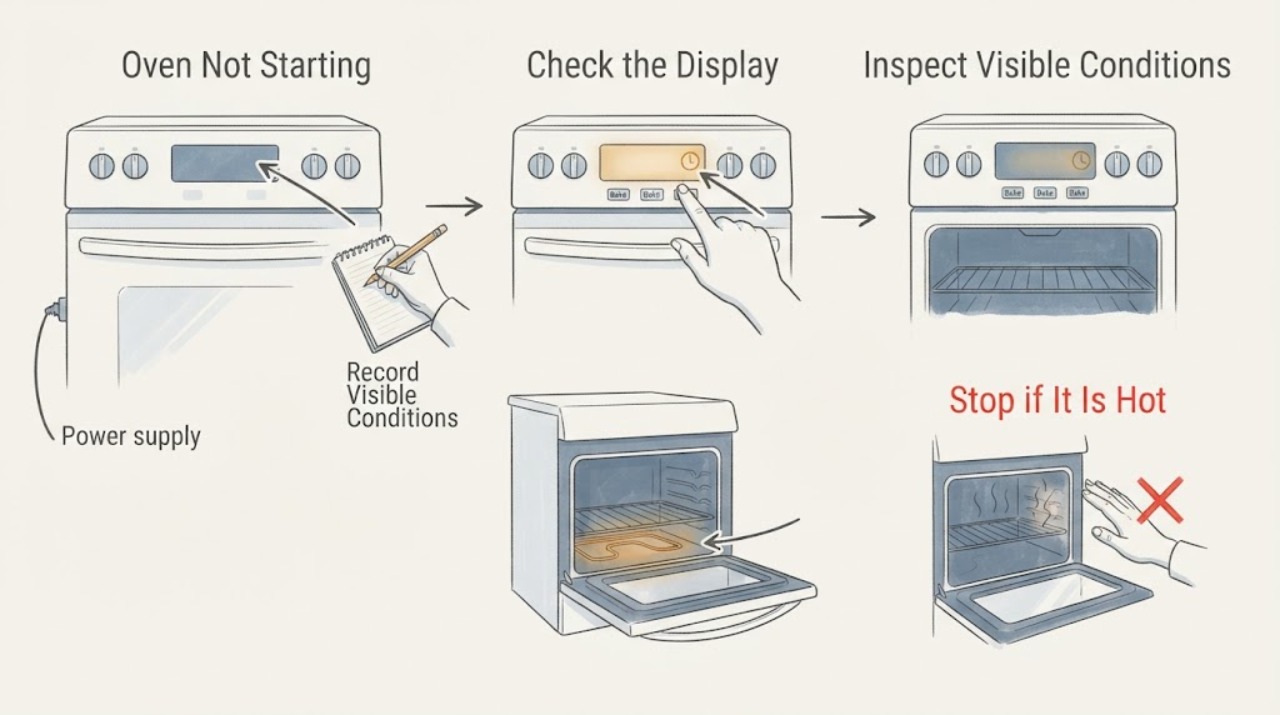
First determine whether the Kenmore oven has no display at all, has a display but will not accept a command, enters a cycle without heating, or is a gas model that does not ignite. Confirm the range or wall oven has power, the clock and controls are set, Control Lock or a delayed/Sabbath mode is not active, and the door is fully closed. Then select the exact model's Bake or other intended mode and press Start as described in its manual. A gas smell, delayed ignition, abnormal flame, smoke, sparking, burning odor, repeated breaker trip, or heat-damaged wiring is a stop condition: leave the appliance off and obtain qualified help. Do not remove panels, test live wiring, move a gas range, or repeatedly attempt ignition.
Work through in order
Diagnostic checks
Use only checks that match the exact appliance or system and its official guide.
-
Check 1
Identify whether the Kenmore appliance is a gas or electric range/wall oven, record its model number, and note the exact symptom: no display, display but no key response, cycle accepted but no heat, or gas ignition not occurring. Find the matching Kenmore manual before attempting model-specific controls.
Expected result: The fuel type or model is known, or the appliance identity is uncertain and the symptom spans more than one control or function.
Next step: Use the exact Kenmore manual for the control layout and start sequence. If the label cannot be read or the appliance has been modified, limit checks to safe external observations and arrange qualified service.
Stop if: Do not remove panels, access terminals, move a gas appliance, or guess a gas/electric procedure from another model.
Why this matters
Why: Gas ignition, electric heating, wall-oven controls, and range controls use different parts and start sequences. Without the model and fuel type, a button sequence or component diagnosis can be wrong.
-
Check 2
From a dry position, check the basic power symptom: see whether the display, clock, or interior light responds, verify the power cord is not visibly damaged, and inspect the household breaker or fuse only if there is no smoke, water, heat damage, or sparking. Do not repeatedly reset a breaker that trips.
Expected result: Nothing works, the display is blank but other range functions have power, the breaker is open, or the display and other controls respond normally.
Next step: Restore only an obvious breaker or fuse condition once, with all oven and surface controls off and the area dry. If power does not return, the breaker trips again, or heat damage is visible, leave the oven off and arrange qualified electrical/appliance service.
Stop if: Do not open the electrical cover, touch wiring, test voltage, or operate the oven after smoke, melted insulation, burning odor, sparking, or repeated trips.
Why this matters
Why: A completely dead control points toward the household supply, cord, terminal, or appliance power circuit. A working display narrows the problem to settings, control acceptance, door/lock status, fuel, heating, or ignition. A partially tripped or repeatedly tripping circuit is not a harmless reset issue.
-
Check 3
Check the clock and control state using the exact manual. Look for a flashing or unset clock, Control Lock or LOC indicator, delayed start, Sabbath or other special mode, an error code, or a cycle that was selected but never confirmed with Start. Cancel the current selection only with the documented Cancel/Off control.
Expected result: The clock is unset, the panel is locked, a delayed/special mode or code is active, Start was not confirmed, or the controls accept the normal Bake sequence.
Next step: Set the clock, clear the lock, leave delayed or special modes, and select the intended cycle only as the model manual directs. If the code returns or controls still reject commands, record the exact code and arrange service.
Stop if: Do not guess a hidden key combination, bypass a door lock, or continue resetting an overheating or malfunctioning control.
Why this matters
Why: Many electronic ovens will not begin an ordinary cycle until the clock, lock state, mode, and Start confirmation are valid. A recurring error or a control that remains unresponsive after the manual's safe cancel/reset is a control or sensor fault, not a reason to force the keys.
-
Check 4
Check the door and external controls before starting a cycle. Remove a rack or pan that prevents closure, verify the door is fully latched without slamming, and confirm no lock indicator remains after a completed clean cycle. Keep hands clear of the hinge and latch.
Expected result: The door is obstructed, does not close or latch, remains locked, or closes normally and the control accepts the cycle.
Next step: Remove only a simple rack or pan obstruction and follow the manual's cancel/cool-down instructions. Arrange service for a door, hinge, latch, or lock that does not operate normally.
Stop if: Do not force the door, bypass the lock switch, insert tools into the latch, or open a hot self-cleaning oven to troubleshoot.
Why this matters
Why: A door or lock interlock can prevent a cycle from starting or prevent a gas/electric heating request from being enabled. A latch that is bent, jammed, or still locked after cooling requires service; forcing it can damage the safety interlock.
-
Check 5
For an electric Kenmore oven only, start the documented Bake or other intended cycle and observe from outside for a normal control response, preheat indication, and heat after the model's normal preheat interval. Do not touch the element or remove a panel; note whether the surface elements work while the oven does not.
Expected result: The cycle never begins, the cycle begins but the oven stays cold, a heating element has a visible break or blister, the surface works but the oven does not, or the oven starts and heats normally.
Next step: Cancel the cycle and record the symptom, mode, and any code. Arrange qualified service for no heat, a damaged element, repeated control failure, or any electrical odor; do not order a part without model-specific confirmation.
Stop if: Do not test resistance live, touch an element, remove the rear panel, or keep operating after smoke, sparking, burning odor, or abnormal heat.
Why this matters
Why: A start failure remains a control/door/power issue. A cycle with no heat can involve an element, sensor, relay, thermal protection, wiring, or control board; a visible damaged element or a difference between surface and oven operation does not identify a safe DIY repair by itself.
-
Check 6
For a gas Kenmore oven only, confirm the appliance is not in a gas-emergency condition before any start attempt. Without moving the range or opening panels, observe whether there is a gas odor, a sound of escaping gas, delayed ignition, a repeated clicking ignition attempt, an abnormal flame, or smoke. Follow the exact manual only when there is no odor or abnormal flame.
Expected result: Gas is smelled or heard, ignition is delayed, the flame is yellow/unstable or absent, the igniter repeatedly clicks without safe ignition, or the oven starts with a stable normal flame.
Next step: For odor, escaping-gas sound, delayed ignition, abnormal flame, or smoke, leave immediately and contact gas or emergency assistance from a safe location. Without those signs, use only the model manual's external control and ignition checks; arrange service if the oven will not ignite.
Stop if: Do not light a burner manually unless the exact manual explicitly permits it for that model, do not repeatedly attempt ignition, do not operate switches near a gas odor, and do not move the range to inspect a connector.
Why this matters
Why: A gas odor or delayed/abnormal ignition can allow unburned fuel to accumulate and creates a fire or explosion hazard. A stable normal flame does not prove every control or venting component is healthy, but it separates a start symptom from an immediate gas emergency.
-
Check 7
If the oven still will not start, record the model, fuel type, display text or exact code, clock/lock state, selected mode, whether Start was accepted, door behavior, surface-function result, gas or electric observations, and any recent power event or self-clean cycle. Stop repeating start attempts and arrange qualified service.
Expected result: A documented control correction restores a normal cycle, or the oven remains unresponsive, does not heat/ignite, trips power, smells of gas, smokes, sparks, or overheats.
Next step: Monitor a successful cycle without changing additional settings. For a persistent or hazardous symptom, keep the oven off and provide the service professional with the record; gas emergencies require leaving first and seeking help from safety.
Stop if: Stop immediately for gas odor, delayed ignition, abnormal flame, smoke, sparking, burning smell, exposed or heat-damaged wiring, repeated breaker trips, or an oven that becomes dangerously hot.
Why this matters
Why: A corrected clock, lock, mode, door obstruction, or one-time power interruption is different from a persistent fault in the power supply, control, interlock, heating circuit, ignition, gas valve, sensor, or wiring. Hazard symptoms override further diagnosis.
Use your observations
Decision map
Find the observation that best matches what you see, then follow the next safe action.
-
PATH 01Safety boundary
What you see
The oven has no display or no appliance function, or the breaker/fuse is open.
Do this next
With all controls off and the area dry, check the household supply once; arrange qualified service for no power, a recurring trip, or any heat damage.
Why this path and its safety boundary
Safety stop: Continue with clock, lock, mode, and Start confirmation.
-
PATH 02Safety boundary
What you see
The display works but the clock is unset, the panel is locked, a delay/special mode is active, or Start was not confirmed.
Do this next
Use the exact Kenmore manual to set the clock, clear the lock or special mode, cancel safely, select the intended cycle, and press Start.
Why this path and its safety boundary
Safety stop: Continue with door/latch and fuel-type checks.
-
PATH 03Safety boundary
What you see
The door is obstructed, will not latch, or remains locked after the oven has cooled according to the manual.
Do this next
Remove only a simple obstruction and arrange service for a latch, hinge, or lock fault; never bypass the interlock.
Why this path and its safety boundary
Safety stop: Continue with the electric-heating or gas-ignition branch.
-
PATH 04Safety boundary
What you see
This is an electric oven and the cycle begins but no heat appears after the normal model-specific preheat interval.
Do this next
Cancel the cycle, record whether the surface works and whether an element is visibly damaged, and arrange qualified service.
Why this path and its safety boundary
Safety stop: If the oven starts and heats, monitor it; if the cycle never begins, return to power and controls.
-
PATH 05Safety boundary
What you see
This is a gas oven and there is gas odor, escaping-gas sound, delayed ignition, abnormal flame, smoke, or repeated ignition without a safe flame.
Do this next
Do not operate switches or attempt another ignition; leave immediately and contact gas or emergency assistance from a safe location.
Why this path and its safety boundary
Safety stop: Use only the exact model manual's external start checks, then arrange service if ignition does not occur.
-
PATH 06Safety boundary
What you see
Smoke, burning odor, sparking, exposed or heat-damaged wiring, repeated breaker trips, or dangerous overheating is present.
Do this next
Stop using the oven, isolate power only from a dry safe position when possible, and arrange qualified service; do not reproduce the fault.
Why this path and its safety boundary
Safety stop: Complete only the documented low-risk checks and record the result.
-
PATH 07Safety boundary
What you see
The oven remains unresponsive or fails to heat/ignite after the documented power, control, door, and applicable fuel checks.
Do this next
Keep it off and provide a qualified service professional with the model, exact symptom, code, and observations.
Why this path and its safety boundary
Safety stop: Monitor the restored cycle and stop if any hazard symptom returns.
Helpful context
Understand the symptom
Kenmore ovens and ranges span many model generations, fuel types, and control layouts. The model number matters: Kenmore's manual library is the authoritative place to identify the exact sequence for setting the clock, clearing a lock, selecting a mode, exiting special modes, and starting a cycle. A general instruction such as “turn the knob” is not safe for every electronic, gas, electric, or wall-oven control. Identify the appliance type and model before changing a setting.
Separate a start-control problem from a heat or ignition problem. If the display never appears, the fault begins with power. If the display works but Bake will not begin, check the clock, lock, mode, door, and Start confirmation. If the cycle begins but the oven stays cold, use the correct gas or electric branch and stop short of internal component testing. A surface burner working does not by itself prove that an electric oven heating circuit or a gas oven ignition circuit is healthy.
Gas symptoms change the safety plan. If gas is smelled or heard escaping, do not light the oven, operate switches, use a phone in the area, or move the appliance to inspect the connector. Leave immediately and contact emergency or gas assistance from a safe location. Never use a gas oven to heat the home; carbon monoxide is odorless and a malfunctioning fuel appliance needs qualified attention.
When checks do not resolve it
Need a professional?
Provide the Kenmore model and fuel type, exact display/code, clock and lock status, selected mode, whether Start was accepted, door behavior, surface-function result, gas/electric observations, breaker history, and any smoke, odor, spark, or heat-damage detail.
Have this ready
- Have the matching Kenmore manual, photos taken only from a safe position, and the sequence that was attempted. Do not move a gas range or remove panels to gather more information.
Common questions
FAQ
Why does my Kenmore oven have power but not start?
Check the model-specific clock, Control Lock, delayed or special mode, door latch, selected cooking mode, and Start confirmation. If the display accepts commands but the cycle still will not begin, record any code and arrange service rather than forcing the controls.
What should I check if the Kenmore oven display is blank?
With all controls off and the area dry, check the household breaker or fuse once and look for visible cord or heat damage. A blank display that does not recover, a recurring breaker trip, or any burning odor needs qualified service.
Can a lock or unset clock stop a Kenmore oven from starting?
Yes. Many electronic controls require a valid clock, an unlocked panel, a selected mode, and a Start confirmation. Use the exact Kenmore manual because key sequences and indicators vary by model.
What if a Kenmore gas oven clicks but does not ignite?
Do not keep attempting ignition. If you smell gas, hear escaping gas, observe delayed ignition, an abnormal flame, or smoke, leave immediately and seek gas or emergency assistance from a safe location. Without those signs, use only the exact manual's external checks and arrange service if ignition fails.
Can I use a Kenmore gas oven while waiting for repair?
Do not use it if it has a gas odor, delayed ignition, abnormal flame, smoke, sparking, or another safety symptom. Never use a gas oven to heat the home; keep it off and obtain qualified help when the fault persists.
Should I replace the bake element or igniter when the oven will not start?
Not without model-specific evidence. A no-start condition can be power, clock, lock, door, control, heating, ignition, sensor, wiring, or gas-supply related. Record the symptom and exact model and have a qualified professional identify the part and fit before replacement.
Read the exact guide
Official sources
- Find Your Manual | Kenmore Appliance Manuals & GuidesKenmore · Use the model-specific Kenmore manual to determine control, clock, lock, mode, start, gas, electric, and service instructions.
- Protect Your Family from Carbon Monoxide PoisoningU.S. Consumer Product Safety Commission · Government safety guidance relevant to a gas oven; it supports not using a gas oven for heating and seeking professional attention for fuel-appliance risks.
- Certain Older Gas Connectors May Be DangerousU.S. Consumer Product Safety Commission · Government safety guidance for a Kenmore gas range or oven when gas odor or suspected connector leakage is present; it does not identify a model-specific repair.
Community feedback
Share a repair observation
Share a plain-text repair observation. Accepted observations are published automatically; this page may take a moment to update.