
On this page
Start here
Quick answer
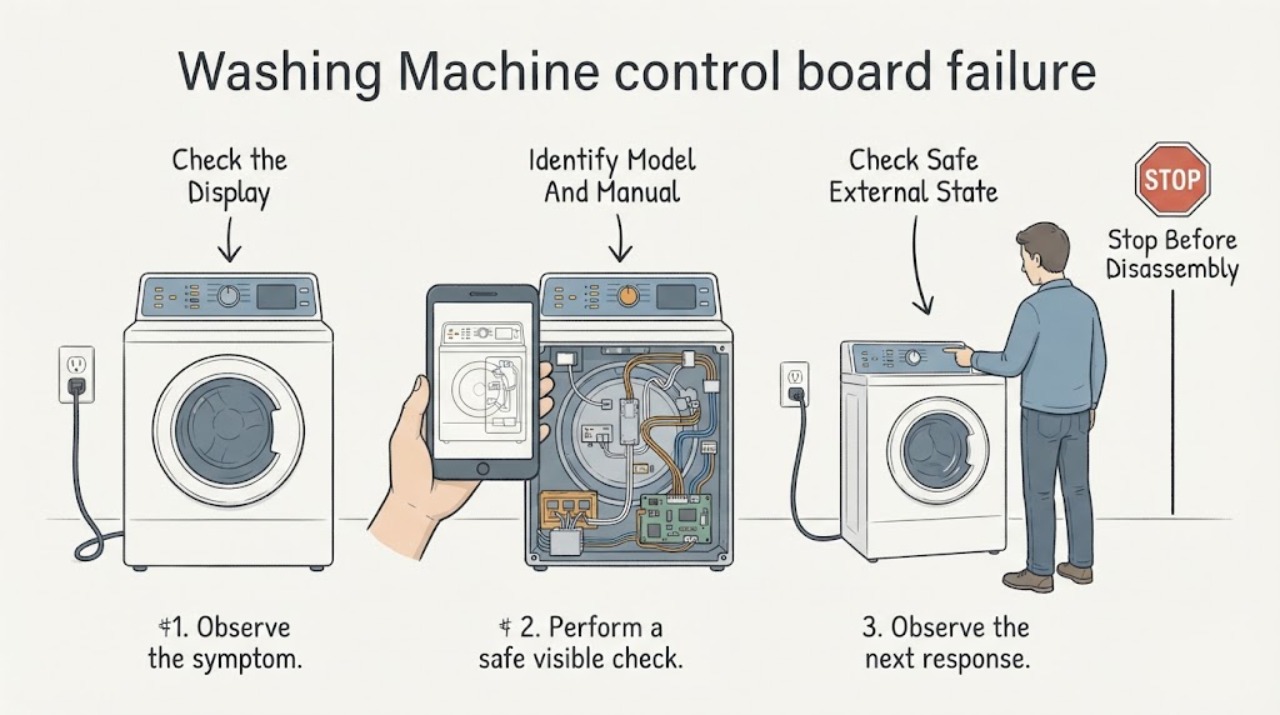
A washer that appears to have a control-board failure should not be diagnosed from a dead display, ignored buttons or a stopped cycle alone. First identify the exact Kenmore model and separate no power from a lit display that will not accept commands, a lid/door condition, a control-lock state, or a cycle-specific stop. Kenmore's manual portal requires the model number and provides model-specific owner resources, so use that manual before attempting any reset or part decision. If the washer remains unresponsive after safe external checks, stop using it and arrange qualified Kenmore service; do not open the console, bypass a lid/door lock or order a board by appearance.
Work through in order
Diagnostic checks
Use only checks that match the exact appliance or system and its official guide.
-
Check 1
With the washer idle and safe to approach, write down exactly what happens: no display or indicator at all, a display that is lit but ignores buttons, a cycle that stops after starting, or a displayed lock/message. Do not open the console or repeatedly start a cycle just to reproduce it.
Expected result: The display is completely dark; the display is lit but commands are ignored; the washer starts and then stops; or a lock/message is shown.
Next step: Use the exact model manual for the observed state. If there is smoke, a burning smell, water near electrical parts or a damaged cord, leave the washer off and use qualified service immediately.
Why this matters
Why: These observations are different decision paths. They do not by themselves prove that the electronic control board has failed, because the model, power state, lid/door condition and control state are still unknown.
-
Check 2
Read the washer's model and serial label without removing panels, then enter the model into Kenmore's Manuals page. Keep the full model exactly as printed, including letters, numbers and suffixes.
Expected result: A model number is available and returns a manual, or the label is missing/ambiguous and no exact manual can be matched.
Next step: If a manual is found, follow only its external controls and user checks. If the model cannot be matched, stop at the identity boundary and arrange service rather than applying another Kenmore model's board or reset procedure.
Why this matters
Why: Kenmore states that its manuals search uses the model number, which is at least 11 characters and should be entered without special characters. A matched manual is the only safe basis here for the washer's control-lock, lid/door and diagnostic instructions.
-
Check 3
Using the matched manual, perform only its user-level checks for the reported state: confirm the washer is connected to its intended supply, inspect the accessible cord and outlet area for damage, and confirm the lid or door is fully closed if the manual identifies that as a start condition. Do not bypass the lock or remove panels.
Expected result: The washer has no safe power indication, the cord/outlet area is damaged or overheated, the lid/door is not recognized as closed, or the external conditions appear normal.
Next step: For damage, heat, water near electrics or a failed supply, leave the appliance off and obtain qualified electrical/appliance service. If the external state is normal, continue only with the manual's model-specific control instructions; do not substitute a generic reset.
Why this matters
Why: An external supply or lid/door condition can prevent a washer from responding or starting, while a normal external state still does not isolate the control board. The specific behavior and test limits vary by model.
-
Check 4
Compare the observed display, indicators and cycle behavior with the matched Kenmore manual's troubleshooting or control descriptions. Record any exact message or light pattern and the point in the cycle where it occurs; do not assign an error meaning from a different model.
Expected result: The manual describes the same state and a user-level correction, or the state is absent from the manual or persists after its permitted check.
Next step: Apply only the documented correction once. If the behavior persists or the manual calls for service, stop using the washer and provide the model, exact message, symptom category and timing to qualified service.
Why this matters
Why: A documented model-specific state may have a safe user action. An undocumented or persistent state is evidence for service diagnosis, not proof that the board is the failed part.
-
Check 5
Stop using the washer for smoke, burning odor, arcing, a hot or damaged cord, leaking water near electrical parts, repeated breaker trips, or a cabinet/console that is damaged. Disconnect normal power only if it can be done without contacting water or damaged wiring; otherwise keep clear and obtain professional help.
Expected result: The hazard is present, clears after shutdown, or its source is uncertain.
Next step: Keep the washer off and arrange qualified appliance/electrical service. Do not continue cycling it, bypass the lid/door lock, test exposed wiring or install a board without model-specific diagnosis.
Why this matters
Why: A possible electrical or water hazard is outside ordinary control troubleshooting and must not be used to justify opening the console or bypassing a safety interlock.
Use your observations
Decision map
Find the observation that best matches what you see, then follow the next safe action.
-
PATH 01Next step
What you see
The display is dark and the model manual cannot be matched.
Do this next
Do not use another model's reset or board information. Record the label details and arrange qualified service or obtain the correct manual first.
Why this path and its safety boundary
Why it matters: The identity and external-power path are unresolved; a control-board failure has not been established.
-
PATH 02Next step
What you see
The display is lit, but buttons are ignored or the washer shows a lock/message.
Do this next
Use only the exact model manual's control/lock instructions once. If it persists, stop using the washer and request service rather than bypassing the lock.
Why this path and its safety boundary
Why it matters: The behavior may be a model-specific control state or interlock condition; the supplied topic does not identify which one.
-
PATH 03Next step
What you see
A matched manual's external check resolves the symptom.
Do this next
Monitor the next normal cycle and keep the model/manual details. Escalate if the symptom returns or a new message appears.
Why this path and its safety boundary
Why it matters: The observed problem was addressed by a documented user-level condition; this result does not prove the board was faulty.
-
PATH 04Next step
What you see
The symptom persists after the manual's permitted external checks, or there is smoke, burning, water near electrics or repeated breaker tripping.
Do this next
Leave the washer off and arrange qualified appliance service. Do not open the console, bypass safety devices or choose a replacement board by appearance.
Why this path and its safety boundary
Why it matters: The issue needs qualified diagnosis and may involve power, wiring, an interlock or a control assembly; no component is confirmed from the supplied evidence.
Helpful context
Understand the symptom
A possible board failure needs a symptom and model first
“Control board failure” is a diagnosis, not an observation. Record whether the washer is completely dark, has a lit but unresponsive panel, stops after starting, or shows a lock/message. Those states can lead to different model-specific checks, so do not order a board or open the console from the topic label alone.
Use the exact Kenmore manual
Kenmore's Manuals page asks for the appliance model number and says washer manuals and resources are available through that lookup. Read the full model label without removing panels, match it on the official page, and use only the returned manual's control, lock and troubleshooting instructions. Kenmore's washer catalog includes both front-load and top-load models, so a generic reset or another model's board procedure is not a safe substitute.
Keep checks external and symptom-led
With the washer off, inspect only accessible power/cord surroundings for damage and confirm the lid or door is closed if the matched manual lists that as a start condition. Compare any exact display message or indicator pattern with that manual. A normal external state does not prove a board failure; it only tells service what has already been checked.
Stop for hazards or persistent failure
Leave the washer off for smoke, burning odor, arcing, a hot or damaged cord, water near electrical parts, repeated breaker trips or a damaged console. Do not bypass a lid/door lock, test exposed wiring or install a board without model-specific diagnosis. Kenmore's Customer Care page provides warranty and repair information, and its warranty page says washer defects are handled under the stated warranty conditions and verified service process.
When checks do not resolve it
Need a professional?
Arrange qualified Kenmore appliance service when the washer stays unresponsive after the exact model manual's external checks, the model cannot be identified, the symptom persists, or any burning smell, smoke, arcing, damaged cord, water near electrical parts or repeated breaker trip is present. Supply the full model number, the display/indicator state, any exact message, the cycle stage and what changed immediately before the failure.
Common questions
FAQ
Does a dead or frozen Kenmore washer display prove the control board failed?
No. The model and exact behavior are missing, and a dark display, ignored buttons, a lid/door condition or an external supply issue can lead to different next steps. Identify the model and follow its manual before naming a board.
Can I use another Kenmore washer's reset or control-board instructions?
No. Kenmore lists multiple front-load and top-load washer models, and its manuals page requires the exact model number. Use only the matched manual and stop if the model cannot be confirmed.
When should I stop troubleshooting and request service?
Stop for smoke, burning odor, arcing, a hot or damaged cord, water near electrical parts, repeated breaker trips, a damaged console or a persistent symptom after the exact manual's external checks. Do not open the console or bypass a lid/door lock.
Read the exact guide
Official sources
- Customer Care & Support | Kenmore AppliancesKenmore · Official support hub for warranty, repair information and product manuals.
- Find Your Manual | Kenmore Appliance Manuals & GuidesKenmore · Official manual lookup page; requires the exact model number and provides washer manuals/resources.
- Washers | Laundry | KenmoreKenmore · Official washer catalog showing multiple front-load and top-load model families; used only to establish model variation.
- Warranty Information | Kenmore AppliancesKenmore · Official warranty page; washer warranty/service scope and distinction between drive-motor coverage and other components.
Community feedback
Share a repair observation
Share a plain-text repair observation. Accepted observations are published automatically; this page may take a moment to update.