
On this page
Start here
Quick answer
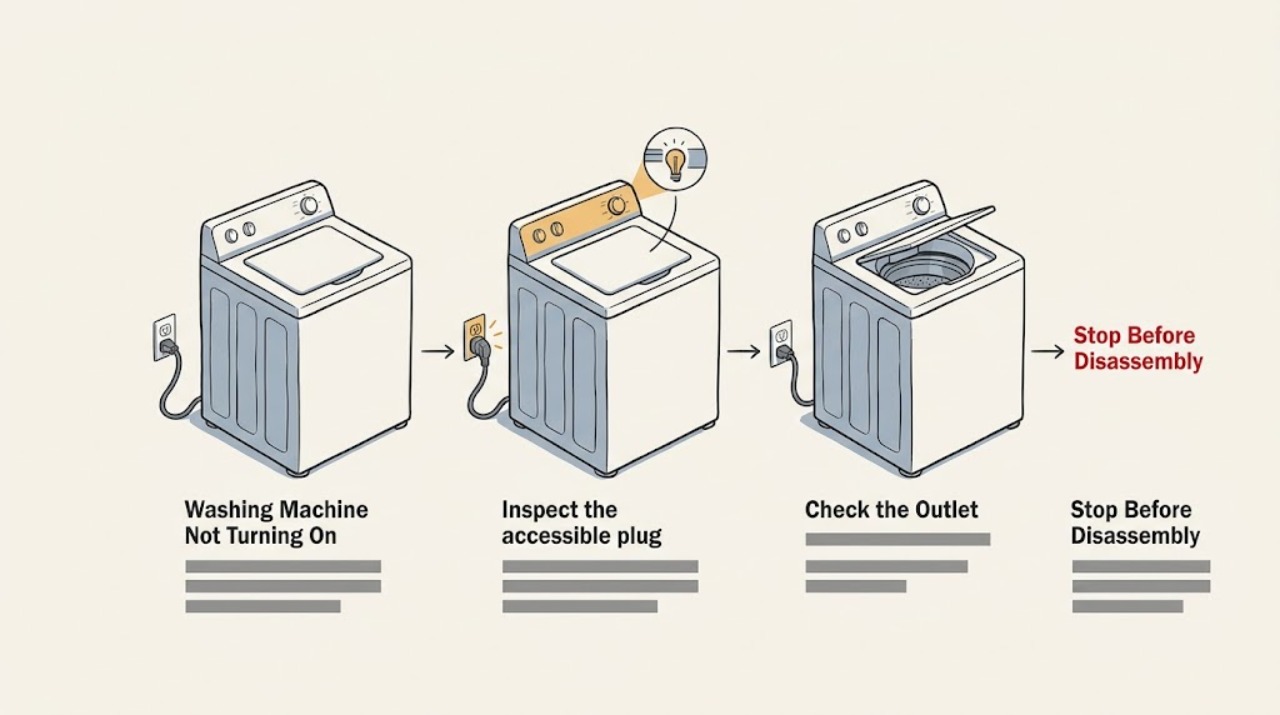
If a Kenmore washer has no display or response, first check the outlet and household breaker without opening the appliance, then confirm the power cord and plug are dry and undamaged. If the console lights but Start does nothing, select a valid cycle, cancel Delay Start or Control Lock if the model provides those features, and close the lid or door firmly so its interlock can engage. Record any displayed code and use the exact Kenmore manual for the model's reset and control sequence; Kenmore provides model-number manuals for this purpose. A single safe power reset may clear a control glitch, but repeated breaker trips, smoke, burning odor, arcing, wet electrical parts, a damaged cord, or a lid or door that will not safely latch is a stop condition. Do not bypass the interlock, open the cabinet, or test live wiring.
Work through in order
Diagnostic checks
Use only checks that match the exact appliance or system and its official guide.
-
Classify the washer's response
Without opening the washer, press the normal Power or control button once and note whether the console is completely blank, briefly flashes, shows a code, or lights normally but will not start. Record any sound, click, or drain activity and whether the problem began after a move, outage, leak, or breaker event.
Expected result: There are no lights or sounds; the console lights but Start is ignored; a code appears; or the washer begins a function and stops.
Next step: Follow the matching power or no-start branch below. If smoke, arcing, burning odor, wet electrical parts, or abnormal heat is present, stop immediately and do not press the controls again.
Why this matters
Why: A blank console sends the diagnosis toward the household power path, while a lit console sends it toward cycle controls, an interlock, a code, or the control system.
-
Check the outlet and breaker safely
If the area is dry and there is no smell, smoke, or visible damage, inspect that the plug is fully seated in the intended wall outlet and look at the household breaker or fuse position. Use another small appliance only in the same outlet and only when doing so is safe; do not use an extension cord, adapter, or a wet outlet to force a test.
Expected result: The outlet is dead, the breaker is open, the outlet works but the washer remains blank, or the breaker trips again when the washer is connected.
Next step: Leave a dead circuit or repeat trip for qualified electrical or appliance service. If the outlet is live and the washer cord is visibly sound, continue only with the manual-based external checks; do not measure live voltage or remove the rear panel.
Why this matters
Why: A dead outlet or open breaker can explain a blank console. A working outlet with a blank washer points to the cord, plug, appliance power path, or control. A repeat trip indicates an electrical fault rather than a reason to keep resetting.
-
Inspect the accessible plug and cord
With the washer disconnected only by a dry, safe plug area, look for a loose plug fit, cuts, crushed insulation, discoloration, melted plastic, moisture, or strain at the cord and plug. Do not pull on the cord, splice it, replace the plug, or use a damaged cord as a temporary test.
Expected result: The cord and plug are dry and intact, or there is visible damage, heat discoloration, moisture, or a loose connection.
Next step: Keep the washer unplugged and arrange qualified repair for any damage or moisture. If the external power path is sound and the console is still blank, provide the model and outlet result to service rather than opening the appliance.
Why this matters
Why: An intact external cord does not prove the appliance is healthy, but visible damage or moisture can create shock or fire risk and can explain loss of power.
-
Clear ordinary control states before diagnosing a lit console
For a console that lights, use the exact Kenmore manual to select a normal cycle, verify the required Power or Start sequence, and check whether Delay Start, Control Lock, Child Lock, Pause, or a special mode is active. Use only the button sequence documented for that model; do not hold random keys or bypass a lock.
Expected result: The washer was waiting for Delay Start, a control lock was active, no cycle was selected, the Start control responds after the documented sequence, or the console remains unresponsive.
Next step: If the washer starts normally after the documented setting is cleared, monitor one cycle. If it remains unresponsive or a code returns, record the exact display and stop repeated button experiments; arrange model-specific service.
Why this matters
Why: A scheduled start, control lock, pause state, or incomplete cycle selection can look like a failed washer even when the power system is working. Continued unresponsiveness after the documented sequence points toward an input, control, or code-related fault.
-
Confirm the lid or door interlock condition
With the washer empty of loose items and the controls off, inspect only the visible lid or door edge and strike area for clothing, a detergent item, or another obstruction. Close the lid or door normally, without slamming or forcing it, and observe whether the model's lock indicator or start response changes. Never defeat, tape, or hold an interlock closed.
Expected result: The lid or door closes and latches normally; a visible obstruction remains; the lock indicator stays open; or the lid or door is misaligned, cracked, or mechanically loose.
Next step: Remove only a loose visible obstruction when the washer is off. If the lock will not engage, the lid or door is damaged, or the washer would need an interlock bypass, keep it out of service and arrange qualified repair.
Why this matters
Why: The washer may intentionally refuse to start when its lid or door is not recognized as closed. A persistent lock indication with no visible obstruction can indicate an interlock, alignment, or control fault.
-
Capture the code and perform one documented reset
Write down every code, icon, or flashing pattern exactly as shown, along with the cycle and stage. Check the exact Kenmore manual for that code and its approved reset procedure. If the manual permits a power reset, disconnect the washer using the safe method it specifies, wait for the stated interval, reconnect once, and test one ordinary cycle only if there is no safety symptom.
Expected result: The code clears and the washer starts, the same code returns, the console stays blank, or the breaker trips or an unsafe symptom appears during the reset.
Next step: Keep the washer out of service for a returning code, repeat trip, smoke, odor, arc, heat, leak near electrics, or failed interlock. Give qualified service the model number, code, cycle, power observations, and reset result.
Why this matters
Why: A cleared one-time control state may have been temporary. A returning code, persistent blank console, or electrical symptom indicates a fault requiring diagnosis rather than repeated resets.
Use your observations
Decision map
Find the observation that best matches what you see, then follow the next safe action.
-
PATH 01Next step
What you see
The console is completely blank, the outlet is dead, or the household breaker is open.
Do this next
Do not keep cycling the breaker. Have the circuit or appliance power path checked by qualified service, and keep the washer disconnected if the cause is not obvious and safe.
-
PATH 02Next step
What you see
The outlet is live, the external cord looks dry and intact, but the console remains blank.
Do this next
Stop consumer troubleshooting and arrange qualified Kenmore appliance service for the washer power path or control. Do not open the cabinet or test live wiring.
-
PATH 03Next step
What you see
The console lights, but Delay Start, Control Lock, Pause, or missing cycle selection explains why Start is ignored.
Do this next
Use the exact model manual to clear the documented state and run one normal cycle. If the state returns, record it and arrange service.
-
PATH 04Next step
What you see
The lid or door does not latch, its indicator stays open, or the visible strike or hinge area is damaged.
Do this next
Do not force the lid or door and do not defeat the interlock. Keep the washer out of service and arrange qualified repair.
-
PATH 05Next step
What you see
A code or flashing pattern returns after one manual-approved reset.
Do this next
Stop repeated resets and provide the exact code, model, cycle, and stage to qualified service; do not guess a part from the code alone.
-
PATH 06Next step
What you see
There is water near electrical parts, smoke, burning odor, arcing, abnormal heat, cord damage, or a breaker trips again.
Do this next
Stop using the washer. If it is safe and dry to do so, disconnect it without touching wet energized equipment; otherwise keep away and obtain qualified or emergency help as appropriate.
Helpful context
Understand the symptom
First separate no power from no start
A blank console and a lit console are different faults. No lights or sounds point first to the outlet, breaker, plug, cord, or appliance power path. A lit console that will not begin points instead to a cycle selection, Delay Start or Control Lock setting, lid or door interlock, a displayed code, or a control fault. Do not remove panels to decide which path applies.
Kenmore behavior is model-specific
Kenmore publishes manuals by model number, and its washer range uses different cycles and controls. A product page can show features such as Delayed Start for one model, but that does not prove that every Kenmore washer has the same buttons or reset sequence. Read the manual for the complete model number before holding buttons or interpreting a code.
When a safe reset is no longer a useful test
A single reset performed as the manual describes can distinguish a temporary control state from a repeatable fault. If power returns only briefly, Start remains unavailable, a code returns, or a breaker trips again, stop repeated attempts. Wet electrical areas, smoke, burning odor, arcing, heat damage, or a damaged cord require the washer to remain out of service until qualified help is arranged.
Safety boundary
Stop conditions
- Stop immediately for smoke, burning odor, arcing, abnormal heat, melted or discolored plastic, a damaged cord or plug, water near electrical parts, or a breaker that trips again.
- Do not touch wet energized equipment, open the cabinet, test live wiring, splice a cord, use an extension cord to force operation, or bypass a lid or door interlock.
- Do not force a lid or door that will not latch, and do not repeatedly reset a breaker or control after the washer fails again.
- Stop after one model-documented reset if the code, blank console, no-start condition, or electrical symptom returns; arrange qualified repair.
Only after diagnosis
Potential parts
- lid or door interlock assembly
Consider only when qualified diagnosis confirms that the lid or door is correctly aligned but its interlock does not report a safe closed state.
Confirm the complete Kenmore model and manufacturer fit information before ordering; never bypass the interlock. - power cord or plug component
Relevant only when qualified inspection finds cord or plug damage or a failed connection in the appliance power path.
Keep a damaged or wet cord out of service and confirm exact model fit; do not splice or improvise a replacement. - user-interface control
Consider only when the outlet and external power path are sound but documented button input or console response is absent.
A no-start symptom alone does not identify this part; confirm the model and qualified diagnosis first. - electronic control board
Relevant only after qualified diagnosis links a persistent blank console, returning code, or control fault to the board.
Do not open the appliance or order a control from a symptom alone; verify exact model compatibility.
When checks do not resolve it
Need a professional?
Arrange qualified Kenmore appliance or electrical service when the outlet is live but the washer stays blank, when Start remains unavailable after the exact manual's control-state checks, when a lid or door interlock will not engage, when a code returns, or when a power fault, leak near electrics, smoke, odor, arc, heat, cord damage, or repeat breaker trip occurs. Provide the full model number and the observations rather than opening the washer.
Common questions
FAQ
Why is my Kenmore washer completely blank?
Start with a safe distinction between a dead outlet or open breaker and a washer whose external power path appears normal. Check the outlet and breaker only when the area is dry and there is no electrical hazard. If the outlet works but the console stays blank, arrange qualified service rather than opening the washer.
Why does my Kenmore washer have lights but not start?
Check the exact model manual for cycle selection, Delay Start, Control Lock, Pause, and the lid or door interlock. A washer may refuse to start until a valid cycle is selected and the lid or door is recognized as closed. Do not bypass the interlock.
Can I reset a Kenmore washer that will not turn on?
Use only the one power-reset procedure documented for the exact model, and test once only when there is no leak, smoke, odor, arc, abnormal heat, cord damage, or repeat breaker trip. If the symptom or code returns, stop resetting and arrange service.
What should I do if the breaker trips when I start the washer?
Do not repeatedly reset the breaker or use an extension cord. Keep the washer out of service, and arrange qualified electrical or appliance diagnosis, especially if there is water near electrical parts, a burning odor, smoke, arcing, heat, or cord damage.
What information helps a Kenmore technician?
Provide the complete model number, whether the console is blank or lit, outlet and breaker result, cord condition, cycle and control-lock or delay state, lid or door indicator, exact code or flashing pattern, reset result, and any leak, smoke, odor, arc, heat, or repeat-trip symptom.
Read the exact guide
Official sources
- Washing MachinesUnited States Consumer Product Safety Commission · CPSC washing-machine safety standards and unsafe-product reporting context
- Customer Care & Support | Kenmore AppliancesKenmore · Kenmore product manuals, parts and literature, and repair-service routing
- Find Your Manual | Kenmore Appliance Manuals & GuidesKenmore · Kenmore model-number lookup for washer manuals and model-specific appliance documentation
- 3.9 cu. ft. Front-Load Washer - White | KenmoreKenmore · Opened Kenmore washer product page showing model-specific cycles, controls, and Delayed Start behavior; not a universal specification
Community feedback
Share a repair observation
Share a plain-text repair observation. Accepted observations are published automatically; this page may take a moment to update.