
On this page
Start here
Quick answer
A KitchenAid cooktop can feel hot after cooking because a zone or a nearby hot pan is still transferring residual heat, and some models cycle their elements to control temperature. Turn every control off and keep hands and combustibles away while it cools. If the cooktop shuts down with an overheat code, check only for blocked airflow below it and, after it is fully cool, follow the one-minute power reset in the model's instructions. Persistent heat with all controls off, repeated overheat shutoffs, smoke, sparking, a cracked surface, or a gas odor is a stop-use condition that needs professional help.
Work through in order
Diagnostic checks
Use only checks that match the exact appliance or system and its official guide.
-
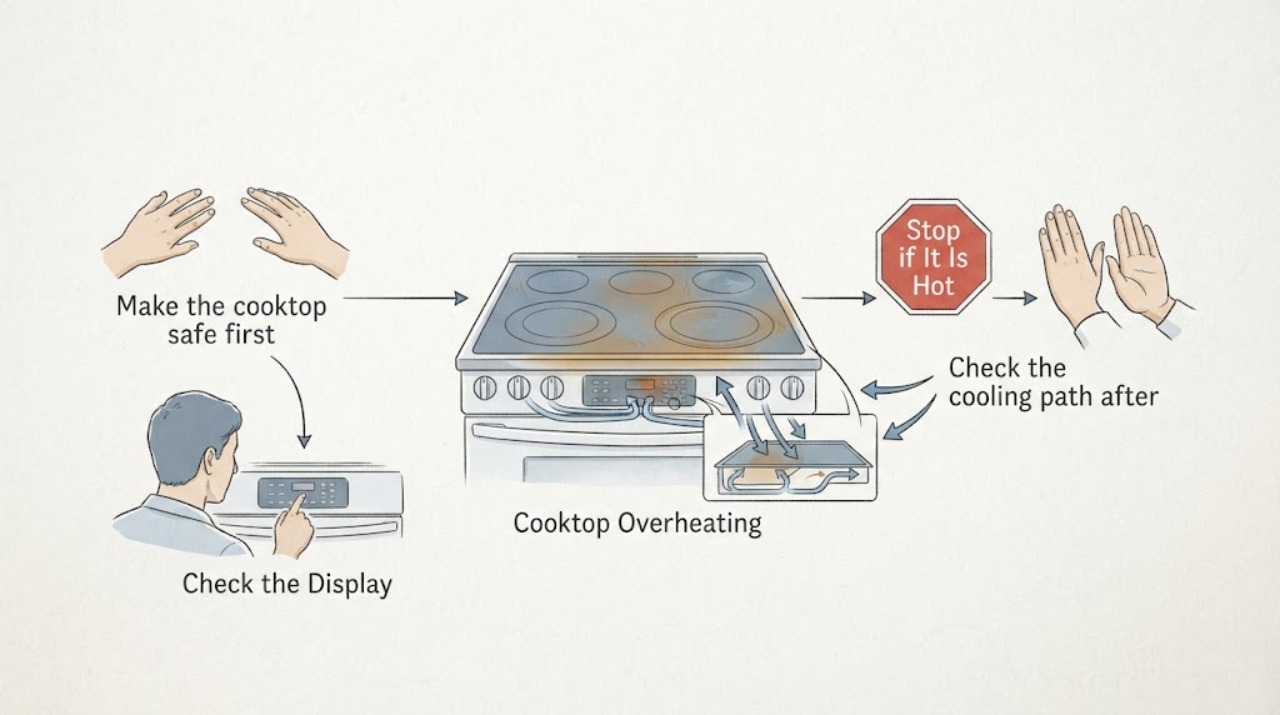
Make the cooktop safe first
Turn all surface controls to Off. Keep hands, towels, paper, and other combustibles away from the cooking areas while they cool, and do not touch the glass to test its temperature.
Expected result: The heat gradually falls with no smoke, sparking, persistent flame, gas odor, or damage visible.
Next step: If there is smoke, fire, sparking, a cracked or shattered surface, a flame that will not stop, or a gas odor, stop using the cooktop, leave the area when appropriate, and seek emergency or qualified service help. Otherwise continue only after it is cool enough to inspect safely.
Why this matters
Why: A hot surface after a cooking cycle may be residual heat, but an active hazard is not a troubleshooting condition.
-
Check whether the indicator describes residual heat
After the cooking area has cooled, note the display and the location of the heat. On an electric model, check whether H or HOT is shown; on an induction model, check whether H remains for a zone that was heated by that zone, an adjacent zone, or a hot pan.
Expected result: The indicator disappears as the zone cools, or the warmth is limited to a recently used zone or a nearby zone.
Next step: Keep the controls Off and allow the zone to finish cooling. If heat or the indicator continues with no recent cooking, treat it as abnormal and use the service branch below.
Why this matters
Why: KitchenAid describes this as a hot-surface or residual-heat indication, not proof that the control is still requesting heat.
-
Check the cooling path after an overheat shutdown
With the cooktop Off and cool, look from the accessible cabinet space below the unit for stored items or other obstructions pressed against the underside. Move only loose items that can be removed without opening the appliance or disturbing wiring, and turn off an oven below if it is operating.
Expected result: The underside has clear space and the cooktop still reports an overheat condition, or the same shutdown returns after cooling.
Next step: Do not remove panels or inspect energized parts. If the airflow is clear or the fault returns, leave the cooktop out of service and arrange a qualified appliance service visit.
Why this matters
Why: KitchenAid links an overheat shutdown to high surface or internal electronic temperatures and warns that restricted airflow can contribute to it.
-
Rule out an induction cookware trigger
If the KitchenAid unit is induction, remove an empty pan after the burner is Off and cool. For a later controlled test, use a pan that attracts a magnet, center it on the matching zone, and keep its base close to the zone size; do not run the zone with an empty pan.
Expected result: The overheat code or excessive heat occurs only with an empty, poorly centered, oversized, or unsuitable pan, or it returns with suitable cookware and food or liquid present.
Next step: Correct the cookware or placement and allow the unit to cool before another brief use. If it overheats again with suitable cookware and clear airflow, stop using it and request service.
Why this matters
Why: KitchenAid identifies empty cookware, unsuitable magnetic material, poor sizing, and inadequate ventilation as possible contributors to induction overheating or shutdown.
-
Use the documented power reset only after cooling
After the cooktop is fully cool and no immediate hazard is present, switch off its circuit breaker for one minute, switch it back on, and observe the controls for one minute without starting a cooking cycle.
Expected result: The indicator or overheat code clears and does not return during the observation, or it immediately returns or the controls behave abnormally.
Next step: If the fault returns, leave the breaker off when safe to do so and arrange qualified service. Do not remove the cooktop, bypass a safety device, or measure live electrical parts.
Why this matters
Why: KitchenAid lists a one-minute power reset as a recovery step for persistent hot indicators and some overheat codes; a returning fault is not resolved by repeated resets.
Use your observations
Decision map
Find the observation that best matches what you see, then follow the next safe action.
-
PATH 01Next step
What you see
The surface is warm only after cooking and the H or HOT indication disappears as it cools.
Do this next
Treat it as expected residual heat, keep the area clear until cool, and follow the model manual for normal operation.
-
PATH 02Next step
What you see
An overheat code or automatic shutdown occurs, but there is no smoke, gas odor, visible damage, or recurring fault after cooling and the accessible airflow path is clear.
Do this next
Use the model-specific cooling and reset sequence once, then stop if the fault returns.
-
PATH 03Next step
What you see
A zone remains actively hot with every control Off, or the cooktop produces smoke, sparks, a persistent flame, a gas odor, or visible damage.
Do this next
Stop use immediately and seek qualified appliance, gas, or emergency assistance as appropriate; do not continue tests.
Helpful context
Understand the symptom
Overheating does not mean the same thing on every KitchenAid cooktop. A radiant electric surface may cycle on and off, an induction surface may show a residual-heat H, and a gas surface needs a different safety response. Use the control layout and the owner's manual to identify the technology before interpreting the symptom.
Do not keep testing a cooktop that is producing smoke, a burning smell, sparks, an uncontrolled flame, or a gas odor. Keep people away, leave the area for a gas odor or fire risk, and contact the appropriate emergency or gas service from a safe location.
When checks do not resolve it
Need a professional?
Call a qualified appliance technician when a zone heats with its control Off, an indicator or overheat code returns after the documented reset, the accessible airflow is clear but overheating persists, or the glass, controls, or wiring show damage. For gas odor, uncontrolled flame, smoke, or fire risk, leave the area when safe and contact the appropriate emergency or gas service from a safe location.
Common questions
FAQ
Is it normal for a KitchenAid cooktop to stay hot after it is turned off?
Yes, residual heat from a recently used zone or nearby hot pan can keep a surface hot and can keep an H or HOT indication visible until the zone cools. Heat with every control Off, a returning overheat fault, or any smoke, gas odor, or visible damage is not a normal residual-heat case.
Why does an induction KitchenAid cooktop overheat or shut down?
KitchenAid points to an empty pan, unsuitable or poorly sized cookware, and restricted ventilation as possible contributors. Let the unit cool, use suitable centered cookware with food or liquid, and stop for service if the fault returns.
Should I keep resetting a cooktop that shows an overheat code?
No. After the unit is fully cool and the area is safe, use the documented one-minute breaker reset once and observe the controls. A returning code or abnormal heating means the cooktop should remain out of service for qualified diagnosis.
Read the exact guide
Official sources
- H - Residual Heat - Error Code - Induction CooktopKitchenAid Product Help · KitchenAid induction cooktop residual heat indication
- Indicator or Hot Light On - Electric CooktopKitchenAid Product Help · KitchenAid electric cooktop controls, hot light, cooling, and power reset
- Excessive heat around cookware on cooktopKitchenAid Product Help · KitchenAid induction cooktop cookware sizing, cookware material, and ventilation
- C81 or C83 - Electric CooktopKitchenAid Product Help · KitchenAid electric cooktop overheat shutdown and airflow checks
- E_3 - Induction CooktopKitchenAid Product Help · KitchenAid induction cooktop E_3 overheat, cookware, cooling, and reset guidance
- Displaying H or HOT - Electric CooktopKitchenAid Product Help · KitchenAid electric cooktop hot-surface indication and cooling
Community feedback
Share a repair observation
Share a plain-text repair observation. Accepted observations are published automatically; this page may take a moment to update.