
On this page
Start here
Quick answer
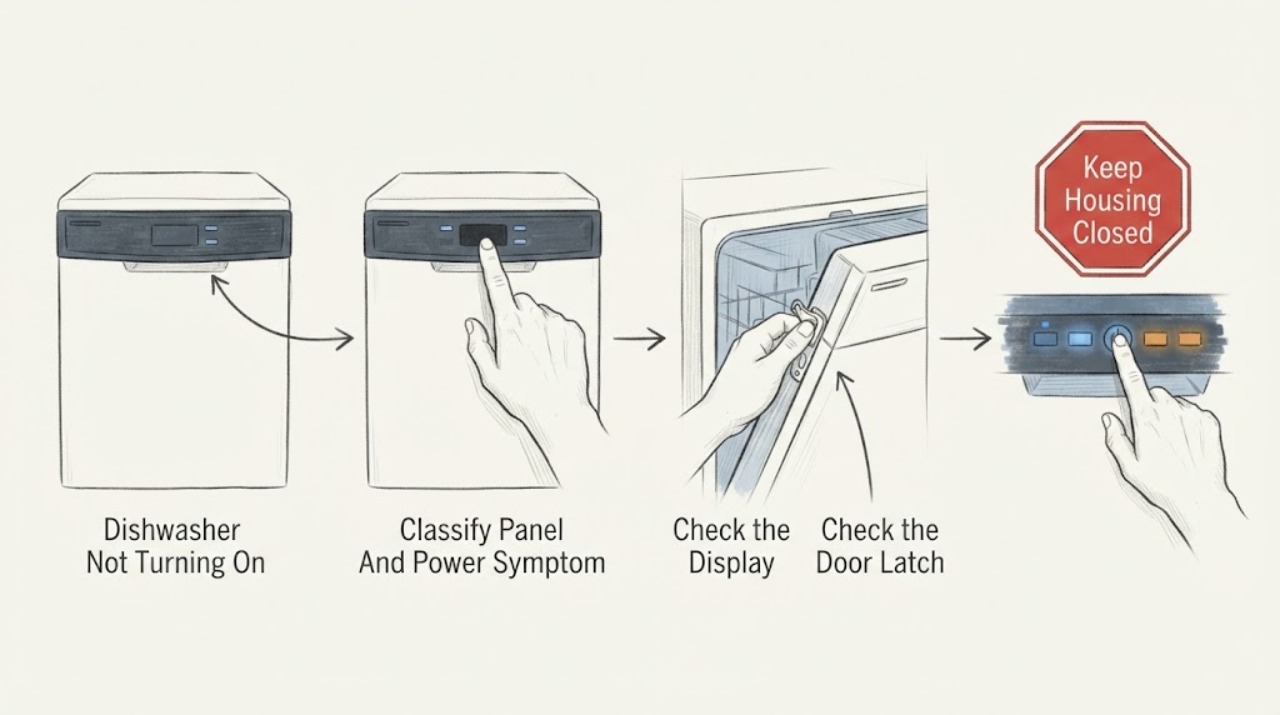
First decide whether your KitchenAid dishwasher has no power at all or has lights/buttons but will not start. If the display is dark, check the household breaker and the appliance's power connection only from a dry, safe position; do not open the electrical compartment. If the panel responds, check Control Lock, Sleep or Standby mode, Delay Wash, a fully closed and latched door, and the water-supply valve. KitchenAid says a locked control disables buttons, a delayed cycle waits until its scheduled time, an unlatched door prevents a cycle from starting, and some models require a model-specific control reset. Use the exact manual for your model's buttons and timing. If the breaker trips again, there is heat or a burning smell, the wiring or outlet is damaged, the panel remains dead, or the dishwasher still will not start after the documented user checks, leave it off and arrange qualified service.
Work through in order
Diagnostic checks
Use only checks that match the exact appliance or system and its official guide.
-
Check 1
With dry hands, note whether any display, indicator, interior light, or button response is present. If the panel is completely dark, check the dedicated breaker and any accessible power connection without removing panels or reaching into wiring. If power is present, do not treat the problem as a household power outage.
Expected result: The dishwasher is completely unresponsive, the breaker is open or trips again, or the panel lights respond but a cycle does not begin.
Next step: For a repeated trip, damaged cord/outlet, heat, odor, or water near electrical parts, leave the dishwasher off and arrange qualified service. If the panel responds, continue with the control-state checks.
Stop if: Do not remove the junction-box cover, test energized wiring, replace a breaker, or use an extension cord to make the dishwasher run.
Why this matters
Why: No display or a recurring breaker trip points toward a power-path or appliance electrical issue; a responsive panel routes to control, door, delay, water, or cycle-selection checks instead.
-
Check 2
If the panel responds, look for a Control Lock indicator or a button response that flashes without accepting input. Check whether the dishwasher is in standby or sleep mode and whether Delay Wash is displayed. Wake or cancel these states only with the controls and button-hold sequence documented for the exact model.
Expected result: The lock indicator is on or flashes, the panel wakes after the door or Start/Cancel is used, or a delay time is displayed; none of these states is present.
Next step: Disable the identified state using the model's instructions, then select a cycle and use Start/Resume as documented. If the controls remain disabled or the state returns unexpectedly, arrange service.
Stop if: Do not guess a universal lock button, hold time, diagnostic sequence, or hidden key combination across KitchenAid models.
Why this matters
Why: A lock, sleep state, or delay can make a working dishwasher appear not to turn on. If none is present, the cause is more likely the door, water supply, cycle selection, control, or power path.
-
Check 3
Select a cycle and press Start/Resume according to the model instructions. Close the door firmly and check that no rack, dish, utensil, or protruding item prevents the latch from engaging. On models with top-of-door controls, follow the documented timing for closing the door after pressing Start/Resume.
Expected result: The Start/Resume indicator flashes or sounds, the door does not click or stay latched, the lower rack or a dish blocks closure, or the door latches but the cycle still does not start.
Next step: Correct only a visible loading obstruction and retry the model-documented start sequence once. If the latch is loose, bent, misaligned, or the cycle still does not start, keep the dishwasher off and arrange service.
Stop if: Do not defeat or tape the latch, run the dishwasher with the door open, or remove the door panel to test the switch.
Why this matters
Why: KitchenAid says an unlatched door prevents a cycle from starting or resuming, and its model materials note that a door opened after Start may require Start/Resume again. A latched door with no start response points beyond simple closure.
-
Check 4
From the accessible area under the sink, confirm that the dishwasher water-supply valve is open and that no recent plumbing work left it restricted. Do not loosen the water line or reach behind the dishwasher. Check the exact installation instructions if the valve location is unclear.
Expected result: The valve is closed or restricted, or the valve is open and the dishwasher still refuses to start.
Next step: Open the valve only if it is clearly the dishwasher's accessible shutoff and there is no leak. Then retry the exact model start sequence once; if it remains a no-start or leaks, close the valve and arrange service.
Stop if: Do not disconnect the supply hose, remove the inlet valve, or continue if the valve, line, or cabinet is leaking.
Why this matters
Why: KitchenAid says modern dishwashers may require immediate water pressure to initiate a cycle, so a closed or restricted supply can look like a no-start condition. An open valve does not clear the inlet valve, control, wiring, or other internal components.
-
Check 5
After the safe user checks, use the exact model instructions to disconnect the dishwasher from power for the documented reset interval. For a plug-connected unit, unplug only from a dry, accessible plug; for a hard-wired unit, operate only the labeled dishwasher breaker. Restore power once and observe whether the panel and start function return.
Expected result: The dishwasher starts normally after the documented reset, the panel remains dark, or it returns to a no-start state or trips the breaker again.
Next step: If it does not recover or the problem returns, leave power off and provide the model, symptom sequence, breaker behavior, and any displayed code to qualified service. Do not repeat resets as a substitute for repair.
Stop if: Do not open the electrical box, bypass the door or control, measure live voltage, or replace internal fuses or boards.
Why this matters
Why: A one-time recovery supports a temporary control state but does not prove the underlying electrical system is sound. A dead panel, recurring no-start, or breaker trip needs professional diagnosis.
Use your observations
Decision map
Find the observation that best matches what you see, then follow the next safe action.
-
PATH 01Next step
What you see
The dishwasher has no lights or display, or its breaker trips when power is restored.
Do this next
Leave the dishwasher off. Have a qualified electrician assess the household circuit when the breaker/outlet is involved, and have appliance service assess the dishwasher; do not keep resetting the breaker.
Why this path and its safety boundary
Why it matters: A power-path or internal electrical fault is more likely than Control Lock, Delay Wash, or a latch setting.
-
PATH 02Next step
What you see
The panel lights or responds, but buttons are disabled, flash, or a delay time is shown.
Do this next
Clear the indicated state using the exact model instructions, select a cycle, and press Start/Resume. Escalate if the lock, sleep, or delay state cannot be cleared or returns without user selection.
Why this path and its safety boundary
Why it matters: The appliance is powered; a control state is more likely than a dead main supply.
-
PATH 03Next step
What you see
The panel accepts a cycle but Start/Resume flashes, the door does not remain latched, or the water supply is closed/restricted.
Do this next
Correct only the visible loading or valve condition and retry the model-specific sequence once. Arrange service for a latch, supply connection, inlet, or internal fault.
Why this path and its safety boundary
Why it matters: A door or water-entry condition is more likely; KitchenAid states both can prevent a cycle from starting, while the exact latch and plumbing arrangement varies by model.
-
PATH 04Next step
What you see
The dishwasher remains unresponsive or returns to no-start after the model-documented control reset.
Do this next
Keep the dishwasher off and arrange qualified service with the exact model and observed sequence. Do not perform diagnostic-mode or live electrical tests unless performed by the technician.
Why this path and its safety boundary
Why it matters: A control, wiring, latch, inlet, or other internal appliance fault cannot be safely distinguished by more button presses.
Helpful context
Understand the symptom
“Not turning on” has two different starting points
A dark panel and a lit panel that will not begin a cycle should not be diagnosed the same way. KitchenAid's official troubleshooting path first covers water, Control Lock, standby/sleep or Delay Wash, the door latch, and a control reset. Its broader troubleshoot page also separates dishwasher generations and systems, so the model number remains important when a button name or reset procedure differs.
A reset is a control check, not an electrical repair
KitchenAid describes disconnecting power briefly as a possible control reset for a dishwasher that will not start. A reset can clear a temporary control state, but it cannot make a damaged cord, outlet, breaker, latch, control, or wiring safe. If power returns only briefly, the breaker trips, or the panel remains dead, stop repeating resets and arrange service.
When checks do not resolve it
Need a professional?
Arrange qualified appliance service for a dead panel after safe power checks, a recurring no-start after the model-specific reset, a failed or misaligned latch, an inaccessible or leaking water connection, a recurring error, a breaker trip, heat, burning odor, damaged cord/wiring, or any condition requiring a panel or internal component. Use an electrician when the household circuit, breaker, outlet, or hard-wiring appears involved.
Common questions
FAQ
What is the difference between a KitchenAid dishwasher with no power and one that will not start?
A dark panel or missing indicators points first to the power path; a lit panel routes to Control Lock, sleep/standby, Delay Wash, door latch, water supply, cycle selection, or reset. Do not open wiring to decide between them.
Could Control Lock make the dishwasher appear not to turn on?
Yes. KitchenAid says an active Control Lock disables the buttons and may flash when a button is pressed. The button and hold time vary by model, so use the exact model instructions rather than a universal sequence.
Why does my dishwasher have lights but not start a cycle?
Check whether it is in sleep/standby or Delay Wash, whether a cycle was selected, whether the door is fully latched, and whether the water supply is open. If those states are clear, use the exact model reset once and arrange service if the no-start persists.
Can a closed water valve prevent a KitchenAid dishwasher from starting?
It can. KitchenAid says modern dishwashers may require immediate water pressure to initiate a cycle, and its consumer guide lists a turned-off water supply as a no-start cause. Check only the accessible valve; do not loosen the water line.
Should I keep resetting the dishwasher if it still will not turn on?
No. A model-documented power reset can clear a temporary control state, but repeated resets do not diagnose a dead panel, breaker trip, damaged wiring, latch fault, or internal control problem. Leave it off and arrange qualified service if the issue returns.
Read the exact guide
Official sources
- Not Starting or Operating - Dishwasher - Product Help | KitchenAidKitchenAid Product Help · KitchenAid dishwasher no-start and no-operation checks for water, Control Lock, standby/sleep, Delay Wash, door latch, and control reset
- Dishwasher Not Starting: List of Solutions | KitchenAidKitchenAid Canada · KitchenAid dishwasher not-starting explanation for Control Lock, sleep mode, delay wash, door latch, water supply, and model-specific reset
- Troubleshoot | KitchenAidKitchenAid · KitchenAid model-family troubleshooting entry points for dishwasher generations and system variations
- DISHWASHER FEEDBACKKitchenAid · KitchenAid dishwasher cycle feedback, Start/Resume, door timing, Delay, and Control Lock behavior for the covered cycle-guide family
Community feedback
Share a repair observation
Share a plain-text repair observation. Accepted observations are published automatically; this page may take a moment to update.