
On this page
Start here
Quick answer
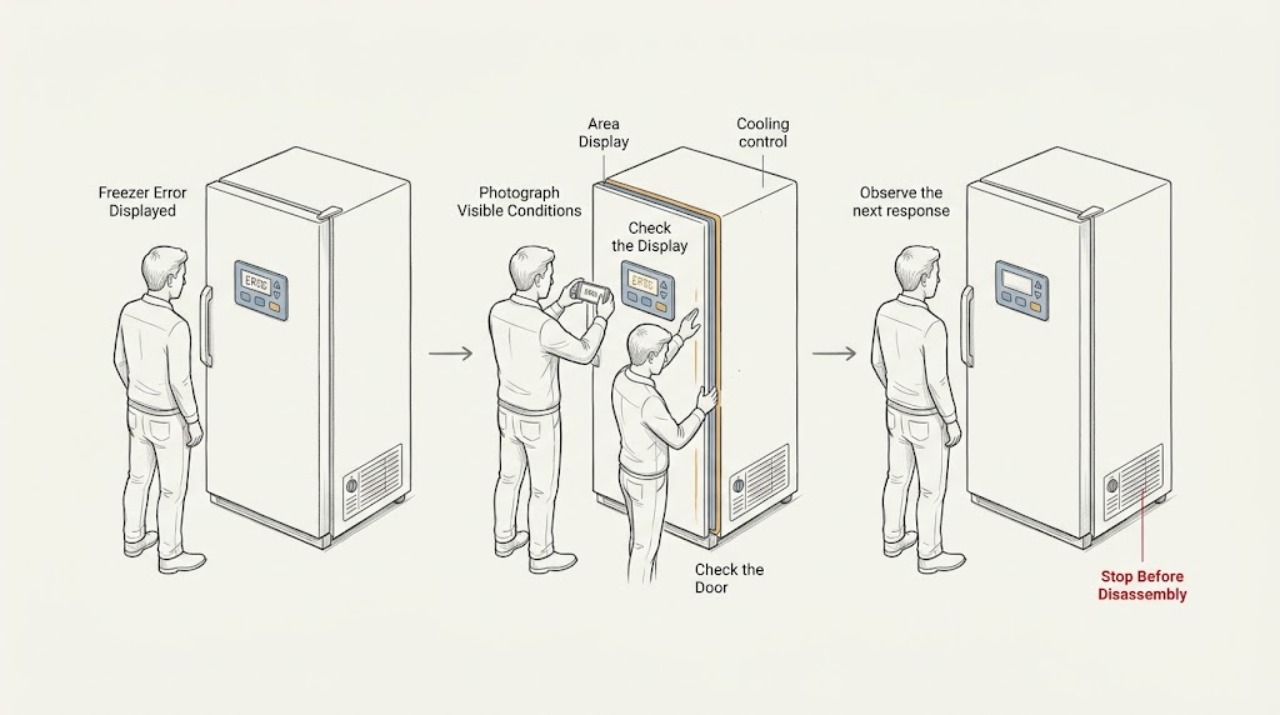
When a KitchenAid freezer displays an error, photograph or write down the exact letters, numbers, and flashing pattern before clearing it. Check whether cooling is enabled and whether the message indicates a recent power interruption, temperature alarm, demo setting, or a service condition; the meaning and button sequence vary by model. If the matching owner’s manual permits a single power reset, switch the unit off from its accessible control for the specified interval, restore power, and watch the display. If the code returns, cooling does not resume, or a breaker trips, stop resetting and arrange qualified appliance service.
Work through in order
Diagnostic checks
Use only checks that match the exact appliance or system and its official guide.
-
Check 1
Photograph or write down every visible character, icon, and flashing pattern. Note whether the freezer is still cold, whether its interior light works, whether you hear a fan or compressor, and whether the message appeared after an outage or door-open event.
Expected result: The display shows a recognizable code or status message, or only a generic flashing light; cooling either continues or has stopped.
Next step: Use the model number and exact message to open the KitchenAid support result or owner’s manual before attempting a reset.
Why this matters
Why: The exact code and cooling state determine the next branch. A temperature-related warning can follow a power interruption, while a recurring fault code with no cooling needs service even if the display can be cleared.
-
Check 2
Check the display for a cooling-off, demo, showroom, Sabbath, power-outage, or temperature-alarm indication. Follow only the matching model-specific instruction to turn cooling on or acknowledge the warning; do not guess a button combination from another model.
Expected result: The status clears and the normal temperature controls return, or the message remains and the panel stays limited or unresponsive.
Next step: If cooling is restored, monitor the temperature and check whether the same message returns. If the status cannot be cleared, continue with the documented power-reset check only if the manual allows it.
Why this matters
Why: A cleared status may have been an operating mode or an alert requiring acknowledgement rather than a failed component. A persistent status, especially with no cooling, needs a controlled reset or service path.
-
Check 3
If the exact support page or manual calls for a reset, keep the doors closed and power the appliance down using the accessible unplug or breaker method for that model’s stated interval. Restore power once, ensure cooling is enabled, and do not open panels or enter service diagnostics.
Expected result: The display returns to normal and cooling resumes, or the same message comes back after power is restored.
Next step: Watch the display for the monitoring period specified by the KitchenAid guidance. If the error returns, record the timing and arrange service.
Why this matters
Why: A one-time recovery can indicate a transient control state. A repeated error after the documented reset is evidence that the underlying condition remains and is not a reason to repeat the reset indefinitely.
-
Check 4
After a successful reset, verify that cooling is on and use an appliance thermometer if available. Check that the freezer continues to cool without repeated alarms; avoid repeatedly opening the door to test it.
Expected result: The temperature trends back toward the normal frozen range and the message stays away, or the temperature remains high and the error returns.
Next step: Arrange qualified service for persistent warming or a recurring code, and give the technician the exact message, temperature observations, and reset result.
Why this matters
Why: Stable cooling with no repeat message supports monitoring. Continued warming or a recurring code indicates a cooling, sensor, or control fault that user-level checks cannot identify safely.
Use your observations
Decision map
Find the observation that best matches what you see, then follow the next safe action.
-
PATH 01Safety boundary
What you see
The message clears after the model-specific acknowledgement and cooling is operating.
Do this next
Keep the doors closed, monitor the freezer temperature, and record whether the message returns.
Why this path and its safety boundary
Safety stop: If food has warmed or the alert returns, stop treating it as a one-time notification and arrange service or follow food-safety guidance.
-
PATH 02Safety boundary
What you see
A flashing F appears and returns after the documented power reset, or cooling does not resume.
Do this next
Arrange KitchenAid or qualified appliance service and provide the photo of the code, model number, cooling status, and reset result.
Why this path and its safety boundary
Safety stop: Do not repeat resets, remove panels, or test internal sensors, relays, wiring, or sealed-system components.
-
PATH 03Safety boundary
What you see
The panel is lit but most commands are disabled and the display indicates a special mode or a recent outage.
Do this next
Use the owner’s manual for the exact procedure to exit the mode or acknowledge the outage; sequences vary by model.
Why this path and its safety boundary
Safety stop: If the mode cannot be exited or the panel remains unresponsive, arrange service instead of trying undocumented combinations.
-
PATH 04Safety boundary
What you see
The appliance is dark, the breaker trips again, or power cannot be restored safely.
Do this next
Leave the circuit off when necessary and have the household supply checked by a qualified electrician; arrange appliance service if the supply is stable but the freezer remains dark.
Why this path and its safety boundary
Safety stop: Do not repeatedly reset the breaker, change its rating, or access live wiring.
Helpful context
Understand the symptom
Record the message before trying to clear it
Error displays are not interchangeable across KitchenAid freezer and refrigerator families. Take a photo of the complete message, including any flashing lights, and note whether the interior light, fans, or cooling sound are present. The model number lets you match the code to the correct owner’s manual.
A code is not always a failed part
Some displays report a power interruption, an over-temperature condition, cooling being turned off, or a demonstration setting. Other messages identify a control or sensor fault. Clear the condition only with the model-specific procedure; do not enter technician diagnostic tests or open the cabinet.
Protect food while the message is active
Keep the freezer closed as much as possible. If the display is accompanied by warming, move food to a known-working freezer or cooler when practical and use a food thermometer or the safety guidance in the owner’s materials to decide what can be kept.
Safety boundary
Stop conditions
- Stop immediately for smoke, arcing, a burning or hot electrical smell, a hot or damaged cord, water near electrical parts, or a breaker that trips again.
- Do not open the control housing, remove rear covers, enter technician diagnostics, bypass a safety condition, or test live wiring.
- If food safety is uncertain after a temperature alarm or outage, keep questionable food out of use until a thermometer or official food-safety guidance supports a decision; smell and appearance are not reliable tests.
Only after diagnosis
Potential parts
- electronic control board
Only consider this category after a qualified diagnosis confirms a control fault and rules out a temporary alert, power problem, sensor issue, or cooling-off mode.
Confirm the complete model number and official fit information; control boards are model-specific and should not be selected by appearance alone. - temperature sensor
Only consider this category when the exact error and qualified testing identify a sensor problem rather than a power or control-mode condition.
Verify the exact model and approved part information before ordering; sensor connectors and ratings vary.
When checks do not resolve it
Need a professional?
Arrange qualified appliance service when the error returns after the model-specific reset, cooling does not resume, the display remains unresponsive, or the code identifies a service condition. Arrange electrical service for a dead circuit or repeated breaker trips.
Common questions
FAQ
What should I do first when my KitchenAid freezer shows an error?
Record the exact letters, numbers, and flashing pattern, then note whether the freezer is still cooling. The model number and complete message are needed to select the correct KitchenAid procedure.
Can I reset a KitchenAid freezer error myself?
Only when the exact KitchenAid support page or owner’s manual calls for it. Follow the stated power-down interval once, restore power, make sure cooling is enabled, and arrange service if the message returns.
Why is the display on but the freezer is not cooling?
The unit may be in a cooling-off or demonstration setting, may be reporting an outage or temperature condition, or may have a cooling fault. Check the model-specific status message and do not keep clearing it if the temperature remains high.
Should I keep opening the freezer to check the food?
No. Keep the door closed as much as possible and use a thermometer when available. If an alarm followed an outage or warming event, use food-safety guidance rather than smell or appearance alone.
Read the exact guide
Official sources
- Control Panel or Interface Not Working - Built-In RefrigeratorKitchenAid Product Help · KitchenAid control-panel modes, outage status, and reset guidance
- Error Codes, Blinking, Flashing LightsKitchenAid Product Help · KitchenAid refrigerator/freezer error-code index
- Call for Service - Error Message - Built-In RefrigeratorKitchenAid Product Help · KitchenAid error-message reset and service boundary
- Over Temperature Light - Error Message - Built-In RefrigeratorKitchenAid Product Help · KitchenAid freezer over-temperature warning and recovery guidance
- Owner's ManualKitchenAid · KitchenAid model-specific owner instructions and control guidance for the opened manual
- Cooling Off Indicator Light - Side by Side RefrigeratorKitchenAid Product Help · KitchenAid cooling-off indication and model-specific reactivation guidance
- 9 Possible Freezer Troubleshooting Fixes & TipsKitchenAid · General KitchenAid freezer symptom and professional-service guidance
- Flashing "F" - Error Code - RefrigeratorKitchenAid Product Help · KitchenAid freezer/refrigerator flashing F troubleshooting
Community feedback
Share a repair observation
Share a plain-text repair observation. Accepted observations are published automatically; this page may take a moment to update.