
On this page
Start here
Quick answer
Treat a completely dark KitchenAid YKHMS147H as a power-path question first, not as proof of a failed high-voltage part. This is an older microwave hood combination, and KitchenAid's official dimension sheet identifies the related KHMS147H as a microwave hood combination while not listing the Y prefix; confirm the exact rating-label model and market before applying model-specific instructions. From a safe, accessible position, note whether the display, interior light, vent fan, and cooktop light are all dead or whether only the microwave controls are dead. Check the accessible grounded outlet and breaker once; if the outlet is dead or the breaker trips again, stop and use an electrician. If the outlet works, the door closes, and the display remains dead, keep the embedded unit closed and arrange qualified microwave service. Do not remove the cabinet, reach behind the installation, perform a live test, or short a door interlock.
Before you begin
Safety first
- Do not remove the outer microwave cabinet, access high-voltage components, test energized terminals, short or bypass the door interlock, pull the hood combination from its mounting, or continue operation after a breaker/fuse trip, smoke, arcing, burning odor, heat damage, wet electrical area, or damaged cord. Keep the unit closed and power isolated when a safe accessible disconnect is available.
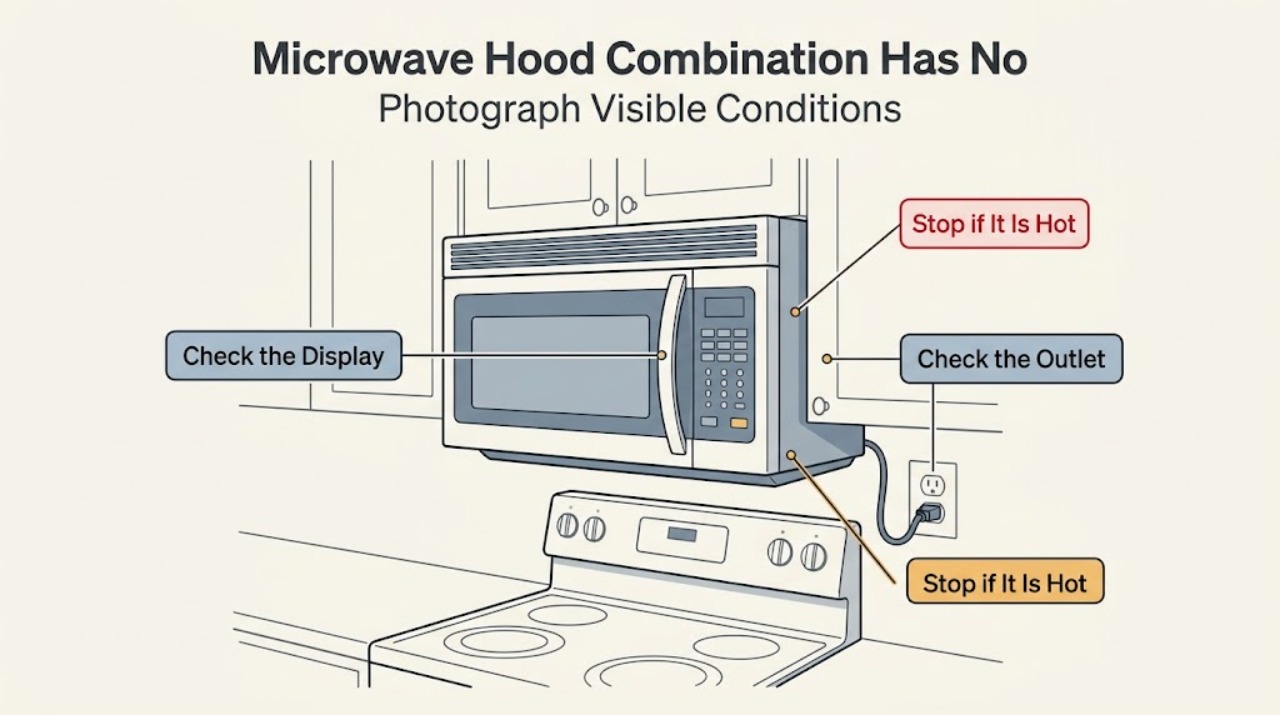
Work through in order
Diagnostic checks
Use only checks that match the exact appliance or system and its official guide.
-
Check 1
Before applying any model-specific instruction, open the microwave door normally and photograph or record the complete rating-label model, including the Y prefix and every suffix, serial information, and market. Compare it with KitchenAid's model lookup and the official hood-combination dimension sheet; do not remove trim or move the installed unit to find another label.
Expected result: The label clearly reads YKHMS147H, only a shorter KHMS147H-like identifier is visible, or the label and market cannot be confirmed.
Next step: Use the complete label and market to obtain the matching KitchenAid manual. If the identity remains uncertain, keep the unit closed and use qualified service rather than importing instructions from another KHMS or YKHMS model.
Stop if: Do not remove the outer cabinet, pull the hood combination from its mounting, or treat a partial model number as confirmation of an electrical procedure.
Why this matters
Why: The official dimension sheet identifies KHMS147H as a microwave hood combination but does not enumerate the Y prefix. A missing prefix or suffix can select the wrong manual, voltage/market assumptions, or service procedure.
-
Check 2
From outside the closed unit, note which functions respond when the appliance is otherwise safe: the display or clock, interior light when the door is opened, vent fan, and cooktop light. Do not operate it if there is smoke, sparking, a burning smell, a damaged cord, heat damage, or a loose installation.
Expected result: Everything is dead, the vent or cooktop light works while the display is dead, or the display responds but the microwave will not start.
Next step: Use the result to choose the branch below: check the accessible supply only when safe, then use the exact model control guidance if the display is active. Keep an embedded unit out of service when the microwave side remains dead or any damage is present.
Stop if: Do not open the cabinet, defeat an interlock, or use a powered test to distinguish the microwave's internal circuits.
Why this matters
Why: No response from the entire combination keeps household supply high on the list. A working hood function suggests partial power or control response but does not prove the microwave power circuit, interlocks, or high-voltage section is safe. A live display moves the question toward control, door, lock, Demo mode, or Start conditions.
-
Check 3
If the outlet and plug are easily accessible without reaching behind the mounted hood, verify that the power cord is connected to a grounded operational outlet. If safely accessible, use a known-good small appliance with a similar cord to check the outlet, then check the household breaker or fuse once; do not remove a wall plate or use a meter on live wiring.
Expected result: The outlet is dead, the breaker or fuse has opened, the breaker trips again, or the outlet operates the comparison appliance and the breaker remains on.
Next step: For a dead outlet or repeat trip, leave the microwave off and use a qualified electrician. For confirmed household power, proceed only to the safe control and one-time reset decision; do not dismantle the hood combination.
Stop if: Do not keep resetting a tripping breaker, test energized terminals, unplug from a wet or inaccessible position, or reach behind the installation.
Why this matters
Why: A dead outlet points to household power rather than the microwave. A repeat trip indicates an electrical fault or overload that should not be chased by repeated resets. A working outlet narrows the issue to the appliance, its accessible cord path, or its controls, but does not identify an internal part.
-
Check 4
Only if the display is active and there is no damage, check the visible door closure and control state: remove only an obvious obstruction, close the door normally, confirm Control Lock or Demo mode is not indicated, select a cycle, and press Start as directed by the exact model guide. Do not slam the door, bypass the latch, or use a control sequence borrowed from another model.
Expected result: The door cannot close or latch, a lock/Demo indication is visible, the controls respond after the correct setting, or the display remains dead despite an operational outlet.
Next step: Correct only a plainly visible obstruction or exact-model setting. If the door, controls, or display remain abnormal, keep the microwave off and arrange qualified KitchenAid or microwave service.
Stop if: Do not short or bypass the door interlock, remove the control panel, open the cabinet, or attempt a high-voltage diagnosis.
Why this matters
Why: KitchenAid identifies door closure, Control Lock, Demo mode, and pressing Start after selecting a cycle as separate causes of a microwave that does not operate. These checks cannot explain a fully dead display; a dead display with confirmed power needs service rather than an interlock guess.
-
Check 5
If the outlet is confirmed operational and no electrical hazard is present, perform at most one model-permitted power cycle from a dry, accessible position: turn the dedicated breaker off or unplug only if the plug is reachable, wait one minute, restore power once, and observe without opening the unit. Stop immediately if the breaker or fuse opens again.
Expected result: The display returns and stays stable, the unit remains completely dead, or the breaker/fuse opens again or a burning, sparking, or overheating symptom appears.
Next step: If the unit remains dead or protection opens again, leave power isolated and arrange qualified service; use an electrician for a household supply fault. Give the provider the full YKHMS147H identity, market, function-by-function observation, and reset result.
Stop if: Do not repeat resets, run the microwave as a confirmation test, remove covers, probe live circuits, or continue after smoke, odor, arcing, heat damage, or cord damage.
Why this matters
Why: A one-time recovery supports a temporary control state but does not prove the old combination is reliable. Persistent darkness with confirmed power, or any repeat protection trip, points beyond user checks and into appliance or electrical service.
Use your observations
Decision map
Find the observation that best matches what you see, then follow the next safe action.
-
PATH 01Next step
What you see
The display, interior light, vent fan, and cooktop light are all dead, and the accessible outlet is also dead or the breaker trips again.
Do this next
Leave the microwave off and have a qualified electrician assess the outlet or circuit. Do not keep resetting the breaker or reach into the mounted hood.
Why this path and its safety boundary
Why it matters: The combined symptom is more consistent with household supply, breaker, fuse, or wiring trouble than with a microwave-only control diagnosis.
-
PATH 02Next step
What you see
The outlet is operational and the breaker remains on, but the entire YKHMS147H combination stays dark after the one-time safe power cycle.
Do this next
Keep the embedded unit closed and arrange qualified KitchenAid or microwave service. Do not remove the cabinet or test high-voltage parts.
Why this path and its safety boundary
Why it matters: Household power has been separated from a completely dead appliance. The remaining power-entry, control, interlock, or internal microwave conditions cannot be identified safely from outside.
-
PATH 03Next step
What you see
The vent fan or cooktop light responds, but the microwave display or microwave controls remain dead.
Do this next
Do not infer a fuse, board, or door-switch failure. Keep the microwave cooking function unused and arrange qualified service for the partial-power symptom.
Why this path and its safety boundary
Why it matters: The hood combination has some response, so a whole-house outage is less likely, but fan or light operation does not certify the microwave control or high-voltage section.
-
PATH 04Next step
What you see
The display is active, the door closes normally, and Control Lock/Demo mode or an omitted Start step explains the no-operation complaint.
Do this next
Use only the exact YKHMS147H guide to clear the setting or start the selected cycle. If the display, latch, or controls remain abnormal, stop and request service.
Why this path and its safety boundary
Why it matters: This is a control-state or closure path rather than a completely dead appliance. KitchenAid treats these settings and door conditions separately from loss of power.
-
PATH 05Next step
What you see
The breaker or fuse opens again, or there is smoke, arcing, burning odor, heat damage, a damaged cord, wet electrical area, or a loose embedded installation.
Do this next
Keep clear, isolate power only from a dry and safe accessible position, and use qualified electrical or microwave service as appropriate. Do not restart the appliance to collect more evidence.
Why this path and its safety boundary
Why it matters: This is an electrical, fire, mounting, or microwave safety boundary; repeated operation could increase damage or exposure.
Helpful context
Understand the symptom
YKHMS147H is an older KitchenAid microwave hood combination, but the official dimension document opened for this research lists KHMS147H without the Y prefix. That is enough to confirm the hood-combination product line, not enough to assume that a US KHMS147H document is the exact Canadian or regional YKHMS147H manual. Use the rating label and market to select documentation; the model label for a KitchenAid microwave is inside the door according to KitchenAid's model-location guide.
A hood combination can give a more useful first split than a countertop microwave: record whether the display, interior light, vent fan, and cooktop light respond without opening the appliance. KitchenAid's over-the-range guidance covers the grounded outlet, breaker, control lock, Demo mode, Start, and door checks, and says not to keep operating after a breaker or fuse opens again. A fan or light that still works shows some response from the combination but does not certify the microwave controls or high-voltage system.
When checks do not resolve it
Need a professional?
Use a qualified electrician for a dead outlet or repeat breaker/fuse trip. Use qualified KitchenAid or microwave service when the outlet is live but the embedded YKHMS147H remains dark, when only hood functions respond while the microwave side is dead, when the door or controls are abnormal, or when model/market documentation cannot be confirmed.
Safety scope: Do not remove the outer microwave cabinet, access high-voltage components, test energized terminals, short or bypass the door interlock, pull the hood combination from its mounting, or continue operation after a breaker/fuse trip, smoke, arcing, burning odor, heat damage, wet electrical area, or damaged cord. Keep the unit closed and power isolated when a safe accessible disconnect is available.
Have this ready
- Provide the complete rating-label model YKHMS147H, serial information, market, whether the label was inside the door, the official documentation match or mismatch, outlet/breaker result, which display/light/fan functions responded, whether the door latched, any Control Lock or Demo indication, and the result of the single safe power cycle.
Common questions
FAQ
Is YKHMS147H the same model as KHMS147H?
Do not assume they are interchangeable. KitchenAid's official dimension sheet lists KHMS147H as a microwave hood combination, while the task model includes a Y prefix and a different market may use different documentation. Confirm the complete rating label and market before using a manual or service procedure.
What does it mean if the hood fan works but the microwave display is dark?
It means the combination has some response, so a total household outage is less likely, but it does not identify a microwave fuse, board, door switch, or high-voltage fault. Keep the cooking function unused and arrange qualified service rather than opening the cabinet.
Can I test the KitchenAid microwave outlet myself?
Only if the outlet is easily accessible and the comparison can be done without reaching behind the mounted unit or touching wiring. KitchenAid's guidance allows checking an operational grounded outlet with a known-good small appliance; use an electrician when the outlet is dead or the breaker trips again.
Should I keep resetting an old KitchenAid hood microwave that has no power?
No. With a confirmed operational outlet and no hazard, one safe power cycle may be observed, but do not repeat it. If the breaker or fuse opens again, or the display stays dark, leave the unit off and use qualified electrical or microwave service.
Read the exact guide
Official sources
- Vent Not Turning On - Over-the-Range MicrowaveKitchenAid Product Help · The opened official page confirms that over-the-range microwave combinations have a vent/exhaust fan with model-dependent controls and that the fan can also run as a cooling or automatic fan. It supports observing hood-function response without inferring a microwave internal part; it does not establish a YKHMS147H-specific wiring diagnosis.
- KitchenAid Microwave Hood Combination Dimension Guide 8183731KitchenAid · The opened official dimension sheet lists KHMS145K, KHMS147H, KHMS147K, and KHMS155L under Microwave Hood Combination and describes the electrical supply location and cabinet installation. It confirms the related hood-combination line but is not an exact YKHMS147H owner manual, so the article uses it only for product-line identity and documentation caution.
- Display Not Scrolling - Over-the-Range MicrowaveKitchenAid Product Help · The opened official over-the-range page explains that Control Lock can disable the controls and describes a one-minute power-down and power-up check, with service escalation if the display remains abnormal. It is general over-the-range guidance and not proof of a YKHMS147H-specific control layout.
- Not Powering On - Over-the-Range MicrowaveKitchenAid Product Help · The opened official over-the-range page directs owners to verify a polarized grounded operational outlet, check the breaker or fuse, stop repeated operation after a repeat trip, and check Control Lock, Demo mode, Start, and door conditions. It does not authorize cabinet removal, live testing, interlock bypass, or a specific internal part diagnosis for YKHMS147H.
- How to Find Your Model NumberKitchenAid · The opened KitchenAid guide says microwave-oven model labels are inside the door. It supports the safe identity-first check, not any internal electrical diagnosis.
Community feedback
Share a repair observation
Share a plain-text repair observation. Accepted observations are published automatically; this page may take a moment to update.