
On this page
Start here
Quick answer
First confirm that this is a KitchenAid gas or dual-fuel oven and identify whether the control is completely dead, the oven accepts Bake but never produces a flame, or ignition begins and then fails. With the oven cool and no gas odor, check the grounded outlet, the oven's control state, the closed door, and the accessible gas shutoff; use only the settings and model-specific instructions in the owner's manual. A gas oven may need both electrical power for its ignition system and an available gas supply. Do not open panels, manually light the oven, test for a leak with a flame, repeatedly start a gas cycle, or continue after gas odor, delayed ignition, a bang, smoke, an unusual flame, carbon-monoxide alarm, or electrical damage. If the safe external checks do not restore ignition, arrange qualified appliance service.
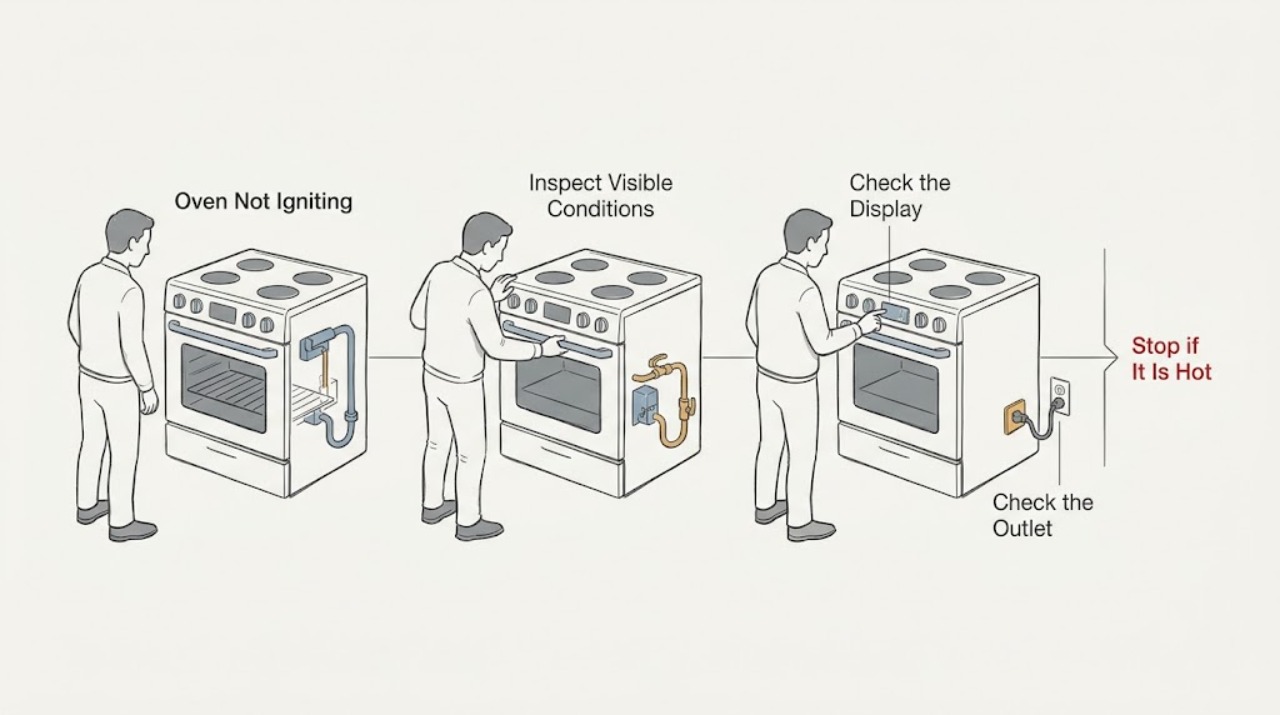
Work through in order
Diagnostic checks
Use only checks that match the exact appliance or system and its official guide.
-
Check 1
Before touching the controls, look for gas odor, smoke, soot, a bang or delayed whoosh, an unusual flame, a carbon-monoxide alarm, a hot or discolored receptacle, a damaged cord, water near the appliance, or a breaker that trips again.
Expected result: There is a gas odor, combustion warning, visible smoke/flame abnormality, electrical damage, water contact, or a repeated trip.
Next step: Stop using the oven and do not relight or retest it. Leave the area for gas or carbon-monoxide symptoms and contact the appropriate emergency, gas, fire, or qualified electrical service from a safe location.
Stop if: Stop immediately for gas odor, smoke, delayed ignition, bang, abnormal flame, carbon-monoxide alarm, shock, water contact, burning odor, visible electrical damage, or a breaker that will not remain reset.
Why this matters
Why: This is a safety stop, not a normal ignition check. Unburned gas and abnormal combustion can flare when a door is moved, and damaged or wet electrical equipment can remain hazardous.
-
Check 2
With the oven off, identify the fuel configuration from the rating label or manual and press Power or another normal control once; note whether the display, clock, interior light, and other range controls respond.
Expected result: The display and other controls are completely dark, or the display works but the oven does not accept a normal command.
Next step: Continue only with the external power and control-state checks below. Do not remove a control panel or attempt live electrical diagnosis.
Stop if: Stop if the panel, cord, or receptacle shows heat damage, liquid, sparks, or a burning smell.
Why this matters
Why: A fully dark panel is a power or supply problem rather than proof that the gas burner itself is bad. A live panel that rejects commands may be locked, in a special mode, or affected by a control fault.
-
Check 3
Without moving the range or opening an electrical enclosure, inspect that the power cord is fully seated in an operational grounded outlet and that no two-prong adapter or extension cord is being used; if the outlet is safely accessible and dry, verify it only with a known-working small appliance.
Expected result: The outlet is dead, the cord connection is loose or damaged, the outlet is not known to be grounded, or the small appliance also fails.
Next step: Leave the oven off and have a qualified electrician or installer correct the supply. If the outlet works and is safe, continue to the control and gas checks.
Stop if: Stop if the receptacle or cord is hot, scorched, cracked, wet, sparking, or loose, or if a breaker trips during the check.
Why this matters
Why: KitchenAid identifies a grounded operational outlet as necessary for oven igniter operation. A supply or grounding fault needs an electrician or installer, not an oven ignition test.
-
Check 4
If the breaker or fuse is clearly off and the appliance area is dry with no damage or odor, restore the household circuit once using the normal panel control; do not remove the range or reset the circuit repeatedly.
Expected result: The breaker stays on and the display returns, or it trips again immediately or when an oven command is made.
Next step: If it stays on, record that result and continue with low-risk control checks. If it trips again, leave the appliance off and arrange qualified electrical/appliance service.
Stop if: Stop after one reset if the breaker trips again, the panel flashes, the cord heats, or any burning odor or spark appears.
Why this matters
Why: A successful single reset may explain a dark control. A repeat trip indicates an electrical fault or overload and is not evidence that the igniter should be tested again.
-
Check 5
Close the oven door fully and check only for an obvious rack, pan, or obstruction preventing closure; if the model has a self-clean latch, leave it in the normal unlocked position unless the manual says otherwise.
Expected result: The door closes and latches normally, or it remains misaligned, blocked, or locked after a completed cycle.
Next step: Remove only an obvious external obstruction and close the door normally. If the latch, hinges, or alignment are damaged, stop and request service rather than forcing or bypassing it.
Stop if: Stop if the door glass is broken, the latch is damaged, the door is hot from a prior cycle, or the lock cannot release normally.
Why this matters
Why: KitchenAid notes that an open door can prevent normal oven operation on some models. A door or latch that cannot close correctly can also prevent a safe ignition sequence.
-
Check 6
On the cool oven's control, cancel any delayed start, demo mode, or control lock according to the exact model manual, then select Bake, enter a normal temperature, and press Start once.
Expected result: The control accepts Bake and begins a cycle, or it stays locked, displays a mode indicator, or does not accept Start.
Next step: If the control still will not accept the cycle, record the indicator and model number for service. If it accepts the cycle, observe only from a normal position and do not open the door to inspect the burner.
Stop if: Stop if the control becomes erratic, shows a fault, smells hot, sparks, or starts a delayed ignition or bang.
Why this matters
Why: A delayed start, demo mode, or control lock can look like failed ignition even though the gas system has not been asked to heat. Model controls and unlock steps are not interchangeable.
-
Check 7
If the range was recently installed or reconnected, confirm from the installation instructions that the appliance is the correct gas type and that the accessible main gas shutoff is in the normal ON position; do not loosen a fitting or move the range.
Expected result: The gas supply was recently changed, the shutoff is not on, the fuel type is uncertain, or the valve position cannot be safely identified.
Next step: If the valve is safely identifiable and there is no odor or damage, set it only as directed by the matching installation instructions. For uncertain fuel type, inaccessible valves, or connection work, stop and use a licensed gas professional.
Stop if: Stop for any gas odor, hissing, damaged connector, uncertain fuel conversion, or a valve that requires tools or moving the appliance.
Why this matters
Why: KitchenAid says trapped air after reconnection and an off main gas valve can prevent operation. Fuel-conversion and connection work are installation tasks, not a consumer ignition repair.
-
Check 8
Check from outside the cavity that the oven bottom is not covered by foil or an aftermarket liner and that storage areas do not obstruct the appliance; do not remove the oven bottom or burner cover.
Expected result: A liner, foil, spill, or stored item is blocking the documented burner or airflow area, or there is no obvious external obstruction.
Next step: Remove only a loose, cool, user-removable liner or item as allowed by the manual. If obstruction is fixed, baked on, or beneath a panel, leave it for service.
Stop if: Stop if removal would require tools, a hot cavity, contact with the burner, or disturbing a gas component.
Why this matters
Why: KitchenAid warns that covering the oven bottom can block air or gas flow. A clear bottom does not prove that the igniter, valve, sensor, or burner is healthy.
-
Check 9
If there is no hazard and the model manual specifically provides a normal ignition observation, note whether a click, igniter glow, or flame appears after the single Start attempt; do not manually light the oven, open the door during a failed attempt, or repeat the cycle to prove the result.
Expected result: There is no ignition cue, an ignition cue occurs without a stable flame, or a flame appears and then goes out.
Next step: Cancel the cycle, leave the oven off, ventilate only if safe and appropriate, and give the exact observation and timing to a qualified appliance technician. Do not access the burner or measure live voltage.
Stop if: Stop immediately for gas odor, flare-up, delayed ignition, bang, smoke, abnormal flame, or any need to open a panel or repeat ignition.
Why this matters
Why: No cue can point toward control power or ignition-circuit failure; a cue without a stable flame can involve gas flow, igniter, valve, sensor, or burner issues. These parts and fuel connections require model-specific service diagnosis.
-
Check 10
Prepare a service handoff with the full model number, fuel type, display or error text, whether the panel is powered, whether Bake accepted Start, breaker history, recent installation or gas reconnection, door/latch behavior, and the exact ignition observation.
Expected result: The safe external checks did not restore ignition, or the symptom requires a gas, electrical, igniter, valve, sensor, or control diagnosis.
Next step: Arrange qualified appliance service; use a licensed electrician for supply problems and a qualified gas professional when the gas connection, valve, conversion, or suspected leak is involved.
Stop if: Do not continue DIY checks once internal parts, gas connections, live measurements, repeated breaker trips, or safety symptoms are involved.
Why this matters
Why: A complete sequence helps the technician choose the correct KitchenAid manual and separate supply faults from internal ignition faults without asking you to perform hazardous tests.
Use your observations
Decision map
Find the observation that best matches what you see, then follow the next safe action.
-
PATH 01Safety boundary
What you see
Gas odor, delayed ignition, bang, smoke, abnormal flame, carbon-monoxide alarm, water contact, or electrical damage is present.
Do this next
Stop using the oven, do not create a spark or attempt another ignition, leave or isolate the area as appropriate, and contact the relevant emergency, gas, fire, or qualified electrical service from a safe location.
Why this path and its safety boundary
Safety stop: Continue with the external power, door, control, and supply checks.
-
PATH 02Safety boundary
What you see
The display and range controls are completely dark.
Do this next
Check the dry, accessible outlet and household circuit once without opening the appliance; use qualified electrical service if supply is absent or the breaker trips again.
Why this path and its safety boundary
Safety stop: Treat the problem as a control, gas-supply, door, or ignition-sequence symptom rather than assuming the oven has no power.
-
PATH 03Safety boundary
What you see
The display works but Bake is delayed, locked, in demo mode, or does not accept Start.
Do this next
Cancel the special state and follow the exact model manual for Control Lock, Demo Mode, Delayed Start, and Start; stop if the control remains erratic or shows a fault.
Why this path and its safety boundary
Safety stop: Proceed to the closed-door and gas-supply checks.
-
PATH 04Safety boundary
What you see
The oven was recently installed or reconnected to gas.
Do this next
Verify model-specific fuel configuration and the accessible main gas valve only from a safe position; leave connection, conversion, and trapped-air work to a licensed professional.
Why this path and its safety boundary
Safety stop: Continue with the normal gas-valve, door, and one controlled observation path.
-
PATH 05Safety boundary
What you see
The oven accepts Bake but gives no ignition cue or gives a cue without a stable flame.
Do this next
Cancel the cycle and arrange qualified appliance service; do not manually light, open panels, measure live voltage, or repeat the ignition attempt.
Why this path and its safety boundary
Safety stop: If a stable flame is present but heat is still abnormal, stop using the oven and provide the observed flame and temperature behavior to service.
-
PATH 06Safety boundary
What you see
A breaker trips again or the outlet/cord/receptacle becomes hot or discolored.
Do this next
Leave the appliance off and use qualified electrical/appliance service; do not keep resetting the breaker.
Why this path and its safety boundary
Safety stop: Record the successful power check and continue only with model-specific, external controls and service handoff information.
Helpful context
Understand the symptom
Separate a no-ignition symptom from a no-power symptom
A KitchenAid gas oven does not use gas alone: the control and ignition circuit need electrical power, while the bake burner also needs the correct gas supply. A dark display points first toward power, a lock, or control state. A live display with a selected Bake cycle but no flame points toward the door, gas shutoff, ignition sequence, or a failed component. Because models differ, use the model number to open the matching KitchenAid manual before changing a setting.
Safety comes before another ignition attempt
If you smell gas, hear a delayed whoosh or bang, see smoke or an abnormal flame, or notice heat damage at the receptacle or cord, stop using the oven. Do not operate switches or create a spark near a suspected gas leak; leave the area and contact the appropriate emergency, gas, or fire service from a safe location. If a carbon-monoxide alarm sounds, go outside and do not re-enter or operate the appliance until responders and trained personnel say it is safe.
What the result tells a technician
The most useful handoff separates the control symptom from the flame symptom: whether the display works, whether Bake is accepted, whether clicking or a glow is observed from a normal position, whether the cooktop works, whether the gas supply was recently reconnected, and whether a breaker tripped. Record the model and exact sequence rather than removing panels or trying to prove a gas leak yourself.
Only after diagnosis
Potential parts
- oven igniter
Consider only after a qualified diagnosis finds an ignition-circuit or igniter fault for the exact model.
Confirm the complete model number and the manufacturer's fit information before ordering; do not replace or test a gas ignition part without qualified service. - oven temperature sensor or gas valve
These are only candidates if model-specific service testing identifies a sensor or valve problem after supply and ignition checks.
Do not infer compatibility from appearance or a symptom; gas components require exact model fitment and qualified installation.
When checks do not resolve it
Need a professional?
Call qualified appliance service when the oven still will not ignite after safe external checks, when an igniter, valve, sensor, control, burner, or gas connection may be involved, or whenever the door/latch or control remains faulty. Use a licensed electrician for outlet, grounding, cord, or repeated-breaker symptoms and a qualified gas professional for supply, conversion, connector, or suspected-leak concerns.
Common questions
FAQ
Why does my KitchenAid gas oven click but not ignite?
A click without a stable flame can involve the electrical ignition path, gas supply, igniter, valve, sensor, or burner. Check only the safe external power, door, control, and gas-valve conditions for the exact model, then stop and arrange service rather than opening the burner area or repeating ignition.
Can a KitchenAid gas oven work if the display is dark?
The oven ignition system needs electrical power, so a dark display points first to the outlet, breaker, cord, or appliance power circuit rather than proving a gas fault. Verify a dry accessible outlet and reset a tripped household circuit only once if there is no hazard; repeated trips need service.
Could the gas valve be off after installation?
Yes. KitchenAid lists an off main gas valve and a recently reconnected gas supply among possible causes. Confirm the valve only if it is safely accessible and clearly identified; do not loosen fittings, move the range, or investigate a suspected leak yourself.
Can a control lock or delayed start look like failed ignition?
Yes. A control lock, demo mode, or delayed start can prevent the oven from beginning the expected heating sequence. Follow the exact model manual, cancel the special state, and press Start once; if the control remains locked or erratic, arrange service.
What should I do if I smell gas while the oven will not ignite?
Stop using the oven and do not create a spark, operate controls near the suspected leak, or attempt another ignition. Leave the area and contact the appropriate gas or emergency service from a safe location. A delayed ignition can allow gas to accumulate and flare.
When should I stop troubleshooting and call a technician?
Call when safe external checks do not restore ignition, when a burner, igniter, valve, sensor, control, door latch, gas connection, or electrical supply may be involved, or after any repeated breaker trip, abnormal flame, smoke, bang, gas odor, or carbon-monoxide alarm.
Read the exact guide
Official sources
- Oven Not Working - GasKitchenAid Product Help · KitchenAid gas ovens and ranges; model-specific instructions still control
- Oven Not Working - Gas and Dual Fuel RangeKitchenAid Product Help · KitchenAid gas and dual-fuel ranges; exact model and installation instructions apply
- Carbon Monoxide Fact SheetU.S. Consumer Product Safety Commission · Homes using fuel-burning appliances including gas ranges and ovens
- Oven Not Heating Up: Possible Causes and FixesKitchenAid · KitchenAid gas and electric ovens; use the matching manual and licensed technician for model-specific repairs
- Gas Range Delayed Ignitions - Tests and Examinations of RangesU.S. Consumer Product Safety Commission · Residential gas ranges and ovens; safety context for abnormal or delayed ignition
Community feedback
Share a repair observation
Share a plain-text repair observation. Accepted observations are published automatically; this page may take a moment to update.