
On this page
Start here
Quick answer
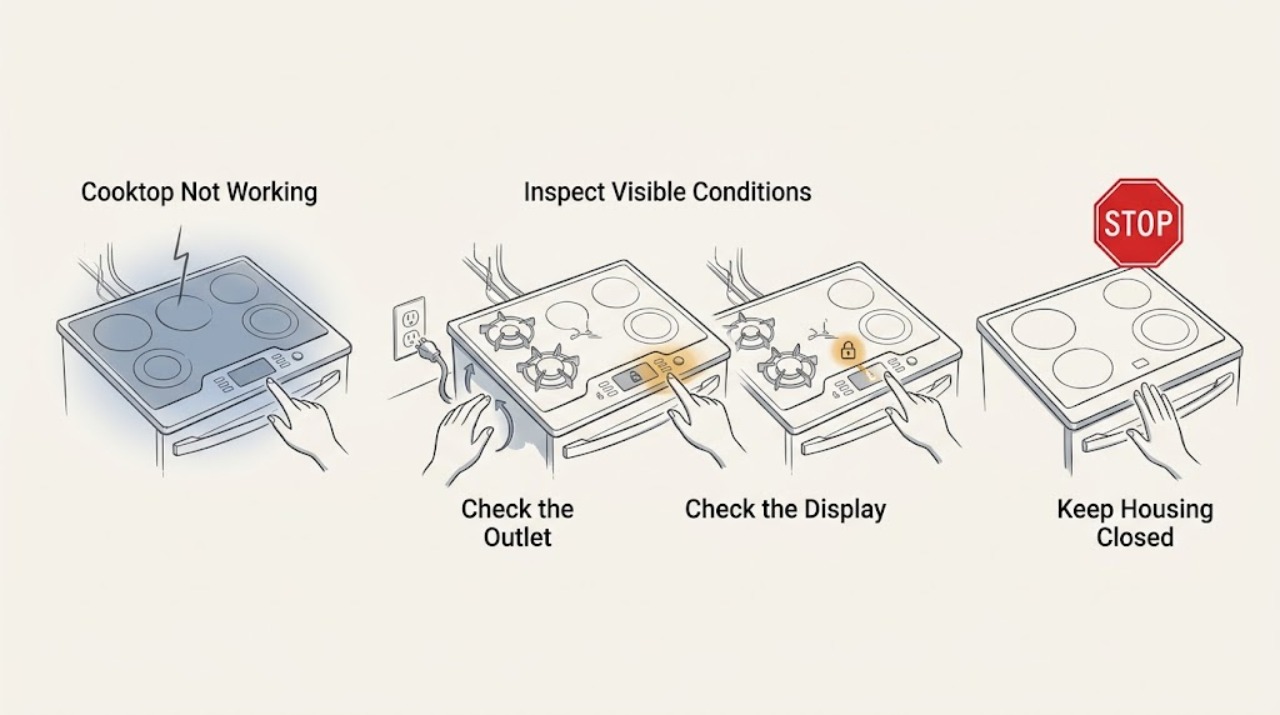
First identify whether the whole LG cooktop is dead or only one burner or zone will not heat. Check the visible power connection and circuit breaker once, use a known-working device to confirm an accessible outlet where applicable, and do not use an extension cord or change breaker wiring. If the display is on, clear Control Lock or Child Lock, select the intended zone, set a power level, and press the required confirmation or Start control. On a gas cooktop, check only the external gas supply and whether the burner cap and head are dry and seated; stop for gas odor. On an induction model, use a flat, magnetic-compatible pan centered on the matching zone. If the correct power and settings are present but the cooktop remains dead, a breaker trips, a control or glass surface is damaged, or a gas or electrical hazard appears, leave it off and arrange qualified LG service.
Before you begin
Safety first
- Do not open the cooktop, test live conductors, bypass control or thermal protection, alter the breaker, dismantle the gas train, or operate with cracked glass, gas odor, smoke, or a damaged connection.
Work through in order
Diagnostic checks
Use only checks that match the exact appliance or system and its official guide.
-
Check 1
Press Power once and observe the whole LG cooktop before touching cookware. Check the display, indicator lights, control beeps, and whether any zone responds; note if all zones are dead or only one burner or element is affected.
Expected result: No display or indicator suggests an incoming-power, breaker, wiring, or control-power issue. A lit display with a single unresponsive zone points toward selection, cookware, burner assembly, or one-zone circuitry. If the panel responds but the zone does not heat, it is not a total power failure.
Next step: If the entire cooktop is dead, perform the external supply check. If the panel is live, continue with lock, zone-selection, gas, or induction checks that match the appliance type.
Why this matters
Why: LG's cooktop and range guidance distinguishes no power, controls that are locked or incomplete, and a single burner or induction zone that cannot operate with the selected setup.
-
Check 2
For a cooktop with no display or no zone indicators, check the visible plug or connection and the dedicated circuit breaker only from a safe position. Test an accessible outlet with a small known-working device when the model uses a plug; never remove panels or use an extension cord as a workaround.
Expected result: If the test device also fails or the breaker will not stay on, the household supply or circuit needs an electrician. If the supply is present but the cooktop remains dead, the appliance needs service. A hot, scorched, wet, loose, or damaged connection is an immediate stop condition.
Next step: Reset the breaker once only when there is no damage, moisture, smoke, or odor. Leave the cooktop off and arrange qualified electrical or LG service if power does not hold or the display stays blank.
Why this matters
Why: LG states that cooktop and range no-power problems can result from the supply, power cord, circuit breaker, incomplete installation wiring, or an outage, and that cooktops should use the model's properly powered circuit.
-
Check 3
If the panel is lit but no zone heats, inspect the controls without forcing them: check for Lock or Child Lock, an E or E1 touch-control indication, and any error code. Select the intended burner or zone first, set the desired power, and press the model-required Select or Start control; use the exact manual for the unlock sequence.
Expected result: A lock indicator can make every touch appear dead, while an E or E1 indication can occur when a control is held or obstructed. LG notes that some electric controls require the zone-selection step before power is accepted. If the lock clears and a zone works, the issue was control state; if input remains unresponsive, service is needed.
Next step: Wipe the cool, dry touch area with a suitable cloth and clear the lock only as documented. If an error, lock, or unresponsive zone returns, stop changing settings and arrange service.
Why this matters
Why: A lit display does not guarantee a heating command has been accepted. LG's range guidance describes lock behavior, touch-surface obstructions, required zone selection, and service when the control does not respond after the documented sequence.
-
Check 4
For a gas LG cooktop, with controls off and the surface cool, check that the burner cap and head are level, dry, and in the correct position, and that no accessible food or moisture is around the igniter. Check the external gas valve only if it is safe and visible; do not dismantle the gas train.
Expected result: If one burner clicks but does not ignite, a mis-seated cap or head, moisture, debris, or a blocked burner opening may be involved. If every burner fails and there is no gas odor, LG identifies a possible gas-supply issue. Gas odor, hissing, or abnormal flame behavior is a stop condition.
Next step: Dry and reseat only accessible burner parts as the model guide permits, then make one supervised attempt. If ignition remains unreliable, gas is smelled, or flame behavior is abnormal, stop and contact a qualified gas or appliance technician.
Why this matters
Why: LG's gas-burner guidance separates all-burner supply symptoms from a single-burner cap, head, igniter, or moisture problem. Ignition and combustion faults must not be converted into internal DIY gas work.
-
Check 5
For an induction LG cooktop, place one flat-bottomed, induction-compatible pan in the center of the intended zone and check whether a U indication or no-heat state changes. Use a pan whose magnetic base fits the zone; do not test the zone empty or use glass, ceramic, aluminum, or another non-magnetic pan unless the exact manual says it is compatible.
Expected result: A U indication or no heat that clears with a suitable centered pan points to cookware detection or size/position, not necessarily a failed coil. If a suitable pan is centered and the same zone still will not operate while other zones do, the zone or control circuit needs diagnosis.
Next step: Use the exact model's cookware and zone-size guidance. If the correct pan does not restore operation or the panel shows a recurring code, leave the cooktop off and request service.
Why this matters
Why: LG explains that induction heating depends on magnetic cookware with a flat base and an appropriate zone fit, and that a zone may not operate without the correct pan.
-
Check 6
After one safe external check, record any recurring code, clicking without ignition, zone that shuts off, breaker trip, unusual heat, crack, or visible damage. If the model supports a documented power reset, isolate power according to the manual and perform it once; do not repeat resets under a fault.
Expected result: A code or symptom that returns after reset indicates an unresolved control, sensor, element, induction coil, ignition, or supply fault. A breaker trip, smoke, burning smell, cracked glass, or damaged wiring requires the cooktop to remain off.
Next step: Give service the exact model, appliance type, affected zones, code, supply result, cookware or burner observations, and what happened immediately before the failure. Do not open the cooktop to identify the part yourself.
Why this matters
Why: LG's cooking-appliance support directs owners to troubleshoot displayed error codes and obtain repair service when power and settings are correct but the unit still will not operate.
Use your observations
Decision map
Find the observation that best matches what you see, then follow the next safe action.
-
PATH 01Next step
What you see
The entire cooktop has no display or indicators.
Do this next
Check the visible connection and dedicated breaker once, then test an accessible outlet if applicable. If household power is good but the cooktop remains dead, arrange LG or qualified electrical service.
-
PATH 02Next step
What you see
The panel is lit but Lock, Child Lock, E, E1, or an error prevents zone selection.
Do this next
Clear the lock or touch-surface obstruction using the exact model procedure and select the zone before setting power. If the indication returns, request service.
-
PATH 03Next step
What you see
A gas burner clicks but does not ignite, or all gas burners fail.
Do this next
For one burner, check accessible cap, head, igniter dryness, and debris. For all burners, check the external gas supply only if safe. Stop for gas odor, hissing, or abnormal flame and call qualified service.
-
PATH 04Next step
What you see
An induction zone shows U or does not heat with the control on.
Do this next
Use a flat, magnetic-compatible pan centered on the matching zone. If a suitable pan does not work or the code returns, leave the cooktop off and arrange service.
-
PATH 05Next step
What you see
One electric or induction zone remains dead while the rest of the panel and zones work.
Do this next
Confirm the correct zone-selection sequence and cookware where applicable. If the zone still fails, do not open the glass surface; request a technician diagnosis.
-
PATH 06Next step
What you see
The breaker trips again, the glass is cracked, the outlet is damaged, smoke or burning odor appears, or water reaches controls.
Do this next
Stop immediately, isolate power only if safe, and arrange qualified electrical or appliance service. Do not retry the breaker or cooktop.
Helpful context
Understand the symptom
Start by separating dead from not heating
‘Not working’ may mean no display or lights, a lit panel that ignores input, one gas burner that will not ignite, an induction zone that reports U, or a zone that turns off after selection. Record the full model, whether it is gas, electric radiant, or induction, which controls respond, any code or lock symbol, and whether the problem affects every zone. Do not assume a burner or element part has failed before checking the supply and control state.
Keep power and gas work outside the cabinet
Do not remove the cooktop, open a terminal box, test live conductors, bypass a lock or thermal protector, or probe a gas orifice with an improvised tool. If the glass is cracked, the outlet or cord is hot or scorched, water is on the controls, smoke or burning odor appears, a breaker trips again, or you smell gas, stop immediately. Isolate power or close the gas supply only if safe, keep away from the hazard, and arrange qualified appliance, electrical, or gas service.
Safety boundary
Stop conditions
- Stop immediately for gas odor or hissing, an abnormal gas flame, smoke, burning odor, arcing, a cracked cooktop surface, a hot or scorched connection, water near controls, or a breaker that trips again.
- Do not open the cooktop, test live wiring, bypass locks or thermal protection, alter breaker wiring, operate induction zones empty, or run a gas appliance with an uncontrolled ignition or odor.
- Stop after one unsuccessful safe reset or when correct supply, settings, burner assembly, or induction cookware do not restore operation. Preserve the model and code information for service.
Only after diagnosis
Potential parts
- cooktop user interface or main control board
Consider this class only when supply is verified and a technician confirms that the panel, lock, code, or control logic is failing rather than a user setting or cookware issue.
Confirm the complete model and control revision; do not infer fit from a similar-looking panel. - electric cooktop heating element or induction coil module
Consider this class only when one zone fails with correct selection and, for induction, a suitable centered pan, and a qualified diagnosis identifies the zone circuit.
Cooktop circuits and modules are model-specific and require mains isolation and qualified installation. - gas cooktop igniter or burner ignition component
Consider this class only when external gas supply, cap and head position, dryness, and accessible cleaning pass inspection and a technician confirms an ignition fault.
Do not test or replace gas ignition components as a live user repair; verify exact model and local safety requirements.
When checks do not resolve it
Need a professional?
Request LG service when a known-good supply and correct controls do not restore the cooktop, one zone remains dead, a code or lock returns, an induction zone fails with compatible cookware, a gas burner will not ignite after a safe cap and supply check, or any glass, electrical, gas, smoke, water, or breaker hazard is present.
Safety scope: Do not open the cooktop, test live conductors, bypass control or thermal protection, alter the breaker, dismantle the gas train, or operate with cracked glass, gas odor, smoke, or a damaged connection.
Common questions
FAQ
Why is my LG cooktop completely dead?
Check the visible power connection and dedicated breaker once, and test an accessible outlet if the model uses one. If the supply works but the cooktop has no display or indicators, leave it off and request LG or qualified electrical service.
Why does my LG cooktop turn on but not heat?
Clear Control Lock, select the correct zone, set power, and follow the required confirmation step. Gas models also need a dry, correctly seated cap and head; induction models need a flat, magnetic-compatible pan centered on the zone. Persistent failure needs service.
What should I do if an LG gas cooktop burner will not ignite?
Check the external gas supply only if safe, and inspect the cool burner cap, head, igniter area, moisture, and debris. Stop for gas odor, hissing, or abnormal flames and arrange qualified gas or appliance service.
Read the exact guide
Official sources
- LG Range - Troubleshooting Buttons Not Working ProperlyLG USA Support · LG electric range and cooktop touch-control models; buttons and sequences vary by model
- LG Range - Troubleshooting a Burner Not Igniting On My LG RangeLG USA Support · LG gas ranges and cooktops; follow the exact model's cleaning and ignition instructions
- [LG DIOS induction] It Won’t IgniteLG USA Support · LG DIOS induction ranges and cooktops; exact display and cookware guidance varies by model
- INSTALLATION INSTRUCTIONSLG · LG gas cooktop installation guide; exact model and local code govern installation
- LG Electric Range / Gas Range: Power IssuesLG USA Support · LG electric and gas ranges and their cooktop power/control paths; verify the exact model and appliance type
- LG Range - Why Won't My Burner LightLG USA Support · LG gas ranges and sealed gas cooktops; model images and details may differ
Community feedback
Share a repair observation
Share a plain-text repair observation. Accepted observations are published automatically; this page may take a moment to update.