
On this page
Start here
Quick answer
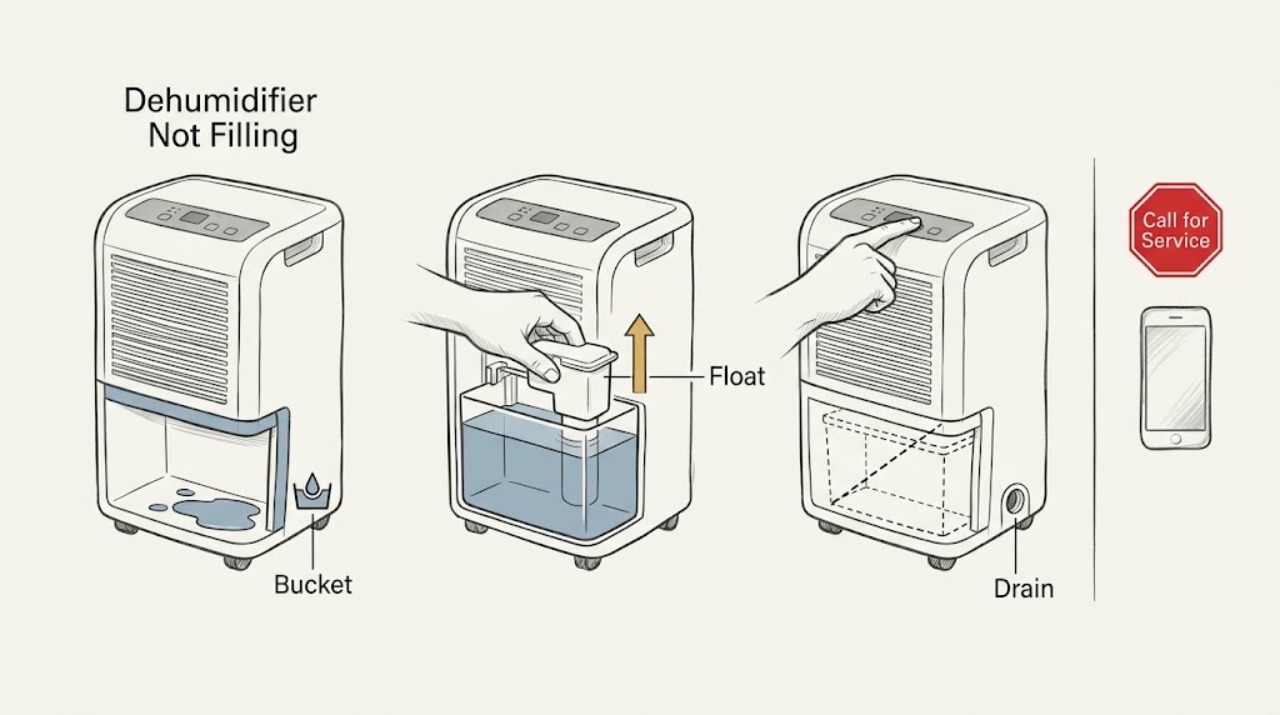
If an LG dehumidifier runs but the bucket stays empty, confirm the bucket is fully seated, the float is not stuck in the full position, and any continuous-drain hose is clear. LG warns not to open the float cover. If collection does not resume, request service.
Work through in order
Diagnostic checks
Use only checks that match the exact appliance or system and its official guide.
-
Check 1
Turn the unit off, remove the bucket, inspect it, and reinstall it fully as the exact model manual shows.
Expected result: The bucket seats fully, or stays loose and the full light remains on.
Next step: Continue only if it seats; request service for damage or persistent seating trouble.
Why this matters
Why: A bucket out of position can prevent collection or keep the safety sensor active.
-
Check 2
With power off and the bucket removed, gently shake it and observe whether the float moves freely.
Expected result: The float moves low, or remains stuck high.
Next step: Reinstall if free. Do not open the cover; request service if stuck.
Why this matters
Why: LG identifies a float stuck in the full position as a reason the full indicator remains on.
-
Check 3
If continuous drainage is installed, inspect the visible hose for a loose connection, kink, or blocked outlet.
Expected result: The hose is clear, or its path is restricted.
Next step: Correct only a visible issue allowed by the manual, then observe one cycle; otherwise request service.
Stop if: Do not open the sealed system or use a unit with damaged wiring or overheating.
Why this matters
Why: A hose can route water away from the bucket; a restriction prevents intended drainage.
Use your observations
Decision map
Find the observation that best matches what you see, then follow the next safe action.
-
PATH 01Next step
What you see
The empty bucket shows full because its float is stuck high.
Do this next
Keep the cover closed and monitor one cycle.
Why this path and its safety boundary
Why it matters: The sensor path was blocking collection.
-
PATH 02Next step
What you see
The bucket seats, float moves, and drain path is clear but no water collects.
Do this next
Stop and request LG service.
Why this path and its safety boundary
Why it matters: Internal controls, fan, coil, or sealed-system faults need diagnosis.
When checks do not resolve it
Need a professional?
Request service if the float remains stuck, the bucket cannot seat, the hose leaks, or no water collects in normal conditions.
Common questions
FAQ
Why is the LG dehumidifier running but not filling?
Check bucket seating, a stuck float, and any continuous-drain hose. If all are normal and no water collects, request service.
Read the exact guide
Official sources
- Maintenance and ServiceLG · LG dehumidifier manual family; verify exact model
- [LG Dehumidifier] Why Does the Bucket Full Light Stay On After Emptying the Bucket?LG USA · LG dehumidifiers; float location varies by model
Community feedback
Share a repair observation
Share a plain-text repair observation. Accepted observations are published automatically; this page may take a moment to update.