
On this page
Start here
Quick answer
If an LG dryer stops before the selected cycle finishes, first note whether it is ending early with damp clothes, shutting off completely, or showing a code. A Sensor Dry cycle can end early when a very small load does not contact the moisture sensors, when the dry level is intentionally low, or when residue prevents sensing; LG recommends a suitable load or Time Dry for a small load and cleaning the sensors when an HS code appears. Then check the lint filter, the exhaust hose and outside vent for restriction, the door and filter fit, and the safe power condition. On a gas model, an unlit supply or a gas-related display needs model-specific attention; do not continue if there is a gas smell. Do not bypass a door switch, work on wiring or gas components, or keep running the dryer with smoke, burning odor, sparks, severe airflow restriction, overheating, or a repeated breaker trip. If the cycle still stops, capture the exact code and arrange qualified service.
Before you begin
Safety first
- This article supports ordinary external observation and model-approved controls only. Do not bypass safety devices, work on energized electrical or gas parts, reach into internal dryer components, or continue using a severely restricted or hazardous appliance.
Work through in order
Diagnostic checks
Use only checks that match the exact appliance or system and its official guide.
-
Check 1
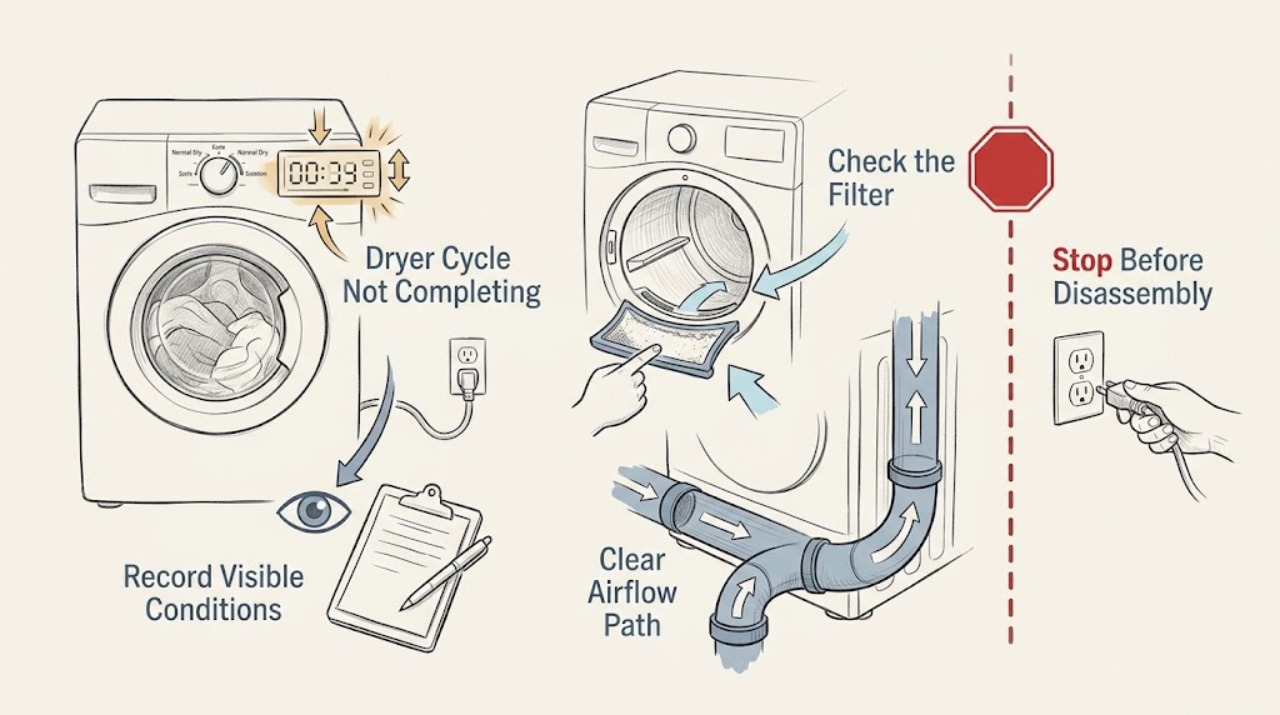
Record the selected cycle, Dry Level, load type and size, whether clothes are damp or dry, whether the drum and display lose power, the remaining time when it stops, and every visible message or code.
Expected result: The cycle ends early with damp clothing and the display remains on; or the dryer shuts off or loses power; or a code, Flow Sense bars, or an insert-filter message appears.
Next step: Keep the exact text or a photo of the display, identify whether the dryer is electric, gas, vented, or condensing, and continue only with the matching checks below.
Stop if: Stop immediately for smoke, flame, gas odor, burning odor, sparks, a hot cord or plug, severe overheating, or a breaker that trips again.
Why this matters
Why: Early completion with power still present points first to load, sensor, setting, or airflow behavior. A dark display shifts attention to door, power, breaker, or control checks. A code or Flow Sense indication selects the corresponding LG branch instead of a generic reset.
-
Check 2
For an early-ending Sensor Dry cycle, check whether the load is so small that items do not contact the moisture sensors, whether Dry Level is set lower than intended, and whether the sensor area below or near the lint-filter housing has visible residue; clean only as the exact manual allows with the dryer cool and off.
Expected result: The load is very small, Dry Level is low, or residue is present; or the load is appropriate, the setting is intended, and the sensor area is clean.
Next step: Add suitable items so the load can contact the sensors, or use the model-approved Time Dry cycle for a small load; after an allowed sensor cleaning, let the area dry before one controlled retest.
Stop if: Do not scrape, bend, bypass, or electrically test the sensors; stop if the sensor housing, drum, wiring, or door area is damaged.
Why this matters
Why: A small load or low Dry Level can explain a short cycle without proving a failed part. Residue can interfere with humidity sensing. If those conditions are absent, early termination is more likely to need model-specific diagnosis rather than repeated cycle restarts.
-
Check 3
With the dryer off and cool, remove lint from the filter and confirm it is seated; inspect the visible exhaust hose behind the dryer for crushing, kinks, coils, holes, loose connections, or lint, and check the outside vent from a safe position for a clear outlet and airflow during normal operation.
Expected result: The filter is dirty or out of position, the hose or outside outlet is restricted, airflow is weak, or the path is clear and the code or early stop remains.
Next step: Clean and reseat the filter, correct only a visible safe hose kink or obstruction, reduce an overloaded load, and arrange professional vent cleaning when restriction is not fully visible or a severe Flow Sense indication persists.
Stop if: Do not run the dryer with a severely restricted exhaust, remove internal panels, reach into the blower or heater, or use a damaged duct or cord.
Why this matters
Why: Lint and exhaust restriction can extend drying and trigger d75, d80, d90, d95, or Flow Sense indications. A clear visible path does not rule out a concealed or excessive-length restriction; a persistent indication needs vent or appliance service.
-
Check 4
Check that the door closes fully without clothing caught in the opening, the lint filter is pushed into its housing, the plug is secure, and the dryer breaker or supply has not tripped; do not open the terminal block or perform a live-voltage test.
Expected result: The door or filter was not seated, the breaker or supply is off, power is present but the dryer stops again, or a dE, F0/INSERT FILTER, PF, nP, or PS message is displayed.
Next step: Correct only the visible seating issue and follow the exact LG model instructions for one safe reset when the display calls for it; if the message returns or power is uncertain, leave the dryer off and arrange qualified help.
Stop if: Do not bypass the door switch, defeat the filter sensor, reset a breaker repeatedly, use damaged wiring, or touch exposed electrical parts.
Why this matters
Why: A door or filter-detection condition can prevent normal operation. PF can follow a power interruption, while nP or PS indicates a power or wiring condition that may require an electrician or service; a repeated trip is not a normal reset step.
-
Check 5
Match the code and symptom to the appliance type: on a gas model, from a safe position check only the visible, model-approved gas-supply status; on a hybrid or condensing model, check only the visible drain or water-container condition; on a steam model, check the approved water-supply indication.
Expected result: A gas-supply message or missing supply is shown on a gas dryer, an E13/drain message appears on a hybrid condensing model, an Add Water message appears on a steam model, or none of these type-specific conditions applies.
Next step: Follow the exact model manual for a safe external check; if a gas line is damaged or a gas smell is present, leave the area and contact the appropriate emergency or qualified service channel. If a drain or water condition returns after the allowed check, request service.
Stop if: Do not disconnect gas fittings, relight or test a suspected leak, open water or drain assemblies near electricity, or continue running with a gas odor, leak, smoke, or sparking.
Why this matters
Why: Gas, drain, and steam branches are model-dependent and should not be applied to an electric vented dryer. A gas message can stop heating or the cycle; an E13 or water message can stop a drying function without proving a drum or sensor failure.
-
Check 6
After the applicable safe checks, perform at most the single model-approved unplug-and-reset sequence for the displayed condition, then run one controlled cycle with a suitable load while recording whether the original stop recurs.
Expected result: The cycle completes and drying is consistent; or it stops again, will not power on, shows the same code, overheats, or has an abnormal smell or sound.
Next step: Leave the dryer off and arrange qualified appliance service; provide the model, full code, cycle settings, load, filter and exhaust findings, power history, and the result of the one controlled test.
Stop if: Do not repeatedly reset, run empty cycles to reproduce a fault, bypass a safety device, open panels, or work on gas, heater, motor, or control wiring.
Why this matters
Why: A single recovery after an interruption does not prove the underlying issue is fixed. Recurrence, no power, persistent code, inadequate heat or airflow, or a hazard needs technician diagnosis rather than more resets.
Use your observations
Decision map
Find the observation that best matches what you see, then follow the next safe action.
-
PATH 01Safety boundary
What you see
The Sensor Dry cycle ends early with damp items, the load is very small, or Dry Level is set low.
Do this next
Use an appropriate load that contacts the sensors or select the model-approved Time Dry cycle for a small load; change Dry Level only when the desired dryness requires it.
Why this path and its safety boundary
Why it matters: The sensors may not be contacting enough fabric, or the selected level may intentionally leave moisture for ironing.
Safety stop: Do not assume a sensor or control part has failed until load and setting behavior has been checked once under safe conditions.
-
PATH 02Safety boundary
What you see
An HS code appears or visible residue is present at the humidity-sensor area.
Do this next
Use only the exact manual-approved cleaning method, allow the sensors to dry, and run one controlled cycle; request service if HS returns.
Why this path and its safety boundary
Why it matters: LG associates HS with the humidity sensor and directs cleaning of the sensors followed by a dry retry; a persistent code requires service.
Safety stop: Do not scrape, pry, bypass, or test sensor wiring.
-
PATH 03Safety boundary
What you see
The filter is blocked, the hose is crushed or kinked, outside airflow is weak, or d75/d80/d90/d95 or severe Flow Sense appears.
Do this next
Clean and reseat the filter, correct a visible safe hose issue, and stop using the dryer until the full exhaust route is cleaned or professionally assessed when restriction remains.
Why this path and its safety boundary
Why it matters: LG identifies the exhaust route as restricted; a severe restriction can create an unsafe operating condition and may require professional vent cleaning.
Safety stop: Do not keep running a dryer with severe exhaust restriction or reach into internal duct, blower, heater, or motor components.
-
PATH 04Safety boundary
What you see
The door or filter is not seated, the dryer loses power, or dE, F0/INSERT FILTER, PF, nP, or PS appears.
Do this next
Correct safe seating, follow the exact model reset instruction once if applicable, and request qualified electrical or appliance service when the message returns or power is abnormal.
Why this path and its safety boundary
Why it matters: The display selects a door, filter-detection, power-interruption, or supply/wiring path rather than a generic load adjustment.
Safety stop: Do not bypass the door or filter sensor, work on the terminal block, or repeatedly reset a tripping breaker.
-
PATH 05Safety boundary
What you see
The model-specific display indicates gas supply, E13 drain, Add Water, or another feature that the appliance type supports.
Do this next
Confirm the appliance type and follow the matching model manual for safe external checks; request service if the message persists.
Why this path and its safety boundary
Why it matters: The cycle may be stopping because a gas, drain, or steam function is unavailable; the branch does not apply to every LG dryer.
Safety stop: Leave immediately and seek appropriate emergency or qualified help for gas odor, a visible leak, smoke, sparks, or electrical contact with water.
-
PATH 06Safety boundary
What you see
The dryer still stops after the applicable load, sensor, airflow, door, power, and type-specific checks, or it will not power on.
Do this next
Leave the dryer off and arrange qualified appliance service with the full symptom record and exact code.
Why this path and its safety boundary
Why it matters: A recurring stop can involve a control, sensor, motor, heater, thermistor, wiring, or another model-specific fault that cannot be safely identified from the outside.
Safety stop: Do not keep repeating cycles or resets, remove panels, or substitute an unverified part.
Helpful context
Understand the symptom
First separate early completion from a shutdown
A dryer that finishes with damp clothing is a different problem from one that loses all power or stops with a code. Record the selected cycle, Dry Level, load size and type, whether the drum turns, whether heat was present, the time shown before it stopped, and every display message. If a cooling or wrinkle-care phase is displayed, the drum may pause or tumble intermittently as part of the selected option; compare the behavior with the exact model manual before calling it a failure.
Sensor Dry needs a load that the sensors can detect
LG explains that a very small load may not brush the moisture sensors, allowing the cycle time to drop quickly and the cycle to end while clothes remain damp. A low Dry Level is also an intentional setting, not proof of a failed heater. For a small load, use the model-approved Time Dry option; clean the sensor area only as LG and the owner's manual direct, with the dryer cool and safe to handle.
Airflow and filter checks are separate from sensor checks
Lint in the filter or a crushed, kinked, coiled, damaged, or restricted exhaust path can extend drying and trigger Flow Sense indications. With the dryer off and cool, check the lint filter and visible hose routing without reaching into moving or heated parts. Check the outside outlet only from a safe position. A severe restriction, no outside airflow, or a d80, d90, or d95 indication is a reason to stop using the dryer until the exhaust path is cleaned or professionally assessed.
Use the exact code and appliance type to choose the next step
LG uses different messages for a door or filter problem, airflow restriction, humidity-sensor fault, power interruption, heating supply, steam-water supply, and other model-specific conditions. A gas dryer also has a gas-supply branch that does not apply to an electric dryer. Do not guess from a partial code or assume that a washer-dryer combination uses the same sequence as a vented dryer; record the full code and model before following a reset or service instruction.
Safety boundary
Stop conditions
- Stop using the dryer for smoke, flame, gas odor, burning odor, sparks, severe overheating, a hot cord or plug, or a breaker that trips again.
- Do not bypass the door switch, filter sensor, thermal safety, or any other safety device.
- Do not perform live-voltage tests, open the terminal block, or work on heater, motor, control, or gas wiring as an ordinary user check.
- Do not run the dryer with a severely restricted exhaust, and do not reach into the blower, heater, drum drive, or internal ducting.
- Do not repeatedly reset or run cycles to reproduce a recurring stop; capture the code and arrange qualified service.
When checks do not resolve it
Need a professional?
Arrange qualified LG appliance service when the cycle still stops after one applicable safe check sequence, the display code returns, the dryer will not power on, heating or drying is inadequate, a sensor or control fault persists, the exhaust restriction is not fully visible, or the appliance type-specific gas, drain, or steam condition is unresolved. Use qualified electrical help for abnormal supply or repeated breaker trips, and follow the local emergency process from a safe location for gas odor, smoke, or fire.
Safety scope: This article supports ordinary external observation and model-approved controls only. Do not bypass safety devices, work on energized electrical or gas parts, reach into internal dryer components, or continue using a severely restricted or hazardous appliance.
Common questions
FAQ
Why does my LG dryer stop before the cycle is finished?
If the display stays on and clothes are damp, check the Sensor Dry load size, Dry Level, sensor area, and airflow. A very small load may not contact the sensors, while a blocked exhaust can prolong or disrupt drying. If the dryer loses power or shows a code, follow that separate branch instead.
Why does the time drop quickly on my LG Sensor Dry cycle?
LG says a very small load may not contact the humidity sensors, so the dryer can interpret the drum as empty and end early. Use a suitable load or the model-approved Time Dry cycle; do not assume a sensor part has failed after one short load.
Can a dirty lint filter make an LG dryer stop early?
Lint or a restricted exhaust usually causes long drying and Flow Sense indications, but it can make the cycle behavior abnormal. Clean and reseat the filter with the dryer off and cool, check visible hose routing, and stop using the dryer if severe restriction remains.
What should I do if my LG dryer shows d80, d90, or d95?
Those messages indicate restricted airflow between the dryer and the outside exit. Check the filter and visible hose routing only as the model instructions allow; if airflow remains weak or the restriction is not fully visible, stop using the dryer and arrange professional vent cleaning or appliance service.
Should I reset an LG dryer that stops mid-cycle?
First record the symptom and code, then correct only safe load, sensor, filter, door, or visible airflow conditions. If the exact LG guidance calls for a reset, perform it once with the dryer safely without power. A recurring stop, persistent code, no power, or any overheating or electrical hazard needs service rather than repeated resets.
What if my LG gas dryer stops and I smell gas?
Stop using it, avoid flames and electrical switches, leave the area, and contact the appropriate local gas emergency or qualified service channel from a safe location. Do not disconnect fittings, relight the appliance, or run another cycle to test it.
Read the exact guide
Official sources
- LG Dryer - Error Code ListLG USA Support · LG USA code reference spanning multiple dryer types; apply only codes and features shown by the exact model.
- LG Support: Manuals and DocumentsLG USA Support · LG support portal; identify the exact model before using cycle, gas, steam, reset, or installation instructions.
- [LG Dryer] Remaining Dry Time Decreases Quickly, Laudry Still DampLG USA Support · LG general guidance marked for all models; screen labels and available cycles may differ on a particular dryer.
- LG Dryer – Why is My Dryer Not Heating, Not Drying or Taking a Long Time Drying?LG USA Support · LG USA guidance for dryer airflow and installation-test preparation; test controls vary by model and require the owner's manual.
- LG Dryer – Why Does My Dryer Turn Off Abnormally?LG USA Support · LG USA general dryer guidance; controls, reset sequence, and cycle names can differ by model, so the owner's manual controls.
Community feedback
Share a repair observation
Share a plain-text repair observation. Accepted observations are published automatically; this page may take a moment to update.