
On this page
Start here
Quick answer
When an LG dryer displays an error, photograph the complete code, including lower-case letters, spaces, alternating characters, indicator bars, and any insert-filter or cooling message, then record the exact model. LG's official dryer guide separates power codes such as nP, PS, and PF; airflow codes such as d80, d90, and d95; door and filter states such as dE, dE4, and FO; temperature, humidity, motor, gas, steam, drain, and communication codes. Use only the instruction that matches the complete code and model. If the code returns, the dryer overheats, airflow is severely restricted, or there is gas odor, smoke, a burning smell, sparking, or a repeated breaker trip, stop using the dryer and arrange qualified service.
Before you begin
Safety first
- Do not remove panels, open the terminal block, rearrange power-cord wiring, bypass the door or temperature sensor, test live voltage, or run a dryer with severe exhaust restriction. For gas dryers, do not operate switches or relight anything when gas odor is present; leave the area and use the local emergency route from outside the affected area.
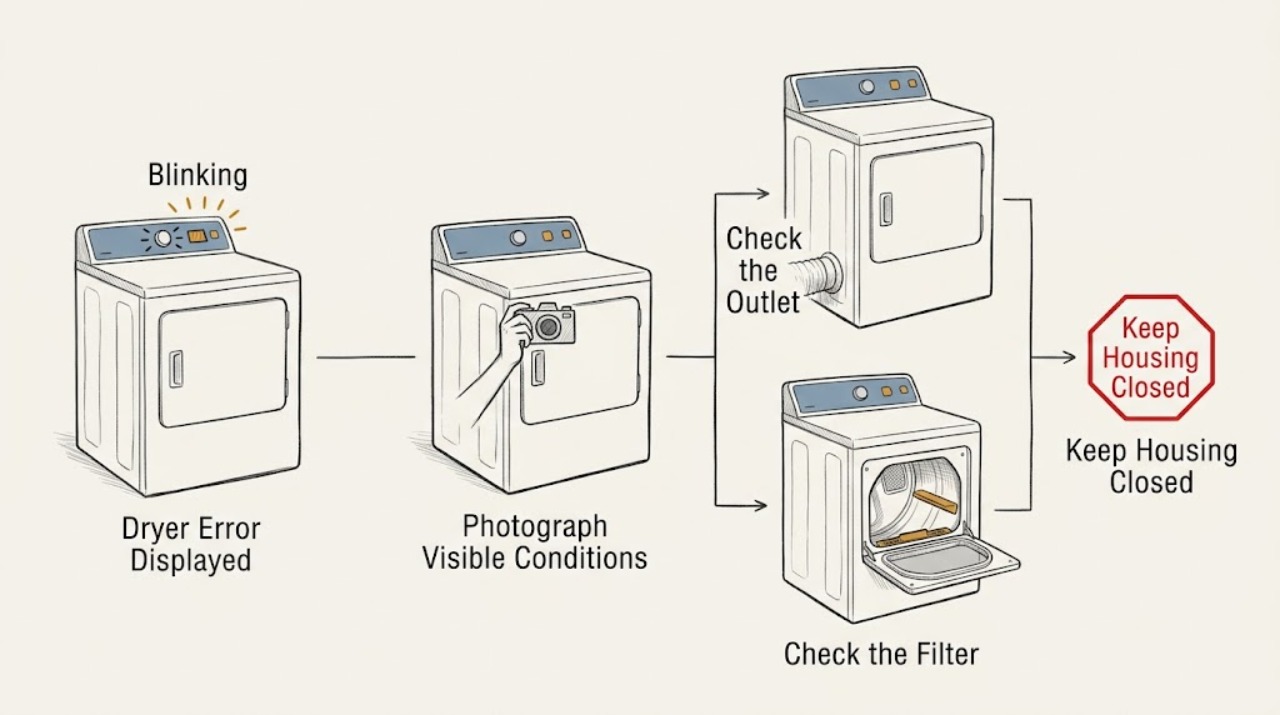
Work through in order
Diagnostic checks
Use only checks that match the exact appliance or system and its official guide.
-
Check 1
Before pressing buttons, photograph the full LG dryer display and write down every letter, number, space, alternating pattern, Flow Sense bar, flashing indicator, and plain-language message.
Expected result: A complete entry such as d90, d95, nP, PS, PF, dE, dE4, FO, HS, or tE1 through tE6 supports a specific branch. A partial, alternating, or blinking-light pattern may need the exact model guide or service interpretation.
Next step: Find the model number and compare the complete display with LG's official dryer error list. Do not substitute a similar-looking code from another model.
Stop if: Stop touching the controls if the panel is wet or hot, the dryer smells burned, smoke or sparks are present, or a breaker has tripped.
Why this matters
Why: LG uses different code families for airflow, power, door, filter, temperature, and other systems; clearing the display before recording it can remove useful diagnostic information.
-
Check 2
Check whether the display and interior light have normal power, and inspect only the accessible plug, outlet area, and household breaker from a dry, safe position.
Expected result: nP means no current is detected at the heater; PS indicates improper power-cord voltage; PF commonly follows a power outage. A completely dead dryer or a breaker that will not remain on is a power-supply branch, not a reason to open the machine.
Next step: If there is no damage, moisture, heat, or repeated trip, perform one normal accessible breaker reset only where LG documents it for the observed code. If the code returns or power remains abnormal, leave the dryer off and arrange service.
Stop if: Do not remove the terminal cover, rearrange cord wires, test live voltage, reset a breaker repeatedly, or touch a hot or damaged outlet.
Why this matters
Why: LG directs owners to check the grounded connection and accessible breaker for these conditions, but outlet wiring and terminal connections may require a licensed electrician or qualified service.
-
Check 3
If the display shows d80, d90, d95, or Flow Sense bars, clean the accessible lint filter and inspect the visible exhaust hose behind the dryer for crushing, kinks, holes, loose connections, or a blocked exterior flap without reaching into a running dryer.
Expected result: d80, d90, and d95 indicate greater exhaust restriction; weak or absent airflow at the outside outlet supports a blocked or damaged vent path. A clear visible path with a returning code can indicate restriction inside the wall or another fault.
Next step: Stop using the dryer until a severely restricted exhaust is cleaned or repaired. If the accessible path is clear but the code remains, arrange professional vent inspection or qualified service.
Stop if: Do not run repeated heated cycles with d90 or d95, enter the duct, move a heavy dryer alone, or continue if the cabinet or exhaust is overheating or smells burned.
Why this matters
Why: LG says lint, crushed or kinked ducting, blocked flaps, long runs, and multiple bends can restrict exhaust. Severe restriction can make continued operation unsafe.
-
Check 4
For dE or dE4, turn the dryer off, check that no clothing is trapped at the door, confirm the lint filter is fully seated, and close the door firmly; for FO or INSERT FILTER, remove and correctly reinsert the lint filter without forcing it.
Expected result: dE or dE4 means LG has not detected a completely closed door. FO or INSERT FILTER means the filter is not being detected in its housing. A damaged, bent, or misaligned door frame, or a filter message that remains after correct seating, needs service.
Next step: After one correct door or filter correction, select a cycle and press Start once. If the code returns, stop and arrange service rather than bypassing the door or filter sensor.
Stop if: Do not force a bent door, bypass a door switch, run with the filter removed, or continue if the door glass or frame is damaged.
Why this matters
Why: Door position and filter detection can prevent a cycle from starting even when the dryer has power; these states do not prove a failed motor or heater.
-
Check 5
For tE1 through tE6 or HS, let the dryer cool, clean only the accessible moisture sensors below the lint filter with a soft damp cloth when LG directs it, and allow the sensors to dry fully before one normal cycle attempt.
Expected result: tE codes indicate a thermistor condition. HS indicates a humidity-sensor condition and may make the cycle appear unusually long. A code that persists after the documented clean-and-dry or reset step requires service.
Next step: Use the exact model's LG instructions for the code. If the dryer becomes unusually hot, stops, or the code returns, leave it off and arrange qualified service.
Stop if: Do not open the cabinet, touch a hot sensor area, bypass a temperature control, or keep running a dryer that smells burned or overheats.
Why this matters
Why: Temperature and humidity messages have different causes from airflow or power messages; an error that recurs can involve an internal sensor or control path.
-
Check 6
For gas, motor, compressor, steam, drain, or communication messages, identify the exact code and whether the dryer is gas or electric, then compare only with the matching LG model guide.
Expected result: gAS indicates the dryer is not receiving gas; LE1 relates to drum motor rotation; LE2, AE, and CE1 relate to compressor conditions; E13 concerns a hybrid condensing drain path; E1 or E4 concerns a steam function; nE, nF, or nC concerns a module connection; other codes have their own model limits.
Next step: For a gas dryer, stop immediately if gas odor is present; otherwise use only the visible external check LG documents and arrange service if the code remains. For all recurring motor, compressor, steam, drain, or communication codes, provide the code and model to qualified service.
Stop if: Do not open gas connections, remove panels, reach into moving parts, or keep testing after smoke, gas odor, sparks, abnormal heat, or a breaker trip.
Why this matters
Why: These categories can look similar to a general “not working” symptom but need different evidence. A gas-supply, motor, compressor, or internal module fault is not a safe panel-level repair.
-
Check 7
Only when LG explicitly documents a reset for the recorded code and model, perform one directed power reset, then verify the display, cycle start, drum movement, exhaust airflow, and temperature behavior.
Expected result: A code that clears and does not return after normal operation may have followed a temporary power or control condition. A returning code, no heat, weak airflow, abnormal sound, or immediate shutdown means the fault remains.
Next step: Stop resetting once the same code returns. Preserve the code photo, exact model, reset performed, and resulting symptom for qualified service.
Stop if: Do not use a generic reset sequence, bypass a safety device, or restart after smoke, gas odor, burning smell, sparking, severe heat, or a repeated breaker trip.
Why this matters
Why: LG publishes different reset intervals and button-hold steps for different codes, including a five-second Start/Pause hold for some power or temperature codes and a shorter wait for some door conditions.
Use your observations
Decision map
Find the observation that best matches what you see, then follow the next safe action.
-
PATH 01Safety boundary
What you see
Gas odor, smoke, burning smell, sparks, abnormal heat, a hot outlet, water near electrical parts, or a repeated breaker trip is present.
Do this next
Stop the dryer. From a dry, safe position only, isolate power if this can be done without touching water or exposed wiring; for gas odor, avoid operating switches and leave the area using the local emergency route from outside the affected area. Arrange urgent qualified service.
Why this path and its safety boundary
Safety stop: Do not restart, open the dryer, test the circuit, or continue a heated cycle.
-
PATH 02Safety boundary
What you see
The display is dark, or the complete code is nP, PS, or PF.
Do this next
Check the accessible grounded connection and breaker once as documented for the code. If the code returns, the heater has no detected current, or the dryer remains dead, arrange electrical or appliance service.
Why this path and its safety boundary
Safety stop: Do not open the terminal block or rearrange power-cord conductors.
-
PATH 03Safety boundary
What you see
The display is d80, d90, d95, or Flow Sense shows severe restriction.
Do this next
Clean the accessible filter, inspect visible hose and exterior outlet, and stop using the dryer until severe restriction is professionally cleaned or repaired. A returning code requires vent inspection or service.
Why this path and its safety boundary
Safety stop: Do not operate repeatedly with a severe restriction or an overheating cabinet.
-
PATH 04Safety boundary
What you see
The complete code is dE, dE4, FO, HS, or tE1 through tE6.
Do this next
Perform only the documented door, filter, sensor-cleaning, and cool-down check for the exact model, then try one normal cycle. If the message returns, request service.
Why this path and its safety boundary
Safety stop: Do not bypass a door or temperature sensor or run with a missing filter.
-
PATH 05Safety boundary
What you see
The display is gAS, LE1, LE2, AE, CE1, E13, E1, E4, nE, nF, nC, bE, E00, E03, EHE, F1, or another model-specific message.
Do this next
Use the exact LG entry and model guide. One documented reset or accessible correction may be appropriate, but a returning code or a gas, motor, compressor, drain, steam, or module condition requires qualified service.
Why this path and its safety boundary
Safety stop: Do not diagnose an internal component from the code alone or continue after a safety symptom.
Helpful context
Understand the symptom
Record the whole display before resetting
An LG dryer may show an alphanumeric code, a code with spaces, alternating characters, Flow Sense bars, or a plain-language status such as INSERT FILTER. Do not diagnose from one character. Take a clear picture, write down the exact model, note whether the drum turns and whether the dryer is heating, and keep the door closed until the relevant branch is clear.
Common code families
Power and heater-current conditions include nP, PS, and PF. Vent restrictions include d80, d90, and d95. Door and filter states include dE or dE4 and FO. Temperature or moisture sensing includes tE1 through tE6 and HS. LG also documents motor, compressor, gas, steam, drain, Wi-Fi, and other model-specific messages. These are examples from LG's guide, not a substitute for the exact model entry.
Fire and gas boundary
A restricted exhaust can make a dryer unsafe, and a gas dryer must not be tested when gas odor is present. Stop for smoke, a burning smell, a hot plug or outlet, visible sparking, abnormal heat, gas odor, or a repeated breaker trip. Do not remove panels, open a terminal block, bypass the door switch, or test live voltage.
Only after diagnosis
Potential parts
- dryer thermistor
Consider only after qualified diagnosis confirms a thermistor fault for the exact model behind a recurring temperature code.
Confirm the exact dryer model and manufacturer fit information before ordering any component. - dryer door or filter sensor
Consider only if a correctly closed door or correctly seated filter still produces a persistent dE, dE4, or FO message and qualified testing identifies a sensor fault.
Confirm the exact dryer model and manufacturer fit information before ordering any component. - dryer control module
Consider only after qualified diagnosis confirms a control or communication failure rather than power, wiring, airflow, sensor, or user-setting causes.
Confirm the exact dryer model and manufacturer fit information before ordering any component.
When checks do not resolve it
Need a professional?
Arrange qualified service when the code is not listed for the exact model, returns after its documented action, the dryer remains unpowered, the heater lacks detected current, airflow remains restricted, a door or filter message persists, or a motor, compressor, gas, steam, drain, or communication code remains. Stop immediately for gas odor, smoke, burning smell, sparking, severe heat, a hot outlet, water near electrical parts, or a repeated breaker trip.
Common questions
FAQ
What should I do before resetting an LG dryer error?
Photograph the complete display, including spaces, alternating characters, bars, and flashing indicators, then record the exact model. Reset only when LG documents that step for the observed code; a returning code needs service.
What do d90 and d95 mean on an LG dryer?
LG uses d90 and d95 to indicate severe exhaust restriction detected in the duct path. Check the accessible lint filter, visible hose, and outside flap, but do not keep using the dryer until severe restriction is cleaned or repaired.
What do nP and PS mean on an LG dryer?
LG says nP means no current is detected at the heater and normally points to home electrical wiring; PS indicates improper voltage with the power cord. Check only the accessible connection and breaker as documented, and leave wiring or outlet diagnosis to qualified service.
What does dE or FO mean on an LG dryer?
dE or dE4 means the door is not detected as completely closed; FO or INSERT FILTER means the lint filter is not detected in its housing. Correct the visible door or filter position once, then request service if the message returns.
When should I stop using an LG gas dryer?
Stop immediately for gas odor, smoke, burning smell, abnormal heat, sparks, a hot outlet, or a repeated breaker trip. For gas odor, avoid operating switches, leave the area using the local emergency route from outside the affected area, and arrange qualified service.
Read the exact guide
Official sources
- LG Dryer - Error Code List(New) | LG USA SupportLG USA Support · LG dryer error-code categories, power, door, filter, temperature, gas, motor, steam, drain, and communication troubleshooting
- LG Dryer - Error Code List | LG USA SupportLG USA Support · LG dryer code meanings and model-specific reset guidance for older or alternate dryer models
- LG Dryer - Understanding d90 and d95 Error Codes | LG USA SupportLG USA Support · LG dryer d90 and d95 exhaust restriction, lint filter, hose, exterior outlet, and service guidance
Community feedback
Share a repair observation
Share a plain-text repair observation. Accepted observations are published automatically; this page may take a moment to update.