
On this page
Start here
Quick answer
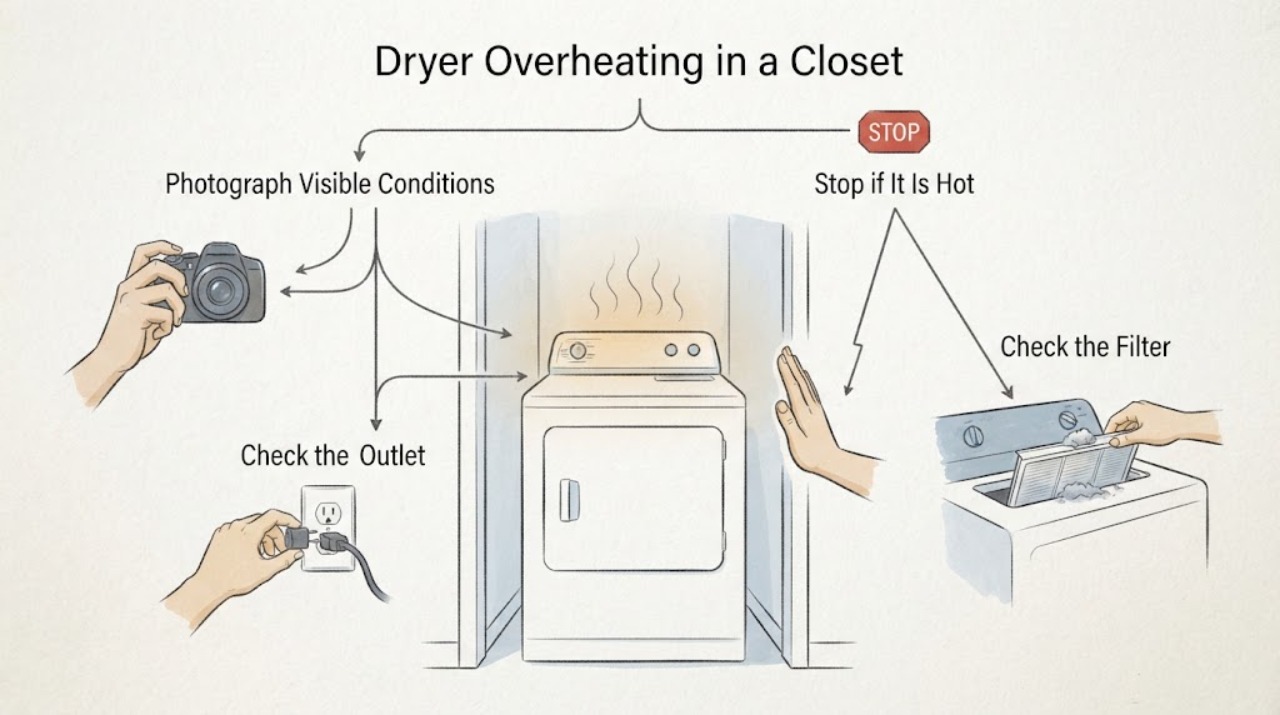
On LG dryer platforms that use these displays, d80, d90, and d95 or severe Flow Sense bars point to restricted exhaust airflow, not a direct measurement that the drum temperature is too high. Stop the dryer for smoke, burning odor, sparks, gas odor, a hot outlet, or abnormal heat. Otherwise, with the dryer off and cool, record the complete display and model, clean the lint filter, inspect the visible duct and outside flap, and check whether the closet blocks the required installation airflow. A d90 or d95, weak outside airflow, a crushed or hidden duct, or a returning alert means do not keep running the dryer; arrange professional vent cleaning or qualified appliance service. Exact code availability, bar interpretation, closet clearances, and gas versus electric requirements must be confirmed in the manual for the model.
Work through in order
Diagnostic checks
Use only checks that match the exact appliance or system and its official guide.
-
Check 1
Before pressing buttons, photograph the complete display, including lower-case letters, spaces, alternating characters, Flow Sense bars, and any plain-language message, and record the full model number and whether the dryer is vented, ventless or heat-pump, gas, or electric.
Expected result: You can identify d80, d90, d95, another code, or only an indicator pattern, and you can tell whether the unit is an LG platform for which the cited vent guidance applies.
Next step: Use the exact model guide before interpreting a partial display or applying any model-specific reset, clearance, or duct requirement. Do not substitute d80, d90, or d95 for a similar-looking message.
Why this matters
Why: The no-model description is not enough to transfer a code meaning or a closet clearance from one LG dryer to another. LG's general checklist says it is a reference for all models but that images and content can differ, and it directs gas-dryer installation to a specialist.
-
Check 2
Stop and leave the dryer off if there is smoke, a burning smell, gas odor, sparking, abnormal heat, a hot outlet, water near electrical parts, or a breaker that trips again.
Expected result: Any of those hazards is present, or the cabinet, plug, outlet, or surrounding closet is unusually hot or damaged.
Next step: From a dry, safe position only, isolate power if that can be done without touching water or exposed wiring. For gas odor, avoid switches and leave the area; arrange urgent qualified service from outside the affected area. Do not run another test cycle.
Why this matters
Why: An airflow alert can coexist with a fire, gas, or electrical hazard; a display code does not make continued operation safe.
-
Check 3
With the dryer off and cool, remove lint from the accessible filter and inspect the visible rear exhaust connection for a crushed, kinked, dented, torn, loose, or sharply bent duct; do not reach into a running dryer.
Expected result: Lint is packed into the filter, the duct is deformed or disconnected, or the dryer has been pushed tightly against the closet wall and pinches the connection.
Next step: Correct only an accessible, obvious issue without opening the dryer, then reassess the complete display once. If d90, d95, or severe Flow Sense returns, leave the dryer off until the exhaust path is professionally cleaned or repaired.
Why this matters
Why: LG identifies lint and crushed, kinked, or dented ductwork as airflow restrictions. A tight closet installation can make a visible restriction worse, but this check does not prove the hidden wall run is clear.
-
Check 4
From a safe position, inspect the outside exhaust hood and observe airflow only with a model-approved cool or air-only check; confirm the flap opens and that lint or snow is not blocking it.
Expected result: Airflow is weak or absent, the flap does not open, or lint is visible at the outside termination.
Next step: Do not keep operating the dryer to compensate. Arrange a qualified vent inspection and cleaning; a returning alert after the visible path is clear needs appliance service as well.
Why this matters
Why: Weak outside airflow supports a restriction somewhere between the dryer and outdoors, including an in-wall section, long run, or multiple bends that cannot be judged from the rear connection.
-
Check 5
Check the closet installation without dismantling the dryer: make sure the door is not sealing off the dryer intake or exhaust area, the rear duct is not crushed by the enclosure, and the model manual's required clearances and ventilation openings are available.
Expected result: The closet door has no model-required ventilation, the dryer is wedged against the wall, the rear duct is sharply bent, or the space does not match the exact installation diagram.
Next step: Do not use generic clearance numbers from another LG dryer. Keep the door open only if the exact manual permits that as a temporary check, and have the installation corrected by a qualified installer; gas dryers require an installation specialist.
Why this matters
Why: A closet can create a repeat restriction or heat buildup even after the lint filter is clean. LG publishes general installation references, but the exact dimensions and ventilation arrangement depend on the model and dryer type.
-
Check 6
If the visible filter, duct, and outside hood are clear but the alert returns, note the cycle, load size, closet-door position, complete display, and whether airflow changes, then stop troubleshooting at the panel.
Expected result: The code returns with a clear visible path, or d90/d95 appears again after one safe correction.
Next step: Request professional vent inspection and qualified LG/appliance service. Do not bypass a thermal or door safety, open the cabinet, or perform live electrical testing.
Why this matters
Why: The remaining restriction may be inside the wall, in a long or multi-bend run, or related to a model-specific sensing or internal fault; the display alone cannot identify a heater, thermistor, or control part.
Use your observations
Decision map
Find the observation that best matches what you see, then follow the next safe action.
-
PATH 01Next step
What you see
Smoke, burning odor, gas odor, sparks, severe heat, a hot outlet, water near electrical parts, or a repeated breaker trip is present.
Do this next
Stop immediately, leave the dryer off, and arrange urgent qualified service; for gas odor, avoid switches and leave the area before calling for help.
Why this path and its safety boundary
Why it matters: This is a safety event, not a routine Flow Sense cleaning decision.
-
PATH 02Next step
What you see
The display is d90 or d95, Flow Sense shows the highest restriction indication, and outside airflow is weak or absent.
Do this next
Do not run the dryer until a qualified vent professional cleans or repairs the full exhaust path; then verify the exact model's installation and retest only when safe.
Why this path and its safety boundary
Why it matters: The combined result strongly supports severe exhaust restriction, including a hidden or installation-related blockage, and continued heating is unsafe.
-
PATH 03Next step
What you see
The display is d80 or a lower Flow Sense restriction indication, and the filter or visible rear duct is blocked, kinked, or pinched by the closet.
Do this next
Correct the accessible obstruction without opening the dryer, then make one safe reassessment. If the indication returns, stop and obtain a full vent inspection.
Why this path and its safety boundary
Why it matters: A visible airflow restriction is more likely than a confirmed heater or temperature-sensor failure.
-
PATH 04Next step
What you see
The visible path is clear but d80, d90, or d95 keeps returning, or the closet cannot meet the exact model's installation requirements.
Do this next
Leave the dryer off and arrange qualified vent inspection or installation correction, followed by appliance service if the alert persists.
Why this path and its safety boundary
Why it matters: A concealed duct restriction, excessive run or bends, blocked termination, or incompatible installation remains possible; the code does not identify a particular internal part.
-
PATH 05Next step
What you see
The unit is not confirmed as a vented dryer, the model number is missing, or the display is not a complete d80/d90/d95 entry.
Do this next
Pause model-specific troubleshooting, obtain the rating-label model and installation manual, and use only its code table and installation instructions.
Why this path and its safety boundary
Why it matters: LG code and clearance behavior cannot be safely generalized across vented, ventless, heat-pump, gas, and electric platforms.
When checks do not resolve it
Need a professional?
Stop using the dryer and arrange urgent service for smoke, burning smell, gas odor, sparks, severe heat, a hot outlet, water near electrical parts, or repeated breaker trips. Arrange professional vent cleaning or qualified appliance service for d90/d95, weak or absent outside airflow, a returning alert, a hidden or long multi-bend duct, or a closet that cannot meet the exact manual. Do not open the cabinet, bypass a thermal or door safety, test live electrical circuits, or replace a heater, thermistor, or control module based only on this display.
Common questions
FAQ
Does d90 mean the dryer temperature is 90 degrees?
No. In LG guidance that lists these displays, d90 and d95 describe progressively severe exhaust restriction; they are not a direct drum-temperature reading. Confirm the exact model's display table before acting on a similar-looking message.
Can I keep the closet door open and continue drying?
An open door may change airflow, but it does not repair a blocked or crushed duct and is not a universal operating instruction. Use the exact model installation manual; if d90/d95, weak airflow, or abnormal heat remains, keep the dryer off until the exhaust and installation are corrected.
Read the exact guide
Official sources
- LG Dryer - Understanding d90 and d95 Error CodesLG USA Support · LG dryer d90 and d95 restricted-exhaust guidance and safety boundary
- [LG Dryer] Pre-Purchase & Installation ChecklistLG USA Support · General LG dryer installation reference, model-specific clearance caveat, gas-dryer specialist guidance, and duct precautions
- LG Dryer – Why Does My Dryer Turn Off Abnormally?LG USA Support · LG dryer abnormal shutoff and safe power/reset boundary
- LG Dryer – Proper Venting and Installation TipsLG USA Support · LG dryer duct routing and ventilation-system guidance
- LG Dryer - Error Code ListLG USA Support · LG dryer error-code and Flow Sense guidance, including d80, d90, and d95
Community feedback
Share a repair observation
Share a plain-text repair observation. Accepted observations are published automatically; this page may take a moment to update.