
On this page
Start here
Quick answer
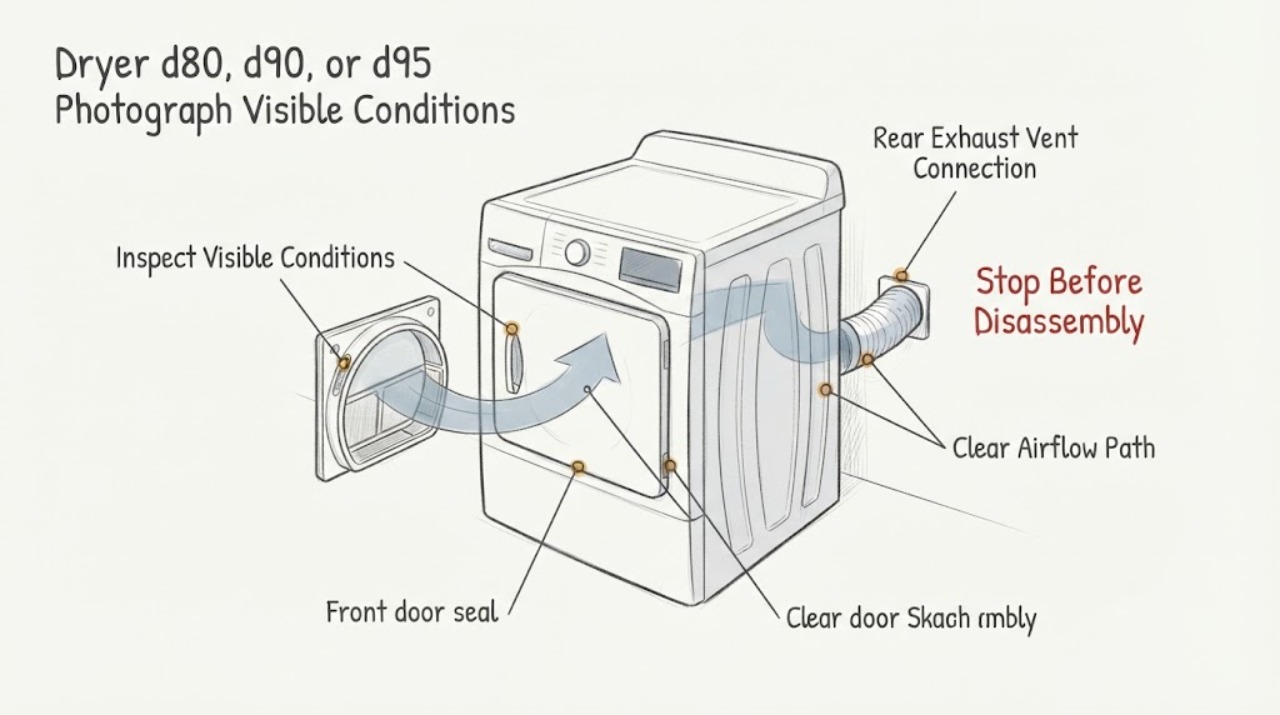
On LG dryers, d80, d90, and d95 are airflow-restriction messages, with the number indicating an approximately 80%, 90%, or 95% restriction; LG also notes that d80 on a gas dryer can indicate insufficient gas supply. Because this dryer was installed in a new-build home, a clean lint filter and undamaged short transition hose do not clear the house-side vent: the wall duct, construction debris, excessive length or bends, and exterior hood are installation-handoff checks. Do not keep running a dryer showing severe restriction. Photograph the display, inspect only safe visible areas with the dryer off, and ask the builder, installer, or qualified vent professional to verify the concealed duct and outside hood against LG's requirements. Do not open the dryer, enter a service or installation test, or replace a sensor based on d80/d90/d95.
Work through in order
Diagnostic checks
Use only checks that match the exact appliance or system and its official guide.
-
Check 1
With the dryer stopped, photograph the complete display exactly as shown, including lower-case d, the number, Flow Sense bars, and any other message. Record whether the dryer is gas or electric, the installation date, whether the code appeared from the first loads, and whether it is d80, d90, or d95 rather than treating the three labels as interchangeable.
Expected result: The display consistently shows d80, d90, or d95; the code changes between loads; or another message is present as well.
Next step: Keep the exact display photo with the installation paperwork. Use the airflow branch only for a confirmed d80/d90/d95 and ask LG or the installer to use the exact model guide for any additional message.
Why this matters
Why: LG maps these codes to increasing exhaust restriction, but a gas dryer can show d80 for a gas-supply condition and other messages can require a different path. The installation date and complete code determine whether the house-side handoff should be prioritized.
-
Check 2
With the dryer off and cool, clean the lint filter as the model instructions permit and look at the short transition section behind the dryer without pulling the appliance out or disconnecting it. Check only for an obvious crush, sharp kink, hole, loose visible joint, or material that is not the recommended rigid or semi-rigid metal transition duct.
Expected result: The filter is visibly blocked, the transition duct is crushed or damaged, or the accessible machine-side path appears clear.
Next step: Correct only a plainly accessible condition without moving or dismantling the dryer. If d80/d90/d95 remains or the accessible section is clear, stop using the dryer and move to the new-build vent-handoff check.
Why this matters
Why: Lint and a crushed or damaged transition duct can restrict exhaust before the wall. A clear visible section does not clear the concealed home duct, and it does not prove a dryer sensor or control failure.
-
Check 3
From a safe ground-level position with the dryer off, inspect the outside exhaust termination for a blocked opening, lint or construction debris, a damaged cover, or a flap that appears unable to open. Do not climb onto a roof, insert tools into the duct, or run the dryer repeatedly to measure airflow.
Expected result: The hood is blocked or damaged, the opening looks clear but the dryer still reports restriction, or the exterior termination cannot be safely seen.
Next step: Photograph the visible termination and ask the builder or vent professional to inspect the concealed route. Do not substitute a dryer part or continue operation while d90/d95 remains.
Why this matters
Why: LG identifies the outside hood and its ability to open as part of the exhaust path. A clear exterior does not exclude a blockage, excess length, too many elbows, or a crushed/incorrect duct inside the wall.
-
Check 4
Use the new-home handoff record rather than opening the wall: ask the builder, appliance installer, or vent contractor for the duct route, termination location, duct material, approximate length, number of 90-degree elbows, and confirmation that no temporary cap, screen, seal, or construction debris remains. Compare the installation with LG's published ventilation limits.
Expected result: The route exceeds the published limits, has more elbows than allowed, uses an incompatible material, terminates into a concealed or unventilated space, has an obstructed hood, or the route cannot be documented.
Next step: Leave the dryer off and have the builder/installer or a qualified vent professional correct and verify the house exhaust. Do not cut drywall, reroute ducting, remove a wall cap, or enter installation test mode yourself.
Why this matters
Why: A new-build-specific installation defect or concealed restriction is more likely than a part failure when the warning began after installation and the machine-side checks are normal. LG's installation guidance gives limits for duct length/elbows and warns against unsafe concealed exhaust and plastic or thin-foil ducting.
-
Check 5
Check for a gas-specific or fire-safety exception without touching the appliance: note whether the dryer is gas, whether a gas odor, smoke, burning smell, abnormal heat, a hot outlet, sparking, or a breaker trip is present. Do not restart a gas dryer to test supply or airflow.
Expected result: A gas dryer shows d80, or any odor, smoke, sparking, severe heat, hot outlet, water near electrical parts, or repeated breaker trip is present.
Next step: For gas odor, avoid operating switches, leave the area, and use the local gas-emergency route from outside. For smoke, burning, sparking, severe heat, or electrical danger, stop use and isolate power only from a dry, safe position if possible; arrange qualified gas, electrical, appliance, or vent service.
Why this matters
Why: LG warns that d80 on some gas dryers can reflect insufficient gas supply, while fire and electrical signs override ordinary vent checks. Neither observation identifies a user-replaceable part.
Use your observations
Decision map
Find the observation that best matches what you see, then follow the next safe action.
-
PATH 01Next step
What you see
d80, d90, or d95 first appeared immediately after this dryer was installed in the new-build home, and the lint filter and visible transition section are normal.
Do this next
Keep the dryer off and ask the builder, installer, or qualified vent professional to verify the in-wall route, construction debris, length, elbows, material, and outside hood against LG's requirements.
Why this path and its safety boundary
Why it matters: The concealed house exhaust and installation handoff become the priority. The timing does not prove the dryer is faulty, and the code does not justify a sensor or control replacement.
-
PATH 02Next step
What you see
The outside hood is blocked or its flap cannot open, or the installer cannot document a compliant route and termination.
Do this next
Have the responsible installer or a vent professional clean, repair, or reroute the house duct and verify airflow. Do not climb, insert tools into the duct, or alter the wall system yourself.
Why this path and its safety boundary
Why it matters: The evidence points to an exterior or concealed installation restriction rather than a confirmed dryer component failure.
-
PATH 03Next step
What you see
The house-side route and hood are professionally confirmed compliant, but d80/d90/d95 remains or the code returns after the correction.
Do this next
Provide LG or qualified service with the model, code photo, installation record, vent-route report, and whether the warning changes. Keep the dryer off until the restriction or the underlying fault is diagnosed.
Why this path and its safety boundary
Why it matters: A persistent warning now needs exact-model LG service; it still does not identify a thermistor, sensor, control, heater, or other part from the code alone.
-
PATH 04Next step
What you see
A gas odor, smoke, burning smell, sparking, severe heat, a hot outlet, water near electrical parts, or a repeated breaker trip is present.
Do this next
Stop using the dryer and leave a gas-odor area without operating switches. Isolate power only when safely accessible from a dry position, keep clear, and arrange urgent qualified service.
Why this path and its safety boundary
Why it matters: This is an immediate gas, fire, or electrical stop boundary, not a normal d80/d90/d95 branch.
Helpful context
Understand the symptom
The date of installation is useful context, not proof that the LG dryer is defective. A d80/d90/d95 warning measures restriction somewhere between the dryer and the outside exhaust exit. In a new home, the concealed run and exterior termination may be new but still incorrectly routed, obstructed by construction debris, too long, or fitted with a hood that cannot open freely. The first handoff should include the builder or installer who owns that vent path.
LG's public guidance does not turn these messages into a dryer-part diagnosis. It points to the lint filter, visible transition duct, exterior hood, and professional inspection of the in-wall system. A severe restriction can be unsafe, so do not keep using the dryer while d90 or d95 remains; do not defeat the warning with a test mode or repeated cycles.
When checks do not resolve it
Need a professional?
Keep an LG dryer with d90 or d95 off until the exhaust system is cleaned or repaired; apply the same stop rule to a persistent d80. For a new-build installation, contact the builder or installer first for the concealed duct and exterior hood handoff, then use a qualified vent professional or LG service if the route is compliant or the warning returns. Stop immediately for gas odor, smoke, burning smell, sparking, severe heat, a hot outlet, water near electrical parts, or a repeated breaker trip. Do not open the dryer, enter installation/service mode, run repeated tests, or replace a sensor from the code alone.
Common questions
FAQ
What do d80, d90, and d95 mean on an LG dryer?
LG's official error list maps d80, d90, and d95 to approximately 80%, 90%, and 95% exhaust-duct restriction. On some gas dryers, LG notes that d80 can instead indicate insufficient gas supply. Record the complete code and use the matching model guidance; do not treat the code as proof that a dryer sensor or control needs replacement.
Why check the builder or installer if the LG dryer is new?
A new appliance does not eliminate a house-side vent problem. LG's installation guidance identifies long or bent runs, crushed or incompatible ducting, blocked hoods, and concealed in-wall restrictions as airflow causes. If the warning began from the first loads, have the builder or installer document and verify that route before treating the dryer as defective.
Can I keep using the dryer while d90 or d95 is displayed?
No. LG says not to use the dryer until a severely restricted exhaust system has been cleaned or repaired. Do not bypass the warning or run repeated cycles to test a new-build vent; arrange the installer or qualified vent professional to inspect it.
Read the exact guide
Official sources
- Installation Check - Laundry DryerLG USA Support · Opened official LG dryer installation-check guidance for d80 d90 d95 restricted exhaust in a new-build installation; it routes incompatible home ventilation to professional inspection rather than a user part replacement.
- Part 8 — Exhaust Requirements and MaintenanceLG · Opened official LG dryer exhaust requirements used to scope the new-build wall and exterior-termination check for d80 d90 d95; exact dryer model must still be matched to its own manual.
- LG Dryer - Error Code ListLG USA Support · Opened official LG dryer error-code guidance for d80 d90 d95 and Flow Sense; the assigned dryer model is not supplied, so use the exact model guide for any additional message.
- LG Dryer – Proper Venting and Installation TipsLG USA Support · Opened official LG installation guidance for the assigned LG dryer d80 d90 d95 restricted-exhaust condition in a new-build home; it is a vent-system requirement reference, not an exact-model part diagnosis.
Community feedback
Share a repair observation
Share a plain-text repair observation. Accepted observations are published automatically; this page may take a moment to update.