
On this page
Start here
Quick answer
An LG dryer's drum can appear not to tumble when the door was opened, a very small load ends before the clothes contact the moisture sensors, or an overloaded drum cannot move; a power, filter, airflow, door, motor, or drive fault is also possible. Turn the dryer off before inspecting it, check that the door closes and the lint filter is seated, and try one suitable normal load using the model's controls. If the empty drum or a normal load still does not turn, an LE1 or recurring dE/IF/airflow code appears, the breaker trips, or you hear grinding, scraping, or binding, stop and arrange qualified appliance service. Smoke, sparking, a burning smell, or a hot damaged cord is an immediate stop condition.
Before you begin
Safety first
- This article covers ordinary-access observation, load, door, filter, and control checks only. Do not open the cabinet, bypass a safety device, probe live circuits, force the drum, or continue operating a dryer with an electrical, fire, binding, or repeated no-tumble hazard.
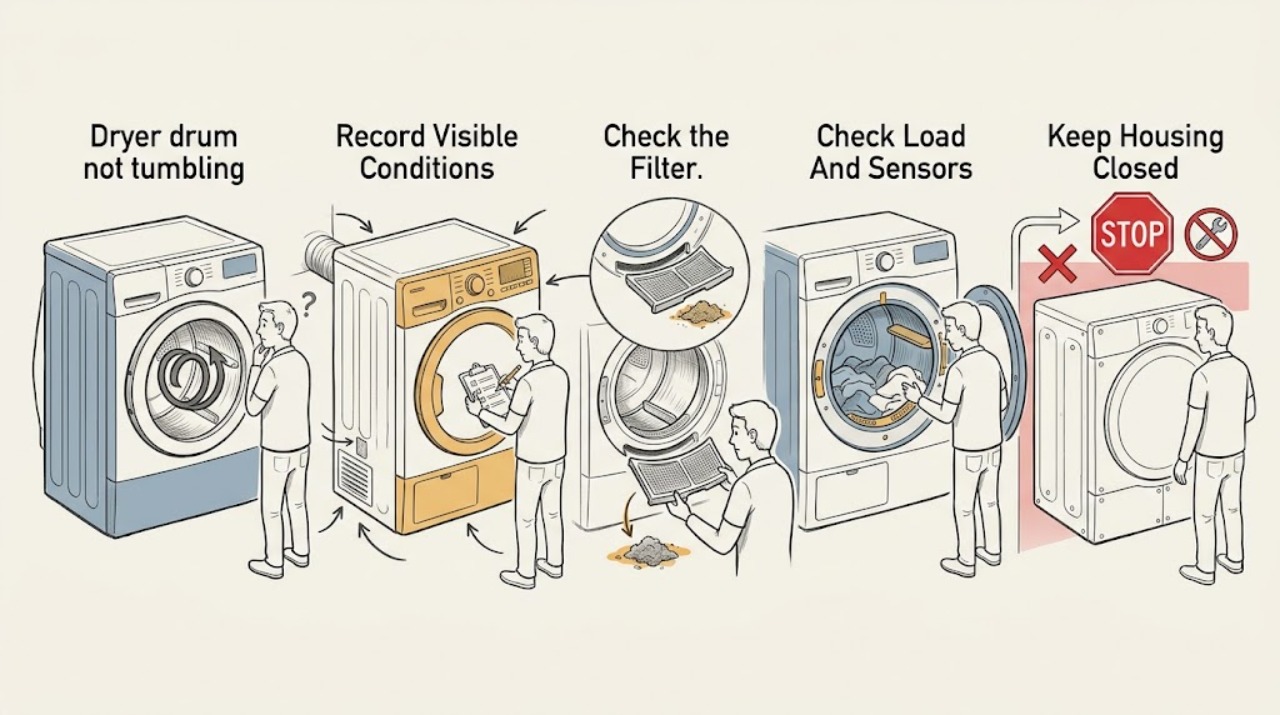
Work through in order
Diagnostic checks
Use only checks that match the exact appliance or system and its official guide.
-
Check 1
Before restarting, observe the display, drum light, control response, door position, exact error code, and the point at which the drum stops; do not touch a hot or damaged cord.
Expected result: Record whether the panel is blank, the light works but the cycle will not start, the drum stops only after the door opens, the cycle ends quickly, or the drum never moves; record any dE, IF, d80, d90, d95, or LE1 indication.
Next step: Continue only with ordinary-access checks when there is no smoke, sparking, burning odor, scorching, damaged cord, water exposure, or repeated breaker trip; otherwise leave the dryer off and arrange service.
Stop if: Stop immediately for smoke, sparking, burning smell, scorching, a hot or damaged cord, exposed wiring, water near electrical parts, or a breaker that trips again.
Why this matters
Why: A door-related pause or early finish has a different path from no power, a filter or airflow indication, or a motor-related LE1 indication. The timing and code are more useful than assuming every stop is a failed motor.
-
Check 2
Switch the dryer off and disconnect power using the normal user-accessible method, then inspect the empty drum, door opening, door seal, and lint-filter area without removing a cabinet panel.
Expected result: Check whether the door closes fully, clothing or debris is caught at the seal, the drum has a visible obstruction, or the filter is damaged, wet, incorrectly assembled, or not seated; do not reach past guards.
Next step: Remove only a visible obstruction or correctly reseat the filter as the model instructions allow; if the door, filter housing, seal, or drum is damaged, stop and provide the model information to service.
Stop if: Do not remove the cabinet, bypass a door switch, reach into a moving or energized dryer, or use the appliance with a damaged filter, seal, guard, or door latch.
Why this matters
Why: A door that cannot close can prevent operation, and a misplaced filter or obstruction can trigger a code or interfere with normal operation. A clear drum, secure door, and correctly seated filter make an internal drive or control issue more likely if the drum still will not move.
-
Check 3
Assess the load that produced the symptom: remove excess clothing from an overloaded drum, and do not diagnose from a single tiny item or an empty sensor cycle.
Expected result: Record whether the drum is packed tightly, whether the load is so small that items do not contact the moisture sensors, and whether the same dryer can rotate a suitable normal load without abnormal noise.
Next step: Use a suitable load size and the cycle recommended in the owner's manual for one controlled retest; if a suitable load still does not tumble, do not keep adding or rearranging clothing as a substitute for diagnosis.
Stop if: Stop if the drum binds, scrapes, makes a grinding or rubbing sound, smells hot, or does not rotate with a suitable load; do not force the drum or run it with a suspected mechanical obstruction.
Why this matters
Why: LG notes that overload can keep a drum from rotating, while a very small load can finish quickly because the sensors do not detect enough clothing. A normal load that turns shifts suspicion away from a seized drive and toward load or sensing conditions.
-
Check 4
Check the household-side power connection and the dryer controls from outside the cabinet: verify the plug is fully seated, check the dryer breaker once for an obvious tripped position, and check whether a child-lock indication is active according to the model manual.
Expected result: Record whether the display is responsive, the drum light has power, the breaker immediately trips again, the controls are locked, or a code returns after the filter, door, and load checks.
Next step: Use only the model-specific child-lock or reset instruction if the unit is otherwise safe; if power remains abnormal, the code returns, or the unit has power but will not run, arrange qualified appliance service.
Stop if: Do not remove the terminal cover, probe live wiring, repeatedly reset a tripping breaker, bypass a lock or switch, or use a damaged extension cord or outlet.
Why this matters
Why: LG distinguishes supply and control symptoms from a drum motor fault; electric dryers use more than one supply path, and a child lock can make controls seem unresponsive. A repeated breaker trip, persistent code, or power at the light with no operation is not a reason to open the appliance.
-
Check 5
After the safe checks, run one controlled test with the door fully closed and a suitable normal load, remaining nearby long enough to observe whether the drum starts and stays in motion; do not repeat a test that produces a hazard.
Expected result: Classify the result as drum turns normally, drum turns only with a different load, drum starts then stops, drum never turns, or an error or abnormal noise returns.
Next step: Stop testing and send the technician the model, symptom timing, code, load condition, power result, and any noise; use the dryer again only when the safe result is repeatable and no hazard is present.
Stop if: Stop and leave the dryer out of service for smoke, sparking, burning odor, scorching, repeated breaker trip, binding, scraping, grinding, exposed electrical parts, or any recurring no-tumble failure.
Why this matters
Why: Normal rotation after correcting load, door, filter, or control conditions supports that condition as the immediate cause. Failure with an empty or suitable load, repeated LE1, persistent dE/IF/airflow code, binding, or abnormal noise makes a motor, drive, switch, support, control, or airflow diagnosis more likely.
Use your observations
Decision map
Find the observation that best matches what you see, then follow the next safe action.
-
PATH 01Safety boundary
What you see
The drum stops after the door was opened, or dE appears, and the door does not close fully.
Do this next
Remove clothing from the seal, close the door fully, and press Start or Start/Pause as the model directs; service the latch or switch if the condition returns with a clear, undamaged door.
Why this path and its safety boundary
Why it matters: The immediate pattern is consistent with LG's door-safety or door-closure path, not proof of a failed drum motor.
Safety stop: Do not bypass the door switch or run with a damaged latch, seal, or door.
-
PATH 02Safety boundary
What you see
A tiny load ends quickly or seems to stop, but a suitable normal load tumbles and there is no error or hazard.
Do this next
Use a load and cycle size permitted by the owner's manual and observe repeat behavior; request service if normal loads also fail to tumble or sensing behavior remains abnormal.
Why this path and its safety boundary
Why it matters: LG says a load that is too small may not contact the moisture sensors, so the cycle can finish without establishing a motor failure.
Safety stop: Do not run a load that binds, scrapes, overheats, or produces a burning smell simply to test the sensors.
-
PATH 03Safety boundary
What you see
The drum is tightly packed, the symptom occurs with an unusually heavy load, and the drum turns after reducing it without unusual sound.
Do this next
Follow the model's load-size guidance and retest once; if a suitable load still stops, treat the recurring symptom as a service issue rather than reducing the load indefinitely.
Why this path and its safety boundary
Why it matters: The load may have prevented normal tumbling; clothing can expand as it dries and leave insufficient room for movement.
Safety stop: Do not force the drum to start, overload the appliance, or continue when it binds or makes abnormal noise.
-
PATH 04Safety boundary
What you see
The filter is not seated or an IF, d80, d90, or d95 indication returns, or the controls are unresponsive until the model-specific child lock is cleared.
Do this next
Clean and correctly seat the filter, inspect only the accessible exhaust path for obvious crushing or blockage, or follow the exact model manual for the lock; service a persistent code or restricted path.
Why this path and its safety boundary
Why it matters: The pattern points first to LG's filter, airflow, or control-state guidance; it does not establish that the drum motor is defective.
Safety stop: Do not dismantle the exhaust system, open the cabinet, defeat a control lock, or repeatedly run with a persistent airflow indication.
-
PATH 05Safety boundary
What you see
The empty or suitable-load drum never turns, the drum binds with power disconnected, LE1 returns, or grinding, scraping, or repeated stopping occurs.
Do this next
Leave the dryer off and arrange qualified appliance diagnosis; provide the model, code, whether the drum turns by hand with power disconnected, and the sound or timing of the failure.
Why this path and its safety boundary
Why it matters: A motor, drive, support, switch, control, or related mechanical fault is more likely than a simple load-size explanation, but the exact failed part cannot be identified safely from this check.
Safety stop: Do not remove panels, test live components, force a seized drum, or order a motor, belt, roller, or control board before model-specific diagnosis.
-
PATH 06Safety boundary
What you see
Smoke, sparking, a burning odor, scorching, a hot or damaged cord, water near electrical parts, or a breaker that trips again is present.
Do this next
If safe, stop the cycle and disconnect power at the normal disconnect or breaker without touching damaged parts; keep the dryer out of service and arrange qualified repair.
Why this path and its safety boundary
Why it matters: This is an electrical or fire-risk boundary, not a normal no-tumble troubleshooting branch.
Safety stop: Do not restart, open the cabinet, handle scorched wiring, or keep resetting the breaker. If there is active smoke or fire, leave the area and contact local emergency services.
Helpful context
Understand the symptom
First separate a pause or early finish from a drum that cannot turn
Note exactly when the symptom occurs. If the drum stops only after the door is opened, close the door and use Start or Start/Pause as the model instructs. If a tiny load finishes almost immediately, the clothes may not be contacting the moisture sensors, so the cycle can look like a drum failure even though the motor is not the problem. By contrast, a normal load that never moves, an empty drum that will not turn, or repeated stopping with an error code needs a different path.
Check the accessible load, door, filter, and airflow conditions
With power off, remove an overloaded load and make sure no clothing is caught in the door seal. Confirm that the lint filter is clean, dry, correctly assembled, and seated as the model requires. A dE code can indicate that the door is not completely closed, while IF or d80/d90/d95 indications point toward filter or airflow checks in LG's code guidance. Do not remove panels or reach into the motor area as a troubleshooting shortcut.
Know when the symptom has crossed into service territory
If the controls respond but the empty drum will not rotate, the drum binds by hand with power disconnected, a normal load repeatedly stops, an LE1 code returns, or unusual noise accompanies the failure, a motor, drive, support, switch, or related component needs model-specific diagnosis. If the unit has no usable power, the display is dark, or a breaker or cord is abnormal, address the supply safely without opening the dryer. Smoke, sparking, a burning odor, scorching, or a damaged cord is not a reset opportunity: switch off power if it is safe and leave the dryer out of service.
Safety boundary
Stop conditions
- Stop immediately for smoke, sparking, burning odor, scorching, a hot or damaged cord, water near electrical parts, exposed wiring, or a breaker that trips again.
- Do not bypass the door switch, child lock, thermal protection, filter, guard, or any other safety device.
- Do not remove the cabinet, probe live wiring, force a seized drum, or replace a motor, belt, roller, switch, or control board without model-specific diagnosis.
- Do not keep testing a drum that binds, scrapes, grinds, repeatedly stops, or will not turn with a suitable load.
- Do not treat a recurring LE1, dE, IF, d80, d90, or d95 indication as resolved by repeatedly resetting it; follow the model guidance and arrange service when it persists.
Only after diagnosis
Potential parts
- drum motor or drive component
Consider this category only when a qualified diagnosis confirms that the drum will not turn with a suitable load or an LE1 or comparable motor symptom persists after safe checks.
Confirm the complete LG model and revision, the diagnosed failure, and the manufacturer's parts information before ordering; do not infer fit from the symptom alone. - drum support or drive hardware
Consider this category only when inspection by a qualified technician finds binding, scraping, abnormal rotation, or a worn support or drive part.
The exact support and drive design varies by model; confirm diagnosis and fit before replacing any belt, roller, idler, bearing, or related hardware. - door switch or latch assembly
Consider this category only when the door is visibly aligned and undamaged but a qualified diagnosis confirms that the switch or latch does not report closure reliably.
Confirm the complete model and the diagnosed switch or latch design; never bypass the safety circuit to test or operate the dryer. - lint filter or filter housing component
Consider this category only if the exact model's filter is missing, damaged, or cannot be seated and the model documentation identifies a compatible replacement.
Match the complete model and filter configuration; do not operate with a missing, damaged, wet, or incorrectly fitted filter.
When checks do not resolve it
Need a professional?
Arrange qualified LG appliance service when the empty or suitable-load drum will not turn, an LE1 or other code returns after the model-specific checks, a door or filter cannot be restored, power is abnormal, the breaker trips, the drum binds or makes abnormal noise, or the cause is inside the cabinet. Do not use the dryer until a smoke, spark, burning smell, scorching, damaged cord, water exposure, or repeated no-tumble condition has been assessed.
Safety scope: This article covers ordinary-access observation, load, door, filter, and control checks only. Do not open the cabinet, bypass a safety device, probe live circuits, force the drum, or continue operating a dryer with an electrical, fire, binding, or repeated no-tumble hazard.
Common questions
FAQ
Why does my LG dryer sound like it stopped tumbling after I open the door?
Opening the door stops the drum as a safety condition. Close it fully and press Start or Start/Pause as the model instructs. If the door is clear and closed but the dryer repeatedly reports dE or will not restart, arrange service rather than bypassing the switch.
Can a small load make an LG dryer seem like the drum is not turning?
Yes. LG explains that a very small load may finish quickly because clothing does not contact the moisture sensors. Compare with a suitable normal load, but stop if the drum binds, makes abnormal noise, or still will not turn.
Can an overloaded LG dryer stop the drum from tumbling?
It can. LG notes that an overloaded drum may not rotate, so remove excess clothing and follow the model's load guidance for one safe retest. A suitable load that still does not tumble needs diagnosis.
What does LE1 mean when an LG dryer drum will not turn?
LG's error guidance associates LE1 with a drum motor issue and allows a load-reduction retry; if the indication or no-tumble symptom persists, leave the dryer off and arrange qualified service. Do not order a motor without model-specific diagnosis.
Should I keep resetting an LG dryer that will not tumble?
No. A model-specific reset may be appropriate for a safe, isolated control condition, but repeated resets do not repair a persistent no-tumble, recurring code, tripping breaker, binding drum, or electrical hazard. Stop and provide the symptom history to a qualified technician.
Read the exact guide
Official sources
- LG Dryer - Error Code List(New)LG USA Support · LG USA error-code guidance; displayed codes and exact procedures can vary by model and control generation.
- Power On, Wont Run - Laundry DryerLG USA Support · LG USA support guidance for dryer power and no-run symptoms; exact controls and reset behavior are model-specific.
- LG Dryer – Why Does My Dryer Turn Off Abnormally?LG USA Support · LG USA support guidance for abnormal dryer shutdown; exact cycle behavior depends on model and selected program.
- [LG Dryer] Dryer Drum Not TurningLG USA Support · LG USA support guidance for the linked dryer symptom; the exact owner's manual and model-specific instructions control the appliance.
Community feedback
Share a repair observation
Share a plain-text repair observation. Accepted observations are published automatically; this page may take a moment to update.