
On this page
Start here
Quick answer
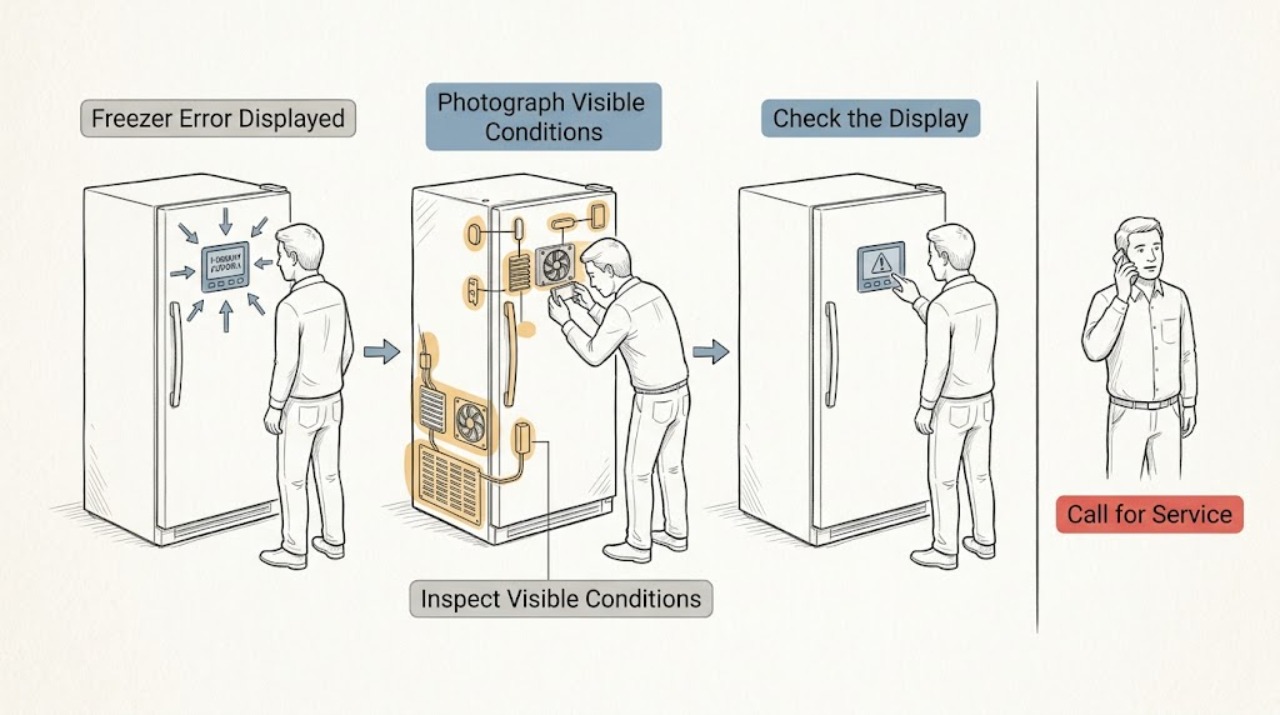
When an LG freezer displays an error, photograph the exact letters or LED pattern before resetting anything and use the manual for the exact model. Some displays are operating modes rather than faults: LG says O F F indicates Demo or Display Mode, which disables cooling. Codes such as FS, FF, or dH point to freezer sensing, fan, or defrost-related conditions and may require service. A single transient display issue can sometimes clear after the manufacturer’s reset procedure, but a repeated code, warm freezer, heavy frost, leak, or unresponsive display is a service boundary. Do not remove covers, bypass a sensor, or test internal wiring.
Work through in order
Diagnostic checks
Use only checks that match the exact appliance or system and its official guide.
-
Check 1
Photograph the complete display and note whether the freezer is still cooling, whether the panel responds, and whether the pattern appears immediately at power-up or after the doors and controls are used.
Expected result: The display shows O F F, a named code such as FS, FF, or dH, a flashing pattern, or a panel that is completely unresponsive.
Next step: Keep the exact code for the model-manual lookup and continue to the matching branch below; do not erase useful evidence by repeatedly resetting the appliance.
Why this matters
Why: O F F can be Demo or Display Mode rather than a component failure. A named code narrows the system involved, while an unresponsive or flickering panel points toward power, display, or control behavior. The freezer temperature and food condition determine urgency.
-
Check 2
If the display reads O F F, compare it with LG’s Demo or Display Mode guidance and check whether the freezer and refrigerator sections are cooling while the display remains active.
Expected result: O F F is displayed and cooling is disabled; or the display contains another code or the appliance is cooling normally.
Next step: Use only the exact model’s documented button sequence to leave Demo or Display Mode, then confirm normal temperature operation. If O F F returns or the unit does not cool, arrange service.
Why this matters
Why: LG describes O F F as a showroom mode that leaves limited display functions active while disabling cooling. Another code must not be treated as Demo Mode without the matching manual evidence.
-
Check 3
If the code is FS or another sensor indication, compare the displayed pattern with the exact LG manual and observe whether the freezer temperature is changing normally or food is softening.
Expected result: The display matches FS or a freezer-sensor pattern, or the freezer temperature is abnormal; alternatively, the code does not match the model’s sensor description.
Next step: Record the code and temperature behavior, keep the door closed, and arrange qualified service for a sensor indication or abnormal cooling. Do not disconnect or substitute a sensor yourself.
Why this matters
Why: LG identifies FS as a freezer sensor error requiring service. A warm compartment with a sensor or cycle indication increases food-safety urgency; an unrecognized pattern must not be assigned a sensor meaning by guesswork.
-
Check 4
If the display is FF or another freezer-fan indication, listen only for normal airflow and inspect the accessible compartment for heavy frost obstructing vents; do not remove the fan cover or reach into the fan.
Expected result: The code matches a freezer-fan issue and frost is visible; the code returns after a documented defrost/reset; or there is no frost but the fan indication remains.
Next step: Follow the exact LG guidance for food transfer and a safe power-off defrost only if the model and food situation make it appropriate. If the code returns or food cannot be protected, stop and arrange service rather than dismantling the fan area.
Why this matters
Why: LG states that FF can indicate a freezer fan motor problem and can also occur when ice blocks the fan. A recurring indication without visible frost can require motor, wiring, or control diagnosis.
-
Check 5
If the code is dH, FdH, dHF, or another defrost-related indication, observe whether frost covers the freezer surfaces, whether water can drain after a permitted defrost, and whether the same code returns afterward.
Expected result: Heavy frost or a blocked drain is visible; the code clears after a complete model-directed defrost; or the code returns or cooling remains poor.
Next step: Protect food and follow only the exact model’s safe defrost directions. If the indication returns, the freezer remains warm, or water leaks, arrange qualified inspection instead of removing panels or servicing the defrost circuit.
Why this matters
Why: LG links these indications with defrost failure and possible ice accumulation, drainage, fuse, heater, or control problems. A temporary clear does not prove that an internal heater or control issue is repaired.
-
Check 6
After recording the code, perform at most one reset using the exact LG owner guidance; use dry hands and the normal plug or dedicated consumer control only, then check whether the code clears and whether cooling resumes.
Expected result: The code clears and normal operation returns; or the same code, a new code, abnormal temperature, flickering display, or unresponsive controls remain.
Next step: If the code returns or cooling is abnormal, stop using the appliance as normal and arrange qualified LG appliance service. Provide the original photograph, reset result, model number, and food-temperature concern.
Why this matters
Why: A cleared one-time display can reflect a temporary power or communication event, but LG directs service when a symptom or code persists or repeats. Resetting cannot correct a failed sensor, fan, defrost component, or control board.
Use your observations
Decision map
Find the observation that best matches what you see, then follow the next safe action.
-
PATH 01Next step
What you see
The display reads O F F and both compartments are not cooling
Do this next
Use the exact model’s Demo or Display Mode procedure once; arrange service if the mode cannot be cleared or cooling does not return.
-
PATH 02Next step
What you see
The code is FS or a freezer sensor pattern
Do this next
Treat it as a service condition and protect food while recording temperature behavior; do not replace or bypass the sensor.
-
PATH 03Next step
What you see
The code is FF and frost is obstructing the fan area
Do this next
Follow the model-specific safe defrost guidance only if food can be protected; escalate if the code returns or frost recurs.
-
PATH 04Next step
What you see
The code is dH, FdH, or dHF, or defrost-related frost and drainage symptoms are present
Do this next
Arrange qualified inspection after the exact model-directed defrost boundary; do not open the defrost or control system.
-
PATH 05Next step
What you see
The code persists after one documented reset, or the freezer is warm, leaking, or electrically unsafe
Do this next
Stop normal use and request qualified appliance service with the code photograph and model information.
Helpful context
Understand the symptom
Read the display before trying a reset
An error display is a symptom, not a part diagnosis. Record capitalization, spaces, and whether the display is a code, O F F, a flashing pattern, or only a temperature indication. The same freezer family can use a different panel layout from the photographs in a general help page, so the exact model manual controls the button sequence.
Protect food and avoid internal repairs
If the freezer is warming, keep the door closed as much as practical and move food to a safe backup only when needed. Do not scrape frost with a sharp tool, open the sealed system, remove the fan cover, or bridge a sensor. If there is smoke, burning odor, a water leak, repeated electrical protection trips, or damaged wiring, stop using the appliance and arrange qualified service.
Safety boundary
Stop conditions
- Stop immediately for smoke, burning odor, damaged wiring, repeated protection trips, a water leak, or a freezer that is rapidly warming.
- Do not remove covers, reach into a fan, scrape frost with sharp tools, bypass a sensor, or test internal wiring.
- Arrange qualified service when FS or another sensor code appears, a fan or defrost code returns, the display remains unresponsive, or cooling does not recover after one model-documented reset.
Only after diagnosis
Potential parts
- freezer temperature sensor
Consider this only when the exact model code and a qualified diagnosis identify a freezer-sensor fault such as FS.
Confirm the exact LG model and the diagnosed sensor location and fitment before replacement. - freezer fan motor
Consider this only when a recurring fan code or qualified inspection confirms a failed motor rather than frost, wiring, or control trouble.
Fan assemblies are model-specific; verify the exact appliance and diagnosed component through qualified service. - defrost system component
Consider a defrost component only when a recurring defrost code and qualified diagnosis identify ice buildup, heater, fuse, drain, or control failure.
Do not select a heater, fuse, drain, or control part from the display code alone; confirm the exact model and diagnosis.
When checks do not resolve it
Need a professional?
Arrange qualified LG appliance service when an error code persists or repeats, the freezer is warm, the display is unresponsive, a sensor, fan, or defrost indication appears, or the appliance leaks or shows an electrical safety symptom.
Common questions
FAQ
What should I do first when my LG freezer displays an error?
Photograph the complete code or LED pattern, note whether the freezer is cooling, and look it up in the exact model manual. Do not repeatedly reset before recording the evidence.
What does O F F mean on an LG freezer display?
LG uses O F F for Demo or Display Mode on refrigerator models, which disables cooling while leaving limited functions active. Follow the exact model procedure to clear it and arrange service if cooling does not return.
Can I keep using an LG freezer with an error code?
Only a one-time code that clears through the model instructions and leaves normal cooling should be monitored. A recurring code, warm freezer, leak, or sensor, fan, or defrost indication requires qualified service and food protection.
Read the exact guide
Official sources
- FS Error CodeLG USA Support · LG manufacturer identification of FS as a freezer sensor error requiring service
- [LG refrigerator display] The display is flickering.LG USA Support · LG manufacturer guidance for temporary display or power symptoms and persistent-display service
- LG Refrigerator - Troubleshooting an F dH or r DH Error CodeLG USA Support · LG manufacturer guidance for dH-related defrost failure, frost, drainage, and service boundaries
- Error codes on analog display modelsLG USA Support · LG manufacturer guidance for analog LED patterns and professional inspection boundaries
- LG Refrigerator - Troubleshooting an E FF or E rF Error CodeLG USA Support · LG manufacturer guidance for freezer fan motor abnormality, frost blockage, reset, and repeated-code service
- LG Refrigerator – How to Disable Demo ModeLG USA Support · LG manufacturer guidance for O F F on the display and cooling disabled by showroom mode
Community feedback
Share a repair observation
Share a plain-text repair observation. Accepted observations are published automatically; this page may take a moment to update.