
On this page
Start here
Quick answer
Start by separating an LG gas oven with no display from one that has power but will not start, ignite, heat, or complete a cycle. If there is any gas smell, delayed ignition, popping, abnormal flame, smoke, burning odor, carbon-monoxide alarm, sparking, or repeated breaker trip, stop immediately, leave for a suspected gas emergency, and contact emergency services or the gas supplier from outside; do not relight or repeat the test. If the area is safe, note the exact model and display message, confirm the intended mode and temperature were accepted with Start, and check whether Oven Lockout, Child Lock, or Delay Start is active. LG's gas-range guidance then separates power, control settings, gas supply, and igniter symptoms. Check only a safely visible breaker or connection and never move the range or work on gas lines. If the gas supply and settings are correct but the oven still does not run, heat, or ignite, arrange qualified LG gas-appliance service.
Before you begin
Safety first
- For suspected gas or CO danger, leave and contact emergency or gas-supplier help from outside. Otherwise keep checks to ordinary safe access; do not move the range, open the cabinet, work on gas connections, repeat ignition tests, bypass interlocks, or probe energized wiring.
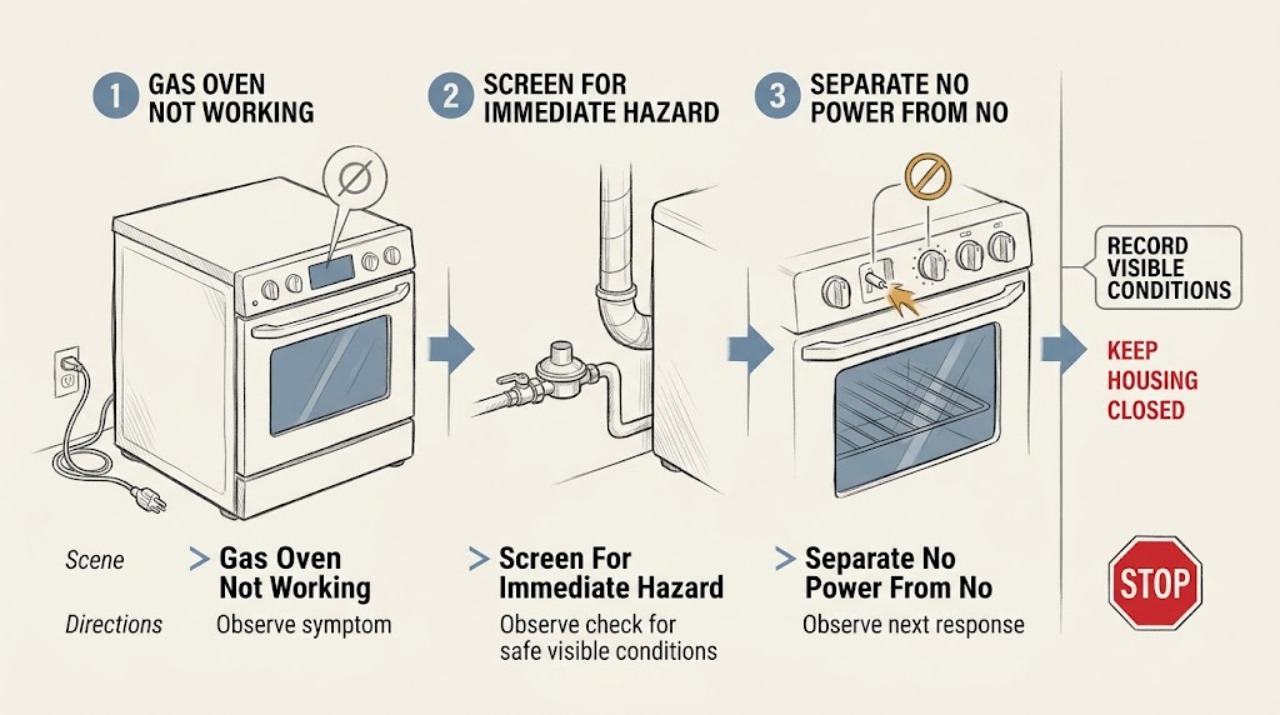
Work through in order
Diagnostic checks
Use only checks that match the exact appliance or system and its official guide.
-
Check 1
Before pressing any control, stop and screen the area for fuel-gas odor, hissing, smoke, burning odor, sparks, an abnormal flame, a carbon-monoxide alarm, or anyone feeling ill.
Expected result: A strong or continuing gas odor, hissing, flame outside the burner area, smoke, arcing, a CO alarm, or symptoms such as headache, dizziness, nausea, weakness, chest pain, or confusion means the oven must not be tested.
Next step: Leave immediately for a suspected gas emergency, keep others out, and contact emergency services or the gas supplier from outside or a neighbor's location. Do not operate switches, phones, flames, or the oven controls inside, and do not re-enter until cleared.
Why this matters
Why: These signs can indicate unburned fuel, fire, electrical danger, or combustion products. The problem is no longer a routine no-start diagnosis.
-
Check 2
From a dry, safe position, determine whether the LG range has no display or interior response at all, or whether the display and lights work but the oven will not run.
Expected result: No display or response points to power supply, breaker, cord, or installation; a lit display with no cycle points to settings, lockout, delay, control, gas supply, or ignition.
Next step: For no power, make only a visual check of the accessible breaker and cord condition if the area is dry and there is no hazard. For a powered unit, continue to the display and control checks without opening the range.
Why this matters
Why: LG publishes separate power and powered-but-not-working paths. A gas oven still needs electrical power for controls and ignition even though its heat source is gas.
-
Check 3
Record every character of the display, including an F-style code, Oven Lockout, Child Lock, Delay Start, or a door-lock indication, along with the selected mode and when the message appeared.
Expected result: A code should be matched to the exact LG range type and model; lockout or delay text can prevent a cycle from starting even when the range has power. A recurring or unlisted code is a service clue, not permission to guess.
Next step: Use the exact LG manual or official error-code page for that model. If an error returns, the display is abnormal, or the panel will not accept safe controls, keep the oven off and arrange service.
Why this matters
Why: LG's error-code guidance requires selecting the range type and displayed code, and its powered-unit guidance treats lockout and delay as distinct from a dead appliance.
-
Check 4
With no safety symptom present, select the intended Bake or other model-supported oven mode, set the temperature, and confirm the setting with the model's Start control once.
Expected result: If the cycle begins after the setting is confirmed, the earlier failure was a control sequence or mode issue. If the display accepts the setting but the oven does not start, continue to the power, gas, and ignition branches without repeatedly cycling the control.
Next step: Record the exact sequence and stop if the control behaves unexpectedly, the burner does not ignite normally, gas odor appears, or the oven produces smoke, popping, or an abnormal flame.
Why this matters
Why: LG notes that intended cycle settings must be made and confirmed, and that a powered gas appliance can still fail to run because of control settings or power supply.
-
Check 5
If the range has no display and the area is dry and odor-free, visually check whether the accessible breaker is tripped and whether the power cord appears seated and undamaged; do not remove covers or use an extension cord.
Expected result: A tripped breaker, loose-looking connection after installation or movement, damaged cord, or repeated trip changes the diagnosis to supply or installation. A breaker that will not stay on is not a repeated-reset opportunity.
Next step: If the breaker is visibly tripped and there is no odor, smoke, water, or damage, follow the home's normal safe reset procedure once. If it trips again, will not hold, or the cord or outlet is damaged, stop and call a qualified electrician or appliance technician.
Why this matters
Why: LG says gas ranges need the correct dedicated electrical supply and that persistent no-power conditions require repair. Repeated trips can indicate an electrical fault or unsafe appliance condition.
-
Check 6
Only when there is no gas odor and the area is cleared for ordinary inspection, compare the recorded failure with whether the household gas service is working at another safe appliance; do not move the LG range or touch a gas connection.
Expected result: If other gas appliances also fail, the household supply or a service shutoff may be involved. If other appliances work but the LG oven does not, the range's valve, regulator, control, or ignition path becomes more likely.
Next step: Contact the gas supplier for a supply issue. For a range-only issue, keep the oven off and arrange qualified appliance service; never adjust a regulator, disconnect a connector, or attempt a leak test.
Why this matters
Why: LG identifies gas supply and the appliance-side regulator as model-dependent conditions for heating, while gas connections and conversion work require qualified installation or service.
-
Check 7
Use the safe event record to classify the oven as no ignition, clicking or igniter glow without a burner flame, delayed ignition, flame-out, or ignition followed by no sustained heat; do not repeat an ignition test to obtain a new observation.
Expected result: No igniter activity, a glow without flame, a delayed flame, or an igniter-related code points to different possible supply, igniter, burner, control, or sensor paths. A gas smell after a failed or delayed start is an immediate stop condition.
Next step: Keep the oven off and request qualified gas-appliance service for any failed or delayed ignition, flame-out, repeated clicking, or no sustained heat. Do not open the cabinet, probe wiring, or keep turning the knob.
Why this matters
Why: LG states that the gas oven uses a hot-surface igniter for the bake burner and that an igniter problem prevents heating. The symptom pattern helps a professional choose a safe diagnostic path but does not identify a replaceable part by itself.
-
Check 8
After the oven is cool and only from ordinary access, confirm that the door is fully closed and that the visible oven vent area is not blocked by an object; do not operate the oven with the door open or cover its vent.
Expected result: An open or misaligned door can interrupt the intended cycle or lose heat, while a blocked vent can affect airflow and combustion. A closed door and clear visible vent do not rule out a gas or control fault.
Next step: Remove only a plainly external obstruction after the oven is cool. If the door is damaged, will not close, the vent is damaged, or the oven still fails, keep it off and call service.
Why this matters
Why: LG's gas-oven guidance treats door position and airflow as operating conditions, but concealed hinges, seals, burners, and venting are not user repair targets.
-
Check 9
Prepare a service record with the complete LG model, power/display state, exact code or text, selected mode, gas-supply observations, ignition pattern, door and vent condition, recent movement or installation, and any odor, smoke, CO alarm, or breaker event.
Expected result: A repeatable record separates no-power, control, lock, gas-supply, ignition, heating, and safety branches without asking the household to recreate a hazardous failure.
Next step: Contact LG support, the authorized installer, gas supplier, qualified appliance repair, or an electrician as appropriate. Do not use the oven again until the professional clears the condition.
Why this matters
Why: If the oven still will not start, ignite, heat, or complete a cycle after safe visible checks, the fault may be in concealed gas, ignition, valve, burner, sensor, control, or wiring components.
Use your observations
Decision map
Find the observation that best matches what you see, then follow the next safe action.
-
PATH 01Next step
What you see
There is a strong or continuing gas odor, hissing, a flame outside the burner area, smoke, burning odor, popping, sparking, or fire.
Do this next
Leave immediately, avoid switches, controls, phones, flames, and other ignition sources inside, and contact emergency services or the gas supplier from outside. Do not move the LG range or re-enter until cleared.
-
PATH 02Next step
What you see
A carbon-monoxide alarm sounds or anyone has headache, dizziness, weakness, nausea, vomiting, chest pain, confusion, or unusual sleepiness.
Do this next
Get to fresh air and seek emergency or medical help. Do not remain inside to test the range and do not re-enter or operate it until responders and a qualified technician say it is safe.
-
PATH 03Next step
What you see
The display and range response are completely absent but there is no gas, fire, smoke, water, or cord hazard.
Do this next
Make only a safe visual check of the accessible breaker and cord. A repeat trip, damaged connection, or persistent no-power condition requires an electrician or appliance service.
-
PATH 04Next step
What you see
The display works but the oven will not start, and it shows lockout, child lock, delay, an unconfirmed setting, or an exact error code.
Do this next
Follow the exact LG model manual or official error-code guidance once, record the result, and request service if the message returns or the controls remain unresponsive.
-
PATH 05Next step
What you see
The controls work but the gas oven does not heat, while other safe gas appliances also lack supply or the range was recently moved or installed.
Do this next
Contact the gas supplier or qualified installer. Do not move the range, inspect a connector, alter a regulator, or work on a gas line.
-
PATH 06Next step
What you see
The oven does not ignite, ignition is delayed, the flame goes out, or the recorded igniter behavior is abnormal.
Do this next
Keep the oven off and arrange qualified gas-appliance service. Do not repeat ignition attempts or open the cabinet to test the igniter, valve, burner, or wiring.
-
PATH 07Next step
What you see
The door will not close correctly, the visible vent is blocked or damaged, or heat is lost despite normal settings and gas supply.
Do this next
Stop using the oven, remove only an external obstruction after cooling if safe, and request service for door, seal, vent, combustion, or heating diagnosis.
-
PATH 08Next step
What you see
Power, settings, lock state, supply, and safe visible conditions are correct but the LG gas oven still will not run, heat, or complete its cycle.
Do this next
Use LG Customer Support or qualified appliance repair and provide the complete service record. Keep the oven off until the technician clears it.
Helpful context
Understand the symptom
Safety changes the troubleshooting route
A gas oven that will not work may have a simple setting or power problem, but an oven that releases unburned gas is a different emergency. Never keep turning the control while waiting for a flame, and never use a match, lighter, phone, or electrical switch to investigate a gas smell. Leave for a strong or continuing odor, and do not move the range to inspect its connector. Only after the area is cleared should ordinary model-specific checks resume.
Use the display and symptom to choose the branch
No display, a lit display with no response, an error code, a locked door, and a burner that does not ignite are not interchangeable symptoms. LG's support pages describe separate paths for power, settings, control lock, delay start, gas supply, and ignition. Record the exact message and what happened immediately before the failure rather than guessing an error-code meaning from another model.
A gas oven can also create carbon monoxide
Carbon monoxide cannot be seen or smelled. The CDC identifies gas ranges as fuel-burning sources and lists headache, dizziness, weakness, nausea, vomiting, chest pain, and confusion as possible symptoms. A CO alarm or symptoms require fresh air and emergency help; they are not a reason to stay inside and test the oven.
Only after diagnosis
Potential parts
- oven igniter
Consider this only after a qualified technician confirms an igniter or delayed-ignition fault and rules out supply, burner, valve, control, and installation causes.
Confirm the complete LG model and professional diagnosis before ordering; do not remove or test this part yourself. - gas valve or regulator
Consider this only when qualified gas-appliance service diagnoses a model-specific supply-control fault after the emergency and safety checks.
Gas-system components require exact model fit and qualified installation; the no-start symptom alone does not identify a part. - bake burner assembly
Consider this only when professional diagnosis finds a burner or combustion problem consistent with the recorded ignition and heating behavior.
Verify the complete LG model and have qualified service confirm compatibility and installation. - oven control or sensor
Consider this only after the model-specific error, power, gas, igniter, and burner checks leave a control or sensing fault as the professional diagnosis.
Confirm the exact model and fault diagnosis before selecting any electronic or sensing component.
When checks do not resolve it
Need a professional?
Leave immediately and contact emergency services or the gas supplier from outside for a strong or continuing gas odor, hissing, delayed ignition with unburned-gas odor, fire, smoke, abnormal flame, or any need to search for a leak. Get fresh air and emergency medical help for a CO alarm or symptoms. Keep the oven off and arrange qualified LG gas-appliance service for repeated breaker trips, an exact error that returns, lock or control failure, no ignition, flame-out, abnormal heating, a damaged door or vent, recent installation or movement, or any failure that remains after safe visible checks. Never move the range, open the cabinet, adjust gas connections or pressure, bypass a safety device, probe wiring, or repeat ignition tests.
Safety scope: For suspected gas or CO danger, leave and contact emergency or gas-supplier help from outside. Otherwise keep checks to ordinary safe access; do not move the range, open the cabinet, work on gas connections, repeat ignition tests, bypass interlocks, or probe energized wiring.
Common questions
FAQ
Why does my LG gas oven have power but not work?
Check the exact cycle and Start confirmation, Oven Lockout, Child Lock, Delay Start, the exact display code, and the recorded gas and ignition pattern. If those are correct but the oven still will not run or heat, arrange LG or qualified appliance service.
What if my LG gas oven has no display?
If the area is dry and free of gas or smoke, make only a safe visual check of the accessible breaker and cord. A persistent no-power condition, damaged connection, or breaker that trips again requires electrician or appliance service; do not remove covers.
What does it mean if the LG gas oven clicks but does not heat?
The recorded pattern may involve gas supply, a hot-surface igniter, burner, valve, or control. Do not keep trying to ignite it, especially if there is any gas odor. Keep the oven off and have qualified gas-appliance service diagnose it.
Can I reset an LG gas oven that is not working?
Use a reset only when the exact LG model instructions call for it, the area is dry and odor-free, and there is no smoke, sparking, abnormal flame, or repeated breaker trip. A reset cannot make an unsafe gas or ignition fault safe, and a returning code needs service.
When should I stop using an LG gas oven?
Stop immediately for gas odor, delayed ignition, hissing, abnormal flame, smoke, burning odor, sparking, a CO alarm or symptoms, water or damage near electrical parts, or a breaker that trips again. For a gas emergency, leave and contact help from outside; otherwise arrange qualified service before reuse.
Read the exact guide
Official sources
- LG Range - Error Codes ListLG USA Support · LG electric, radiant, and gas ranges; code meaning is model and range-type dependent.
- gasU.S. Consumer Product Safety Commission · Consumer gas appliances when a gas leak is suspected.
- LG Range – How to Install a Gas RangeLG USA Support · LG gas ranges; installation and gas-line work require qualified professionals.
- Oven Not Heating - Gas RangesLG USA Support · LG gas ranges; exact model and displayed code can change the diagnosis.
- Carbon Monoxide Poisoning BasicsCenters for Disease Control and Prevention · Household carbon-monoxide safety, including gas ranges and other fuel-burning appliances.
- LG Electric Range / Gas Range: Power IssuesLG USA Support · LG electric and gas ranges; exact model controls and instructions can vary.
- LG SupportLG USA Support · LG appliances and products; select the exact product and model.
Community feedback
Share a repair observation
Share a plain-text repair observation. Accepted observations are published automatically; this page may take a moment to update.