
On this page
Start here
Quick answer
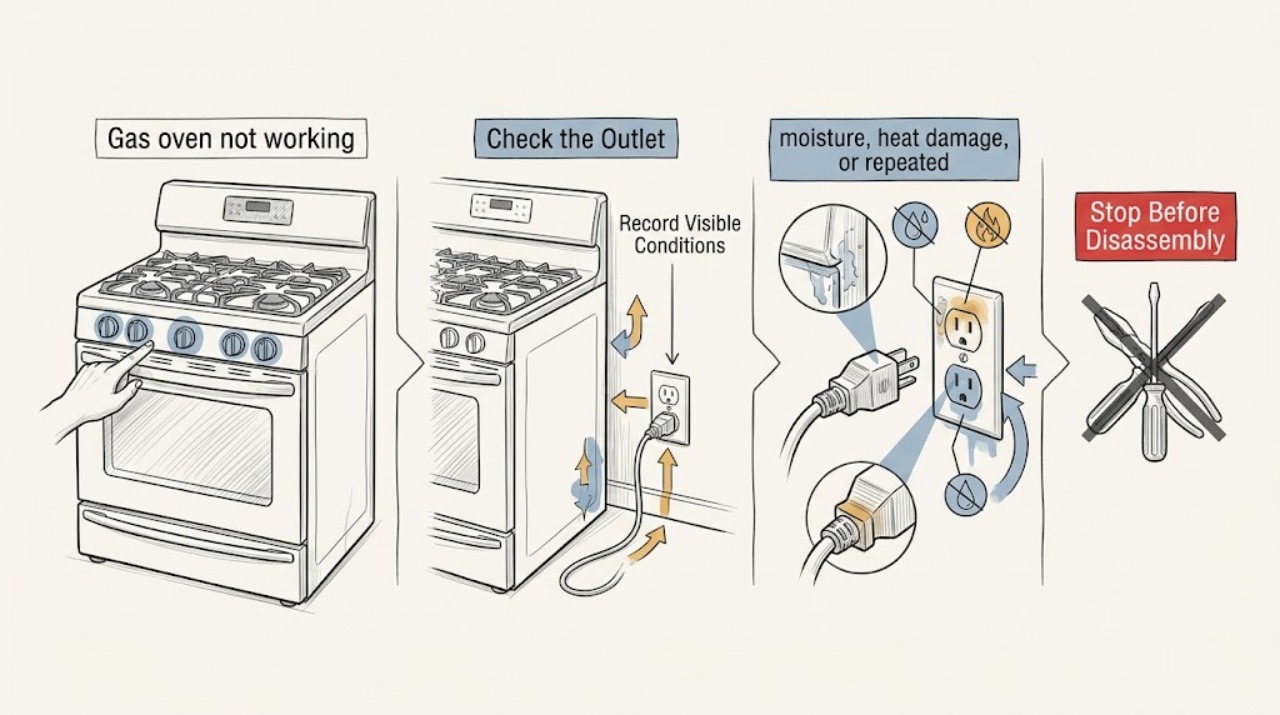
First separate a completely dead oven from an oven that has power but will not start, ignite, or heat. If you smell gas, hear a delayed bang, see smoke or an abnormal flame, notice arcing, or a carbon-monoxide alarm sounds, stop using the oven, leave the hazard area, and contact gas or emergency help from a safe location; do not test for a leak or try another ignition. If there is no hazard, confirm the selected mode and temperature, check the display and normal power supply from a safe external position, record any code, and make no more than one normal start observation. A gas oven needs electricity for its controls and ignition, and a failed ignition or persistent no-heat condition requires qualified service.
Work through in order
Diagnostic checks
Use only checks that match the exact appliance or system and its official guide.
-
Check 1
Before any further test, check from a safe position for gas odor, smoke, soot, a loud pop, an unusual flame, visible arcing, a hot cord or outlet, or a carbon-monoxide alarm. If any appears, leave the oven off and stop.
Expected result: A persistent gas odor, delayed bang, smoke, abnormal flame, arcing, or alarm is a hazard rather than an ordinary no-start symptom. No hazard sign permits only limited external checks.
Next step: Do not operate switches, use a flame, search for a leak, or retry the oven in the hazard area. Move outside if needed and contact gas or emergency help from a safe location; seek medical help for possible carbon-monoxide symptoms.
Why this matters
Why: Unburned fuel, abnormal combustion, fire, electric shock, or carbon-monoxide exposure can worsen when the oven is restarted.
-
Check 2
With the oven cool and no hazard sign, identify what actually fails: is the display blank, does the display respond but the cycle not start, does only the oven fail while surface burners work, or does it start but remain cold? Record the mode, temperature, indicator state, and any exact error code.
Expected result: A blank display points first toward the electrical supply or control state. A responsive display with no heat points toward settings, a door or lock state, gas delivery, ignition, or another model-specific fault. Working surface burners do not prove that the oven gas or ignition path is working.
Next step: Keep the record for the model manual or qualified appliance service. Do not infer an error-code meaning across brands or models.
Why this matters
Why: Separating the symptom prevents treating a no-power problem as an ignitor problem or treating a no-heat problem as a simple control error.
-
Check 3
If there is no odor, moisture, heat damage, or repeated tripping, check the oven's normal wall connection and the household breaker or fuse from the outside, without opening an electrical panel or touching wiring. Restore a tripped breaker only once if it can be done safely and the appliance shows no damage.
Expected result: A dark display or loss of other range functions supports a supply or control-state branch. A breaker that trips again, a scorched outlet, or a hot or damaged cord is not a reset problem.
Next step: Stop and arrange electrician or appliance service for repeated trips, heat damage, arcing, or a dead circuit. Do not keep resetting the breaker and do not manually light the oven during an outage.
Why this matters
Why: Gas ignition and electronic controls still depend on electricity; a repeated interruption may indicate an electrical fault or appliance fault.
-
Check 4
If power is stable and no hazard sign is present, verify that the documented control sequence selects Bake or another intended oven function, a temperature is entered, and any model-specific lock, Sabbath, Demo, timer, or delayed-start state is understood from the manual. Do not force a knob, bypass a lock, or remove a panel.
Expected result: A responsive display or preheat indicator after a corrected setting supports an operating-state issue. No response after the correct sequence, or a code that returns, supports a control or service branch.
Next step: Record the exact display and button or knob response. If the normal sequence still does not start the oven, leave it unused and arrange qualified service.
Why this matters
Why: An oven can appear not to work when it has not received a valid start command or is in a model-specific mode; the exact controls vary by model.
-
Check 5
When the oven has stable power, no gas odor, and no abnormal sound or flame, make one normal start observation from a safe position. Note whether an ignition glow or flame appears promptly, whether only Bake or only Broil fails, and whether heat begins but then stops; do not add a flame or repeat the attempt.
Expected result: No glow or flame after a heat call can indicate an ignition, control, or gas-supply fault. A delayed bang, gas release without prompt ignition, repeated clicking, or abnormal flame means stop immediately. A single function failing while another responds is useful information but not proof that internal repair is safe.
Next step: Turn the control off if safe, keep the oven unused, and provide the timing, sound, flame, and affected function to a qualified appliance professional. Do not inspect the ignitor, valve, regulator, or burner while energized or connected to gas.
Why this matters
Why: The sequence distinguishes no-command and no-power symptoms from a commanded-but-unlit burner without repeated fuel release.
-
Check 6
From outside the appliance, record whether the cooktop burners also fail, whether the appliance was recently installed or moved, whether the fuel supply or conversion changed, and whether an outage or renovation preceded the problem. Do not move the appliance, adjust a regulator, disconnect a connector, or test gas pressure.
Expected result: Failure of both surface and oven functions suggests a wider supply or electrical issue; an oven-only failure narrows the symptom but still may involve gas or electrical components. Recent installation or conversion makes model and fuel verification important.
Next step: Give the model, fuel type, installation history, exact code, and the failed functions to service. If gas odor or combustion symptoms are present, use gas-safety or emergency help before appliance service.
Why this matters
Why: Scope and history help a professional distinguish a house supply issue from an oven-specific control or ignition issue.
Use your observations
Decision map
Find the observation that best matches what you see, then follow the next safe action.
-
PATH 01Next step
What you see
The display is blank, the circuit is dead, or power was interrupted.
Do this next
Arrange qualified service and follow the exact model guidance.
Why this path and its safety boundary
Why it matters: Perform only the safe external supply check and one permitted reset. If the circuit stays dead or trips again, leave the oven unused and arrange electrician or appliance service; never manually light the gas oven during an outage.
-
PATH 02Next step
What you see
The display responds but the oven will not start.
Do this next
Arrange qualified service and follow the exact model guidance.
Why this path and its safety boundary
Why it matters: Check the documented mode, temperature, start, door, lock, timer, and model-specific operating state. If the normal sequence still fails or a code returns, stop and arrange qualified service.
-
PATH 03Next step
What you see
The oven calls for heat but never ignites, or gas is released without prompt ignition.
Do this next
Arrange qualified service and follow the exact model guidance.
Why this path and its safety boundary
Why it matters: Turn the control off if safe and do not repeat the attempt. Leave the oven unused and request gas-appliance service for the ignition, control, valve, or supply path.
-
PATH 04Next step
What you see
The oven lights but does not heat correctly, stops repeatedly, or only one oven function fails.
Do this next
Arrange qualified service and follow the exact model guidance.
Why this path and its safety boundary
Why it matters: Record the function, timing, flame and indicator behavior, then arrange qualified service. Do not remove panels or assume a working cooktop burner proves the oven is safe.
-
PATH 05Next step
What you see
There is gas odor, a delayed bang, abnormal flame, smoke, soot, visible arcing, a carbon-monoxide alarm, or concerning symptoms.
Do this next
Arrange qualified service and follow the exact model guidance.
Why this path and its safety boundary
Why it matters: Treat the situation as an emergency. Avoid ignition sources and electrical switches in the hazard area, leave, and contact gas or emergency help from outside. Do not re-enter or operate the oven until qualified responders clear it.
Helpful context
Understand the symptom
“Not working” can mean a blank display, a responsive display with no start, a burner that never ignites, or an oven that ignites but does not reach heat. Those are different decision paths. Use only external, low-risk observations and the instructions for the exact model; a generic gas-oven page cannot prove which valve, ignitor, control, or supply component has failed.
A gas oven combines fuel and electricity. The U.S. Consumer Product Safety Commission says not to service fuel-burning appliances without the proper knowledge, skill, and tools, and warns that blocked combustion air can contribute to carbon monoxide. Do not cover the oven floor with foil, use the oven as a heater, remove panels, adjust gas pressure, or manually light an oven that needs electrical ignition.
Safety boundary
Stop conditions
- Stop immediately for gas odor, failed ignition with gas release, delayed bang, abnormal flame, smoke, soot, carbon-monoxide alarm or symptoms, visible arcing, electric shock, a hot or damaged cord, fire, or repeated circuit interruption.
- Do not use a match or lighter, test for leaks, manually light the oven during an outage, adjust gas pressure, disconnect a gas line, move the appliance, open an electrical panel, remove oven panels, or repeatedly reset and restart the appliance.
- Leave the oven out of service when it remains dead, will not start, will not ignite, will not heat, shows a returning code, or has a suspected gas, combustion, or electrical fault. Resume only after qualified service or the gas or emergency authority confirms it is safe.
Common questions
FAQ
Why is my gas oven not working when the cooktop burners work?
The oven has a separate control and ignition path, so working surface burners do not prove that the oven is receiving the required gas or ignition signal. Check only the documented settings and observe one normal start without opening the appliance; stop and arrange qualified service if it does not ignite or heat.
Can I light a gas oven with a match if the display or power is out?
Do not improvise manual lighting. Gas ovens commonly depend on electrical controls and ignition, and the exact outage procedure is model-specific. Keep the oven off during an outage and use the model manual or qualified service.
What should I do if the oven smells like gas or makes a bang?
Turn the control off only if it is safe, do not use a flame or operate switches in the odor area, leave, and contact gas or emergency help from outside. Do not retry the oven, search for a leak, or re-enter until qualified responders say it is safe.
Read the exact guide
Official sources
- Gas Range - Oven Does Not Heat, But The Burners HeatGE Appliances · Manufacturer troubleshooting examples when gas cooktop burners work but the oven does not heat
- Gas Range & Wall Oven - Oven Will Not Come OnGE Appliances · Manufacturer troubleshooting examples for a gas oven with no start response
- Carbon Monoxide Fact SheetU.S. Consumer Product Safety Commission · Fuel-burning appliance and carbon-monoxide safety
- Samsung oven temperature issuesSamsung · Manufacturer examples for Demo mode, gas pressure symptoms, power reset, and no-heat escalation
- Carbon Monoxide Poisoning BasicsCenters for Disease Control and Prevention · Carbon-monoxide hazard, symptoms, and gas-appliance safety context
Community feedback
Share a repair observation
Share a plain-text repair observation. Accepted observations are published automatically; this page may take a moment to update.