
On this page
Start here
Quick answer
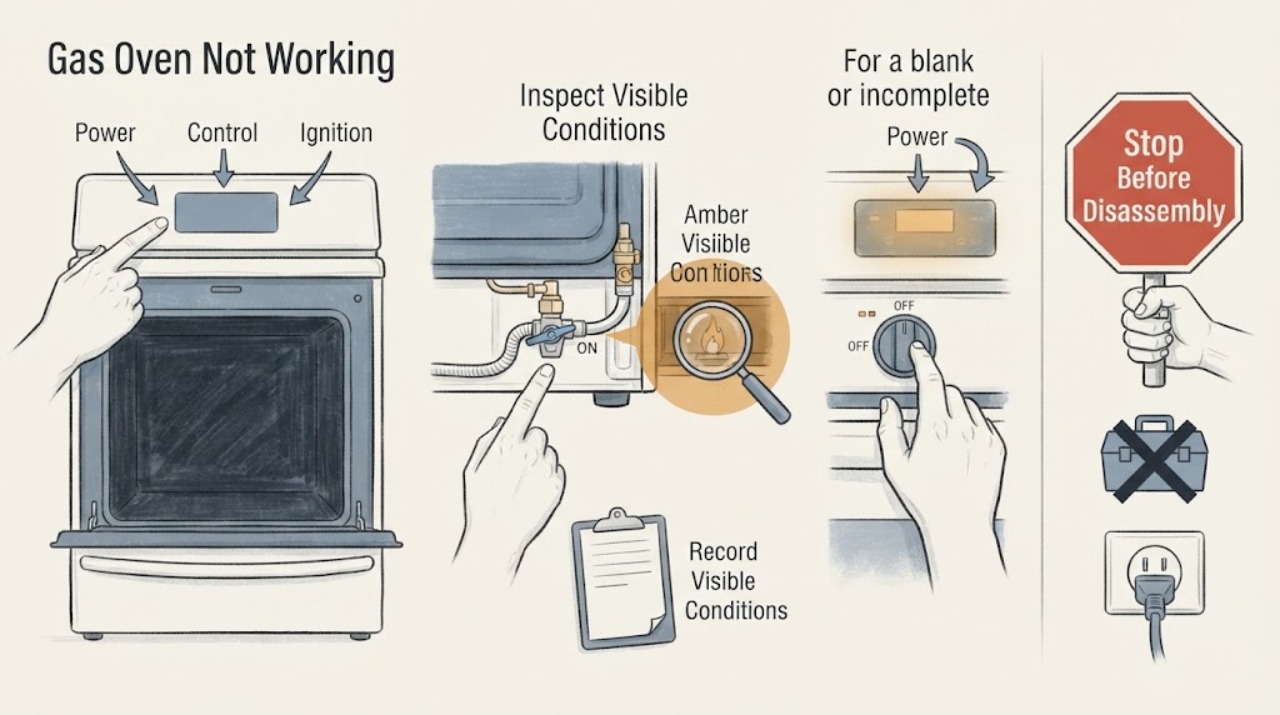
First decide which failure you actually have: a blank panel means power or display, a lit panel that will not start points to settings, lock, door, or an error, a start with no flame points to gas or ignition, and a flame that does not heat the cavity points to the heating sequence or service. Samsung ranges vary by model and fuel configuration, so record the exact display and use the matching manual. Check power and the breaker, make sure Demo mode or a control lock is not active, confirm the door closes, and use Samsung's gas-specific guidance only when the gas supply is known to be safe. If you smell gas, see abnormal flame, hear delayed ignition or a bang, see smoke, feel unusual heat, or have an electrical fault, stop immediately and get professional help.
Work through in order
Diagnostic checks
Use only checks that match the exact appliance or system and its official guide.
-
Check 1
Stop first and screen for hazards: smell for gas only from a safe position, look for smoke or an abnormal flame, and check for carbon-monoxide alarm, sparking, a hot plug or receptacle, or a breaker that trips again. If gas is suspected, leave immediately and do not operate switches, appliances, or flames inside the affected area.
Expected result: A gas, combustion, fire, heat, or electrical hazard is present, or the range is cool and has no hazard sign.
Next step: For any hazard, keep the oven out of use and contact local gas emergency help, emergency responders, or a qualified professional from a safe location. Continue only when no hazard is present.
Why this matters
Why: A hazard changes the task from troubleshooting to emergency safety; repeated ignition or power tests can increase the risk.
-
Check 2
Classify the symptom without opening the range: note whether the display is blank, incomplete, or blinking; whether buttons respond; whether the cooktop burners work; whether the oven starts a cycle; whether an oven flame appears; and whether the cavity warms. Record every letter, number, symbol, and the stage when it appears.
Expected result: The failure falls mainly into no power or display, panel or start refusal, no ignition, no heat, lock, or a displayed code.
Next step: Use the matching branch below and preserve the exact display rather than translating it with a code list from another Samsung model.
Why this matters
Why: The symptom class selects the correct Samsung guide; a gas oven that has a lit panel but no flame has a different next check from a range with no display at all.
-
Check 3
For a blank or incomplete panel, verify from a dry, safe position that the range is connected as installed and check whether the kitchen circuit has tripped. If there is no hazard, follow Samsung's single power-cycle instruction for the range or oven; do not repeatedly reset a breaker that trips again.
Expected result: The display returns normally, remains blank, or returns with a code after power is restored.
Next step: If the display remains blank or the circuit trips again, stop and arrange service. Do not remove the cover or test live wiring.
Why this matters
Why: Samsung identifies power connection and circuit state as causes of a blank or incorrect display; a returning blank panel or code needs model-specific support.
-
Check 4
For a lit panel that will not start or heat, check only the model-visible settings: confirm a normal Bake or other intended mode, press Start as the manual shows, and verify Demo mode, Control Lock, Child Lock, an active self-clean or probe function, and a door that is fully closed. Do not force the door or bypass a lock.
Expected result: The oven starts after a setting or lock correction, or the panel remains unresponsive or the door remains locked.
Next step: If the correct model instruction does not restore the controls, or physical damage is present, request service rather than opening the control panel or latch.
Why this matters
Why: Samsung documents Demo mode, panel lock, function availability, hot-panel protection, and door state as reasons controls may not respond or the oven may not heat.
-
Check 5
For a gas oven that starts but does not ignite or heat, do not repeat ignition if there is any gas odor or delayed ignition. If the gas supply is known to be safe and the manual permits an external check, observe whether the cooktop burners operate normally and whether the oven flame appears during the intended start sequence; do not adjust pressure or open gas components.
Expected result: Cooktop burners also fail, the oven flame never appears, the flame is abnormal, or the flame appears but the oven does not heat.
Next step: Stop for gas odor, abnormal flame, a bang, smoke, or repeated failed ignition. Otherwise follow the exact model support guide; persistent no-heat or no-ignition requires Samsung or qualified gas-appliance service.
Why this matters
Why: Samsung's gas-range guidance distinguishes a home gas-supply issue, ignition or burner behavior, and an oven heating fault; abnormal flame or delayed ignition needs professional assessment.
-
Check 6
For an information code, photograph the complete code and note the model, temperature or mode, and whether it appeared during startup, heating, self-cleaning, or another function. Look up that exact code in Samsung's range error guide and follow only the listed model-appropriate action; perform one reset only when the guide permits it.
Expected result: The guide identifies a permitted external correction, or the code is not listed, returns after the authorized reset, or appears with a safety symptom.
Next step: For an unlisted or returning code, stop using the oven and request service. Retain the photo and do not clear evidence by repeated power cycling.
Why this matters
Why: Samsung states that some codes have specific steps and that other codes should be reset once and sent to service if they return; the code cannot be interpreted safely without its context.
Use your observations
Decision map
Find the observation that best matches what you see, then follow the next safe action.
-
PATH 01Next step
What you see
Gas smell, delayed ignition, explosive-sounding bang, abnormal flame, smoke, carbon-monoxide alarm, sparking, hot electrical parts, or repeated breaker trip
Do this next
Stop immediately, leave a suspected gas-release area without operating switches or flames, and contact emergency help or a qualified professional from a safe location. Do not test the oven again.
-
PATH 02Next step
What you see
The display is blank or incomplete but there is no safety symptom
Do this next
Check the installed power connection and circuit state, then make one Samsung-authorized power cycle. Persistent blank display or another trip requires service.
-
PATH 03Next step
What you see
The display works but Start is ignored or the oven will not heat
Do this next
Check the correct mode, Start action, Demo mode, Control Lock, active special functions, panel temperature, and door state using the exact model manual.
-
PATH 04Next step
What you see
The gas oven starts but no flame appears or the cavity does not heat
Do this next
Use only the safe, external gas-supply and model guidance. Stop for any gas or flame abnormality; persistent no-ignition or no-heat needs qualified service.
-
PATH 05Next step
What you see
An information code appears
Do this next
Record the full code and stage, use Samsung's exact range-code guide, and make one permitted reset at most. A returning or unlisted code goes to service.
-
PATH 06Next step
What you see
The door or control panel remains locked after cooling and the model-authorized steps
Do this next
Do not force, pry, or bypass the lock. Keep the oven out of use and request Samsung support or qualified service.
Helpful context
Understand the symptom
Name the failure before checking parts
Not working can mean no display, no response after Start, no ignition, no heat, a locked door or panel, or an information code. These are different branches. Write down the exact display, buttons that respond, whether the cooktop works, whether the oven flame appears, and when the failure occurs. Do not assume a code or symptom has the same meaning on every Samsung model.
Gas and electrical safety boundary
A gas oven still needs electrical power for controls and ignition, but a gas odor or abnormal flame is not an invitation to test repeatedly. Stop for a gas smell, delayed ignition, a bang, smoke, carbon-monoxide alarm, sparking, a hot receptacle, or a breaker that trips again. Leave any suspected gas-release area without operating switches or flames and contact emergency help from a safe location.
Model-specific settings matter
Samsung ranges include different controls, gas configurations, and display systems. Demo mode, Control Lock, Child Lock, a hot panel, an active self-clean cycle, and a door state can all change what the controls will do. Use the exact model manual for the button sequence; do not force a door or defeat an interlock.
When to stop household checks
If a safe external check and one manual-authorized reset do not restore operation, or an indication returns, the next step is Samsung support or qualified gas-appliance service. Internal ignition, burner, valve, regulator, sensor, wiring, and control work should not be attempted as a casual repair.
Safety boundary
Stop conditions
- If gas is suspected, leave immediately and do not operate electrical switches, appliances, phones, or flames in the affected area; contact help from a safe location.
- Stop for delayed ignition, a bang, abnormal or unstable flame, smoke, carbon-monoxide alarm, burning smell, sparking, unusual heat, or repeated power trips.
- Do not adjust gas pressure, disconnect gas fittings, move the range to inspect a connector, open panels, handle wiring, or bypass a door or control interlock.
- Do not repeat ignition attempts or breaker resets when the oven fails again or a safety symptom is present.
- Keep the oven out of use when a code returns, the display remains blank, the door remains locked, or the cause cannot be matched to the exact model guidance.
When checks do not resolve it
Need a professional?
Request Samsung support or qualified gas-appliance service when the model guide cannot resolve the issue, an information code returns, the display remains blank, the panel or door stays locked, the oven will not ignite or heat, or any burner, flame, wiring, smoke, odor, heat, or power symptom is unsafe. Treat a suspected gas release or carbon-monoxide event as an emergency and contact help from a safe location.
Have this ready
- Provide the full model number, fuel configuration, exact display or photo, selected mode, stage of failure, cooktop behavior, flame behavior, recent installation or service, and safe checks already completed.
Common questions
FAQ
What should I check if my Samsung gas oven has no display?
From a dry, safe position check the installed power connection and kitchen circuit, then follow Samsung's single power-cycle guidance. If the panel stays blank or the circuit trips again, request service.
Why does my Samsung gas oven have power but not start?
Check the correct cooking mode and Start action, Demo mode, Control Lock or Child Lock, active special functions, panel temperature, and door state using the exact model manual. A returning error or unresponsive panel needs service.
Why does my gas oven not ignite?
If the gas supply is safe, Samsung distinguishes supply, ignition, and heating behavior. Do not repeat ignition when there is gas odor, delayed ignition, an abnormal flame, smoke, or a bang; arrange qualified service instead.
Can Demo mode make a Samsung gas oven appear broken?
Yes. Samsung says Demo mode prevents the oven from heating, while a gas cooktop may still ignite. Confirm the mode in the exact manual and do not assume a similar display means the same thing on every model.
What should I do when a Samsung oven code appears?
Record the complete code, model, selected mode, and stage, then use Samsung's range-code guide. Follow one listed reset or external action only when authorized; if the code is unlisted or returns, request service.
When is a Samsung gas oven unsafe to keep testing?
Stop for a gas smell, delayed ignition, a bang, abnormal flame, smoke, carbon-monoxide alarm, burning odor, sparking, unusual heat, or repeated power trips. Leave a suspected gas-release area and contact emergency help from a safe location.
Read the exact guide
Official sources
- Samsung oven door is lockedSamsung Support · Samsung range oven door locks; exact model behavior and manual take precedence
- Flame issues on Samsung gas cooktop or rangeSamsung Support · Samsung gas cooktop or range flame observations; exact model and fuel configuration take precedence
- Samsung range or wall oven error codesSamsung Support · Samsung range or wall oven codes; follow the exact model and listed code guidance
- Self Clean or other buttons do not light up or respond, or panel is locked on Samsung ovenSamsung Support · Samsung oven and range control panels; controls vary by model
- Samsung Range FAQsSamsung US · Samsung kitchen ranges; features and steps vary by model and fuel type
- Home Appliance Terms and ConditionsSamsung Support · Samsung home appliances; product manual and local safety rules also apply
- Samsung oven temperature issuesSamsung Support · Samsung ovens and gas ranges; model and fuel configuration determine exact steps
- Samsung range or wall oven panel is blank, blinking, or incorrectSamsung Support · Samsung range or wall oven display behavior; exact model instructions take precedence
Community feedback
Share a repair observation
Share a plain-text repair observation. Accepted observations are published automatically; this page may take a moment to update.