
On this page
Start here
Quick answer
Start by separating a blank KitchenAid control from an oven that powers up but will not start, click, or heat. Stop immediately for gas odor, delayed ignition, abnormal flame, smoke, sparks, a hot or damaged connection, or a breaker that trips again; do not keep trying to light it. If the oven is cool and there is no hazard, check the model-specific control setting, door closure, lock or demo mode, delayed start, electrical supply, and main gas supply. If the cooktop works but the gas oven does not, KitchenAid also identifies the oven regulator shutoff, storage-drawer interference, and the exact model installation instructions as relevant clues. A gas oven may need electricity for ignition, so a working display does not prove that ignition or gas delivery is safe. If the oven still will not start or heat after safe external checks, keep it off and arrange qualified gas-appliance service.
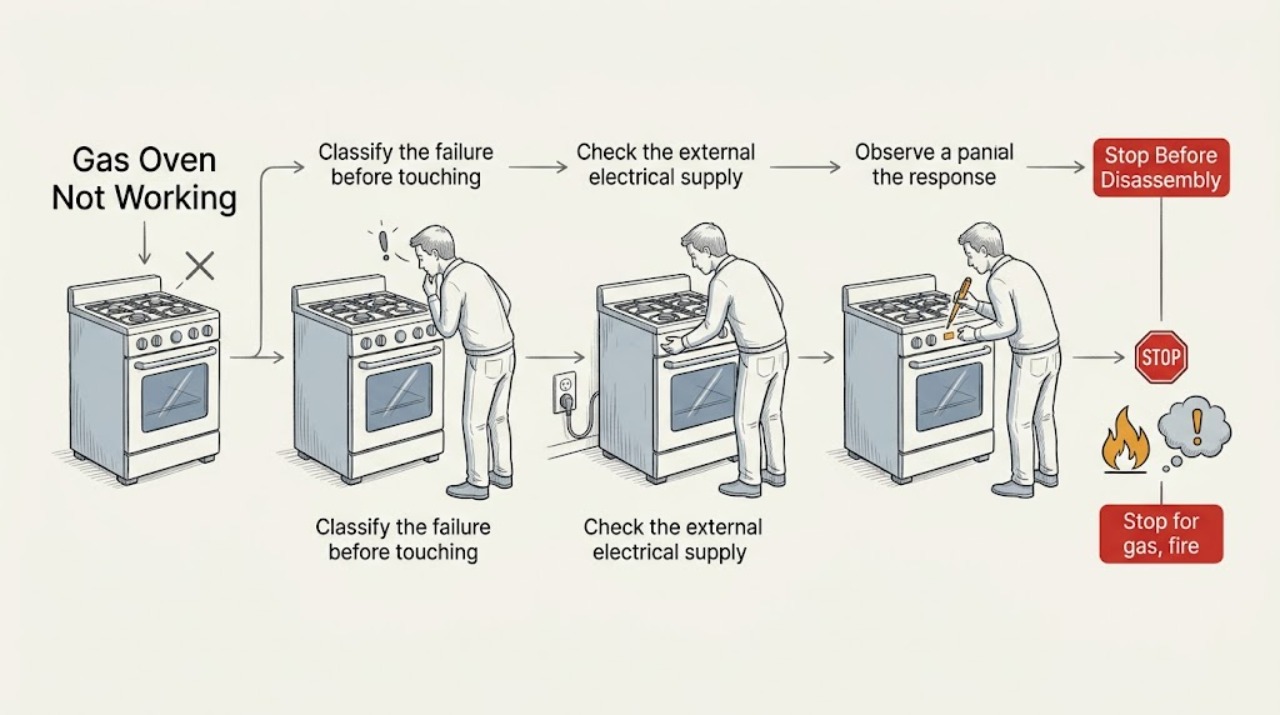
Work through in order
Diagnostic checks
Use only checks that match the exact appliance or system and its official guide.
-
Stop for gas, fire, or electrical danger
Do not start or relight the oven if you smell gas, hear hissing, see an abnormal or uncontrolled flame, smoke, sparks, arcing, a hot or damaged cord, or visible heat damage. Do not operate switches or phones in a suspected gas-leak area. Disconnect power only from a dry, safe location when there is no immediate gas hazard.
Expected result: There is gas odor, hissing, delayed ignition, abnormal flame, smoke, spark, heat damage, water near power, or a repeated breaker trip; or the oven is cool and free of immediate danger.
Next step: Leave when appropriate and contact gas or emergency responders from a safe location. Keep the oven out of service until qualified help confirms it is safe.
Why this matters
Why: These symptoms make repeated ignition or reset attempts unsafe. A gas, fire, or electrical hazard cannot be ruled out by looking at the display or trying another cycle.
-
Classify the failure before touching a setting
With the oven cool and safe, record the complete model number and note whether the display, clock, oven light, cooktop burners, and oven controls respond. Record whether the oven fails at Bake, Broil, or both; whether the igniter clicks; whether a flame appears; and whether an error or lock message is shown.
Expected result: Nothing has power, the display works but controls do not respond, the cooktop works while the oven fails, the oven clicks without flame, or the oven flame appears but does not heat correctly.
Next step: Use the matching KitchenAid manual and support path for the recorded model and symptom. Do not infer a failed igniter, valve, or control from the symptom alone.
Why this matters
Why: A blank unit points toward supply or control power. A working display with no start points toward settings, lock, door, or control state. Cooktop-working/oven-failing symptoms narrow the path toward oven gas delivery or ignition, while a flame without heat needs model-specific combustion or temperature diagnosis.
-
Check the external electrical supply safely
From a dry, safe position, check whether the range plug is seated and whether the household breaker or fuse is on. If the installation is hardwired or the supply is uncertain, do not remove a cover or test terminals; use a qualified electrician. Do not repeatedly reset a breaker that trips again.
Expected result: The display is blank, a breaker or fuse is off, the range has partial power, the breaker trips again, or the supply appears stable.
Next step: Restore only an obviously switched-off supply once when there is no odor, moisture, heat damage, or returning trip. If the supply remains absent or the breaker trips, keep the range off and arrange qualified electrical or appliance service.
Why this matters
Why: KitchenAid states that oven igniters depend on a grounded operational outlet and that a gas range can have no operation after a supply or breaker issue. Partial power does not prove that the ignition or heating circuit is healthy.
-
Rule out lock, mode, timer, and door conditions
Read the display for Control Lock, Demo or Showroom Mode, Sabbath mode, Delayed Start, a self-clean or door-latch state, or an error. Confirm the correct Bake or Broil function and temperature and that Start is pressed when the model requires it. Check only that the door closes fully and that an obvious rack, dish, residue, packaging, or storage-drawer item is not obstructing it; do not force a latch.
Expected result: A lock or special mode is shown, delayed start is set, the door is open or obstructed, the oven clicks but does not ignite, or the controls remain unresponsive.
Next step: Use the exact owner manual to cancel or unlock once. If the latch stays locked, the display remains unresponsive, or the no-start condition returns, keep the oven off and arrange service.
Why this matters
Why: KitchenAid identifies lock, demo mode, delayed start, door position, and storage-drawer or oven-bottom obstructions as model-dependent reasons an oven may not start or may not provide heat. An unresponsive control after the documented procedure needs service.
-
Separate gas supply from oven-only ignition
Only when there is no gas odor and the appliance is otherwise safe, compare the documented behavior of the surface burners and oven without repeated ignition attempts. If the cooktop works but the oven does not click, use the model instructions to identify whether the oven regulator shutoff, main supply, door, storage drawer, or power path is implicated. Do not move the range or adjust a valve.
Expected result: The cooktop works and the oven is silent, the cooktop and oven both fail, the oven clicks but does not light, or the oven behavior changed after installation or reconnection.
Next step: Record the split and give it to qualified gas-appliance service. If installation or reconnection is recent, use the installation instructions and a qualified installer; do not purge a line or keep supplying gas to an unlit oven.
Why this matters
Why: KitchenAid distinguishes an oven regulator shutoff from the home's main gas supply and notes that oven ignition relies on electrical grounding. The same symptom can arise from supply, ignition, or control conditions, so a part cannot be selected from sound alone.
-
Escalate no-click, delayed ignition, or abnormal flame
If the oven never clicks, clicks for an extended time without flame, ignites late, produces an uneven or unusual flame, smells of gas after the control is off, or heats only intermittently, stop using it. Do not remove the oven bottom, clean an internal burner, test a valve, or continue cycling Bake and Broil.
Expected result: The symptom persists with a correct setting and stable supply, the flame is abnormal, the gas odor returns, an error returns, or the oven remains cold despite a start command.
Next step: Keep the oven off and arrange qualified gas-appliance service. Provide the model, function, click or flame behavior, timing, odor, recent installation, and any display or breaker details.
Why this matters
Why: This pattern can involve the igniter, burner, regulator, valve, sensor, control, or combustion path. KitchenAid's user guidance ends at model-specific external checks and service when ignition does not work.
Use your observations
Decision map
Find the observation that best matches what you see, then follow the next safe action.
-
PATH 01Next step
What you see
The display is blank, the breaker or fuse is off, or the range has no safe external power.
Do this next
Restore an obviously switched-off supply once only if safe. If the supply is hardwired, absent, or the breaker trips again, keep the range off and call a qualified electrician or appliance technician.
-
PATH 02Next step
What you see
The display works but Control Lock, Demo Mode, Delayed Start, Sabbath mode, a door-latch state, or an incorrect function prevents starting.
Do this next
Follow the exact KitchenAid model manual to cancel or unlock once and close the door correctly. Do not force a latch; arrange service if the state returns or the controls remain unresponsive.
-
PATH 03Next step
What you see
The cooktop works but the gas oven is silent or does not heat.
Do this next
Keep it safe and use the model-specific path for the oven regulator shutoff, door, storage drawer, main supply, and grounded power. Do not move the range or adjust gas components; call qualified service if it persists.
-
PATH 04Next step
What you see
The oven clicks but does not light, lights late, has an abnormal flame, or continues to smell of gas.
Do this next
Stop ignition attempts, leave for any suspected leak, and obtain qualified gas-appliance or emergency help from a safe location. Do not repeat the test or open the burner area.
-
PATH 05Next step
What you see
The oven and cooktop both fail after installation, reconnection, a power interruption, or a breaker event.
Do this next
Keep the range off and have the electrical and gas installation checked by qualified professionals. Do not purge gas, alter the shutoff, use an adapter, or perform live tests.
-
PATH 06Next step
What you see
Smoke, sparks, a hot connection, visible heat damage, water near electrical equipment, repeated breaker trips, or an uncontrolled flame is present.
Do this next
Stop using the range, keep clear, isolate power only when dry and safe, and obtain emergency or qualified help. Do not reset repeatedly or run another Bake or Broil test.
Helpful context
Understand the symptom
Define what not working means
A blank display, controls that do not respond, an oven that starts but never ignites, an oven that clicks without heat, and an oven that heats poorly are different paths. Record whether the cooktop burners work, whether the oven light or display works, whether there is a click, whether the burner ignites, and whether the symptom began after a move, installation, cleaning, spill, or power interruption.
Gas and electrical safety come before diagnosis
KitchenAid gas ovens use gas for heat but may rely on electricity for controls and ignition. Do not remove panels, probe terminals, adjust a regulator, move the range to inspect a connector, or bypass a door or safety device. If gas odor, smoke, an abnormal flame, or dangerous electrical symptoms appear, leave the area and get help from a safe location.
Safety boundary
Stop conditions
- Stop immediately for gas odor, hissing, delayed ignition, abnormal or uncontrolled flame, smoke, fire, sparks, arcing, or a carbon-monoxide alarm or illness.
- Stop for a hot or damaged cord or outlet, water near electrical parts, visible heat damage, repeated breaker trips, or a range that cannot be controlled normally.
- Do not move the range to inspect its gas connector, adjust a gas valve or regulator, purge a gas line, remove panels, test live wiring, or bypass a door or safety device.
- Do not keep clicking or supplying gas to an unlit oven, repeat Bake or Broil tests after delayed ignition, or force a door latch.
Only after diagnosis
Potential parts
- oven igniter or ignition electrode
Relevant only when qualified diagnosis confirms a no-click, weak-ignition, or delayed-ignition fault after the gas supply and controls are verified safe.
Confirm the complete model and manufacturer fit information; do not infer failure from a cold oven alone. - oven burner or gas valve assembly
Relevant only when qualified gas-appliance diagnosis identifies a burner or valve fault after leak and supply safety are established.
Gas components are safety-critical and model-specific; qualified service is required. - oven regulator shutoff or pressure-regulator component
Relevant only when the model-specific service procedure confirms an oven-only supply or regulator problem while the cooktop operates.
Do not adjust or replace a gas regulator as a user check; confirm the exact model through qualified service. - electronic control or temperature-sensing assembly
Relevant only when qualified diagnosis links an unresponsive control, returning error, or incorrect heating behavior to a specific model component.
Confirm model fitment and keep the appliance isolated before internal repair.
When checks do not resolve it
Need a professional?
Arrange qualified KitchenAid gas-appliance or electrical service when the display stays blank, the controls remain unresponsive, the oven regulator or supply is uncertain, the igniter does not click, ignition is delayed, the oven will not heat, an error returns, or diagnosis would require moving the range, opening panels, gas work, or live electrical testing. For gas odor, hissing, smoke, fire, sparks, abnormal flame, carbon-monoxide alarm, or illness, leave and obtain emergency or utility help from a safe location.
Common questions
FAQ
Why is my KitchenAid gas oven not working when the cooktop works?
KitchenAid separates the oven door, oven regulator shutoff, storage-drawer or oven-bottom obstruction, main gas supply, and grounded electrical ignition path. Check only the model-approved external conditions; do not move the range or adjust gas parts.
What if the KitchenAid oven display is blank?
From a dry, safe position, check the plug and household breaker or fuse. If the supply is hardwired, absent, or trips again, keep the range off and arrange qualified electrical or appliance service.
Why does the oven click but not light?
A gas supply, ignition power, regulator, burner, or control issue may be involved. If ignition is delayed, the flame is abnormal, or gas odor persists, stop immediately and obtain qualified gas-appliance help rather than repeating the test.
Can a control lock or delayed start make the oven seem broken?
Yes. KitchenAid identifies control lock, Demo Mode, Delayed Start, door position, and incorrect function selection as model-dependent reasons an oven may not start. Use the exact manual once and arrange service if the condition returns.
When should I stop using a KitchenAid gas oven?
Stop for gas odor, hissing, delayed ignition, abnormal flame, smoke, sparks, a hot or damaged connection, water near power, repeated breaker trips, or an oven that cannot be controlled normally. Leave for a suspected leak and get help from a safe location.
Read the exact guide
Official sources
- Oven Not Working - Gas - Product Help | KitchenAidKitchenAid Product Help · KitchenAid gas-oven checks for recent reconnection, grounded ignition power, main gas valve, and service
- Oven Not Working - Cooktop Working - Not Clicking - Product Help | KitchenAidKitchenAid Product Help · KitchenAid gas-range oven no-click troubleshooting for door, regulator shutoff, storage drawer, gas supply, and grounded power
- Oven Not Working - Light Doesn't Turn Off - Product Help | KitchenAidKitchenAid Product Help · KitchenAid range door closure and latch obstruction checks
- Oven Not Heating - Powering On - Electric - Product Help | KitchenAidKitchenAid Product Help · KitchenAid range control and oven no-heat clues for door, electrical connection, lock or demo mode, and delayed start
- Nothing is Working - Gas Range - Product Help | KitchenAidKitchenAid Product Help · KitchenAid gas-range no-operation checks for gas shutoff, breaker or fuse, control lock, delayed start, and demo mode
Community feedback
Share a repair observation
Share a plain-text repair observation. Accepted observations are published automatically; this page may take a moment to update.