
On this page
Start here
Quick answer
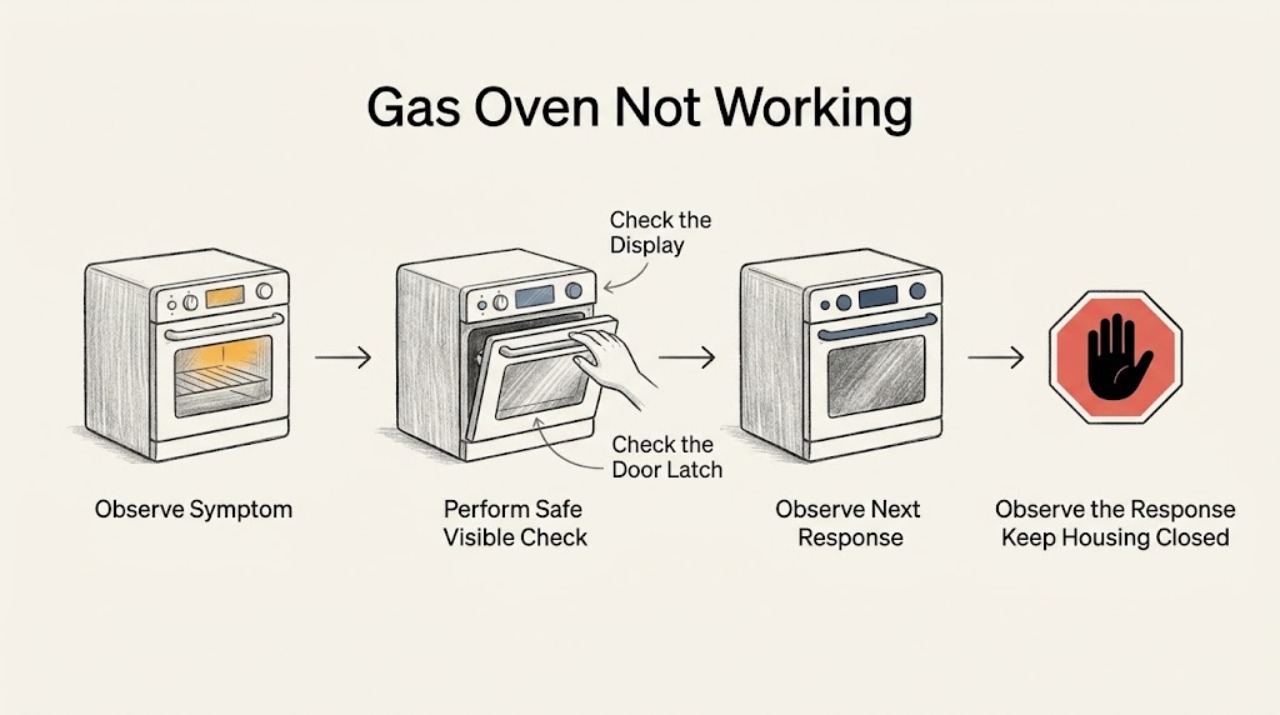
“Not working” can describe several different GE gas-oven states, and each one needs a different next check. Before trying to start it again, stop for a gas or rotten-egg odor, hissing, smoke, an abnormal flame, a boom, or any uncertainty about unburned gas. If the area is safe, classify the symptom: (1) the control or display is dead, (2) a Bake/Broil command is accepted but there is no ignition, (3) ignition starts but the oven does not heat, (4) only one mode or function fails, (5) the flame or sound is abnormal, or (6) a breaker, outage, or other power fault is present. Then use only the matching safe check. GE identifies settings, power, gas supply, the Glo-Bar, self-clean latch, and special modes as distinct causes; its gas-oven ignition and valve also require electrical power. Do not manually light the oven, open the appliance, adjust gas parts, or keep resetting a breaker that trips again.
Before you begin
Safety first
- Do not open the appliance, remove the oven bottom, adjust a regulator or safety valve, move the range to inspect its connector, test energized wiring, bypass an ignition safety device, or manually light an electric-ignition oven.
Work through in order
Diagnostic checks
Use only checks that match the exact appliance or system and its official guide.
-
Check 1
From a safe position, first classify what “not working” means: the control/display is dead; a Bake or Broil command is accepted but there is no ignition; ignition starts but there is no heat; only one mode or function fails; the flame or sound is abnormal; or a breaker, outage, or other power fault is present. Do not operate the controls if you smell gas, hear hissing, see smoke or an abnormal flame, or are unsure whether gas is present.
Expected result: One of the six operating states is clear, or a gas/smoke/flame hazard or uncertainty is present.
Next step: Follow the matching check below. For any possible unburned gas, leave the area and contact the gas utility or emergency service from outside or another safe location.
Why this matters
Why: The symptom class determines the next safe check. A control fault, ignition fault, heat-retention problem, mode lockout, abnormal combustion symptom, and power fault should not be diagnosed with the same start sequence.
-
Check 2
For a dead display, an unaccepted command, or a mode that will not respond, check only the user-facing settings: confirm Bake or Broil and the temperature, confirm an electronic model received Start, verify that knobs are in their intended positions, and check that a self-clean mechanical latch is fully unlocked. If the model has Sabbath Mode or another special feature, check its owner instructions rather than guessing at button combinations.
Expected result: A setting, knob position, door latch, or special mode explains the behavior, or the controls remain correct but the display or command is still unresponsive.
Next step: Correct only the identified setting and make one normal test. If the display remains dead or the command is still not accepted, continue to the power check and then arrange service if it persists.
Why this matters
Why: A control-state or lockout issue can make a working oven appear dead. If the display itself is blank or the controls remain unresponsive after the basic setting check, treat that as a power/control path rather than an igniter diagnosis.
-
Check 3
For a dead control, a recent outage, or a suspected breaker/fuse fault, check the household breaker or fuse and any safely accessible range power connection without moving the appliance or opening a panel. If the controls are still unresponsive and the circuit appears normal, GE permits one electronic-control reset on models so equipped: turn the circuit off, wait one minute, and restore it once.
Expected result: Power is absent or a breaker/fuse is abnormal; power returns after one safe restoration; or the breaker trips again, the display stays dead, or the oven still does not respond.
Next step: Restore power only when the protection has not repeatedly failed. Leave the oven off and request qualified service for a recurring trip, damaged cord, wiring concern, or persistent dead display. Do not bypass protection or test energized wiring.
Why this matters
Why: GE gas-oven ignition and the gas valve require electrical power, so a gas supply can be present while the oven remains unavailable. A recurring trip or persistent dead display indicates an electrical or control fault that is not a normal user adjustment.
-
Check 4
For a command that is accepted but produces no ignition, or for ignition that begins but produces no heat, make at most one normal Bake or Broil request with no gas odor and observe only through the open door whether the Glo-Bar glows red. Do not remove the oven bottom, reach into the burner area, or attempt manual lighting. If the surface burners work but the oven does not, note whether the range is a new installation; an installer or qualified technician may need to verify the regulator setup.
Expected result: No glow is visible; the Glo-Bar glows but no burner ignition follows; ignition occurs but the cavity does not heat; or only one mode (Bake or Broil) fails while another works.
Next step: Record the exact pattern and stop repeated attempts. Request qualified gas-appliance service for no glow, glow without ignition, no heat, a new-installation regulator concern, or a Bake/Broil-specific failure.
Why this matters
Why: No glow can indicate the Glo-Bar, controls, wiring, or another electrical component. A glow without ignition or heat points to a gas-side, safety-valve, burner, regulator, or control problem. A one-mode failure narrows the fault to that mode's ignition/heating path rather than proving that the whole oven is dead.
-
Check 5
For an abnormal flame, smell, or sound, stop using the oven and compare the symptom only with GE's normal-operation guidance: cycling clicks and the Glo-Bar turning on and off can occur during normal temperature control, but a persistent rotten-egg/unburned-gas odor, a boom or delayed ignition, a door that blows open, smoke, or a completely yellow/orange flame is not a normal troubleshooting result.
Expected result: The behavior matches ordinary cycling, or an abnormal gas, combustion, flame, smoke, or delayed-ignition symptom is present.
Next step: For possible unburned gas, do not touch electrical switches or use a flame; leave immediately and call the gas supplier or emergency service from a safe location. For delayed ignition, abnormal flame, smoke, or a damaged appliance, leave the oven off and call qualified service.
Why this matters
Why: Normal cycling does not prove that every part is healthy, but an abnormal combustion or gas symptom changes the task from troubleshooting to safety response.
Use your observations
Decision map
Find the observation that best matches what you see, then follow the next safe action.
-
PATH 01Next step
What you see
The display/control is dead, the command is not accepted, or a self-clean latch or special mode blocks operation while there is no gas/smoke hazard
Do this next
Verify the user-facing setting and latch or mode, then check household power. If the display remains dead or the controls remain unresponsive, arrange qualified electrical/appliance service.
-
PATH 02Next step
What you see
A Bake or Broil command is accepted but there is no ignition
Do this next
After the power and setting checks, use the Glo-Bar only as a visual checkpoint. No glow needs qualified diagnosis of the igniter/control/electrical path; glow without ignition needs qualified gas-side or safety-control diagnosis. Do not manually light the oven.
-
PATH 03Next step
What you see
Ignition starts but the oven does not heat, or only one mode/function fails
Do this next
Record whether the problem is Bake, Broil, or both and whether the surface burners work. Leave the oven off and request service for the affected heating, ignition, gas, regulator, or control path.
-
PATH 04Next step
What you see
The breaker or fuse is abnormal, the display stays dead after one permitted reset, or the circuit trips again
Do this next
Do not keep resetting the circuit, bypass protection, or open the control area. Leave the appliance off and arrange qualified service; a gas oven cannot operate its electronic igniter and valve without power.
-
PATH 05Next step
What you see
A new installation has working surface burners but the oven does not, or the accessible gas supply appears uncertain without any gas odor
Do this next
Have the installer or qualified gas-appliance technician verify the installation and regulator setup. Do not remove or adjust the regulator or repeatedly manipulate a questionable gas connection.
-
PATH 06Next step
What you see
There is a persistent gas/rotten-egg odor, hissing, smoke, abnormal flame, boom/delayed ignition, or uncertainty about unburned gas
Do this next
Do not operate controls, use a match, or touch electrical switches. Leave the area and contact the gas utility or emergency service from a safe location; arrange qualified appliance service after the area is cleared.
Helpful context
Understand the symptom
Start with the operating state, not a parts guess
A GE gas oven is not one single failure mode. A blank display and an oven that accepts Bake but stays cold do not point to the same first check. A Bake-only failure with working Broil is different again from a delayed-ignition boom or a breaker that trips. Treat the first observation as a routing decision; do not repeat a start attempt simply because the label says “not working.”
What the ignition path tells you
On models with electronic ignition, the oven needs a valid command, electrical power, gas supply, and an ignition sequence. The Glo-Bar is a visual checkpoint, not a component to remove: no glow can indicate an igniter, control, wiring, or other electrical fault, while a glow without ignition shifts the concern toward gas delivery, the safety valve, burner area, or controls. A normal cycle may include clicking and the glow cycling off when temperature is reached.
Safe limits for user checks
Keep checks outside the appliance: controls, display, breaker or fuse, a safely accessible outlet connection, an accessible shutoff position when there is no gas odor, and the visible Glo-Bar through the open door. Do not remove the oven bottom, reach toward a burner, test live wiring, move the range to inspect its connector, adjust a regulator or safety valve, or use a flame to test or light an electric-ignition oven.
When a normal sound or smell is not a repair diagnosis
GE notes that a slight cycling sound and the Glo-Bar turning on and off can be normal. A brief combustion odor at startup is different from an unburned-gas or rotten-egg odor. A boom, door movement from delayed ignition, persistent gas odor, a completely yellow or orange flame, smoke, or repeated breaker trips is a stop condition. Leave the appliance off and use qualified service or the gas utility as appropriate.
Safety boundary
Stop conditions
- Stop immediately and leave the area for a persistent gas or rotten-egg odor, hissing, smoke, abnormal flame, boom, or uncertainty about unburned gas.
- Do not touch electrical switches or use a match when gas may be present; contact the gas utility or emergency service from a safe location.
- Stop for a recurring breaker trip, damaged cord, exposed wiring, scorching, or a display that remains dead after one model-appropriate reset.
- Do not remove the oven bottom, open the control area, adjust gas components, move the range to inspect its connector, or bypass an ignition safety device.
Only after diagnosis
Potential parts
- oven glow-bar igniter
Only consider this category after a qualified diagnosis finds that the oven has appropriate power but the Glo-Bar does not glow; “not working” alone does not identify the igniter.
Confirm the exact GE model and approved fitment before ordering or installing any part. - oven safety gas valve
Only consider this category if a qualified technician confirms that the igniter glows but the burner does not ignite or the valve does not admit gas.
Gas-valve fit and installation are model-specific and must be handled by qualified service. - oven electronic control
Only consider this category after a persistent dead display or unaccepted command remains after the model-appropriate power and setting checks and a technician confirms a control fault.
Verify the exact model and configuration; do not substitute a board from a similar-looking GE oven.
When checks do not resolve it
Need a professional?
Contact the gas utility or emergency service from a safe location for any possible unburned-gas odor, hissing, or uncertainty about a leak., Request qualified service for no Glo-Bar glow, Glo-Bar glow without ignition, no heat after ignition, a Bake/Broil-specific failure, delayed ignition, abnormal flame, a new-installation regulator concern, or a persistent dead display., Provide the model number, exact symptom class, display state, whether the surface burners work, whether Bake or Broil is affected, Glo-Bar observation, any fault indication, and whether the problem began after installation or a power event.
Safety scope: Do not open the appliance, remove the oven bottom, adjust a regulator or safety valve, move the range to inspect its connector, test energized wiring, bypass an ignition safety device, or manually light an electric-ignition oven.
Common questions
FAQ
Why is my GE gas oven not working when the clock still works?
A working clock does not prove that the ignition or heating path works. Classify whether the oven accepts the command, observe the Glo-Bar only through the open door when safe, and note whether the surface burners work. No glow, glow without ignition, or ignition without heat needs qualified diagnosis rather than repeated starts.
Can I light a GE gas oven with a match during a power outage?
No. GE says a gas oven's Glo-Bar igniter and gas valve require electrical power, so the oven cannot be used or lit with a match during an outage. Do not use a flame to test a failed oven.
What if the GE surface burners work but the oven does not?
Check the oven settings and, for a new installation, have the installer or a qualified technician verify the regulator setup. Then use the Glo-Bar only as a visual checkpoint. Surface burners working does not rule out a separate oven ignition, gas-control, or heating fault.
Is clicking or an orange glow always a sign that my GE gas oven is broken?
Not necessarily. GE describes cycling clicks and the Glo-Bar turning on and off as possible normal operation. A boom, delayed ignition, persistent unburned-gas odor, smoke, or a completely yellow/orange flame is different and requires the oven to remain off and qualified service.
When should I stop troubleshooting a GE gas oven?
Stop for a gas or rotten-egg odor, hissing, smoke, abnormal flame, delayed-ignition boom, recurring breaker trip, damaged cord, or uncertainty about unburned gas. Leave the area for a possible leak and contact the gas utility or emergency service from a safe location; use qualified appliance service for the other faults.
Read the exact guide
Official sources
- Range, Cooktop & Wall Oven - Power Outage Tips and OperationGE Appliances · GE gas and dual-fuel oven electrical-power and power-outage operation
- Gas Range - Oven Does Not Heat, But The Burners HeatGE Appliances · GE gas-range oven no-heat diagnosis, new-installation regulator context, controls, Glo-Bar observation, and service boundary
- CPSC Issues Winter Safety WarningU.S. Consumer Product Safety Commission · Consumer safety guidance for suspected gas leaks and qualified service boundaries for gas appliances
- Gas Range & Wall Oven - Oven Will Not Come OnGE Appliances · GE gas range and wall-oven controls, power, gas supply, Glo-Bar observation, reset, latch, special mode, and service checks
- Gas Range - What is Normal Operation vs What Requires ServiceGE Appliances · GE gas-range normal cycling, Glo-Bar behavior, delayed ignition, abnormal flame, and unburned-gas safety guidance
Community feedback
Share a repair observation
Share a plain-text repair observation. Accepted observations are published automatically; this page may take a moment to update.