
On this page
Start here
Quick answer
If an LG refrigerator has ice in the bin but will not dispense it, first separate an empty-bin production problem from a delivery-path problem. Check the control lock and door state, then inspect the removable ice bin for clumps, a blocked outlet, or poor seating. A hum with no cubes points toward clumped ice or the bin and chute path; no hum after the controls and doors check points toward a door-sensor, dispenser-control, wiring, or drive problem. Clear only accessible ice and use the exact model guide before arranging service.
Before you begin
Safety first
- Keep hands and tools out of the auger, crusher, chute, and hidden mechanism. Do not bypass door or bin interlocks, perform live electrical tests, remove internal panels, disconnect water lines, or open the sealed refrigeration system.
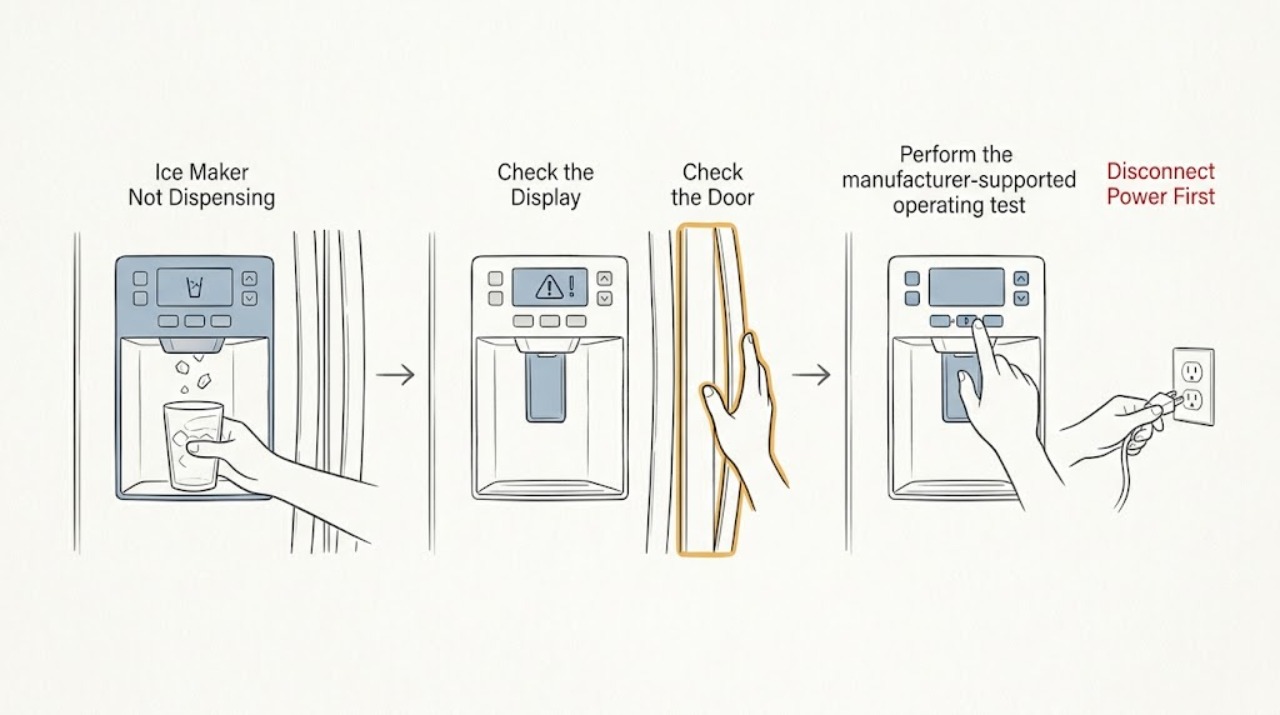
Work through in order
Diagnostic checks
Use only checks that match the exact appliance or system and its official guide.
-
Check 1
Open the freezer or ice-room door and look at the accessible ice bin without reaching into the auger or chute. Decide whether the bin has usable loose cubes, a solid clump, very little ice, or no ice at all. Also note whether the water dispenser works and whether the refrigerator is cooling normally.
Expected result: The bin contains loose ice but nothing exits, the bin contains clumped or wet-refrozen ice, the bin is empty or nearly empty, or both water and ice are unavailable.
Next step: Follow the ice-present branch for clumps, seating, controls, and the visible chute. Follow the empty-bin branch for the exact model's ice-maker setting, freezer condition, and water or filter checks.
Stop if: Stop if there is a leak near electrical parts, exposed wiring, smoke, a burning odor, repeated breaker tripping, or a warm freezer with food-safety concerns. Do not remove the ice maker or dispenser housing.
Why this matters
Why: Ice present in the bin makes the dispensing path the first place to check. An empty bin is an ice-production or supply problem, so changing a dispenser part would be premature. When water and ice fail together, a shared control, supply, filter, or door condition becomes more plausible.
-
Check 2
From the outside controls, check for a lock icon or an ice/dispenser disabled state. Unlock the controls only with the exact model's documented button sequence. Close every refrigerator door fully, then make one brief dispense request while listening for a motor hum.
Expected result: The lock clears and dispensing returns, a door is not fully closed, the interior light stays on when the model's door sensor is activated, the dispenser hums, or the controls are enabled but the dispenser is silent.
Next step: Correct only the documented lock or door condition and make one normal retry. If the controls cannot be unlocked, the interior light does not respond to the model's sensor, or the dispenser stays silent, stop owner-level checks and arrange model-specific service.
Stop if: Do not bypass a door switch, bridge a connector, remove a hinge cover, or continue testing around exposed wiring.
Why this matters
Why: LG states that Control Lock disables the dispenser and that the dispenser will not operate when the refrigerator believes a door is open. A hum means the request is reaching a motor or drive path; silence after the controls and door state are correct makes an interlock, control, connection, or drive issue more likely, but does not identify a replaceable part.
-
Check 3
If the bin is removable by the exact model's instructions, stop the ice function and remove it by the documented grip points. Check for cubes frozen into a brick, wet ice that has refrozen, a bin that is not seated at the rear drive, and loose ice at the visible outlet. Shake the bin only as the LG guide permits, discard clumps that do not separate, wash and dry the bin, and reinstall it without forcing the auger.
Expected result: The bin is clumped, the outlet has a loose accessible obstruction, the bin does not seat or the door will not close, or the bin is dry, clear, and correctly seated.
Next step: Remove only loose accessible ice, dry the bin completely, reseat it as shown for the model, and make one brief dispense request. If the obstruction is behind a cover, the bin cannot seat, or the fault returns, arrange service rather than forcing the mechanism.
Stop if: Do not chip ice with a knife or pick, pry the bin, rotate or force the auger, pour hot water into the ice room, or insert tools into the chute.
Why this matters
Why: LG explains that infrequent use can let cubes shrink and freeze together, preventing dispensing. A clear, correctly seated bin shifts the concern toward the chute, auger drive, dispenser motor, actuator, or control path; a bin that will not seat can prevent the system from engaging its normal interlock.
-
Check 4
If the bin is empty or nearly empty, check only the exact model's ice-maker ON/OFF state, freezer temperature display, visible filter or water-supply condition, and any error indicator. Use an LG-documented ice-maker test only when the model identifies a user-accessible test button and the manual permits it; observe whether the motor moves and whether water or ice is present in the tray.
Expected result: The ice maker is off, the freezer is not at its normal operating condition, water or filter flow is abnormal, an error appears, the test motor does not move, the test has no water or ice, or the bin remains empty despite normal visible conditions.
Next step: Correct only an obvious model-documented setting or accessible filter or supply condition, then allow the model's normal production period. If the bin remains empty, an error returns, the test is unavailable, or an internal valve, heater, motor, or water path would need access, arrange qualified service.
Stop if: Do not force the ejector, pour water into the mold without exact-model authorization, remove the ice maker, disconnect a water line, or perform live electrical tests.
Why this matters
Why: A dispenser cannot release ice that has not been produced. LG's test guidance treats motor movement and water or ice in the tray as separate clues, so a missing result can indicate an ice-maker, water, control, or temperature issue rather than a failed dispenser auger.
-
Check 5
After a documented control correction or a dry, correctly seated bin, close the doors and make one short normal ice request. Record whether ice dispenses, whether the motor hums without moving ice, whether it grinds or stalls, whether the dispenser is silent, and whether water dispensing and cooling remain normal.
Expected result: Dispensing returns normally, the symptom returns after a short time, a hum or grinding occurs with ice present, the dispenser stays silent, or water, cooling, leaks, or an error are also abnormal.
Next step: Use the appliance only when the bin is seated, the door closes, and dispensing is normal. Otherwise leave the affected function unused if the model permits and provide the technician the model number, bin condition, control state, sound, water result, and any error or leak observations.
Stop if: Do not repeat a grinding or stalled test, remove panels, handle refrigerant or sealed-system parts, or continue after smoke, burning odor, a leak, or exposed wiring.
Why this matters
Why: A one-time recovery supports an operating-state or accessible ice-path issue but does not prove an internal repair. Persistent silence, grinding, a recurring jam, or a correctly seated bin with no output can involve the auger drive, actuator, sensor, wiring, or control and cannot be safely distinguished by repeated requests.
Use your observations
Decision map
Find the observation that best matches what you see, then follow the next safe action.
-
PATH 01Next step
What you see
The ice bin is empty or nearly empty, or the refrigerator is also unable to make ice.
Do this next
Use the exact model's accessible ON/OFF, filter, water, temperature, and documented test checks. Arrange service if the bin stays empty, an error returns, or internal parts would need access.
Why this path and its safety boundary
Why it matters: The immediate fault is upstream of dispensing: ice-maker state, freezer condition, water or filter supply, or an internal ice-maker problem is more likely than a chute blockage.
-
PATH 02Next step
What you see
The bin contains ice, but the cubes are clumped, wet-refrozen, wedged at the visible outlet, or the bin is not fully seated.
Do this next
Disable the function, remove and dry the bin only as the model guide allows, discard clumps that do not separate, clear loose accessible ice, reseat the bin, and make one brief retry. Escalate if the jam returns or cannot be reached safely.
Why this path and its safety boundary
Why it matters: An accessible storage or delivery-path obstruction is more likely than a failed ice-making system.
-
PATH 03Next step
What you see
The lock icon is active, a door is sensed open, the interior light does not respond to the model's sensor, or the controls cannot be unlocked.
Do this next
Restore only the exact model's documented lock and door state. If the sensor or controls remain abnormal, stop and arrange qualified LG or appliance service.
Why this path and its safety boundary
Why it matters: The refrigerator may be intentionally preventing dispensing or may have a control or door-sensor fault; a dispenser part should not be ordered from this observation alone.
-
PATH 04Next step
What you see
The bin has usable ice, is dry and correctly seated, the doors and controls are normal, and one brief request produces silence, grinding, stalling, or no ice.
Do this next
Stop repeated tests, leave the affected dispenser unused, and arrange model-specific service with the recorded sound, bin result, water result, controls, and model number.
Why this path and its safety boundary
Why it matters: An internal auger drive, dispenser motor, actuator, interlock, wiring, or control issue is more likely than an accessible clump, but the symptom cannot identify a compatible replacement part.
Helpful context
Understand the symptom
First separate ice production from ice delivery
An LG refrigerator can make ice normally while its bin, chute, door interlock, or auger path prevents that ice from reaching a cup. Start with the bin condition: usable ice means the delivery path deserves attention; an empty bin means the ice-maker and water path must be checked first.
Why a full bin can still dispense nothing
LG notes that ice kept in storage for a long time can lose moisture and freeze into clumps. A solid clump can block the outlet or stop the auger from moving ice. Remove only the user-removable bin by the model's documented method, separate or discard clumps safely, and dry the bin before reinstalling it.
What the sound and test result tell you
A hum with ice in the bin tells you that a dispense request is reaching a motor or drive path, but it does not prove which component is healthy. A silent dispenser after the lock, doors, and bin are correct suggests a control, interlock, connection, or drive problem. An LG ice-maker test can separate motor movement from water or ice availability, but it is model-specific and does not authorize disassembly.
When checks do not resolve it
Need a professional?
Request qualified service when the bin is correctly seated and clear but the dispenser remains silent, grinds, stalls, or repeatedly jams; when an error returns; or when the ice maker remains empty after the model-documented checks. Arrange service immediately for a leak near electrical parts, smoke, burning odor, exposed wiring, repeated breaker trips, or a warm freezer that threatens food safety.
Safety scope: Keep hands and tools out of the auger, crusher, chute, and hidden mechanism. Do not bypass door or bin interlocks, perform live electrical tests, remove internal panels, disconnect water lines, or open the sealed refrigeration system.
Have this ready
- Give the technician the complete model number, whether the bin contained loose ice or a clump, whether the bin seated normally, the Control Lock and door-sensor result, whether the dispenser hummed or grinded, whether water dispensing and cooling were normal, and any displayed error.
Common questions
FAQ
Why does my LG ice maker hum but not dispense ice?
If the bin contains ice, a hum with no cubes makes clumped ice, a blocked outlet, or a poorly seated bin more likely. Stop the function, inspect only the removable bin and visible outlet, clear loose accessible ice, dry and reseat the bin, and make one brief retry. If the path is clear and the problem persists, arrange service for the dispenser drive or control path.
What if the LG ice bin is empty?
An empty bin is a production problem before it is a dispensing problem. Check the exact model's ice-maker setting, freezer condition, visible filter or water condition, and any documented user test. Do not order an auger or dispenser part until usable ice is being produced.
Can I chip the ice out with a knife or screwdriver?
No. Sharp tools can damage the bin, chute, wiring, or nearby components. Remove only loose accessible ice and follow the exact LG bin-removal and cleaning instructions; stop when the blockage is behind a cover or the bin will not seat normally.
When should I stop troubleshooting?
Stop after the documented control and accessible-bin checks do not restore dispensing, after one brief retry produces silence, grinding, or stalling, or whenever a leak, smoke, burning odor, exposed wiring, repeated breaker trip, or unsafe freezer condition appears. Give service the model number and your observations.
Read the exact guide
Official sources
- [LG Refrigerator] Self-maintenance for fresh storageLG USA Support · LG refrigerator ice storage bin clumping and removal
- Controls Don't Work - RefrigeratorLG USA Support · LG refrigerator control lock and dispenser controls
- LG Refrigerator - Troubleshooting Dispenser IssuesLG USA Support · LG refrigerator ice and water dispenser
- LG Refrigerator – Why is My Refrigerator Not Making Ice?LG USA Support · LG refrigerator ice-maker production, settings, temperature, and service
- LG Refrigerator – Why is the Ice Tray Overfilling with Water?LG USA Support · LG refrigerator ice-maker test mode and motor/water-or-ice observations
Community feedback
Share a repair observation
Share a plain-text repair observation. Accepted observations are published automatically; this page may take a moment to update.