
On this page
Start here
Quick answer
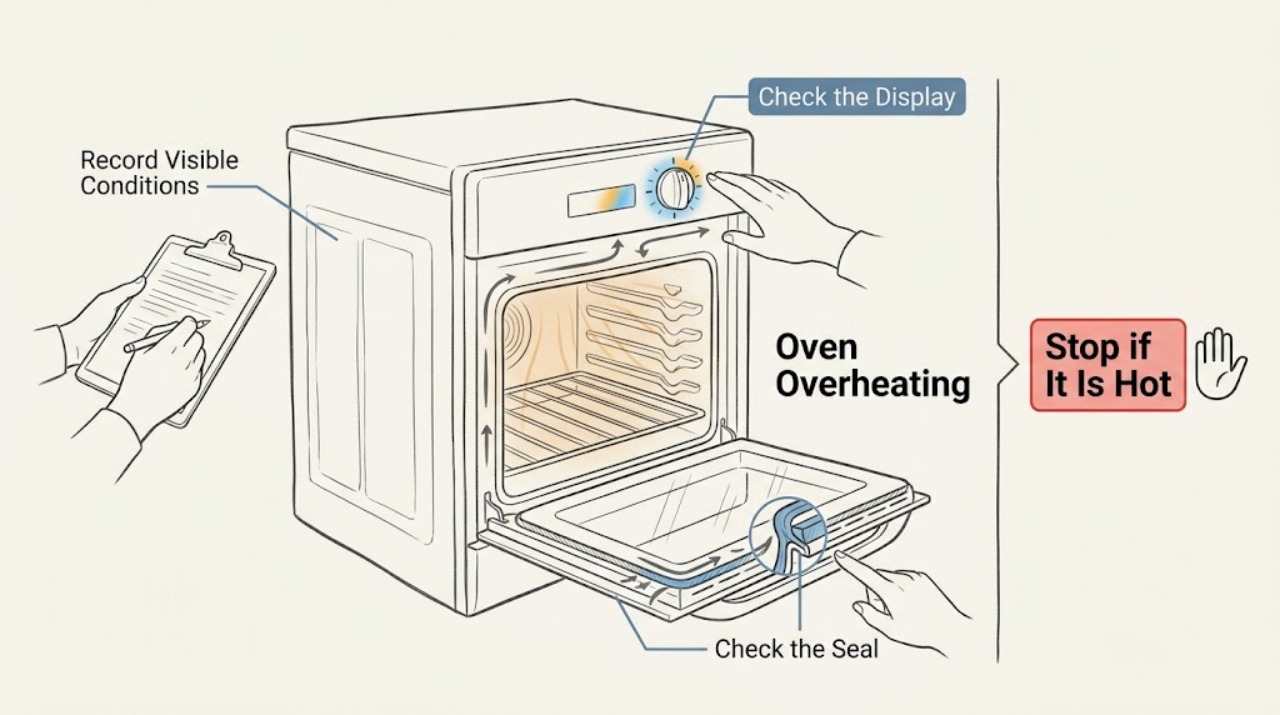
An LG oven that seems too hot should first be separated into normal preheating or element cycling, a setting or rack problem, a thermostat calibration issue, and true uncontrolled heating. Record the complete model, mode, setpoint, display or error, and whether the temperature is high only during preheat or remains high during cooking. Check only the cool, user-visible rack, door, control, and ventilation conditions allowed by the model guide. If heating continues after controls are off, smoke, flames, a gas smell, a strong burning smell, arcing, a damaged or very hot surface, or a breaker trip occurs, stop using the oven and arrange qualified appliance service.
Work through in order
Diagnostic checks
Use only checks that match the exact appliance or system and its official guide.
-
Check 1
Record the complete LG model number, whether the appliance is electric or gas, the mode, selected temperature, rack position, preheat or cooking stage, display message, and what feels or cooks too hot.
Expected result: The issue occurs only during preheat, only in one mode or rack position, throughout cooking, after cancelling, during self-clean, or with an error message.
Next step: Keep the oven off if the heat is uncontrolled or hazardous; otherwise use the matching branch and the exact LG manual.
Stop if: Stop immediately for smoke, flame, gas odor, strong burning smell, arcing, a hot or damaged electrical connection, a damaged glass surface, or a breaker trip.
Why this matters
Why: Timing and mode distinguish normal preheat or cycling from a setting, distribution, thermostat, sensor, control, or safety fault. LG's guidance is model- and range-type dependent.
-
Check 2
Compare the selected mode and temperature with the exact model guide, confirm the change was accepted with the model's Start control, and check whether the display indicates a delayed start, lock, or other control state.
Expected result: The temperature change was not confirmed, the wrong mode or scale is selected, a lock or delay is active, or the settings are correct but the oven still runs hotter than intended.
Next step: Correct only a clearly identified setting or lock condition and make one supervised, hazard-free check. If the oven still overheats, leave it off and preserve the display and model details for service.
Stop if: Do not keep switching modes to force a comparison while the oven is excessively hot, smoking, or unable to stop heating.
Why this matters
Why: A control state can make an oven appear to behave incorrectly, while a correct setting with persistent overheating points beyond a simple selection error. Convection and broil modes use heat differently from standard bake.
-
Check 3
With the oven cool, check that racks are in the model-recommended position, no foil or cookware blocks the bottom passages or vents, the door closes normally, and the visible seal and cooling openings are not obstructed.
Expected result: A rack, foil, cookware, door, seal, or visible vent condition is wrong, or the accessible arrangement is correct but cooking remains consistently too hot.
Next step: Correct only the accessible rack or obstruction named in the manual, then reassess during a normal, supervised use if no hazard exists. Persistent overheat needs service rather than a hotter or longer test.
Stop if: Do not line the oven cavity with foil, block vents, remove the door or seal, or continue if the door or glass is damaged or the oven is dangerously hot.
Why this matters
Why: Rack position and blocked passages can change heat distribution and trap heat. A correct external arrangement with persistent overtemperature points toward calibration, sensing, control, heating, or installation diagnosis.
-
Check 4
Determine whether the oven is merely hotter during preheat or whether it remains above the selected condition during the cooking phase; note whether a convection fan or heating element cycles off normally and whether the oven responds when the mode is cancelled.
Expected result: Heat is higher only while preheating, the fan or element cycles and then settles, the oven stays hot after cancellation, or food overcooks during steady cooking.
Next step: Treat a normal preheat or fan cycle as a mode characteristic only when the oven settles and no hazard exists. Leave an oven that does not settle or stop heating out of use and request service.
Stop if: Do not open the control panel, force a hot door, or run another cycle to reproduce uncontrolled heating.
Why this matters
Why: LG says some gas models intentionally increase heat during preheat and that convection fans and elements can cycle in normal modes. Persistent heating after cancellation or overtemperature during steady cooking is not explained by that normal behavior.
-
Check 5
If food is consistently overcooked but the oven stops heating normally, use a model-appropriate temperature check and compare the result with the owner's guide; consider thermostat calibration only through the exact LG procedure for that model.
Expected result: The measured or observed cooking result is consistently high, varies by mode or rack, is normal after the correct offset, or remains high after the documented adjustment.
Next step: Follow only the exact model's documented adjustment and record the original setting. If the error persists, the oven cannot hold temperature, or a fault code appears, arrange qualified diagnosis.
Stop if: Do not remove panels, bypass a sensor, alter wiring, or continue high-heat cooking when food, cabinetry, or the appliance becomes abnormally hot.
Why this matters
Why: A repeatable steady-temperature error may be calibration or sensing related, but variation by mode or rack can be distribution or cookware behavior. Calibration is model-specific and does not repair uncontrolled heating or a failed component.
-
Check 6
Read and preserve any complete error code or lock message before clearing it, then consult the exact LG model support page or manual; use one model-approved reset only when the oven is cool, dry, and free of warning symptoms.
Expected result: The code clears once, returns, is accompanied by heating that will not stop, or remains unexplained by the model documentation.
Next step: Leave the oven off and provide service the model, exact code, mode, setting, temperature behavior, and reset history. Do not use a code explanation from another LG model.
Stop if: Do not repeatedly reset the breaker, clear the code while the oven is unsafe, or run a self-test or cycle to see whether the code returns.
Why this matters
Why: An error or recurring protection state needs model-specific interpretation. A returning code or heating that continues after cancellation indicates an unresolved control, sensor, heating, or safety condition.
-
Check 7
If the symptom followed self-cleaning or a spill, wait for the oven to cool and inspect only the accessible door, display, and surrounding area; compare the condition with LG's self-clean and cleaning guidance without forcing the lock or energizing a wet area.
Expected result: The oven is in a normal cool-down or locked state, there is excessive smoke or fire, moisture entered an opening, the door or glass is damaged, or the oven remains hot after the expected cycle state.
Next step: For a normal locked cool-down, allow the exact model's process to finish without forcing the door. For smoke, fire, damage, moisture, or continued heat, stop using the oven and arrange qualified service or emergency help.
Stop if: Do not force the door, pour water into a hot oven, use cleaner on energized parts, or restart self-clean to test the result.
Why this matters
Why: Self-clean uses unusually high heat and the door remains locked until cooling. Excessive smoke, fire, damage, or abnormal continued heat is not a normal reason to continue operating.
Use your observations
Decision map
Find the observation that best matches what you see, then follow the next safe action.
-
PATH 01Next step
What you see
The oven is hotter only during preheat, then settles near the selected condition during cooking with no warning.
Do this next
Use the exact model guide and judge the steady cooking phase. Request service if the oven remains too hot after preheat or food is consistently overcooked.
Why this path and its safety boundary
Why it matters: This can be normal model-specific preheat behavior, especially on some LG gas ranges, rather than uncontrolled heating.
-
PATH 02Next step
What you see
The selected mode, temperature confirmation, rack, door, or visible vent arrangement is wrong and there is no hazard.
Do this next
Correct the user-accessible condition using the model guide and make one supervised check; persistent overheating needs service.
Why this path and its safety boundary
Why it matters: A settings or heat-distribution condition may explain the result.
-
PATH 03Next step
What you see
The oven is consistently too hot during steady cooking but stops heating normally when cancelled.
Do this next
Use only the exact LG calibration procedure after recording the original setting. If the issue remains, arrange qualified appliance diagnosis.
Why this path and its safety boundary
Why it matters: A model-specific thermostat calibration or temperature-sensing issue remains possible.
-
PATH 04Next step
What you see
The heating element or burner continues after cancellation, the oven cannot regulate temperature, or the same error or protection state returns.
Do this next
Keep the oven out of service and request qualified LG appliance service; do not open the cabinet or repeat the test.
Why this path and its safety boundary
Why it matters: A control, sensor, heating, gas, or safety fault may be present.
-
PATH 05Next step
What you see
The oven is in self-clean cool-down and the door is locked, with no excessive smoke, fire, or damage.
Do this next
Allow the model-specific cool-down to finish; never force the locked door. If it does not cool normally, arrange service.
Why this path and its safety boundary
Why it matters: The lock and continuing fan or heat can be part of the normal self-clean cool-down sequence.
-
PATH 06Next step
What you see
Smoke, flames, strong burning smell, gas odor, arcing, a damaged or dangerously hot surface, moisture near electrical parts, or a breaker trip occurs.
Do this next
Stop operating the oven, avoid touching hot or wet electrical parts and avoid ignition sources during gas danger, leave the area for active smoke, fire, or gas danger, and contact emergency or qualified professional help from a safe location.
Why this path and its safety boundary
Why it matters: There may be an immediate fire, gas, burn, or electrical hazard.
Helpful context
Understand the symptom
First decide what is actually overheating
A warm cabinet, a cooling fan, or a gas oven that briefly runs hotter during preheat does not prove that the thermostat has failed. The important distinction is whether the oven settles near its selected temperature during the cooking phase, whether food is consistently overcooked, or whether the heat remains uncontrolled after the mode is cancelled. Convection fans and heating elements can cycle as part of normal operation, and LG notes that rack position and cooking mode affect heat distribution.
Use the exact model before changing calibration
LG oven controls and thermostat adjustment sequences vary by model. Write down the model number and use its owner documentation before changing a thermostat offset. Do not treat a single reading, a rack-position difference, or normal preheat behavior as proof of a failed sensor. Avoid opening the control area or measuring live circuits.
Uncontrolled heat is a stop condition
If an element or burner continues heating after the control is cancelled, the oven cannot regulate temperature, or smoke, flames, gas odor, arcing, or a strong burning smell appears, stop testing. Do not open a locked hot door by force or try another mode to compare results. Keep people away from hot surfaces and arrange qualified service; use emergency help for active fire or a gas danger.
Only after diagnosis
Potential parts
- oven temperature sensor
Consider this only when qualified diagnosis finds that a repeatable steady-temperature error is caused by the sensor system after settings and calibration are addressed.
Confirm the complete model number and manufacturer fit information; do not infer sensor failure from one hot rack or preheat behavior. - oven control or thermostat component
Consider this only if the oven remains too hot during steady cooking or continues heating after cancellation and qualified diagnosis identifies the control path.
Electric and gas controls differ by model; internal electrical and gas-appliance work belongs to qualified service. - oven heating element or gas ignition component
Consider this only after professional diagnosis links abnormal heating, cycling, or combustion to the correct electric or gas heating path.
Do not order from a temperature symptom alone; confirm the complete model and qualified diagnosis before any replacement.
When checks do not resolve it
Need a professional?
Arrange qualified LG appliance service when the oven remains too hot during steady cooking, continues heating after cancellation, cannot regulate temperature, returns an error or protection state, or stays abnormally hot after self-clean cool-down. Provide the complete model number, electric or gas type, mode, setting, rack, display or code, temperature behavior, and any smoke, odor, flame, electrical, or damage observations. Use qualified electrical or gas-appliance help for supply, wiring, combustion, or installation concerns.
Common questions
FAQ
Is an LG oven being hotter during preheat always a fault?
Not always. LG documents model-specific gas preheat behavior and normal fan or element cycling. The key question is whether the oven settles during steady cooking. Persistent overtemperature, uncontrolled heating, smoke, or a code needs service.
Can I calibrate my LG oven if it cooks too hot?
Only through the exact model's LG procedure, after recording the original adjustment and confirming the issue is repeatable during steady cooking. Calibration does not make an oven safe if heat continues after cancellation or a safety symptom is present.
Why does the LG oven fan keep running after cooking?
A fan can continue during normal cooling, including after self-clean. Allow the model-specific cool-down to finish, but arrange service if the oven remains abnormally hot, the fan state never resolves, or smoke, fire, damage, or a code appears.
What should I do if an LG oven keeps heating after I turn it off?
Stop using it and do not switch modes or run another test. Keep people away from hot surfaces and arrange qualified appliance service; smoke, flame, gas odor, arcing, or active fire requires emergency action from a safe location.
Can foil or a rack position make an LG oven seem too hot?
Yes. LG says rack position changes heat distribution and warns that blocking oven passages can disturb airflow and trap heat. Correct only the accessible arrangement named in the model guide, and stop if the oven is dangerously hot or damaged.
Read the exact guide
Official sources
- Oven Not Heating - Gas RangesLG Electronics · LG gas-oven error, settings, electrical supply, door, gas supply, and service guidance
- Oven Cooking Issues (Under or Over Cooking)LG Electronics · LG range and oven overcooking or undercooking issue classification
- LG Range – Oven Cooking ModesLG Electronics · LG electric and gas oven mode, fan, element cycling, and self-clean behavior
- How can I calibrate the oven temperature?LG Electronics · LG model-dependent oven thermostat calibration procedures
- LG Range – How to Clean Your Oven Using Self CleanLG Electronics · LG oven self-clean lock, cooling, smoke, fire, and safe cancellation guidance
- Oven Over Cooking - Gas RangesLG Electronics · LG gas-range settings, rack position, thermostat adjustment, preheat behavior, and combustion cautions
- LG Range, Oven, Electric Cooktop: Powers On, Won't RunLG Electronics · LG oven control settings, lock, delay, circuit, error, and service checks
Community feedback
Share a repair observation
Share a plain-text repair observation. Accepted observations are published automatically; this page may take a moment to update.