
On this page
Start here
Quick answer
If an LG washer-dryer will not work, first determine whether the display is completely dark or the controls light up. With the appliance dry and safe to reach, connect it directly to a working wall outlet, check the outlet and breaker once, then clear Control Lock or a post-outage state if the panel responds. If the outlet works for another appliance but the LG unit remains dead, if a breaker trips again, or if the cord, outlet, or appliance shows heat, arcing, water, or burning odor, stop and arrange qualified service.
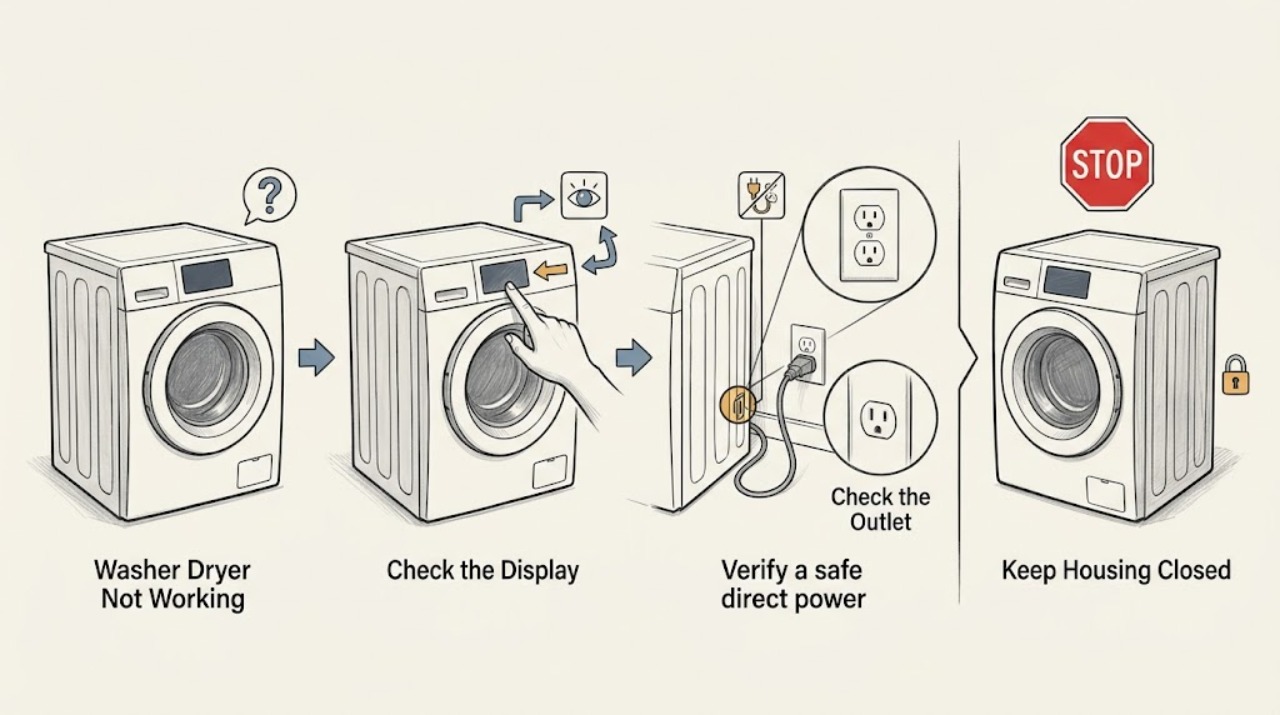
Work through in order
Diagnostic checks
Use only checks that match the exact appliance or system and its official guide.
-
Classify the symptom before touching controls
Stand in front of the LG washer-dryer and record whether the display is completely dark, partly lit, showing CL or PF, showing another code, chiming without starting, or showing a locked-door symbol. Also check for standing water in the drum without opening any panel.
Expected result: A completely dark panel points to power delivery or an internal electrical fault; CL means Control Lock can block most buttons; PF can follow a power interruption; a lit panel with water or a lock symbol is a separate door or drain state.
Next step: If the panel is dark, continue to the outlet and breaker checks. If it is lit, use the control and door branches below; preserve any other displayed code for model-specific guidance.
Why this matters
Why: These observations choose different next checks, so repeatedly pressing Start will not diagnose a dead outlet or a protected locked door.
-
Verify a safe direct power connection
With dry hands and no water near the receptacle, confirm the power cord is fully seated and connect the washer-dryer directly to a suitable wall outlet. Remove an extension cord, surge protector, or shared power strip from the test; do not pull a heavy appliance forward alone.
Expected result: If the LG unit comes back on when directly connected, the removed strip or extension arrangement was interrupting or limiting power. If it remains dark, the connection alone did not restore operation.
Next step: Leave the unit on the direct wall connection only if the cord and outlet look normal. If the plug or receptacle is hot, scorched, loose, wet, or damaged, stop and call an electrician or appliance technician rather than testing again.
Why this matters
Why: LG advises direct wall connection for these appliances; a strip, damaged plug, or loose connection can interrupt power and can also trip protection.
-
Separate an outlet problem from an appliance problem
Unplug the washer-dryer only when it is safe and dry, then test the same outlet with a small known-good device such as a lamp. If the outlet is protected by a GFCI, use its normal reset button only when the receptacle is dry and undamaged.
Expected result: If the test device also fails, the outlet, GFCI, circuit, or home supply is the likely issue. If the test device works but the LG washer-dryer does not, the appliance or its cord needs further diagnosis.
Next step: For an outlet or GFCI that will not reset, stop using that circuit and have an electrician investigate. If the outlet works and the LG panel remains dark, do not remove covers; proceed to the single breaker check and then service.
Why this matters
Why: The test prevents replacing or opening an appliance when the source outlet has no usable power; LG directs service when another appliance works but the washer does not.
-
Check the breaker or outage once
If the outlet test failed and there is no moisture or visible electrical damage, check whether the washer circuit breaker is tripped and reset it once according to the home's normal procedure. Do not repeatedly cycle a breaker or inspect live wiring.
Expected result: If the outlet returns and the washer-dryer powers on, the interruption was upstream. If the breaker trips again immediately or during a cycle, the circuit or appliance may have a fault; if the outlet remains dead, the home electrical issue is unresolved.
Next step: Arrange an electrician for a dead outlet or repeat trip. If power is stable but the LG still does not respond, arrange appliance service and report the outlet test, breaker behavior, and any displayed code.
Why this matters
Why: A repeat trip is a safety signal, not a prompt to keep resetting. The appliance should not be operated until the electrical cause is assessed.
-
Clear control lock and a delayed or post-outage state
When the panel is lit, check for CL or a lock icon and use only the control-lock button combination printed on the model's own panel or manual, holding it for the model-specified period. If PF appears after an outage, power the unit off and back on; also check that Delay Wash was not selected before assuming it is frozen.
Expected result: CL normally leaves the Power control available while blocking other buttons; PF indicates a recent power interruption; a delay setting can make a normal machine appear not to start.
Next step: If the lock clears and a normal cycle starts, monitor it. If controls stay unresponsive after the model-specific lock procedure and a safe reset, do not bypass the panel; request service.
Why this matters
Why: These are operating states rather than proof that the motor or main control has failed, but the exact lock buttons vary by model.
-
Handle a locked door or water condition without forcing it
If the display works but the door stays locked, look through the glass for water and consider whether the load may still be hot. Do not pull the door or defeat the interlock. Use the model-approved drain-only selection only when the controls respond and the hose path can be handled safely; otherwise leave it closed and call service.
Expected result: A high water level, hot water, or a brief outage can keep an LG front-load door locked. After safe draining and cooling, the lock may release; continued locking with no safe drain path indicates a service condition.
Next step: If water leaks, the drum is very hot, the outlet is wet, or the unit will not drain safely, stop and arrange qualified service. Never open an access area with a full or hot drum unless the model instructions make the procedure safe.
Why this matters
Why: The lock protects against water release and hot contents, so a locked door is not evidence that the whole washer-dryer is dead.
Use your observations
Decision map
Find the observation that best matches what you see, then follow the next safe action.
-
PATH 01Safety boundary
What you see
The display is completely dark and the outlet also fails the known-good device test.
Do this next
Treat this as an outlet, GFCI, breaker, or home-supply issue. Have an electrician check it; do not open the appliance or repeatedly reset the breaker.
Why this path and its safety boundary
Safety stop: Stop if there is heat, scorching, moisture, arcing, or a repeat trip.
-
PATH 02Next step
What you see
The outlet works for another device, the cord and receptacle look normal, and the LG remains dark.
Do this next
The fault is likely in the appliance power path or controls. Do not remove covers; request appliance service with the model number and test results.
-
PATH 03Next step
What you see
The panel is lit but CL, PF, Delay Wash, a lock symbol, or another code is visible.
Do this next
Follow the matching model-specific control, outage, door, or error-code branch. Do not treat the message as proof of a failed board.
-
PATH 04Next step
What you see
The machine begins but stops, leaves water, or trips power again.
Do this next
Stop the cycle and arrange service after making the area safe. Record when it stops, whether water remains, and whether the breaker or GFCI changes state.
Helpful context
Understand the symptom
Start with what the machine is actually doing
Do not assume a dark display, an unresponsive touch panel, a locked door, and a cycle that is waiting are the same fault. Note whether any lights, tones, code, PF message, or lock symbol appears; whether the drum contains water; and whether the washer-dryer stopped after an outage. Keep the model number available because control-lock buttons and cycle names vary by model.
Safety boundary
Do not work on a wet floor, expose an outlet to water, remove the console, bypass the door lock, or open the home's electrical panel beyond a normal user reset. Stop immediately for smoke, sparks, a hot or damaged cord, a burning smell, repeated breaker trips, or water near electrical parts. If moving the appliance is necessary, get help and protect the floor.
Only after diagnosis
Potential parts
- power cord
Only consider a cord after a qualified diagnosis identifies cord damage or an open connection; a dead outlet must be separated first.
Confirm the exact model, electrical rating, connector, and manufacturer fit information before ordering. - door lock assembly
Only consider this when the appliance has stable power, the door remains locked or fails the lock check, and service diagnosis points to the interlock rather than water, heat, or a control issue.
Door-lock fit and wiring vary by model; verify the full model number and manufacturer documentation. - main control board
Only consider a control board after outlet, cord, breaker, lock, and reset checks pass and a technician confirms an internal control fault.
Do not infer board compatibility from appearance; use the exact model and qualified diagnosis.
When checks do not resolve it
Need a professional?
Call a qualified appliance technician when a working outlet cannot power the LG, controls remain unresponsive after the model-specific lock check and safe reset, the door remains locked with an unsafe drain or heat condition, or a cycle stops repeatedly. Call an electrician for a dead or damaged receptacle, a GFCI that will not reset, a breaker that trips again, or suspected house-wiring trouble. Stop immediately for smoke, sparks, burning odor, a hot or damaged cord, water near electrical parts, or any situation that makes unplugging unsafe.
Common questions
FAQ
Why is my LG washer-dryer completely blank?
Test the direct wall outlet with a known-good device and check the breaker once if the outlet is dead. If the outlet works but the unit stays blank, stop at external checks and arrange appliance service.
What does CL mean on an LG washer-dryer?
CL normally indicates Control Lock. Use the lock button combination specified for the exact model; most other controls can remain blocked while the lock is active.
Why is the LG door locked when the washer-dryer is not working?
High water, hot water, or a brief outage can keep the door locked. Do not force it; use a model-approved drain-only action only when safe and arrange service if the lock or drain condition persists.
Should I use an extension cord or surge protector for an LG washer-dryer?
LG recommends testing and operating the appliance directly from a suitable wall outlet rather than an extension cord or power strip.
Read the exact guide
Official sources
- LG Washer - Recovering From a Locked WasherLG USA Support · High water, hot water, brief outage, drain-only, cooling, and service guidance
- Powers On By ItselfLG USA Support · PF after power failure, direct outlet connection, and Delay Wash behavior
- [LG Front Load Washer] Power issueLG USA Support · LG power, wall-outlet, and power-strip troubleshooting
- LG Washer – Why Won’t My LG Washing Machine Power On?LG USA Support · LG no-power checks for outlet, GFCI, breaker, reset, and service escalation
- LG Washer - Troubleshooting Unresponsive Washer ButtonsLG USA Support · Control Lock, error-code, reset, and service guidance for unresponsive buttons
Community feedback
Share a repair observation
Share a plain-text repair observation. Accepted observations are published automatically; this page may take a moment to update.