
On this page
Start here
Quick answer
First separate a washer with no display from one that has lights but will not start. For no display, inspect the plug and cord from a dry position, test the wall outlet with a small known-working lamp or appliance, and check the household breaker or GFCI only once when there is no heat, scorch, water, or electrical odor. LG advises direct connection to a suitable wall outlet rather than a shared power strip or extension cord. For a powered washer, check the exact model's Control Lock or Child Lock, Delay Start, selected cycle, closed door or lid, and any displayed code; the lock may leave the Power control available while disabling other buttons. A single model-supported reset is reasonable when there is no hazard. Stop for a hot or damaged outlet or cord, smoke, sparks, water near electricity, repeated breaker trips, or a burning smell, and arrange qualified service.
Before you begin
Safety first
- This article covers safe front-access observation and one model-supported reset only. Do not open the cabinet, bypass a lock, perform live electrical checks, reach into wet areas, or move the washer to inspect a connection.
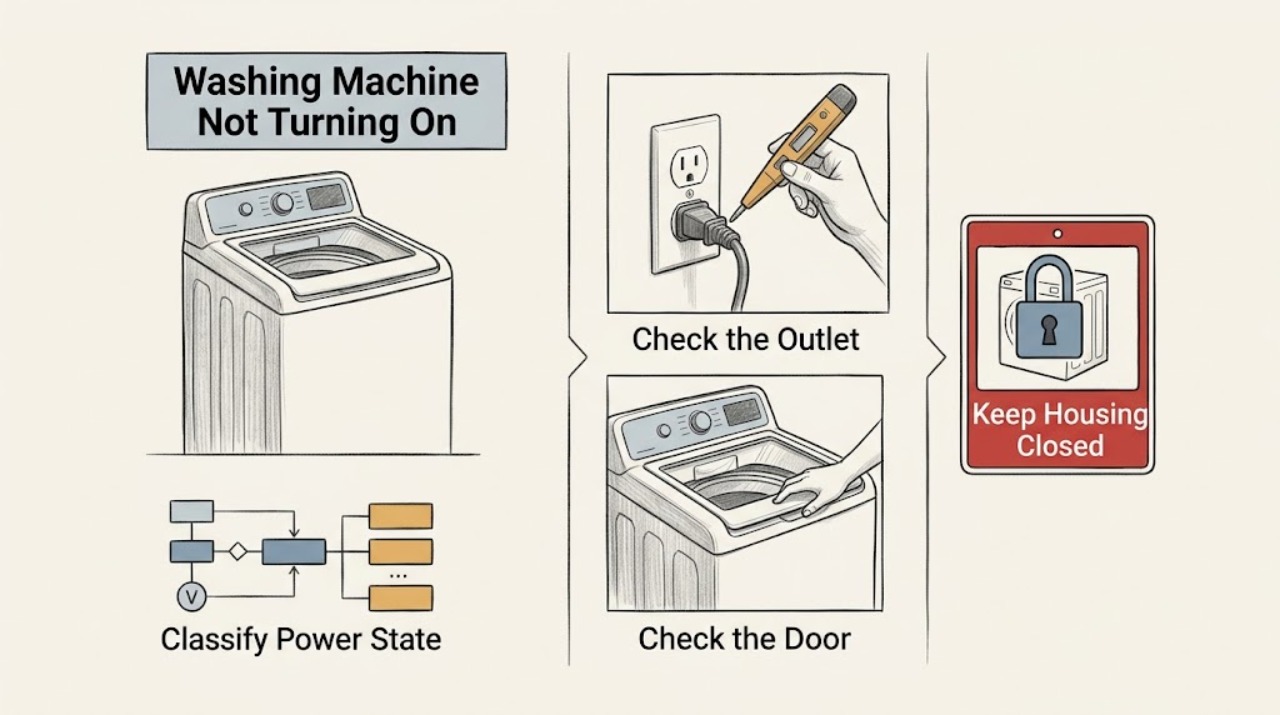
Work through in order
Diagnostic checks
Use only checks that match the exact appliance or system and its official guide.
-
Check 1
From a dry, stable position, press Power once and record whether the display is completely dark, partially lit, chiming, showing a lock indicator, showing an error, or lighting and then going dark; do not reach behind the washer if the floor or connection is wet.
Expected result: There are no lights or sounds, the panel lights but buttons do not respond, the panel shows a code or lock symbol, or the washer powers off again.
Next step: Use the no-power branch for a dark panel and the powered-no-start branch for a lit panel. Stop for smoke, sparks, burning smell, hot wiring, water near electricity, or a repeated trip.
Stop if: Do not keep pressing controls, reach into wet areas, or restart the washer after an electrical or water hazard.
Why this matters
Why: A dark panel points to the supply path, while a lit or locked panel points to controls, cycle state, door or lid interlock, delay, or a model-specific error.
-
Check 2
For a dark panel, look at the plug and cord from outside the appliance, confirm the plug is fully seated in a dedicated wall outlet, and test that outlet with a small known-working lamp or appliance; check the labeled breaker or GFCI only if there is no heat, scorch, water, or odor.
Expected result: The outlet is dead, the breaker or GFCI has tripped, the cord or plug is loose or damaged, the outlet works for the test device but the washer remains dark, or the washer returns after the supply is restored.
Next step: If the outlet or breaker will not hold, stop and arrange qualified electrical service. If the outlet works but the washer remains dark, keep the washer off and request LG appliance service. Connect directly to the wall; do not use a shared strip or extension cord.
Stop if: Do not touch a hot or scorched outlet, repeatedly reset a breaker, use a damaged cord, remove the plug with wet hands, or open the washer.
Why this matters
Why: LG identifies a faulty outlet, interrupted breaker, loose connection, power strip, or extension cord as common no-power causes. An outlet that works while the washer stays dark points toward the washer's cord, input, controls, or internal power system.
-
Check 3
For a lit panel, confirm the exact cycle is selected, the door or lid is fully closed with no garment caught at the seal, the Start/Pause control is pressed as the manual specifies, and Control Lock or Child Lock is not active; read any lock symbol or message before changing settings.
Expected result: The lock indicator clears and Start works, the door or lid does not latch, the panel remains locked, the cycle was not selected or started, or a code appears.
Next step: Use the model manual to release the lock and interpret the code, then try one start. If the door or lid cannot latch, the lock stays active, or the code returns, stop and request service rather than forcing the door.
Stop if: Do not force the door or lid, bypass the interlock, insert tools into the latch, or continue with a cracked door, exposed wiring, water leak, or burning smell.
Why this matters
Why: LG says Control Lock can disable most buttons and that the washer will not operate unless the door or lid is properly closed and locked on applicable models. A code or failed latch needs the exact model guidance.
-
Check 4
Read the display for Delay Start or Delay Wash, a power-failure indication, an active cycle, paused state, or an error code; compare the complete message and selected program with the exact LG manual instead of guessing from a different model.
Expected result: A delay countdown is active, a power-failure message is shown, the washer is paused or waiting for Start/Pause, or a code remains after the correct cycle is selected.
Next step: Cancel or change the delay only as the exact manual allows, reselect the cycle, and press Start/Pause once. Record any code and request service if it returns or the washer still will not start.
Stop if: Do not guess an error-code meaning, run repeated cycles with standing water, or continue if the panel is hot, smoking, sparking, or behaving erratically.
Why this matters
Why: LG notes that Delay Wash postpones the cycle and that a power-failure indication can appear after an interruption. A persistent code may identify a door, water, drain, or control condition that needs model-specific instructions.
-
Check 5
If there is no electrical, water, heat, odor, or mechanical hazard, perform one reset using the exact LG model procedure: power off, remove power or open the correct breaker, hold the specified button while unpowered, restore power, and try one cycle.
Expected result: The panel returns and one cycle starts normally, the panel remains dark, the panel returns but Start still does nothing, or the breaker trips again.
Next step: If the washer still will not start, keep it out of use and provide the model, panel state, code, outlet result, lock result, and reset result to qualified LG service. If the breaker trips again, arrange electrical and appliance service instead of resetting again.
Stop if: Do not repeat the reset, hold random buttons, open the cabinet, or reset after smoke, a hot plug, water near electricity, sparks, or a burning smell.
Why this matters
Why: LG presents a reset as a way to clear some electronic states, not as a repair for a failed supply, door lock, control, or repeated breaker event. A recurring trip or no-start after reset needs diagnosis.
-
Check 6
After the outlet, cord, lock, cycle, delay, code, and single-reset checks, document whether the washer is still dark, has power but will not start, loses power during use, or shows a recurring fault; keep it off for qualified diagnosis.
Expected result: The supply is good but the washer stays dark, the display works but Start remains inactive, the door or lid will not lock, a code returns, or the washer loses power again.
Next step: Request qualified LG washer service; use an electrician for a defective outlet or breaker circuit. Provide the exact model, symptoms, code, and every safe check already completed.
Stop if: Do not bypass the door lock, open panels, perform live electrical tests, repeatedly reset protection, or use the washer with smoke, sparks, heat, water near electricity, or a damaged cord.
Why this matters
Why: The remaining possibilities include an input or control fault, door or lid interlock, power connection, or model-specific condition that cannot be safely isolated from the outside.
Use your observations
Decision map
Find the observation that best matches what you see, then follow the next safe action.
-
PATH 01Next step
What you see
The panel is completely dark and there is no immediate heat, odor, water, or electrical damage.
Do this next
Check the plug and wall outlet from a safe position, connect directly to the wall, and check the labeled breaker or GFCI once. Use qualified electrical service for a dead or repeatedly tripping circuit and LG service when the outlet works but the washer stays dark.
Why this path and its safety boundary
Why it matters: The outlet, breaker or GFCI, plug, cord, or washer input path is more likely than a cycle setting.
-
PATH 02Next step
What you see
The display is lit but most controls are unresponsive or a lock indicator is shown.
Do this next
Use the exact LG manual to release the lock and try Start/Pause once. Do not force a door or bypass an interlock.
Why this path and its safety boundary
Why it matters: Control Lock or Child Lock may be active; the exact button combination varies by model.
-
PATH 03Safety boundary
What you see
The panel works but the washer does not begin and the door or lid does not latch or shows an open or unlocked message.
Do this next
Remove only plainly visible obstruction, close the door or lid as the manual shows, and try one start. If it will not latch or the message returns, request service.
Why this path and its safety boundary
Why it matters: The washer may be waiting for a secure closure or a functioning interlock; a garment at the seal can prevent closure.
Safety stop: Do not force, pry, or defeat the lock.
-
PATH 04Next step
What you see
The display shows a Delay Start or Delay Wash state, a power-failure indication, pause, or a code.
Do this next
Record the complete message and use the exact manual to cancel the delay, resume, or interpret the code. Request service if it returns or the washer still will not start.
Why this path and its safety boundary
Why it matters: The washer may be waiting by design or reporting a model-specific condition rather than lacking power.
-
PATH 05Next step
What you see
The washer has no hazard and starts after one model-supported reset, or remains unresponsive after it.
Do this next
Use the washer only if it starts normally and no warning returns. Otherwise keep it off and request qualified LG service; use electrical service for a recurring breaker or outlet fault.
Why this path and its safety boundary
Why it matters: A successful start supports a temporary electronic state; failure after reset points to supply, lock, control, or another model-specific fault.
-
PATH 06Safety boundary
What you see
The no-start symptom occurs with a hot or damaged plug, outlet, or cord, smoke, sparks, burning odor, water near electricity, or a repeated breaker trip.
Do this next
Stop using the washer, keep clear, and obtain qualified appliance or electrical help from a safe position. Do not restore power until the hazard is inspected.
Why this path and its safety boundary
Why it matters: This is an electrical, water, or fire safety event, not a control-setting problem.
Safety stop: Do not touch hot or wet connections, repeatedly reset protection, open the washer, or reach into standing water.
Helpful context
Understand the symptom
No display and no start are different faults
If every light is dark, begin with the outlet, cord, breaker, and power path. If the display is lit but Start does nothing, the washer may be waiting for a cycle selection, a closed and locked door or lid, a Control Lock release, a Delay Start setting, or an error condition. Record what the panel shows before changing settings. Never treat a burning smell, a wet electrical area, or a repeated trip as a normal no-start problem.
Controls vary by LG model
LG says the buttons used for Control Lock vary by model and directs owners to the model manual. Some models show a lock indicator or message while leaving Power available; others can show an error code, a power-failure indication, or a delayed-start state. Use the exact manual for the displayed code and button combination rather than applying a code table from another model.
Reset once, then diagnose the result
A reset can clear a temporary electronic state, but it cannot repair a failed outlet, damaged cord, unsafe wiring, door-lock fault, or recurring breaker trip. LG's reset sequence is model guidance: power off, remove power or open the breaker, hold the specified control while unpowered, restore power, and try the cycle once. Stop if the reset causes heat, odor, sparks, water exposure, or another trip.
Safety boundary
Stop conditions
- Stop use for smoke, sparks, visible arcing, burning smell, a hot or damaged plug, outlet, or cord, water near electricity, or a repeated breaker trip.
- Do not force or bypass the door or lid lock, insert tools into the latch, open the cabinet, or perform live electrical tests.
- Do not use an extension cord or shared power strip, and do not reset a breaker repeatedly when it trips again.
- Do not reach into standing water, remove a wet connection, or move the washer across a wet floor to inspect its outlet or cord.
- Use only ordinary-access and exact LG model-manual checks; a washer that remains dark or will not start after one safe reset needs qualified service.
Only after diagnosis
Potential parts
- washer door or lid lock assembly
Consider this category only when the exact-model diagnosis confirms that the door or lid closes but the interlock does not report secure closure.
Confirm the exact LG model and lock layout before ordering; never bypass or force the interlock as a test. - washer power cord or input connection
Consider this category only when qualified diagnosis finds a damaged cord or input connection after the wall outlet and circuit are verified safe.
Confirm exact model and electrical requirements through qualified service; do not use a damaged cord or make a live repair. - washer main control assembly
Consider this category only when the outlet, cord, lock, cycle settings, code, and one safe reset are ruled out and qualified diagnosis identifies a control fault.
Confirm exact LG model and technician diagnosis; no control-board replacement or cabinet access is an owner test.
When checks do not resolve it
Need a professional?
Request qualified LG washer service when the wall outlet works but the washer remains dark, when the display is lit but Start remains inactive after the lock, cycle, delay, code, and single-reset checks, when the door or lid will not lock, or when the fault returns. Use qualified electrical service for a dead or repeatedly tripping outlet or breaker. Stop immediately for smoke, sparks, burning smell, a hot or damaged connection, water near electricity, or a repeated trip.
Safety scope: This article covers safe front-access observation and one model-supported reset only. Do not open the cabinet, bypass a lock, perform live electrical checks, reach into wet areas, or move the washer to inspect a connection.
Common questions
FAQ
Why is my LG washing machine completely dark?
Check the plug and cord from a dry position, test the wall outlet with a small known-working lamp or appliance, and check the labeled breaker or GFCI once when there is no hazard. LG advises direct wall connection. If the outlet works but the washer stays dark, request qualified LG service.
Why does my LG washer have lights but not start?
Check the selected cycle, Start/Pause input, closed and latched door or lid, Control Lock or Child Lock, Delay Start, and any displayed code. Use the exact model manual. If the lock will not release or the washer still will not start after one safe reset, request service.
Can Control Lock stop an LG washer from starting?
Yes. LG says Control Lock can disable most buttons and that the button combination varies by model. Read the lock indicator and use the exact owner's manual to release it. Do not bypass the door or lid interlock.
Can Delay Start make an LG washer look like it will not start?
Yes. LG notes that Delay Wash postpones the beginning of the cycle on applicable models. Read the display and use the exact model instructions to cancel or change the delay, then press Start/Pause once.
Should I reset my LG washer if it will not turn on?
A single model-supported reset can clear a temporary electronic state when there is no water, heat, odor, or electrical hazard. If the washer remains dark, the door will not lock, the breaker trips again, or the problem returns, keep it off and request qualified service.
When should I stop troubleshooting an LG washer with no power?
Stop for smoke, sparks, visible arcing, burning smell, a hot or damaged plug, outlet, or cord, water near electricity, or a repeated breaker trip. Do not force the door lock, open the cabinet, reach into wet areas, or keep resetting protection.
Read the exact guide
Official sources
- LG Washer – Why Won’t My LG Washing Machine Power On?LG · Official LG USA support guidance for LG washing machines and washer-dryer combos; exact panel and electrical setup vary by model.
- LG Washer - Troubleshooting Unresponsive Washer ButtonsLG · Official LG USA support guidance for LG washers; Control Lock buttons and displays vary by model.
- Powers On By ItselfLG · Official LG USA support guidance for LG washer and washer-dryer products; feature names and display behavior vary by model.
- LG Washer - Circuit Breaker is TrippedLG · Official LG USA support guidance for LG washers and washer-dryer products; circuit requirements vary by model and installation.
- [LG Front Load Washer] Power issueLG · Official LG USA support guidance for front-load washers and washer-dryer products; images and controls vary by model.
- WT8600CB Owner's ManualLG · Official LG manual for the WT8600CB model family; use the assigned washer's own manual for exact controls and messages.
Community feedback
Share a repair observation
Share a plain-text repair observation. Accepted observations are published automatically; this page may take a moment to update.