
On this page
Start here
Quick answer
A Liebherr freezer error display is not one universal fault code. First read and record the exact message or code, then decide whether it is a door-open reminder, temperature alarm, power-failure warning, protection mode, network message, or a component error. Confirm the message only as the manual describes, check that the door and ventilation are unobstructed, and protect or move food if the freezer temperature has risen. A true Error message or a warning that returns needs the exact model manual and Liebherr service; do not remove covers, bypass a sensor, change refrigerant, or reset repeatedly without recording the code.
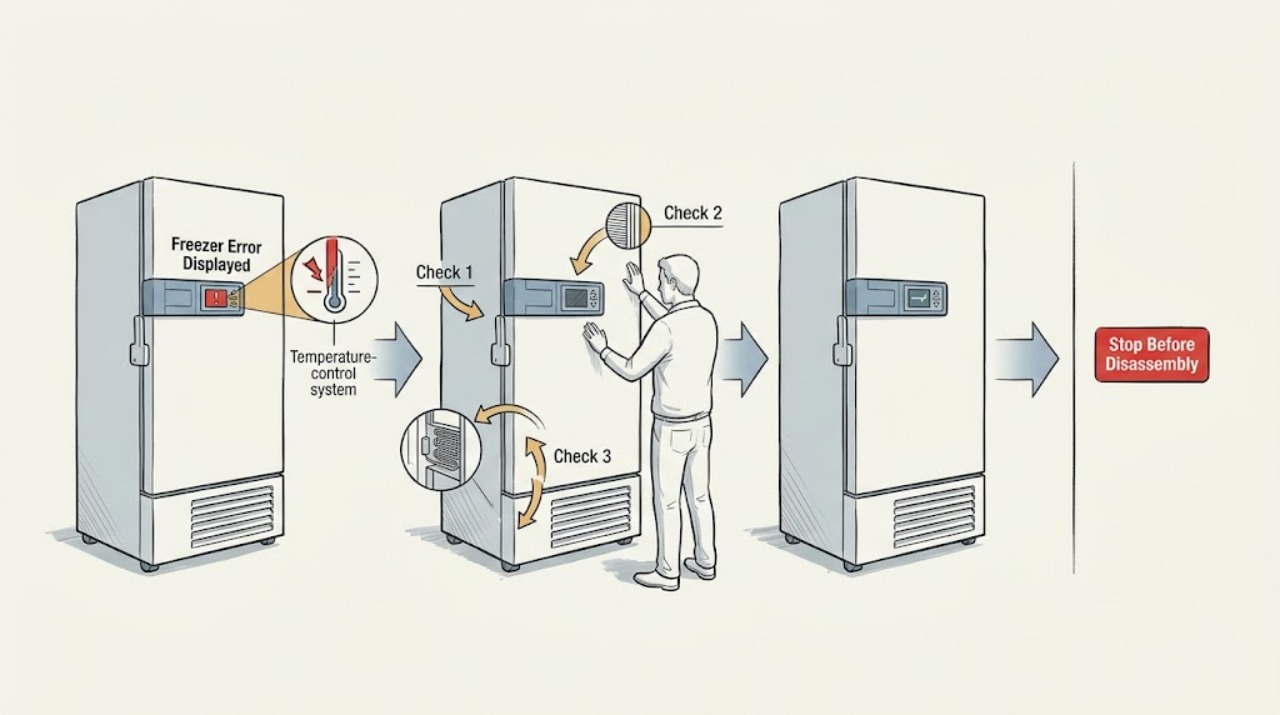
Work through in order
Diagnostic checks
Use only checks that match the exact appliance or system and its official guide.
-
Check 1
Photograph the whole display, transcribe every word, symbol, and code, and note whether an audible alarm is active; do not acknowledge the message until the record is saved.
Expected result: The screen says Door open, Temperature alarm, Power failure, Error, FRZ.PROT or another protection message, WLAN/connection error, or a model-specific code.
Next step: Write down the exact appliance designation, service number, and serial number from the rating plate or display, then use the exact Liebherr operating instructions for that model.
Stop if: Stop troubleshooting at the display if the freezer is smoking, sparking, hot at the plug, leaking refrigerant or liquid, or has exposed electrical parts; disconnect power only if it is safe and arrange urgent help.
Why this matters
Why: The message category determines whether the first response is to close the door, assess temperature and food, check a power interruption, allow a documented protection mode to clear, restore connectivity, or contact service for a component fault.
-
Check 2
If the message is Door open or a door-related alarm, close the freezer door gently and inspect the accessible gasket, shelves, drawers, and food placement for anything preventing a full seal; do not force the door or remove the gasket.
Expected result: The door closes flush and the alarm stops; a drawer or package holds it open; the seal is out of its groove or damaged; or the message returns with the door apparently closed.
Next step: Remove only an obvious obstruction and close the door. If the seal is damaged, the door does not align, or the message returns, keep the freezer closed and arrange model-specific service.
Stop if: Do not pry the door, bend hinges, alter the latch or sensor, or keep running the appliance if the door cannot seal and food temperature is rising.
Why this matters
Why: A door-open message can be a reminder caused by the door being open too long, but a returning alarm can indicate an obstruction, seal problem, alignment issue, or door sensor fault.
-
Check 3
If the message is Temperature alarm, Power failure, or the freezer temperature is flashing, keep the door closed, check whether power is currently available without opening electrical covers, and inspect the accessible ventilation grille for blockage.
Expected result: A power interruption is known; the appliance has power but remains warm; ventilation is obstructed; the alarm clears as the freezer returns to target; or the temperature remains high.
Next step: Confirm the message as instructed, check food quality using the temperature history and applicable food-safety rules, clear only external ventilation obstruction, and move food if the freezer cannot maintain a safe temperature.
Stop if: Do not repeatedly open the freezer, add warm food, bypass the alarm, or rely on a cleared display while the actual temperature remains unsafe.
Why this matters
Why: Liebherr identifies warm food, warm air from extended door opening, a prolonged power cut, and an appliance fault as different causes of a temperature warning. Ventilation and recovery time can affect temperature, but a persistent warm condition may be a fault.
-
Check 4
If the display shows Error or a specific alphanumeric code, briefly confirm it only as the manual describes, wait for the code to reappear if necessary, and record every code before contacting service.
Expected result: The code disappears after acknowledgement but returns; more than one code is shown; the freezer continues cooling normally; or the display reports an appliance/component fault.
Next step: Use the exact model manual to identify whether a simple documented action exists. If the manual directs service, keep the appliance in its safest stable state and provide the code, model, serial, temperature, and timing to Liebherr service.
Stop if: Do not erase the code by repeated resets, remove covers, test live wiring, bypass a sensor, or attempt compressor, refrigerant, or control-board repair.
Why this matters
Why: Liebherr manuals instruct the user to note Error codes and contact customer service. Acknowledgement changes the display state but does not establish that a failed component has been repaired.
-
Check 5
If the display shows FRZ.PROT, WLAN error, connection error, or another model-specific protection or communication message, follow only the matching on-screen or exact-manual action and observe whether the status returns to normal.
Expected result: The protection mode clears after the documented period; the freezer cools normally but connectivity remains unavailable; the message repeats; or the freezer temperature also rises.
Next step: Treat a connectivity-only message as separate from a cooling fault, but call service if the freezer is warm, the message repeats outside the documented condition, or no exact model procedure resolves it.
Stop if: Do not factory-reset the appliance, change hidden service settings, or keep food in a warm freezer while focusing on Wi-Fi or display behavior.
Why this matters
Why: Some Liebherr models temporarily protect the freezer after frequent door openings or loading, while WLAN and connection messages concern setup or network state. A repeated protection message or a temperature problem needs more than a network reset.
-
Check 6
After one documented low-risk correction, monitor the display and freezer temperature without repeatedly opening the door, and compare the result with the target shown in the exact manual.
Expected result: The message remains cleared and temperature recovers; the alarm returns; the freezer cannot reach target; food is softening; or the display shows a new code.
Next step: Keep the code history and move food to known-safe storage if needed. Arrange qualified Liebherr service with the exact model/serial information and photos of the display and rating plate.
Stop if: Stop using the freezer for storage if it cannot hold a safe temperature, shows a persistent Error, or develops electrical, burning, liquid, or refrigerant-warning symptoms.
Why this matters
Why: A cleared warning is useful only when the appliance actually returns to stable operation. A repeated alarm, unresolved temperature, softening food, or new code is evidence that the underlying cause remains.
Use your observations
Decision map
Find the observation that best matches what you see, then follow the next safe action.
-
PATH 01Safety boundary
What you see
The display is a Door open reminder and the door closes flush after an accessible obstruction is removed.
Do this next
Observe the door alarm once without repeatedly opening the freezer; arrange service if the message returns while the door is fully closed.
Why this path and its safety boundary
Why it matters: The message may be a door-use reminder rather than a component fault.
Safety stop: Do not bend the door, hinge, gasket, or sensor to force the alarm to clear.
-
PATH 02Safety boundary
What you see
A Temperature alarm or Power failure warning appears, and the freezer temperature is rising or food has warmed.
Do this next
Keep the door closed, assess food using the temperature history and applicable food-safety guidance, move food to known-safe storage if necessary, and contact service if cooling does not recover.
Why this path and its safety boundary
Why it matters: The food-safety condition takes priority over clearing the display.
Safety stop: Do not repeatedly open the freezer or keep storing food while temperature remains unsafe.
-
PATH 03Safety boundary
What you see
The message is Error, an alphanumeric component code, or a flashing error symbol that returns after acknowledgement.
Do this next
Record the exact code and contact Liebherr service with the model and serial details; follow only an explicit model-manual action before service.
Why this path and its safety boundary
Why it matters: The display is reporting a possible appliance or component fault, not merely a reminder.
Safety stop: Do not repeatedly reset, open the cabinet, bypass sensors, or test live electrical parts.
-
PATH 04Safety boundary
What you see
FRZ.PROT, WLAN, connection, or another model-specific message appears while the freezer is at a stable temperature.
Do this next
Use the exact display/manual procedure and observe whether the message clears; contact service if it repeats or cooling changes.
Why this path and its safety boundary
Why it matters: The immediate issue may be a temporary protection or communication state rather than a cooling failure.
Safety stop: Do not alter hidden settings or factory-reset without the exact manual and a record of the current code.
-
PATH 05Safety boundary
What you see
The display clears, but the freezer remains warm, the alarm returns, food softens, or a new code appears.
Do this next
Move food as appropriate, keep the door closed, and arrange qualified Liebherr service with the code history and temperature observations.
Why this path and its safety boundary
Why it matters: The display acknowledgement did not resolve the underlying condition.
Safety stop: Do not continue relying on the freezer for storage or repeatedly acknowledge the alarm without correcting the temperature problem.
-
PATH 06Safety boundary
What you see
The appliance shows smoke, burning smell, sparks, exposed wiring, severe heat, liquid leakage, or another immediate hazard.
Do this next
Keep people away, disconnect power only if safe, leave the area if smoke or fire is present, and contact emergency or qualified service help as appropriate.
Why this path and its safety boundary
Why it matters: This is an appliance safety event, not a display troubleshooting problem.
Safety stop: Do not touch damaged wiring, open covers, or restart the freezer to collect more code information.
Helpful context
Understand the symptom
The words on the screen determine the next check
Liebherr uses different display paths for a door-open message, temperature alarm, power failure, freezer protection, WLAN or connection issue, and a component Error. Two freezers can show different wording because controls and options vary by model. Photograph the complete screen before acknowledging it, and use the exact service or serial number to find the matching operating instructions.
Protect frozen food before troubleshooting deeply
A temperature or power-failure warning tells you that the freezer may have been above its normal target, not why that happened. Keep the door closed while checking the display, avoid adding warm food, and assess the food according to the temperature history and applicable food-safety guidance. If the freezer remains warm, move food to a known-safe cold storage location and arrange service.
Do not treat a reset as a repair
Acknowledging an alarm can clear the message while the underlying condition remains active. If an Error code returns, if the temperature does not recover, or if the display shows a component fault, keep the code and model details together for service. Do not open electrical covers or attempt refrigerant, sensor, compressor, or control-board work as a household check.
Safety boundary
Stop conditions
- Stop immediately for smoke, fire, sparks, burning odor, severe heat, exposed wiring, liquid or refrigerant concerns, or a damaged power connection.
- Do not remove covers, bypass sensors, alter control settings, test live wiring, handle refrigerant, or attempt compressor or sealed-system repair.
- Stop relying on the freezer for food storage when temperature remains unsafe, food is softening, or a warning repeatedly returns after one exact-manual check.
When checks do not resolve it
Need a professional?
Call for a returning Error/code, unresolved temperature or door alarm, inability to find an exact model procedure, or any hazardous electrical or thermal symptom.
Have this ready
- Exact Liebherr appliance designation and service or serial number
- Photo and transcription of every display message or code
- Current and warmest observed temperature and when the alarm began
- Whether there was a power interruption, prolonged door opening, warm loading, or ventilation obstruction
- Food-storage impact and the one documented check or correction attempted
Common questions
FAQ
What does Error mean on a Liebherr freezer?
It means the appliance or a component has reported a fault in the model's control system. Record the exact code, acknowledge it only as the manual describes, and contact Liebherr service if it returns or the freezer is not cooling normally.
What should I do when my Liebherr freezer shows a temperature alarm?
Keep the door closed, consider recent warm loading, prolonged door opening, or a power interruption, and assess food using the temperature history and applicable food-safety guidance. If the temperature does not recover, move food as needed and arrange service.
Can I clear a Liebherr freezer error by resetting it?
Acknowledging or resetting a display can change what is shown but does not prove the fault is fixed. Save the code first, use only the exact model manual, and contact service for a returning Error or unresolved temperature problem.
Where do I find the Liebherr freezer model or serial number?
Liebherr says the service and serial numbers are on the appliance serial tag, with the location varying by freezer type and model. The exact operating-instructions lookup can then be used to find the matching guide.
Should I keep food in a Liebherr freezer showing an error?
Not if the freezer is warm, food is softening, or the temperature warning remains unresolved. Keep the door closed, assess the food using appropriate food-safety guidance, move it to known-safe storage when needed, and arrange service.
Read the exact guide
Official sources
- User Guide freezerLiebherr-Hausgeräte · Applicable to the Liebherr freezer model covered by the opened guide; exact model instructions govern.
- Customer service for you: Contact us nowLiebherr-Hausgeräte · Applicable to service escalation and appliance-identification details; regional service channels vary.
- Operating instructions of your Liebherr refrigerator or freezerLiebherr-Hausgeräte · Applicable to locating the exact manual using the appliance service or serial number.
- Operating instructionsLiebherr-Hausgeräte · Applicable to the Liebherr appliance family covered by the opened manual; exact model instructions govern.
Community feedback
Share a repair observation
Share a plain-text repair observation. Accepted observations are published automatically; this page may take a moment to update.