
On this page
Start here
Quick answer
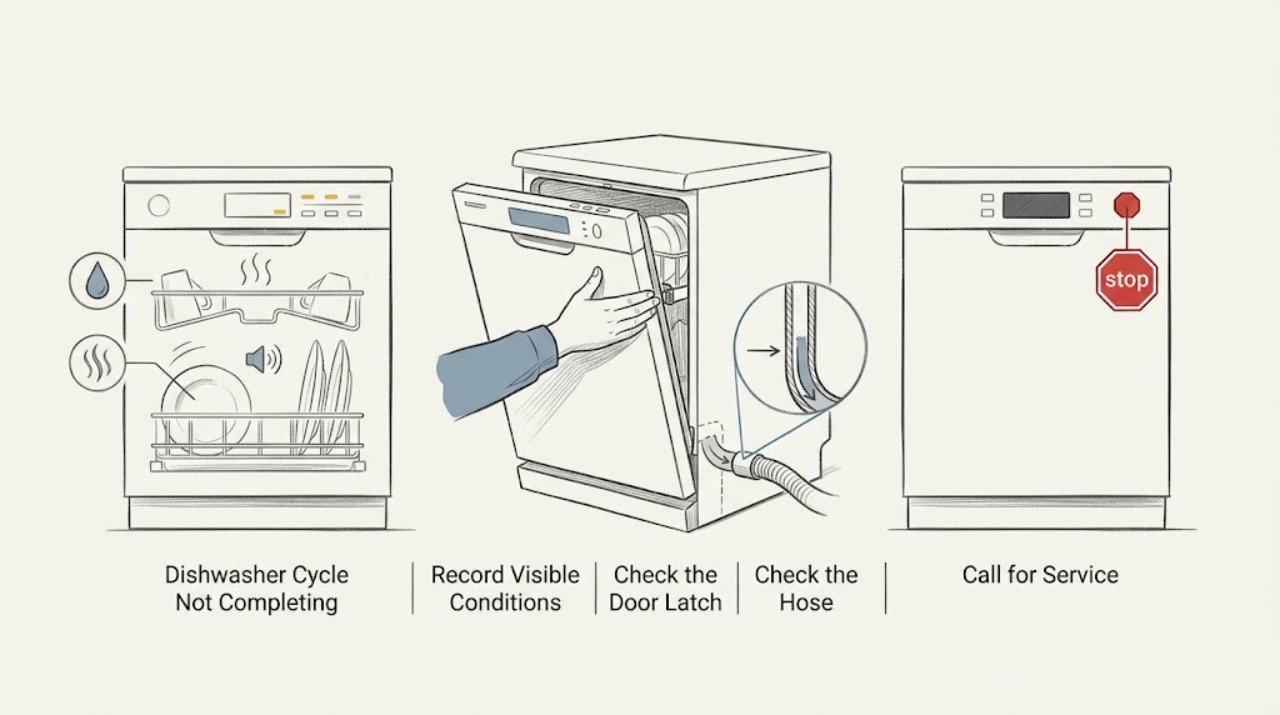
Note exactly where the Magic Chef dishwasher stops: before filling, during washing, during heating/drying, or while draining. Check the door closure, visible water connections, and end-of-cycle water level, then use the exact model manual for delay, lock, and cycle meanings instead of repeatedly restarting it.
Work through in order
Diagnostic checks
Use only checks that match the exact appliance or system and its official guide.
-
Check 1
Start an otherwise empty cycle and record the last audible or visible stage before it stops: no fill, wash spray, quiet/heating period, drain, or end indication.
Expected result: The dishwasher always stops at the same stage.
Next step: Use that stage and the exact model number to select the matching manual troubleshooting section.
Why this matters
Why: A repeatable stage points toward the related input, latch/control, heating, or drain path rather than an unspecified failure.
-
Check 2
Check that the door closes fully and that no rack, tall item, or utensil prevents the latch from engaging. Inspect the accessible gasket and control panel for an obvious obstruction or lock indicator.
Expected result: The latch does not engage, the door springs back, or a lock indicator remains active.
Next step: Clear the obstruction and follow the model manual's door or control-lock procedure; do not force the latch.
Why this matters
Why: The control may be intentionally stopping the cycle because the door state or control lock is not satisfied.
-
Check 3
Inspect the inlet and outlet hoses, faucet adapter if it is a countertop model, and the area under the sink or beside the unit for kinks, loose connections, or a visible leak.
Expected result: Water supply is restricted, the outlet hose is kinked, or water is leaking at a connection.
Next step: Turn off the water supply for a leak, correct only an obvious external kink or loose connection, and arrange service if the connection or internal path is not user-accessible.
Why this matters
Why: The dishwasher may stop to protect itself when filling or draining is not completed.
-
Check 4
After the stopped cycle is safe to open, look for standing water and note whether the display resets, flashes, or returns to idle. Do not reach into moving parts or dismantle the pump area.
Expected result: The tub is full at the stop, or the display returns to idle without draining.
Next step: Follow the exact manual's cancel/drain instruction once; if water remains, leave the unit off and request service.
Why this matters
Why: Drain completion or a control response is more likely than a simple program-selection issue.
Use your observations
Decision map
Find the observation that best matches what you see, then follow the next safe action.
-
PATH 01Next step
What you see
The dishwasher stops before filling and the door/latch is sound
Do this next
Check only the visible hose/adapter path and use model-specific service if filling does not begin.
-
PATH 02Next step
What you see
It reaches drain or end-of-cycle and leaves water behind
Do this next
Use the manual's safe cancel/drain step once, then stop and arrange service if water remains.
Helpful context
Understand the symptom
The stop point is the diagnosis
Magic Chef lists different cycle sets and delay options across dishwasher models. A cycle that stops before filling has a different next check from one that reaches the end but leaves water behind.
When checks do not resolve it
Need a professional?
Use the Magic Chef manual and model-specific service for a cycle that repeatedly stops.
Common questions
FAQ
Should I keep restarting the same cycle?
No. Record the exact stop stage, use the model manual once for the relevant procedure, and request service if it repeats or leaves water behind.
Does a delayed start mean the dishwasher is broken?
Not necessarily. Some Magic Chef models list delay options; verify the control state in the exact manual before treating it as a fault.
Read the exact guide
Official sources
- SupportMagic Chef · Magic Chef product support and service paths
- 21 in. Countertop Dishwasher with 6-Cycles, 6 Place Settings Capacity in WhiteMagic Chef · Magic Chef countertop dishwasher controls, cycles, delay start, and inlet/outlet hoses
- 24 in. Black Front Control Built-in Stainless Steel Tall Tub DishwasherMagic Chef · Magic Chef built-in dishwasher controls, cycles, delay start, and child lock
- Manual DownloadsMagic Chef · Magic Chef model-specific product manuals
Community feedback
Share a repair observation
Share a plain-text repair observation. Accepted observations are published automatically; this page may take a moment to update.