
On this page
Start here
Quick answer
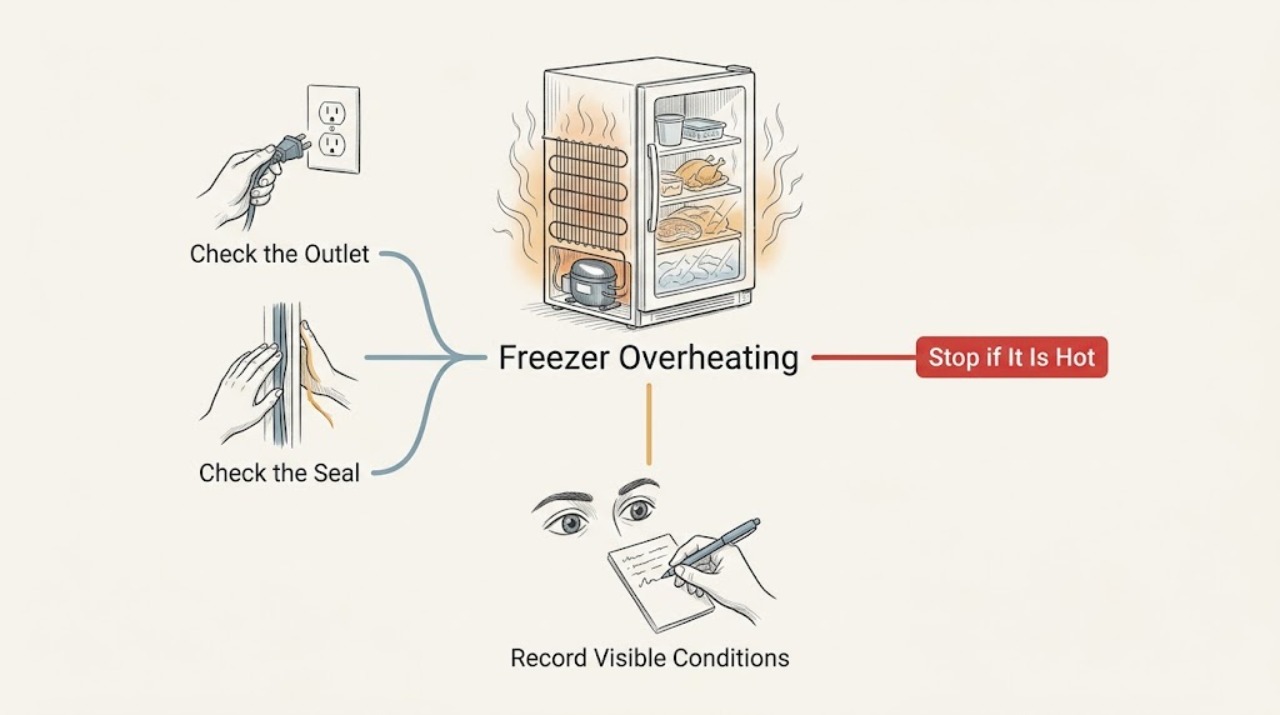
Some warmth around a freezer cabinet can occur while the cooling system rejects heat, so first separate a warm exterior from a freezer that is actually losing temperature. Without moving or opening the Magic Chef freezer, check its temperature, door seal, visible frost, room conditions, and the clearance around it. Keep the door closed if food is warming. Stop using the freezer and arrange qualified service for a burning smell, smoke, melted parts, a damaged cord, repeated breaker trips, an unusually hot plug or outlet, or food that is no longer safely frozen. Use the Magic Chef model-number support path for model-specific clearance and service instructions.
Work through in order
Diagnostic checks
Use only checks that match the exact appliance or system and its official guide.
-
Check 1
From a safe position, identify where the heat is felt: side walls, top, rear area, plug or outlet, or the room around the freezer. Do not touch a hot plug, damaged cord, wet outlet, or any exposed electrical part.
Expected result: The cabinet is mildly warm but the plug and outlet are normal; or the heat is concentrated at the plug/outlet, accompanied by smoke, a burning smell, melting, sparking, or a damaged cord.
Next step: For smoke, burning odor, melting, sparking, or cord/outlet damage, stop using the freezer and leave electrical inspection to qualified service. Do not touch the hot connection or repeatedly reset a breaker.
Why this matters
Why: Cabinet warmth can be part of heat rejection, but an electrical hot spot or burning sign is an immediate safety concern rather than a cooling adjustment.
-
Check 2
Read the freezer temperature from an appliance thermometer or display without opening the door longer than necessary. Note whether food is still solidly frozen, softening, or melting, and record the temperature trend rather than making a one-time guess.
Expected result: The freezer is at or below the model's target and food remains solid; or the temperature is rising and food is softening or melting.
Next step: If food is warming, keep the door closed, transfer food to safe cold storage when practical, and arrange qualified service. Do not keep cycling the appliance to test whether it recovers.
Why this matters
Why: Heat at the cabinet with stable internal temperature is a different path from overheating with loss of cooling. A rising temperature means food protection and service take priority over cosmetic cabinet temperature.
-
Check 3
Visually check the door perimeter and gasket for a gap, torn section, heavy frost interference, or an item preventing closure. Close the door normally and confirm that it sits evenly; do not pry the gasket or remove an interior panel.
Expected result: The door does not seal evenly, frost or a package holds it open, or the gasket is damaged; or the seal is continuous and the door closes normally.
Next step: Remove only a plainly visible package obstruction and close the door. For a torn gasket, heavy internal frost, or continued warming, use the model manual and request service instead of forcing the door or chipping frost with a sharp tool.
Why this matters
Why: A leaking seal or door held ajar can make the cooling system run longer and increase heat around the cabinet while the compartment warms. A good visible seal makes that explanation less likely.
-
Check 4
Without moving the freezer, inspect the visible space around its sides, top, and rear edge for cabinets, boxes, fabric, dust buildup, or another heat source blocking circulation. Compare the installation with the exact Magic Chef manual once the model number is known.
Expected result: The freezer is tightly enclosed, exposed to direct heat or an extreme room temperature, or visibly obstructed; or there is open space and no nearby heat source.
Next step: Remove only loose items that are safely reachable without shifting the appliance. Do not pull, tilt, or unplug a loaded freezer to inspect the rear. If heat or warming persists, arrange model-specific service.
Why this matters
Why: Restricted air circulation and an extreme room environment can make heat rejection harder. Clearance requirements vary by model, so a generic distance is not a substitute for the manual.
-
Check 5
Check the visible frost pattern and operating behavior without removing covers: note heavy ice on the interior, a compressor that runs almost continuously, repeated clicking, an alarm, or a complete lack of normal cooling. Do not scrape ice with a sharp object or reach toward a fan.
Expected result: Heavy frost, continuous operation, repeated clicking, or an alarm accompanies the heat; or the freezer has normal cycling and no frost or alarm.
Next step: For heavy frost with warming food or repeated clicking/no-start behavior, keep the door closed and arrange qualified service. Do not bypass a control, access refrigerant, or test live electrical components.
Why this matters
Why: Those signs can indicate an airflow, defrost, control, start, or sealed-system issue, but they do not identify a part safely from the outside. A normal cycle with stable food temperature points back toward environment or installation.
-
Check 6
Find the complete Magic Chef model number and prepare a service report with the heat location, internal temperature, food condition, door-seal result, room conditions, and when the change began. Use the official freezer support page for the exact model path.
Expected result: The model number and a clear temperature/heat history are available; or the model is unknown and the appliance is still warming.
Next step: Give the model number and observations to Magic Chef support or a qualified technician. If food is warming or a safety sign is present, request service without waiting for a guessed diagnosis.
Why this matters
Why: Magic Chef support is model-driven, and different freezer designs can use different clearances, controls, and service procedures. Missing model identity makes part selection and disassembly instructions unreliable.
Use your observations
Decision map
Find the observation that best matches what you see, then follow the next safe action.
-
PATH 01Next step
What you see
The cabinet feels warm, but the internal temperature and frozen food remain stable and there is no electrical or burning sign.
Do this next
Check visible clearances, nearby heat sources, and the door seal without moving the freezer. Monitor temperature and use the model support path if the warmth is a new change.
-
PATH 02Next step
What you see
The freezer is warming food or its measured temperature is rising.
Do this next
Keep the door closed, protect food in safe alternate cold storage, and arrange qualified freezer service. Do not repeatedly open the door or run experiments to reproduce the heat.
-
PATH 03Next step
What you see
The gasket leaks, a package holds the door open, frost blocks closure, or visible clearance is obstructed.
Do this next
Correct only the safe visible obstruction and close the door. Do not chip frost, force the gasket, or move the appliance; request service if the seal or frost problem persists.
-
PATH 04Next step
What you see
Heat is concentrated at the plug/outlet, or there is smoke, a burning smell, melting, sparking, water at electrical parts, or repeated breaker trips.
Do this next
Stop using the freezer and keep clear of the electrical hazard. Do not touch the connection or reset the breaker repeatedly; contact qualified electrical/appliance service.
-
PATH 05Next step
What you see
Heavy frost, continuous operation, repeated clicking, an alarm, or loss of cooling remains after safe external checks.
Do this next
Keep the door closed and arrange model-specific qualified service. Do not remove covers, reach a fan, test live voltage, handle refrigerant, or bypass a safety control.
Helpful context
Understand the symptom
Warm cabinet versus overheating fault
A warm side or rear area does not by itself prove a failure: a refrigeration system has to reject heat somewhere. The concern is a change from the freezer's normal behavior, excessive heat with a hot plug or burning odor, or heat together with a rising internal temperature. Check from outside first and do not pull the appliance forward to reach coils, wiring, or a power connection.
Protect food while diagnosing
Keep the door closed as much as practical and use an appliance thermometer if one is available. If food is partly thawed, handle it according to the FDA food-safety guidance rather than relying on smell or appearance. A repair diagnosis should not be allowed to turn into repeated door opening or an unsafe food decision.
Safety boundary
Stop conditions
- Stop using the freezer for smoke, burning odor, melting, sparking, a hot plug or outlet, damaged cord, water near electrical parts, or repeated breaker trips.
- Stop and protect the food when the freezer is warming, food is softening or melting, an alarm is active, or the internal temperature is rising.
- Do not move or tilt a loaded freezer, remove covers, reach toward a fan or compressor, chip frost with a sharp tool, test live voltage, handle refrigerant, or bypass a safety control.
Only after diagnosis
Potential parts
- door gasket or sealing component
Consider only if a qualified diagnosis or model documentation confirms that a damaged gasket is causing a persistent air leak and extended cooling operation.
Confirm the complete model number and fit information before ordering; do not force a generic gasket into place. - condenser or evaporator fan component
Consider only after a qualified technician isolates the heat or cooling symptom to a fan that is not operating or is obstructed.
Fan location and fit vary by model. Do not remove covers or reach toward a fan as a homeowner. - temperature control or defrost component
Consider only when a technician confirms a control or defrost fault that explains the temperature rise and heat pattern.
Confirm model-specific fitment and diagnosis before ordering; a warm cabinet alone does not justify this part.
When checks do not resolve it
Need a professional?
Arrange qualified service when the freezer is warming food, runs continuously, has heavy frost or repeated clicking, or remains unusually hot after safe checks. Use urgent electrical help for smoke, burning odor, melting, sparking, cord/outlet damage, water at electrical parts, or repeated breaker trips.
Common questions
FAQ
Is a warm Magic Chef freezer cabinet always overheating?
No. A refrigeration system rejects heat, so some cabinet warmth can be expected. Treat new or excessive heat as a fault when the freezer is warming food, running continuously, or showing an electrical or burning sign.
What should I check if the freezer is hot and not staying cold?
Keep the door closed, check the temperature and food condition, look for a door-seal gap or visible obstruction, and inspect the surrounding clearance without moving the freezer. Arrange service if the temperature is rising.
Can I pull the Magic Chef freezer forward to clean or inspect the rear?
Do not move or tilt a loaded appliance during this diagnosis. Use the model-specific Magic Chef manual or a qualified technician for rear clearance, electrical, fan, and compressor work.
How do I protect food while the freezer is overheating?
Keep the door closed and move food to safe cold storage when practical. Use a thermometer; food with ice crystals or at 40°F or below may be safe to refreeze or cook, while uncertain or warmer perishable food should be handled using FDA guidance.
Read the exact guide
Official sources
- The Magic Chef Help CenterMagic Chef · Magic Chef product support and freezer help routing
- Freezer SupportMagic Chef · Magic Chef freezer model-specific support and troubleshooting
- FreezersENERGY STAR · Consumer freezer temperature, room-environment, air-circulation, seal, and door-use guidance
- Food and Water Safety During Power Outages and FloodsU.S. Food and Drug Administration · Food safety when a freezer warms or fails
Community feedback
Share a repair observation
Share a plain-text repair observation. Accepted observations are published automatically; this page may take a moment to update.