
On this page
Start here
Quick answer
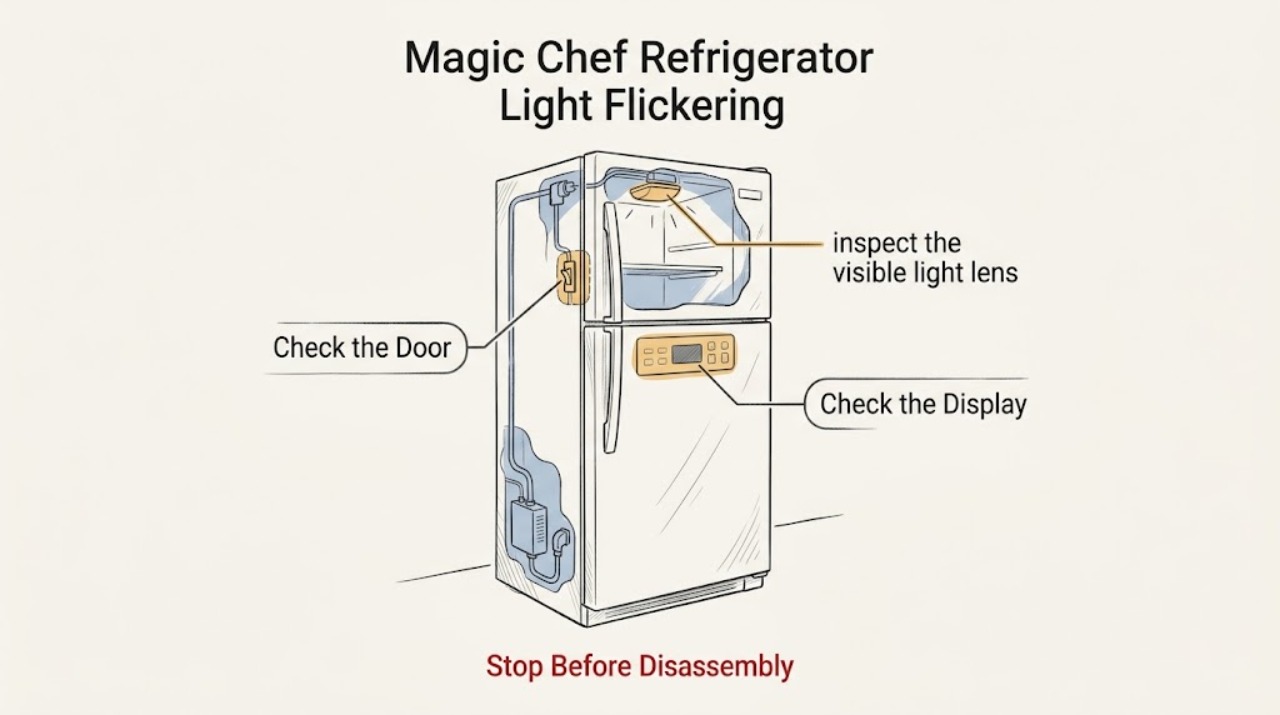
Observe whether the Magic Chef refrigerator light flickers when the door moves, only when the compressor or another load starts, or continuously while the door is still. Check the door switch and visible bulb or lens for dirt, moisture, or a loose fit only as the model allows. A hot socket, burnt smell, damaged wiring, repeated breaker trip, or flicker with other appliance functions needs the refrigerator left off and qualified service.
Before you begin
Safety first
- Do not probe the socket, bypass the door switch, or remove wiring or an LED module unless the exact manual explicitly permits the user operation.
Work through in order
Diagnostic checks
Use only checks that match the exact appliance or system and its official guide.
-
Check 1
Open the refrigerator slowly and watch the light while the door moves through its normal travel; note whether the flicker happens at one angle, only when the door is almost closed, or with the door stationary.
Expected result: Flicker follows door movement, or it continues with the door fully open and still.
Next step: Continue only with the visible switch and lamp inspection. Do not repeatedly snap the door to reproduce the symptom.
Why this matters
Why: Door-linked flicker makes the switch/contact or alignment more likely; stationary flicker points toward the lamp, socket/module, control, or supply.
-
Check 2
With the unit in its normal safe state, inspect the visible light lens, bulb area, or module for a loose fit, condensation, discoloration, cracked lens, or residue; use the exact manual before touching or removing it.
Expected result: The visible part is clean and dry, or there is moisture, heat discoloration, damage, or a part that will not seat correctly.
Next step: Clean only accessible residue and replace a bulb only if the exact manual identifies it as user-replaceable. Otherwise leave it off and request service.
Why this matters
Why: A visible seating or moisture issue may explain intermittent contact; heat damage or an unknown LED module is outside a safe guess-and-replace repair.
-
Check 3
Check whether the display, cooling, fan, or other refrigerator functions also blink, reset, stop, or change at the same time as the light.
Expected result: Only the interior light flickers, or multiple refrigerator functions change together.
Next step: For multiple-function flicker, check the household circuit only from the outside and arrange service if it repeats. Do not test exposed wiring.
Why this matters
Why: An isolated lamp symptom favors the local light path; simultaneous resets or changes suggest a wider power or control issue.
-
Check 4
After the door is closed, inspect the gasket and switch area for an obstruction that prevents the door from reaching its normal closed position, and note whether the light stays on or the cabinet warms.
Expected result: The door seals and the light extinguishes normally, or the light remains on/flickers with a gap or warm cabinet.
Next step: Remove only an obvious door obstruction. Request service for a damaged switch, seal, or persistent light-on condition.
Why this matters
Why: A closure problem can keep the light circuit in an unstable state and also admit warm air; a sealed door with a local flicker keeps the light assembly in focus.
Use your observations
Decision map
Find the observation that best matches what you see, then follow the next safe action.
-
PATH 01Next step
What you see
Flicker occurs only as the door moves and the rest of the refrigerator works normally
Do this next
Check only the visible switch and closure; arrange service if the movement-linked flicker persists.
Why this path and its safety boundary
Why it matters: A door switch/contact or alignment issue is more likely than a whole-appliance power fault.
-
PATH 02Next step
What you see
The light flickers while stationary, with a hot socket, moisture, discoloration, or damaged lens
Do this next
Turn the light/appliance off if safe and request qualified service; do not touch damaged wiring.
Why this path and its safety boundary
Why it matters: The local lamp or module path may be unsafe to operate or cannot be identified from the outside.
-
PATH 03Next step
What you see
The display or cooling functions reset with the light
Do this next
Leave the refrigerator off if it is safe to do so, protect food, and arrange qualified electrical/appliance service.
Why this path and its safety boundary
Why it matters: The symptom extends beyond the lamp and may involve supply or control behavior.
-
PATH 04Next step
What you see
The door does not seal and the light stays on
Do this next
Remove an obvious obstruction, verify the gasket only from outside, and service a damaged door or switch.
Why this path and its safety boundary
Why it matters: The closure problem can both cause the light symptom and warm the compartment.
Helpful context
Understand the symptom
Timing tells you what to inspect
Flicker tied to the door points to the switch or contact position; flicker tied to cabinet operation points to supply or control behavior. Do not assume every model uses a replaceable bulb—many use a model-specific light module.
When checks do not resolve it
Need a professional?
Provide the model number, door position when flicker occurs, visible lamp condition, and whether cooling or the display changes too.
Safety scope: Do not probe the socket, bypass the door switch, or remove wiring or an LED module unless the exact manual explicitly permits the user operation.
Common questions
FAQ
Why does my Magic Chef refrigerator light flicker when I open the door?
Watch whether the flicker follows the door angle. That pattern makes the visible switch/contact or door alignment more likely; do not repeatedly flex the door or bypass the switch.
Can I replace the Magic Chef refrigerator light myself?
Only if the exact model manual identifies a user-replaceable bulb and gives the procedure. Do not touch a hot, wet, discolored, or unknown LED module; arrange service instead.
What if the display flickers along with the interior light?
That is broader than a local lamp symptom and can indicate a supply or control problem. Protect food, avoid exposed electrical checks, and arrange qualified service if it repeats.
Read the exact guide
Official sources
- Refrigeration & Food SafetyUSDA Food Safety and Inspection Service · Keeping refrigerator doors closed and 40°F food-safety target
- Manual DownloadsMagic Chef · Magic Chef model-specific light, door-switch, and control instructions
Community feedback
Share a repair observation
Share a plain-text repair observation. Accepted observations are published automatically; this page may take a moment to update.