
On this page
Start here
Quick answer
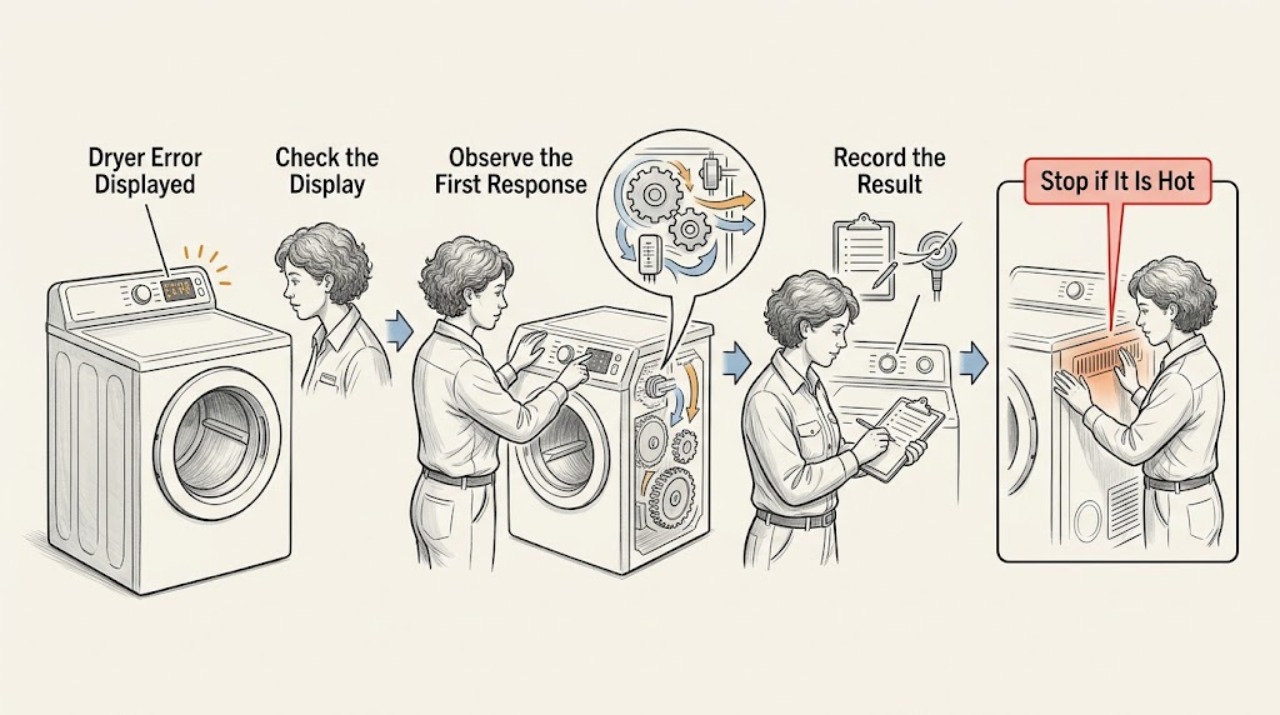
Treat a Maytag dryer error display as model-specific. Photograph the exact code, punctuation, dashes, or letters, record the model number and when the message appears, and note whether the dryer is gas or electric, starts, tumbles, heats, or stops. Maytag maps AF or F4E3 to restricted airflow, ERR to a door that is not latched, Loc to Control Lock, PF to a power interruption, L2 or F4E4 to a power-supply problem, and some F# E# codes to a fault that requires service, but not every code applies to every model. Check only the external condition named by the matching Maytag guidance. A single model-approved reset may be reasonable when there is no smoke, burning smell, gas odor, water, overheating, arcing, damaged cord, or repeated breaker trip; if the code returns, do not keep resetting or open the dryer. Stop immediately for fire, gas, electrical, or severe heat symptoms and arrange qualified service.
Work through in order
Diagnostic checks
Use only checks that match the exact appliance or system and its official guide.
-
Check 1
From a stable, dry position, photograph the display and write every character exactly, including spaces, dashes, flashing segments, and whether the message alternates; record the Maytag model number, gas or electric type, cycle stage, and whether the drum, heat, and controls still respond.
Expected result: The display shows AF or F4E3, ERR, Loc, PF, L2 or F4E4, F3E5, another F# E# pair, or an unfamiliar message; note whether the dryer stopped, kept running, or became unusually hot.
Next step: Continue only with the branch matching the exact displayed code and model. If there is smoke, flame, a gas odor, burning or melting smell, arcing, a hot cord, water, or repeated breaker tripping, leave the dryer off and arrange emergency or qualified service.
Why this matters
Why: Maytag assigns different decision paths to airflow, door latch, Control Lock, power, moisture-sensor, and service fault displays. The same-looking characters can have different meanings on different models, so the code and model must stay together.
-
Check 2
If the message is ERR or Loc, check from outside that the dryer door is fully closed and latched and that the Control Lock indicator is intentionally enabled; do not pry the door, bypass the latch, or dismantle the control panel.
Expected result: ERR appears with an unlatched door; the door looks shut but does not engage; Loc is displayed and the controls do not respond; or the door and controls appear normal.
Next step: Remove only an accessible obstruction, close the door normally, or use the exact model's documented Control Lock key sequence. If the latch will not engage or the code returns, leave the dryer off and request service.
Why this matters
Why: Maytag says ERR means the door is not completely closed and latched, and Loc means Control Lock is enabled so the dryer will not start or operate. These states can prevent a cycle without proving that the motor or heater has failed.
-
Check 3
If the message is PF, L2, or F4E4, note whether there was a recent outage and check the accessible dryer breaker or fuse state once without opening the terminal area; do not measure live voltage or tighten wiring yourself.
Expected result: PF follows an outage; L2 or F4E4 appears with no heat or partial operation; a breaker is tripped; the dryer has no display; or the code remains after stable household power.
Next step: If there is no hazard and the breaker has not repeatedly tripped, follow the exact code page or model manual for one controlled power-cycle check. If the breaker trips again, the display stays dead, or the code returns, leave the dryer off and call a qualified electrician or appliance technician.
Why this matters
Why: Maytag describes PF as a power interruption, while L2 and F4E4 indicate low or no line voltage that can prevent the heater from operating. A tripped breaker or blank display points to the supply path; a recurring code after stable power needs qualified electrical or appliance diagnosis.
-
Check 4
If the display is AF or F4E3, with the dryer off and cool clean the lint screen as the model manual directs and inspect the accessible vent route for a crushed, kinked, clogged, or excessively turned duct; do not run the dryer without the screen or reach into the cabinet.
Expected result: The screen is packed or damaged; the visible duct is crushed, kinked, or restricted; the outdoor exhaust is blocked; or the accessible airflow path is clear but the code persists.
Next step: Remove only loose accessible lint and replace a damaged screen with the model-approved type. Have a concealed or restricted exhaust system professionally cleaned or corrected. If the dryer is hot, smells of burning, smokes, or the code returns, keep it off and arrange service.
Why this matters
Why: Maytag defines AF/F4E3 as restricted airflow and lists a clogged screen or vent, crushed or kinked duct, and excessive turns as possible causes. A clear screen does not rule out a concealed duct or internal airflow problem.
-
Check 5
If the exact code is F3E5, note whether the dryer is level and whether recent cycles used a very small load or a single item; inspect only the accessible drum and normal controls, without opening the dryer.
Expected result: F3E5 follows several loads with no sensor data; the dryer is visibly unlevel; the load was very small; or the code appears with ordinary loads and normal levelness.
Next step: Correct only an obvious levelness issue according to the model instructions or use a normal-sized load and the model's appropriate automatic cycle once, if there are no safety symptoms. If F3E5 returns, stop and request service rather than cleaning behind panels or replacing a sensor based on the code alone.
Why this matters
Why: Maytag says F3E5 can occur when consecutive loads do not register moisture-sensor data, when a small load does not contact the sensors, or when the dryer is not level. A code with ordinary loads and correct levelness is less consistent with those user-observable conditions.
-
Check 6
If the display alternates between an F# and E# or shows an unfamiliar F-, E-, or numeric code, compare the exact string with the Maytag page for the model and code; do not substitute a code from another dryer or continue operating through a safety warning.
Expected result: The exact code has a Maytag model-specific explanation; the general page says an F# E# code requires service; or no matching official explanation can be found for the model.
Next step: Follow only the matching official instruction. For an F# E# service code, an unmatched code, or a code that returns after its documented check, record the display and arrange qualified Maytag service.
Why this matters
Why: Maytag says a code beginning with F and alternating with E indicates that the dryer control detected a problem requiring service, while individual codes can identify airflow, sensors, power, or interface conditions. An unmatched code remains unresolved rather than safe to guess.
-
Check 7
Only when the matching Maytag code page permits it and the dryer is dry, cool, undamaged, and free of gas, smoke, burning odor, arcing, or repeated trips, perform the documented single power-cycle or clear-code step once; do not repeat it to suppress a returning message.
Expected result: The code clears and the dryer behaves normally; the same code returns; a different code appears; or the dryer remains blank, stops, overheats, or does not heat.
Next step: Monitor only for the interval specified by the matching Maytag guidance, then leave the dryer off and request service for any recurrence, abnormal heat, loss of function, or new code. Do not open the cabinet or test live wiring.
Why this matters
Why: A cleared code can represent a temporary power or control state but does not prove that the underlying issue is repaired. A returning, changed, or persistent message is the evidence Maytag uses to move the case to service.
Use your observations
Decision map
Find the observation that best matches what you see, then follow the next safe action.
-
PATH 01Next step
What you see
Smoke, flame, gas odor, burning or melting smell, arcing, exposed damage, water near electrics, extreme heat, or repeated breaker trips accompany the display.
Do this next
Stop using the dryer and do not reset or test it again. Leave the area for a gas or fire emergency and contact the appropriate emergency or utility service from a safe location; arrange qualified appliance service before reuse.
-
PATH 02Next step
What you see
The code is ERR or Loc and there is no hazardous symptom.
Do this next
Close and latch the door normally or use the exact model's documented Control Lock procedure. A returning code or failed latch requires service.
-
PATH 03Next step
What you see
The code is PF, L2, or F4E4, or the display is blank after an interruption.
Do this next
Check the accessible power state once and follow the matching model guidance. A recurring code, dead display, or repeated trip belongs with qualified electrical or appliance service.
-
PATH 04Next step
What you see
The display is AF or F4E3, especially with long drying time or hot clothing.
Do this next
Keep the dryer cool and off, inspect the lint screen and accessible exhaust route, and have restricted or concealed venting professionally corrected. Burning odor or overheating ends user checks immediately.
-
PATH 05Next step
What you see
The code is F3E5 and the dryer is level with no heat or fire symptom.
Do this next
Compare the load size and cycle with the model guidance and make only one normal external correction. If the code returns, request service for sensor or control diagnosis.
-
PATH 06Next step
What you see
An F# E# code requires service, the exact code is not documented for the model, or any code returns after its documented check.
Do this next
Leave the dryer off and provide service with the exact code, model, gas or electric type, cycle stage, and what the dryer did before and after the message.
Helpful context
Understand the symptom
The characters are the diagnosis starting point
A display such as AF, ERR, Loc, PF, L2, F4E3, or an F# E# pair is not interchangeable with a similar-looking code from another model. Photograph the screen before clearing it, copy the characters exactly, and record what the dryer was doing at the time. Maytag's own error index sends owners to the exact model manual for codes not covered by the general help pages.
Use a reset to confirm a temporary state, not to bypass a fault
Some Maytag pages describe switching the dryer circuit off for a defined interval, restoring power once, and monitoring a short time. This is conditional on a stable, dry appliance with no burning smell, smoke, gas odor, heat damage, water, arcing, or repeated trip. A returning code is useful information for service; it is not a reason to repeat the reset or remove a panel.
Airflow and sensor codes need different checks
AF or F4E3 points toward the lint screen and exhaust path, while F3E5 can involve sensor contact, a very small load, or an unlevel dryer. Clean or inspect only the accessible parts described by the matching guidance. A hot cabinet, very hot clothing, long drying time, smoke, or a burning odor changes the problem to a safety and service issue.
When checks do not resolve it
Need a professional?
Arrange qualified Maytag appliance service for any recurring or undocumented code, an F# E# service code, a failed latch, persistent AF/F4E3 after accessible airflow checks, returning F3E5, persistent power codes, or a dryer that stops, will not heat, overheats, or behaves abnormally.
Common questions
FAQ
Why is my Maytag dryer showing an error code?
The code may represent restricted airflow, a door or Control Lock state, power interruption, low line voltage, a moisture-sensor condition, or a model-specific fault. Record the exact code and model before choosing a check.
What does AF or F4E3 mean on a Maytag dryer?
Maytag associates AF and F4E3 with restricted airflow, such as a clogged lint screen or vent, a crushed or kinked duct, or too many turns. Keep the dryer off if it is hot or smells of burning, and have concealed venting professionally checked.
What do ERR and Loc mean on a Maytag dryer?
ERR means the door is not completely closed and latched. Loc means Control Lock is enabled. Check the door and use the exact model's Control Lock procedure without prying the door or bypassing the latch.
Can I reset a Maytag dryer error code?
Only if the matching Maytag code guidance permits a reset and the dryer has no smoke, gas odor, burning smell, water, damage, overheating, arcing, or repeated trip. Perform one documented reset and monitor it; a returning code needs service.
When should I stop troubleshooting a Maytag dryer display?
Stop for smoke, flame, gas odor, burning or melting smell, sparking, exposed wiring, unusual heat, water near electrics, repeated breaker trips, an F# E# service code, an undocumented code, or any code that returns after its model-approved check.
Read the exact guide
Official sources
- F3 E5 - Error Code - DryerMaytag Product Help · Maytag dryer F3 E5 moisture-sensor, levelness, load-size, reset, and service guidance
- F4 E4 - Error Code - DryerMaytag Product Help · Maytag dryer F4 E4 low or no line voltage, breaker, power-cord, electrician, and monitored reset guidance
- PF - Error Code - DryerMaytag Product Help · Maytag dryer PF power-failure condition, clear-code, and monitored power-cycle guidance
- Error Codes in DryersMaytag Product Help · Maytag dryer error-code families, airflow, power, F# E# service, and model-manual routing
- GAS DRYER OWNER'S MANUALMaytag · Maytag gas-dryer gas-odor, fire, electrical, lint-screen, and qualified-service safety boundaries
- Loc - Error Code - DryerMaytag Product Help · Maytag dryer Control Lock display and model-specific unlock guidance
- ERR - Error Code - DryerMaytag Product Help · Maytag dryer ERR door-latch condition and one-cycle-power-check guidance
- Dryer - Product Help | MaytagMaytag Product Help · Maytag dryer troubleshooting index for error codes, airflow, heating, starting, and cleaning topics
Community feedback
Share a repair observation
Share a plain-text repair observation. Accepted observations are published automatically; this page may take a moment to update.