
On this page
Start here
Quick answer
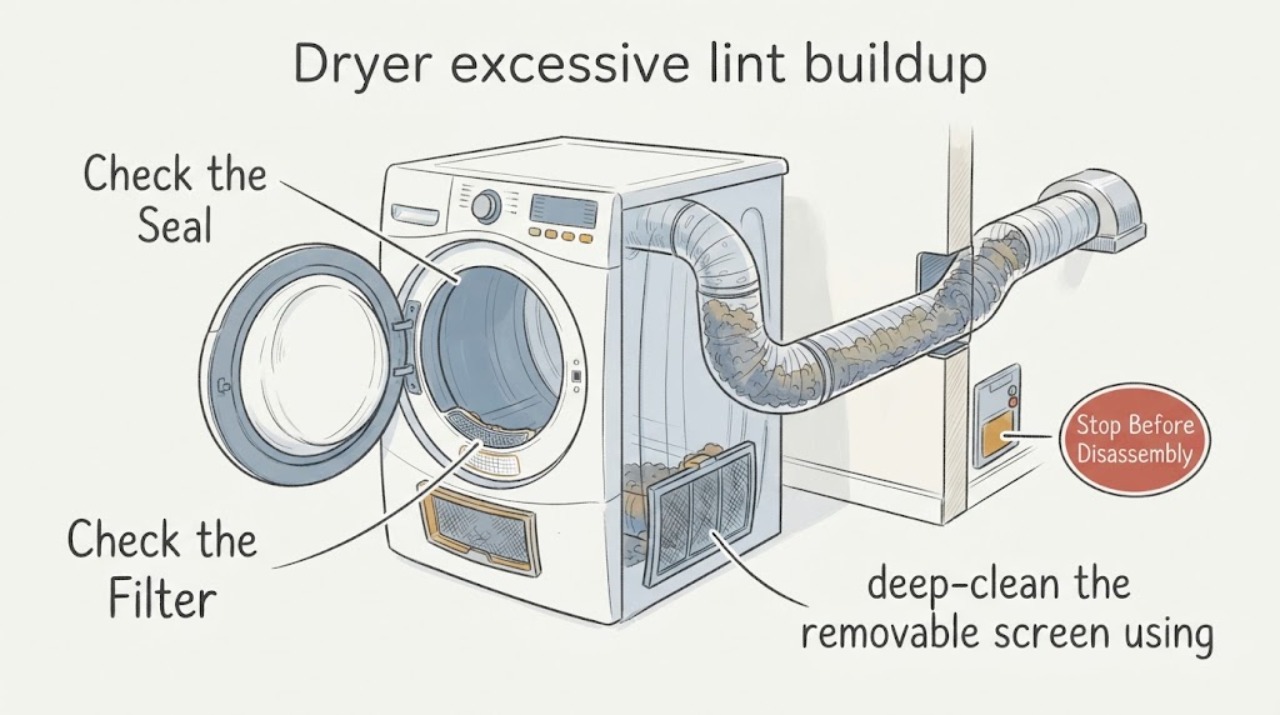
Stop and let the Maytag dryer cool before cleaning visible lint. Clean the lint screen after every load, deep-clean detergent or fabric-softener residue with the model-appropriate nylon-brush method, and make sure the screen is fully dry and seated. Then inspect the visible lint-trap area, the vent behind the dryer, and the outside exhaust hood for crushed ducting, lint, nests, or weak airflow. Lint in the chassis, a hot or burning smell, smoke, a damaged vent, or restricted airflow is a fire-safety and service issue: do not keep running the dryer or open its cabinet. Lint buildup does not by itself identify a failed heater, motor, or control.
Work through in order
Diagnostic checks
Use only checks that match the exact appliance or system and its official guide.
-
Check 1
Stop the dryer, let it cool, and locate the lint before cleaning: check the removable screen, the screen pocket or door opening, around the door seal, behind the dryer, and at the outside exhaust hood.
Expected result: Lint is only on the screen; lint is escaping around the screen or door; lint is behind the dryer or at the hood; or there is smoke, a burning odor, unusual heat, or visibly damaged venting.
Next step: For smoke, burning odor, abnormal heat, or damaged venting, do not run another cycle and arrange qualified service. Otherwise continue with the accessible screen and external vent checks.
Why this matters
Why: Screen lint after a load can be expected, while escape points, rear/hood accumulation, or heat and odor indicate an airflow or safety concern that cannot be reduced to a dirty screen.
-
Check 2
With the dryer cool, remove lint from the screen by hand and reinstall it fully seated. Do not operate the dryer without the filter.
Expected result: The screen was loose, missing, visibly damaged, or heavily loaded; or it is intact and correctly seated but lint still escapes.
Next step: Stop using the dryer if the screen is missing or damaged; use the exact model documentation or genuine-model service to identify the correct replacement. If it is seated and intact, continue to residue and vent checks without assuming an internal failure.
Why this matters
Why: Maytag says the screen must be used each load and must be fully inserted for lint capture. A damaged or missing screen is a safety and fitment issue, not a reason to run the dryer while waiting for a replacement.
-
Check 3
If the mesh has a film or lint falls off while the screen is installed, deep-clean the removable screen using the Maytag method that applies to the model: brush both sides with hot water and liquid detergent, rinse, and dry it completely before reinstalling. Vacuum the visible screen pocket gently where accessible.
Expected result: The screen mesh becomes clear and air can pass through it; or residue remains, the mesh is damaged, or lint still bypasses the screen.
Next step: Reinstall only a clean, fully dry, intact screen. If lint continues to escape, stop short of removing panels and arrange Maytag service; do not substitute an unverified screen.
Why this matters
Why: Detergent or fabric-softener residue can reduce screen effectiveness and lengthen drying. Persistent bypass or damage is outside a simple cleaning result and needs model-specific fitment or service review.
-
Check 4
Inspect the visible vent route without opening the dryer cabinet: look for crushed or kinked ducting behind the unit, lint or nests at the outside hood, and an exhaust hood that does not open freely. Only if there is no smoke, burning smell, abnormal heat, or other hazard, use the Maytag-recommended short operating observation to check whether air reaches the outside hood.
Expected result: Airflow is weak or absent, the duct is crushed or blocked, the hood is obstructed, or exhaust is strong and unobstructed.
Next step: Stop using the dryer until a qualified vent professional or appliance technician clears an inaccessible or restricted run. Do not push the dryer farther back, use plastic/foil ducting as a substitute, or open the cabinet to clean internal lint.
Why this matters
Why: Maytag and CPSC associate weak exhaust, crushed ducting, and blocked vents with restricted airflow, longer drying, heat buildup, and lint accumulation. Strong visible exhaust makes a gross external blockage less likely but does not clear hidden duct or chassis lint.
-
Check 5
After the accessible lint and vent checks, compare the drying result with the normal load and cycle: use a smaller load and a cycle suitable for the fabric, and note whether drying remains slow, clothes stay damp, or lint accumulates rapidly again.
Expected result: A smaller suitable load dries normally and lint collection improves; or drying remains slow, the dryer overheats, lint reappears rapidly, or an airflow/vent warning persists.
Next step: If performance does not improve, stop repeated testing and arrange model-specific appliance or vent service. Bring the model number, lint locations, screen condition, vent observations, cycle/load details, and any odor or heat event.
Why this matters
Why: Maytag identifies overloading and some fabric types as factors in lint collection, but persistent slow drying or restricted airflow points to a venting or service issue rather than proof of a failed heater, motor, or control.
Use your observations
Decision map
Find the observation that best matches what you see, then follow the next safe action.
-
PATH 01Next step
What you see
Lint is collected on an intact, correctly seated screen, the screen pocket and outside hood are clear, drying time is normal, and there is no unusual heat or odor.
Do this next
Clean the screen before or after each load, keep the vent path maintained, and monitor for a change in drying performance or lint location.
Why this path and its safety boundary
Why it matters: This is consistent with normal lint capture rather than evidence of an internal failure.
-
PATH 02Next step
What you see
Lint escapes around the screen, the screen does not seat, the mesh is damaged, or lint rapidly returns after the screen is correctly cleaned.
Do this next
Stop using a dryer with a missing or damaged filter, confirm the exact model, and arrange Maytag/model-specific part or service guidance. Do not operate with a makeshift filter or remove panels.
Why this path and its safety boundary
Why it matters: The screen may be ineffective, damaged, incorrectly fitted, or bypassed; the observation does not identify a heater, blower, or control fault.
-
PATH 03Next step
What you see
The outside exhaust is weak or absent, the duct is crushed or blocked, the hood is obstructed, or drying has become longer while lint accumulates behind the dryer.
Do this next
Do not continue heated cycles until the accessible obstruction is safely addressed and an inaccessible run is cleaned or tested by a qualified vent professional. Do not open the dryer cabinet.
Why this path and its safety boundary
Why it matters: The external vent path is restricted or needs professional cleaning; lint and reduced airflow can increase heat and fire risk.
-
PATH 04Next step
What you see
There is smoke, a burning smell, abnormal heat, sparking, a breaker event, lint visibly inside the cabinet, or any need to remove a panel or reach a heater, motor, blower, or burner.
Do this next
Stop the dryer from a safe position, isolate power or gas only when safe to do so, keep people away from the hazard, and contact qualified appliance service or emergency services as appropriate. Do not restart it to test the cause.
Why this path and its safety boundary
Why it matters: This exceeds routine lint-screen and visible vent maintenance and presents a fire or electrical hazard.
Helpful context
Understand the symptom
Identify where the lint is collecting
A normal amount on the screen after a load is different from lint escaping around the screen, collecting behind the dryer, or accumulating in the exhaust path. Maytag describes the screen as the first filter and says the full venting system must remain unobstructed. The location and any change in drying time or airflow are more useful than guessing at an internal part.
Clean only the accessible lint path
With the dryer stopped and cool, remove lint from the screen by hand and make sure it is installed fully. If residue from detergent or fabric softener is clogging the mesh, use Maytag's appropriate nylon-brush and warm-water cleaning method, then dry the screen completely. Vacuum the visible lint-screen pocket gently where the model allows. Do not remove panels or reach into the chassis to chase lint.
Treat vent restriction as a fire-safety problem
Check the visible duct for crushing or kinks and the outside hood for lint, nests, or other blockage. Maytag recommends a short airflow check at the exterior hood only when the dryer is otherwise safe to operate; weak exhaust means the vent needs cleaning or professional testing. CPSC and the U.S. Fire Administration both recommend periodic vent cleaning and keeping lint behind the dryer from accumulating. A hidden or inaccessible run belongs with a qualified vent-cleaning or appliance professional.
When checks do not resolve it
Need a professional?
Arrange qualified Maytag or vent service when lint continues to bypass an intact screen, the visible vent route is restricted or inaccessible, drying remains slow after screen and external vent checks, lint is visible inside the cabinet, or the model-specific screen or vent connection is damaged. Stop immediately for smoke, burning odor, abnormal heat, sparking, or a breaker event; do not open the dryer cabinet or perform live tests.
Common questions
FAQ
Is some lint on a Maytag dryer screen normal?
Yes. The screen is intended to capture lint. The concern is lint escaping around a correctly seated screen, accumulating behind the dryer or in the vent, or appearing with weak airflow, longer drying, unusual heat, or odor. Clean the screen before or after each load and do not operate without it.
Can I clean lint inside the dryer cabinet myself?
Do not remove the cabinet or reach toward the heater, motor, blower, burner, or wiring from this general guidance. The user-level boundary is the removable screen, visible lint-trap area, and visible external vent checks. CPSC recommends qualified service for interior chassis cleaning.
When should I stop using the dryer because of lint?
Stop when there is smoke, a burning smell, abnormal heat, sparking, a breaker event, a missing or damaged screen, weak or absent exhaust, or lint visibly accumulating inside the cabinet. Isolate power or gas only when safe and arrange qualified service; do not restart the dryer to test it.
Read the exact guide
Official sources
- CPSC Publication 5022 - Overheated Clothes Dryers Safety AlertU.S. Consumer Product Safety Commission · Opened the official CPSC one-page safety alert PDF. It is used for general dryer fire-prevention and professional interior-cleaning boundaries, not Maytag model-specific repair instructions.
- How does a Dryer Dry Clothing? - Product Help | MaytagMaytag · Opened Maytag's official dryer-operation explanation. It provides general airflow and lint safety context without diagnosing an internal part for an unspecified model.
- Clothes Dryer Fire SafetyU.S. Fire Administration · Opened the official USFA fire-safety PDF. It provides general safety guidance and does not expand Maytag-specific user repair steps.
- Washing the Lint Screen in a Dryer - Product Help | MaytagMaytag · Opened Maytag's official lint-screen cleaning page. The wet cleaning step is limited to the removable screen and requires complete drying before reinstalling.
- How to Check Venting - Product Help | MaytagMaytag · Opened Maytag's official venting page. It supports visible duct and hood checks and a conditional short airflow observation; exact installation instructions govern vent length and routing.
- Cleaning the Lint Screen on a Dryer - Product Help | MaytagMaytag · Opened Maytag's official cleaning page. It supports removable-screen and visible lint-pocket maintenance, not cabinet disassembly or universal part fitment.
- Not Collecting Lint - Dryer - Product Help | MaytagMaytag · Opened Maytag's official dryer support page. It supports family-level external checks; exact model instructions still govern any model-specific screen or vent procedure.
Community feedback
Share a repair observation
Share a plain-text repair observation. Accepted observations are published automatically; this page may take a moment to update.