
On this page
Start here
Quick answer
For the assigned Maytag MDE7600AYW, first record whether the dryer stops during an automatic cycle, stops during a timed cycle, or turns on again only after the cycle has ended. Maytag explains that automatic cycles can stop when the load reaches the selected dryness, while a persistent stop during a timed cycle needs diagnosis. Check the exact model manual, the door closure, external power/cord condition, lint screen and vent path without opening the cabinet. If it stops when hot, leaves a burning smell, trips a breaker, has a damaged cord, or the drum will not restart safely, unplug it and arrange qualified dryer service; do not bypass a switch, thermal device or door interlock.
Before you begin
Safety first
- Do not bypass the door switch, thermal cutoff, motor protection or timer; do not bridge wires, probe energized terminals, run with the vent removed, or continue operation after smoke, burning odor, sparking or overheating.
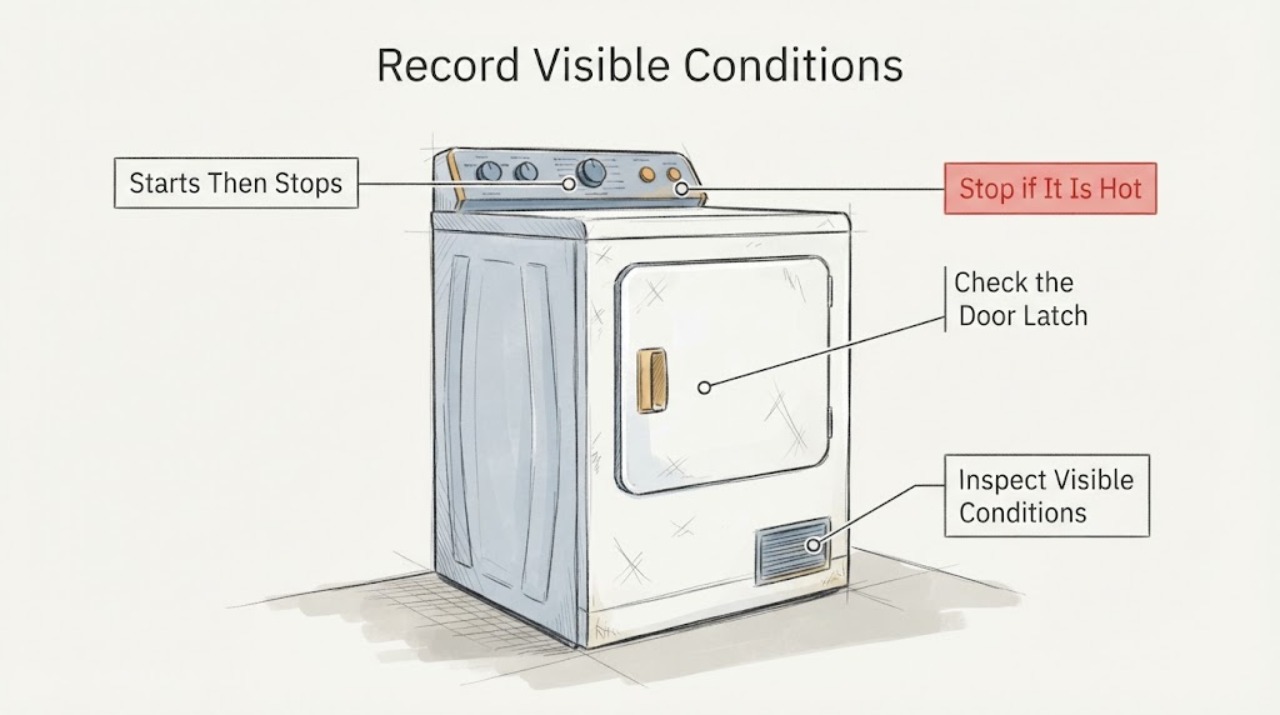
Work through in order
Diagnostic checks
Use only checks that match the exact appliance or system and its official guide.
-
Check 1
Record the complete rating-label model as MDE7600AYW, then note the selected cycle, whether the drum is turning, whether heat is present, whether the timer/control remains active, and whether the stop occurs only after the load is nearly dry or at a repeatable early point.
Expected result: The dryer stops at the end of an automatic cycle, stops at a repeatable point during a timed cycle, or the drum stops while the control/timer remains active.
Next step: Use the exact MDE7600AYW manual for its cycle names and controls. Keep the unit out of service if the stop is accompanied by abnormal heat, odor, smoke, sparking or a breaker trip.
Why this matters
Why: A target-dryness stop can be normal on an automatic cycle. A timed-cycle stop or a drum that stops while the cycle should continue is a different fault pattern; the observation does not identify a motor, switch or thermal component by itself.
-
Check 2
With the dryer off, inspect the outside of the plug, cord, receptacle area and door for visible damage, and confirm the door closes and latches. Do not remove the terminal cover or perform energized electrical measurements; have a qualified electrician check the supply if the cord, receptacle or circuit is questionable.
Expected result: The cord/receptacle is damaged or warm, a breaker has tripped, the door does not latch reliably, or the external power and door appear normal.
Next step: If damage, heat or a repeated trip is present, unplug or isolate power only when safe and arrange electrical/appliance service. If the exterior is normal, continue with the lint and vent checks while the dryer is off.
Why this matters
Why: Maytag identifies power-supply and door/start conditions as separate reasons a dryer may not start or tumble. Visible electrical damage or a failing latch is a stop condition, not a reason to keep restarting the dryer.
-
Check 3
Clean the lint screen and inspect the accessible vent hose, wall connection and outside hood with power disconnected. Look for crushing, kinks, heavy lint, nests or weak external airflow; do not run the dryer with the vent disconnected as a workaround.
Expected result: The lint screen or vent path is restricted, the outside hood has weak/no airflow, or the vent path appears open and the dryer still stops.
Next step: Correct only accessible lint/vent obstructions and use the exact installation instructions for routing. If stopping persists, or heat/odor is abnormal, stop using the dryer and schedule service rather than opening the cabinet.
Why this matters
Why: Maytag says restricted airflow can lengthen drying and increase heat, while a clear vent does not prove the internal motor, thermostat, thermal cutoff or control is healthy.
-
Check 4
If the exact manual permits a user-level observation, perform at most one supervised cycle check with the correct load and setting; do not defeat the door switch, hold a start control down, bridge wires or repeatedly restart a hot dryer.
Expected result: The dryer completes a documented cycle, or it stops again before completion, becomes unusually hot, smells of burning, smokes, sparks or trips power.
Next step: For a repeat stop or any abnormal symptom, unplug/isolate the dryer when safe and provide the model, cycle, stop timing, load, vent observations and power symptoms to a qualified technician. Do not diagnose or replace a part from the symptom alone.
Why this matters
Why: A completed cycle after correcting a documented setup issue supports a cycle/routing explanation. A repeat stop or any heat/electrical abnormality leaves an internal or supply fault unresolved and raises fire/electrical risk.
Use your observations
Decision map
Find the observation that best matches what you see, then follow the next safe action.
-
PATH 01Next step
What you see
The dryer stops only when an automatic cycle reaches the selected dryness, with no abnormal heat, odor, noise or electrical symptom.
Do this next
Confirm the cycle behavior in the MDE7600AYW manual and use the appropriate automatic or timed setting for the load; do not replace a component solely because the drum stopped at target dryness.
Why this path and its safety boundary
Why it matters: That stop can be normal sensor-cycle behavior rather than a continuous-run failure.
-
PATH 02Next step
What you see
The dryer stops during a timed cycle or stops at a repeatable early point while the load is still wet, after the door, lint screen, vent and visible power checks are normal.
Do this next
Stop using the dryer and arrange model-specific appliance service. Do not open the cabinet, bypass an interlock or replace a thermal/motor part as a guess.
Why this path and its safety boundary
Why it matters: The cycle behavior is not explained by target dryness or an obvious external setup issue; an internal or supply fault remains possible but unconfirmed.
-
PATH 03Next step
What you see
The dryer has a burning smell, smoke, sparking, a hot/damaged cord or receptacle, repeated breaker trips, unusual grinding, or becomes excessively hot before stopping.
Do this next
Stop the cycle and disconnect power only if safe to do so; keep the dryer out of service and contact qualified appliance/electrical service. Do not run it with the vent disconnected or repeat tests to reproduce the event.
Why this path and its safety boundary
Why it matters: This is a fire/electrical/mechanical safety stop condition, not a normal cycle adjustment.
Helpful context
Understand the symptom
Define what stops and when
“Not running continuously” can describe a normal automatic-cycle stop, a timed cycle that quits early, a drum that stops while the controls remain on, or a dryer that restarts periodically after the cycle. These are different decisions. Maytag's official guidance says automatic cycles sense load humidity and turn off at the selected dryness, while its startup guidance treats power, the start control, door closure and cord installation as separate checks. Record the cycle, elapsed time, heat state and whether the timer or controls also stop before choosing a repair path.
The used-appliance history changes the service boundary
A Craigslist dryer may have an unknown vent route, cord installation, prior repair or replacement part. Maytag directs owners to use the model number to locate the correct manuals and literature, and its general dryer guidance says to unplug before inspecting the vent or checking terminal-screw installation. That supports external observation and documentation, not live voltage checks, cabinet bypasses or a guessed thermal-part replacement.
When checks do not resolve it
Need a professional?
Call Maytag or qualified appliance/electrical service when the MDE7600AYW stops in a timed cycle, repeatedly stops after warming, has abnormal heat/odor/noise, trips a breaker, has a damaged cord or door latch, or requires cabinet access or energized electrical measurements.
Safety scope: Do not bypass the door switch, thermal cutoff, motor protection or timer; do not bridge wires, probe energized terminals, run with the vent removed, or continue operation after smoke, burning odor, sparking or overheating.
Have this ready
- Provide the complete MDE7600AYW model, serial if requested, whether the dryer is electric or its installed supply configuration, selected cycle, stop timing, drum/heat/control behavior, lint and vent observations, Craigslist purchase history and any visible cord or receptacle issue.
Common questions
FAQ
Could stopping be normal on an automatic cycle?
Yes. Maytag says automatic cycles sense humidity and turn off when the selected dryness is reached. That explanation applies only when the cycle and exact model documentation support it and there are no abnormal heat, odor, noise or electrical symptoms.
What does stopping during timed drying mean?
It is not explained by target dryness. Check only the external door, power, lint and vent conditions, then stop using the dryer and arrange service if the timed cycle still stops. The symptom alone does not identify a motor, timer, thermal cutoff or control fault.
Should I replace a thermal fuse or motor on this used dryer?
Not from this symptom alone. Maytag's public guidance routes persistent stopping and electrical/heat issues to model-specific manuals or service. Do not open the cabinet, bypass a safety device or perform live tests to guess a part.
Read the exact guide
Official sources
- Dryer is not Drying or Experiencing Long Dry TimesMaytag Product Help · Opened the official Maytag article. It supports external checks of power/gas state, door, lint screen, vent hose, outside hood and airflow, and says to arrange service for persistent performance problems or unusual noises. It is family-level guidance and does not diagnose the exact assigned model.
- Dryer is Not HeatingMaytag Product Help · Opened the official Maytag guidance. It provides a short supervised heat observation, external vent guidance, two-breaker context for electric dryers, and directs owners to qualified help for power-supply questions. It is not used to infer a thermal component or gas configuration for the assigned model.
- Using Auto Dry, Timed Dry and EcoBoostMaytag Product Help · Opened the official Maytag article. It says automatic cycles sense load humidity and shut off at selected dryness, while timed dry runs for the set period. The distinction is used conditionally because the exact MDE7600AYW control layout must be verified in its manual.
- Not Tumbling or Spinning - DryerMaytag Product Help · Opened the official Maytag page. It covers power indication, start-button operation, moisture on controls, 240-volt supply and the need to unplug before terminal-screw inspection. It is used for external checks and safety boundaries, not a diagnosis of a specific MDE7600AYW component.
- Dryer Stops Mid-CycleMaytag Product Help · Opened the official Maytag support article. It explains that automatic cycles sense humidity and turn off at selected dryness, and directs owners to service when the behavior is not explained by the cycle. It is family-level guidance; the exact MDE7600AYW manual remains the authority for its controls.
- Maytag Manuals and LiteratureMaytag · Opened the official Maytag manual portal. It requires the appliance model number to retrieve the correct literature and directs owners to contact support if documentation cannot be found. It is used as the exact-model gate rather than evidence of an unseen MDE7600AYW procedure.
Community feedback
Share a repair observation
Share a plain-text repair observation. Accepted observations are published automatically; this page may take a moment to update.