
On this page
Start here
Quick answer
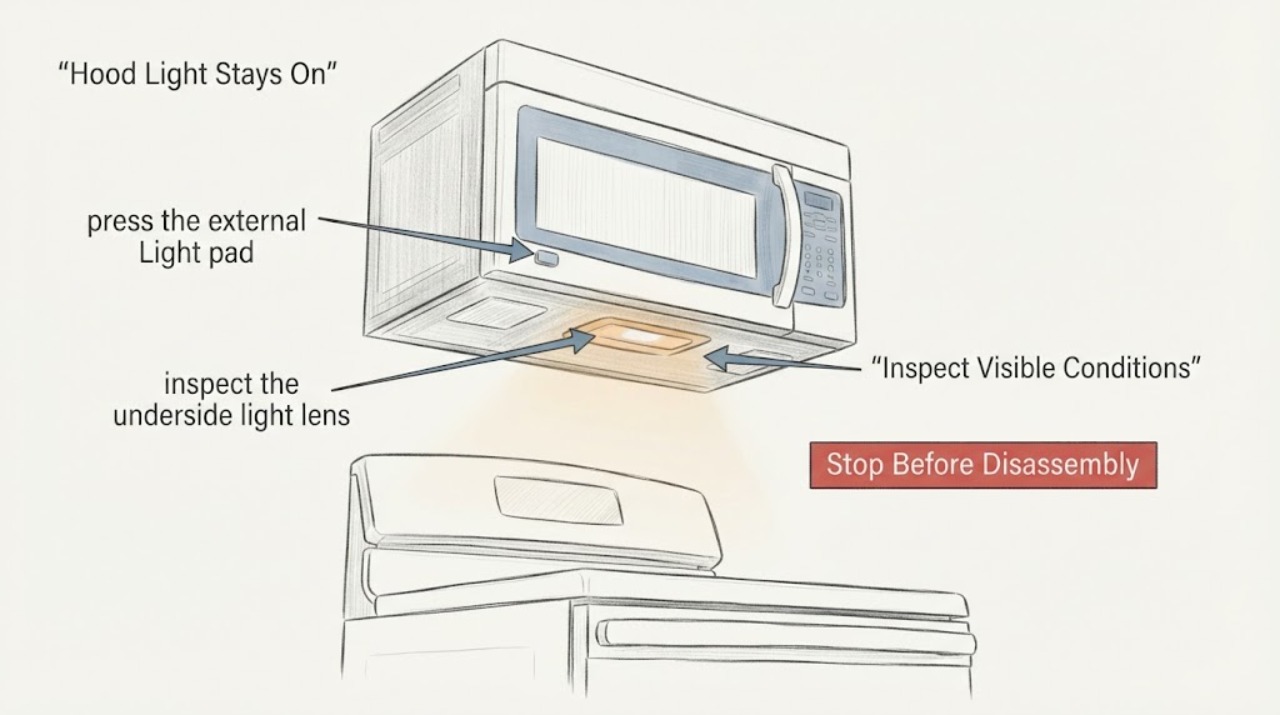
On the assigned Maytag MMV1174FZ-2, first use the Light pad to cycle through the available levels and off state, then check whether a Light Timer is enabled. Maytag says the exact number of levels varies by model and that touching the Light pad overrides the timer. If the light never reaches off, make one controlled power reset by turning the microwave circuit breaker off for one minute and then monitor it after power is restored. If the light remains on, the button still only beeps, or the breaker opens again, leave the microwave disconnected and arrange service; do not open the cabinet or attempt a motherboard, triac, or high-voltage repair.
Work through in order
Diagnostic checks
Use only checks that match the exact appliance or system and its official guide.
-
Check 1
With the microwave idle and the area dry, press the external Light pad through the settings shown by the panel. Count each state and continue until the light should be off; do not hold the key down or press through a damaged or stuck membrane.
Expected result: The light changes level and then turns off, or it stays at one level/on while the control only beeps.
Next step: If Off works, leave the light off and check the timer setting. If it never reaches Off, continue with the timer check and one controlled reset only.
Stop if: Stop if the panel is cracked, wet, sparking, or physically stuck; keep the appliance disconnected and arrange service.
Why this matters
Why: Maytag says the cooktop/vent light has model-dependent high/low or high/medium/low settings plus Off. A normal cycle that reaches Off points to a setting or timer condition; a beep with no state change is not enough to name a failed board.
-
Check 2
If the panel offers Options or Setup, look for a Light Timer and record whether an on/off schedule is enabled. Use only the displayed menu and the assigned model's manual path; do not assume every MMV1174FZ variant has this feature.
Expected result: A Light Timer is enabled, is disabled, or is not offered by the panel.
Next step: Disable or correct the schedule only through the external menu if the panel provides it, then use the Light pad once more. If the light remains on with no timer or ignores the override, leave the menu and continue to the power check.
Stop if: Do not remove the control panel or attempt to reprogram an undocumented service mode.
Why this matters
Why: Maytag documents a timer on certain models and says touching the Light pad overrides the timer. An enabled schedule can explain a light that comes back on, but a light that ignores the Light pad still needs service evaluation.
-
Check 3
From outside the appliance, inspect the underside light lens and the surrounding panel for visible cracking, scorching, moisture, or a loose cover. Do not remove the lens or touch wiring. Treat a light that is stuck on differently from a bulb that is simply dark.
Expected result: The lens and panel look intact, or there is visible heat damage, moisture, or physical damage.
Next step: For visible damage, smoke residue, or moisture, keep power off and arrange service. If the exterior is intact, proceed only to the single controlled power reset.
Stop if: Stop immediately for burning odor, smoke, melted plastic, or water near the electrical area.
Why this matters
Why: Maytag's bulb guidance addresses a failed or dark cooktop light and says to disconnect the microwave before replacing any part; it does not support using a bulb replacement to cure a light that is commanded on continuously. Visible damage raises a safety issue rather than identifying a component.
-
Check 4
Make one controlled reset only after the external checks: turn off the microwave circuit breaker for one minute, restore it, and observe the appliance for one minute without repeatedly pressing the Light pad or starting a cooking cycle.
Expected result: The light returns to normal off/control behavior, stays on with the same beep-only response, or the breaker/fuse opens again.
Next step: If the light remains stuck or the control still only beeps, disconnect power and request Maytag or qualified appliance service with the exact model suffix and observed behavior. If the breaker opens again, leave it off and do not retry.
Stop if: Do not continue operating after a repeat breaker trip, smoke, sparking, or burning smell.
Why this matters
Why: Maytag treats this as a power-reset check, not a board diagnosis. A repeat stuck-on condition after the reset remains unresolved; a breaker or fuse that opens again is an electrical safety stop.
-
Check 5
Prepare the service handoff: record MMV1174FZ-2 exactly as shown on the rating label, whether the Light pad beeps, whether any level changes, whether a timer menu appeared, and whether the light returns after the one-minute reset.
Expected result: The model suffix and repeatable light behavior are documented, or the label/menu information is unavailable.
Next step: Give those observations to Maytag support or a qualified microwave technician. Request diagnosis of the external control and lighting circuit; do not attempt motherboard repair, high-voltage testing, or cabinet access yourself.
Stop if: Keep the microwave disconnected while waiting for service if the light stays on unexpectedly or any electrical symptom occurred.
Why this matters
Why: Maytag's owner-center and manuals paths use the model number to locate applicable information. The opened owner-center page identifies the MMV1174FZ family but shows no available documents, so the suffix and symptom record are important for a service lookup.
Use your observations
Decision map
Find the observation that best matches what you see, then follow the next safe action.
-
PATH 01Next step
What you see
The Light pad cycles through the available levels and reaches Off, and the light stays off after the timer is checked.
Do this next
Leave the light off and monitor it during normal idle time. If it turns itself on again, record whether a timer is present and arrange model-specific support rather than opening the cabinet.
Why this path and its safety boundary
Why it matters: The basic user control is responding; the original always-on state may have been a setting or timer condition rather than proof of a failed board.
-
PATH 02Next step
What you see
The Light pad beeps but the light remains on at one level after the timer is disabled or is not available.
Do this next
Perform the one-minute breaker reset only once. If the symptom returns, disconnect power and arrange qualified service; do not guess a motherboard or triac repair.
Why this path and its safety boundary
Why it matters: The external command is not producing the expected visible state, but the public Maytag guidance does not identify which internal control component is responsible.
-
PATH 03Next step
What you see
The breaker/fuse opens again, or there is smoke, sparking, burning odor, melted plastic, or moisture near the electrical area.
Do this next
Leave the breaker off or disconnect power only from a safe dry location, keep the microwave out of use, and arrange qualified appliance service. Do not retry the microwave or open its cabinet.
Why this path and its safety boundary
Why it matters: This is an electrical or heat safety condition, not a normal lighting-setting problem.
-
PATH 04Next step
What you see
The assigned variant is MMV1174FZ-2 but the public Maytag owner center exposes only the MMV1174FZ family page and no model documents.
Do this next
Keep the article to external light/timer/reset checks and give the exact suffix and symptom record to Maytag support or a qualified technician. Do not infer a part fit or board repair from an online component claim.
Why this path and its safety boundary
Why it matters: The family identity is supported, but a model-specific internal repair procedure or control-board diagnosis is not established by the opened official material.
Helpful context
Understand the symptom
A beep is not proof that the light control is working
The assigned task identifies the product as the Maytag MMV1174FZ-2, while Maytag's public owner center identifies the MMV1174FZ family and does not expose a separate -2 manual on the opened page. Maytag's general over-the-range guidance is therefore used for the user-level light and power checks only. A button beep without a change in light state does not identify a failed board or a particular component.
Keep the microwave cabinet closed
The safe scope is to operate the external Light control, check a displayed Light Timer setting if this model exposes one, observe the underside light from outside, and perform at most one controlled breaker reset. Do not remove the control panel or outer cover, probe live wiring, discharge a capacitor, bypass a switch, or replace a board component based on a forum suggestion.
When checks do not resolve it
Need a professional?
Provide the exact model suffix, whether the Light pad beeps, which levels appear, whether a Light Timer menu is present, whether the light ever turns off, and what happened after the one-minute breaker reset.
Common questions
FAQ
Does a beep from the dimmer or Light pad prove the motherboard is bad?
No. A beep shows that the control registered an input, but it does not identify the internal circuit responsible for a light that stays on. Maytag's public guidance supports checking the light sequence, a possible Light Timer, and one controlled reset; persistent failure needs service rather than a guessed board repair.
Can I replace the bulb to fix a cooktop light that will not turn off?
Do not use a bulb replacement as the diagnosis for a light that is stuck on. Maytag discusses bulb replacement for a failed or dark cooktop light and says to disconnect the microwave before replacing any part. A continuously lit lamp with a nonresponsive external command should be handled through the control/timer checks and service boundary above.
How many times should I reset the breaker?
Make one controlled reset: Maytag says to turn the circuit breaker off for one minute, restore power, verify operation, and monitor the microwave. If the breaker or fuse opens again, stop operating and disconnect power instead of repeating the reset.
Read the exact guide
Official sources
- MMV1174FZ | MaytagMaytag · Opened Maytag product page identifies the MMV1174FZ family; the assigned MMV1174FZ-2 suffix is preserved as task identity, while the page reports no documents available and is not used to infer an internal repair procedure.
- Appliance Manuals and Literature | MaytagMaytag · Used only to direct model-number lookup for the assigned suffix and to support the service handoff; no unseen model-specific rule is inferred from the lookup page.
- Cooktop or Vent Light Not Working - Over-the-Range MicrowaveMaytag Product Help · Maytag's family-level over-the-range guidance; used for external light/timer/power checks only because the assigned MMV1174FZ-2 model page does not expose a separate technical manual.
Community feedback
Share a repair observation
Share a plain-text repair observation. Accepted observations are published automatically; this page may take a moment to update.