
On this page
Start here
Quick answer
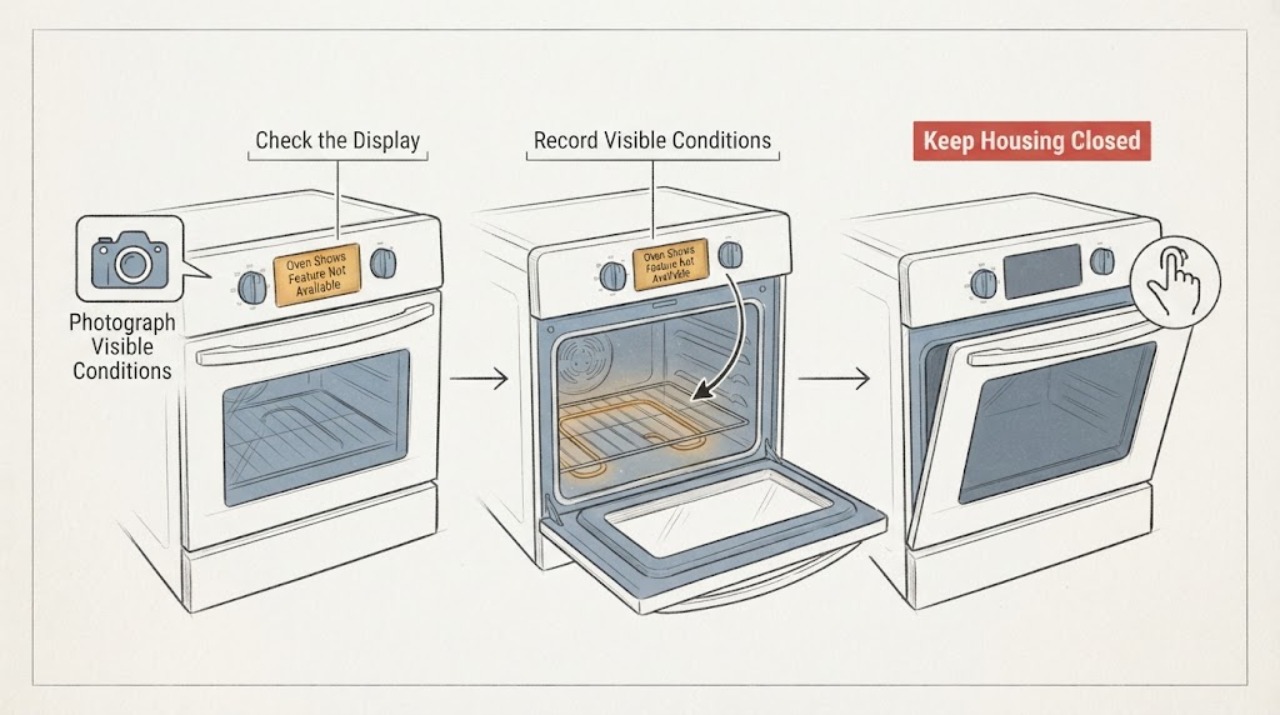
On the Maytag MER8772WW, Feature Not Available is not proof that the bake element, temperature sensor, or control board has failed. Maytag's Range guidance says this message can appear when a fault is detected while a cook cycle is being programmed; it directs the owner to follow the displayed instruction, such as pressing Enter to try again or disabling power to clear, then—if safe—to turn the range circuit off once, restore it, start Bake, monitor for recurrence, and verify operation. First photograph the exact message and separate it from LOC, DEMO, a delayed start, a flashing clock, or a true F/E code. Use the exact MER8772WW manual for any lock or mode sequence. If the message returns, the oven remains cold, the breaker trips, or there is smoke, burning odor, sparks, uncontrolled heat, or a damaged door, stop using the oven and arrange qualified Maytag service; do not open the console or test live wiring.
Before you begin
Safety first
- Owner checks are limited to photographing the display, confirming the complete model, distinguishing lock/demo/delay from the fault message using the exact manual, checking the household breaker once from a safe position, and following one Maytag-directed reset when no hazard exists. Do not open the console, remove panels, enter diagnostics, test live or internal circuits, rewire the range, bypass a lock, or replace a control, sensor, or element from the message alone.
Work through in order
Diagnostic checks
Use only checks that match the exact appliance or system and its official guide.
-
Check 1
From a safe position, photograph the display and copy every character exactly, including spaces, F or E prefixes, LOC, DEMO, PF, a flashing clock, or the full Feature Not Available message. Record whether the oven was in Bake or another preheat mode, whether the cook command was accepted, and whether the cooktop still works.
Expected result: The display is exactly Feature Not Available, it is LOC or a demo/status message, it is an F/E or PF code, or the characters are unclear.
Next step: Use the exact MER8772WW manual or Maytag Product Help entry that matches the photographed message. If the message is unclear or not listed, do not guess a reset; preserve the photo and arrange service if the oven is not heating.
Stop if: Stop using the oven for smoke, burning odor, sparks, uncontrolled heat, a damaged door or glass, exposed wiring, a hot plug, or a repeated breaker trip.
Why this matters
Why: Maytag's Feature Not Available guidance concerns a fault detected while programming a cook cycle, while control lock and demo mode are separate operating states and F/E or PF displays require their own model-specific guidance. A misread message can lead to an invalid key sequence or an unnecessary part diagnosis.
-
Check 2
If the display actually says LOC or shows a lock indicator, compare the control-lock instruction with the exact MER8772WW manual before touching a key. If it shows a demo or store mode, use only the model's documented settings path; do not apply a sequence copied from another Maytag range.
Expected result: The manual confirms a lock or demo state and gives a matching ordinary control sequence, or the display remains Feature Not Available and no lock or demo state is documented for this model.
Next step: Follow only the exact model's ordinary unlock or demo-off sequence, then cancel any delayed start and select a normal Bake operation. If the message persists or the manual does not match, stop experimenting and move to Maytag service.
Stop if: Do not enter service diagnostics, bypass a lock, open the control console, or change wiring to clear a display.
Why this matters
Why: Maytag says a locked control disables the control pads and that demo mode can leave the controls working while the oven does not turn on. A matching status can explain no heat without proving a heater or board failure; a persistent Feature Not Available message remains a fault path.
-
Check 3
Record whether the message appeared after an outage, surge, breaker trip, installation, relocation, or electrical work. Check the household range breaker only from a dry, stable position and do not remove covers or inspect terminals.
Expected result: A recent power or installation event is present, the breaker is off, the breaker trips again, or there is no related event and the display has power.
Next step: For a single accidental breaker position and no damage, use the one-reset procedure below if the Maytag message guidance applies. For a repeat trip, suspected miswiring, hot connection, or damaged cord, leave the range off and arrange qualified electrical or appliance inspection.
Stop if: Do not repeatedly reset the breaker, use an extension cord or adapter, pull the range from its position, or rewire the supply.
Why this matters
Why: A power or connection event can leave the control in a fault state, and repeated breaker operation is an electrical problem rather than evidence for a bad oven part. With no event, the message can still represent an unresolved control, sensing, heating, or wiring fault.
-
Check 4
Only when there is no smoke, odor, spark, damaged door, active electrical issue, or other hazard, and the circuit can be operated safely, follow Maytag's one-reset guidance: turn the range circuit off once, restore it once, select Bake, and watch for the message to return. Do not access the appliance wiring.
Expected result: The message clears and the control accepts Bake, the message returns during the check, the oven remains cold or inoperative, or a different abnormal message appears.
Next step: Stop the check at recurrence or abnormal operation and arrange qualified Maytag appliance service. Provide the photo, exact model suffix, power-event history, selected mode, and whether the display cleared; use an electrician when supply or wiring is suspect.
Stop if: Do not repeat the reset, enter diagnostics, test voltage or resistance, remove panels, or continue operating with smoke, burning odor, sparks, uncontrolled heat, or a breaker trip.
Why this matters
Why: A clear message followed by ordinary operation supports a transient control or power state but does not prove every heating component is healthy. A returning message or no heat means the fault remains; a new code requires its own exact code guidance.
-
Check 5
If the display clears and the exact model guidance permits an operation check, observe one normal Bake start from outside: note whether the control accepts the command, the preheat indication behaves normally, the oven begins heating, and no new message or hazard appears. Do not run a cooking or self-clean cycle merely to stress-test a questionable range.
Expected result: Bake starts and heats without recurrence, the control accepts the command but the cavity stays cold, the message returns, or heating is abnormal or uncontrolled.
Next step: Record the result and monitor only normal use if it remains stable. For no heat, recurrence, or abnormal heating, keep the oven out of service and arrange qualified Maytag diagnosis rather than naming a control board or sensor.
Stop if: Stop immediately for smoke, burning odor, sparks, exposed wiring, a door that will not close normally, uncontrolled heat, or repeated electrical interruption.
Why this matters
Why: Normal limited operation makes a transient message more likely, but it does not prove the element, sensor, relay, wiring, or control is healthy. No heat after an accepted Bake command is a function failure even if the display is normal; uncontrolled heat or electrical symptoms are immediate stop-use conditions.
Use your observations
Decision map
Find the observation that best matches what you see, then follow the next safe action.
-
PATH 01Next step
What you see
The exact display is Feature Not Available, it appeared while programming preheat, the range has no hazard, and one Maytag-directed reset clears it without recurrence while Bake begins normally.
Do this next
Keep the code photo and reset history, continue only ordinary model-approved use, and request service if the message or no-heat symptom returns.
Why this path and its safety boundary
Why it matters: This pattern is consistent with a transient control or power state. It does not identify a failed element, sensor, or control board.
-
PATH 02Next step
What you see
The display is LOC, a documented demo/store mode, or a delayed-start state rather than Feature Not Available, and the exact MER8772WW manual supplies a matching ordinary control path.
Do this next
Follow only the matching model manual to unlock, exit demo mode, or cancel the delay. If the status returns or the manual does not match, stop and arrange service.
Why this path and its safety boundary
Why it matters: A control state can prevent the oven from heating without proving an internal heating failure. Maytag says demo mode can demonstrate controls without turning the oven on, and lock disables the control pads.
-
PATH 03Next step
What you see
The message returns after the one reset, Bake is accepted but the oven remains cold, the message is not listed for the exact model, or a separate F/E or power-related display appears.
Do this next
Leave the oven out of service and arrange qualified Maytag appliance diagnosis. Give the technician the complete model, exact display, timing, reset result, mode, and heating observation; use qualified electrical service for suspected supply faults.
Why this path and its safety boundary
Why it matters: The unresolved fault may involve the control, sensor, heating circuit, wiring, or supply, but the public Maytag guidance does not establish which part from this symptom.
-
PATH 04Next step
What you see
There is smoke, a burning odor, a spark, uncontrolled heat, exposed wiring, a damaged door or glass, a hot or damaged connection, or a breaker that trips again.
Do this next
Stop using the range and isolate power only from a dry, safe position when appropriate. Keep clear of damaged areas and arrange qualified appliance or electrical help; use emergency procedures for active smoke or fire.
Why this path and its safety boundary
Why it matters: This is an immediate thermal or electrical safety path, not a display-clearing exercise.
Helpful context
Understand the symptom
The phrase Feature Not Available is a control message, not a part diagnosis. On Maytag's Range Product Help page it is associated with a fault detected while a cook cycle is being programmed, and the supported first response is the on-screen instruction or one documented power reset. That is different from a display that says LOC, a control in demo mode, a delayed start, or an actual F/E code. Because the assigned identity is MER8772WW without a complete suffix, retain every character printed on the rating label when using the manual or requesting service.
Maytag's general electric-range heating guidance says a locked control, demo mode, delayed start, or a new electrical connection can prevent heating without proving a failed element. It does not authorize opening the console, measuring live voltage, entering diagnostics, or replacing a control board from this message alone.
When checks do not resolve it
Need a professional?
Call qualified Maytag appliance service for a returning or unmatched message, no heat after Bake is accepted, abnormal heating, or any need to access internal controls, sensors, elements, relays, wiring, or terminals. Call an electrician for a repeat breaker trip or suspected supply miswiring.
Safety scope: Owner checks are limited to photographing the display, confirming the complete model, distinguishing lock/demo/delay from the fault message using the exact manual, checking the household breaker once from a safe position, and following one Maytag-directed reset when no hazard exists. Do not open the console, remove panels, enter diagnostics, test live or internal circuits, rewire the range, bypass a lock, or replace a control, sensor, or element from the message alone.
Have this ready
- Provide the complete model and serial information, the exact display photograph, selected preheat mode, whether the cooktop works, first occurrence, outage or installation history, breaker behavior, reset result, whether Bake was accepted, and whether the oven actually heated or showed any odor, smoke, spark, door, or electrical symptom.
Common questions
FAQ
Does Feature Not Available mean the bake element is bad on a Maytag MER8772WW?
No. Maytag describes this as a message that can appear when a fault is detected while programming a cook cycle. It does not identify the bake element, sensor, relay, or control board. Follow the model-appropriate message procedure once and arrange service if the display returns or the oven remains cold.
Is Feature Not Available the same as LOC or demo mode?
No. Maytag documents lock and demo as separate control states. LOC disables controls, while demo mode can allow feature demonstrations without the oven turning on. Confirm the exact display and use the MER8772WW manual instead of copying another range's key sequence.
What reset does Maytag give for Feature Not Available on a range?
Maytag says to follow the displayed instruction, such as pressing Enter to try again or disabling power to clear. If a power reset is applicable and safe, its Range guidance says to turn the circuit off once, restore it, start Bake, monitor briefly for recurrence, and verify operation. Do not repeat resets or open the appliance.
What if Bake is accepted but the Maytag oven still does not heat?
Treat that as an unresolved heating fault even if the message clears. Stop repeated tests, document the mode and result, and arrange qualified Maytag appliance service; the public guidance does not prove which internal part is responsible.
Can I remove the control panel to test the board or element?
No. Keep the range cabinet and wiring closed. Live or internal electrical tests and component diagnosis belong with qualified appliance service, and a suspected supply problem belongs with a qualified electrician.
Read the exact guide
Official sources
- Error CodesMaytag Product Help · Opened the Maytag Range Error Codes index. It lists Feature Not Available under control messages separately from lock, demo mode, and F/E code groups; it is not used to assign a component to the assigned display.
- Appliance Manuals and LiteratureMaytag · Opened Maytag's official manuals page. It requires entering the appliance model number to retrieve the matching manuals and guides, which is necessary because the task identity lacks a complete suffix.
- Feature Not Available or Fault Detected - RangeMaytag Product Help · Opened the Maytag Product Help page for ranges. It provides the message interpretation and one-reset workflow for Maytag ranges, but it does not identify a failed internal part or replace the exact MER8772WW manual.
- Oven Not Heating - Powering On - Electric RangeMaytag Product Help · Opened the Maytag electric-range troubleshooting page. It supports operating-state and installation checks at the range family level; exact MER8772WW control sequences remain manual-dependent.
- Locked, Lock or Loc - RangeMaytag Product Help · Opened the Maytag Range lock page. It establishes that LOC is a distinct locked-control status and gives a general example while directing owners to the model manual; it is not used as proof of the MER8772WW's exact key sequence.
- Demo Mode - RangeMaytag Product Help · Opened the Maytag Range Demo Mode page. It confirms demo mode can show controls without turning on the oven and states that the exact model manual or control guide governs the exit sequence.
Community feedback
Share a repair observation
Share a plain-text repair observation. Accepted observations are published automatically; this page may take a moment to update.